2 Top-Rated AI App Cloners for Content Automation in 2026

AI app cloners help replicate videos, audio, and images using artificial intelligence, enabling faster, more efficient content production. These tools support automation, multilingual content, and media enhancement. Here, we will highlight top cloning tools, especially Picwand AI Video Cloner for AI-powered media replication.
Apps for replicating media are now gaining attention from many individuals. These apps make content creation faster, smarter, and more accessible. Many individuals and businesses now rely on AI tools to reproduce videos, voices, images, and editing styles. These tools are commonly used for social media content, marketing campaigns, video editing, multilingual voiceovers, entertainment, and educational materials. In this post, we will explain what an AI app cloner is and how AI clone technology applies to content creation. We will also introduce the top 2 AI cloning apps for replicating videos, audio, and images. We aim to help you understand how these AI cloning apps work, their benefits, and how they can improve the efficiency and creativity of digital content production.
Contents:
Part 1. What is AI App Cloner
An AI app cloner is a tool that uses artificial intelligence to replicate or generate an existing source. In other words, these apps can duplicate or recreate images, videos, and audio using AI models like Seedream. They analyze the imported source and produce similar outputs by mimicking styles, voices, visuals, or editing patterns. This technology is used in content creation, automation, and creative enhancement.
Part 2. How AI Clone Technology Applies to Content Creation
Fast Video Production
AI cloning technology accelerates video production by automating time-consuming editing and content-generation tasks. It can replicate visual styles, transitions, and even scene structures from existing videos. Instead of manually editing each clip, AI clone apps can generate similar videos from templates or reference material.
Instant Voice Overs
AI cloning replicates human speech patterns, tone, and emotion from a single sample of a voice. It allows creators to produce narration without hiring voice actors or recording multiple takes. You can use the cloned voice for videos, advertisements, and training materials. It also ensures consistency for different content pieces.
Multilingual Expansion
AI clone technology makes multilingual content creation easier. It translates and recreates media in different languages while preserving the original tone and style. It can clone voices and adapt lip movements in videos, ensuring that content feels native to each audience. It eliminates the need for multiple voice actors or re-recordings for each language.
Full Workflow Automation
In education, clone AI apps help create interactive lessons, virtual instructors, and personalized learning materials. It can replicate expert voices and presentations to make learning more engaging and scalable. In B2B marketing, it enables companies to generate customized sales videos, product demos, and client-specific presentations.
Part 3. Best 2 AI Cloning Tools for Digital Content
Picwand AI Video Cloner
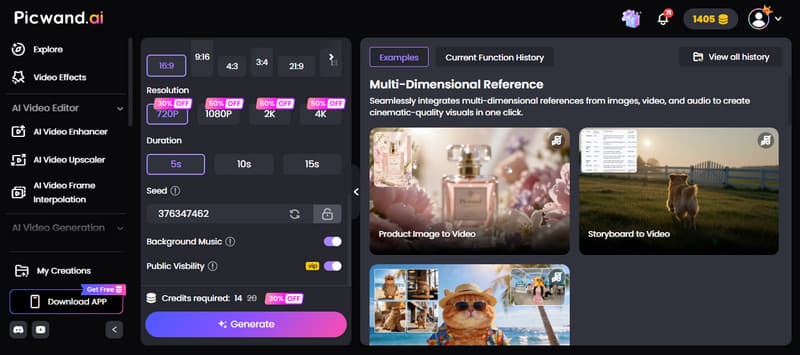
Picwand AI Video Cloner is an internet-based video cloner powered by advanced artificial intelligence technology. It allows you to add up to 12 reference materials, including images, videos, and audio files. It also supports advanced prompting, enabling you to describe the exact content you want to clone from the reference video.
In terms of flexibility, this app clone AI supports multiple aspect ratios, including 16:9, 9:16, 4:3, 3:4, 21:9, and 1:1. You can export cloned videos in resolutions up to 4 K, including 720p, 1080p, 2K, and more. It also supports video lengths of 5, 10, and 15 seconds. Additionally, you can include background music.
What to Expect With Picwand AI Video Cloner:
- • Generates realistic cloned videos based on reference materials.
- • Supports AI-powered cloning for images, videos, and audio content.
- • Includes advanced text prompting to describe the exact content to clone.
- • Accepts mixed media references, including image, video, and audio combinations.
Here's how to use the clone app using AI:
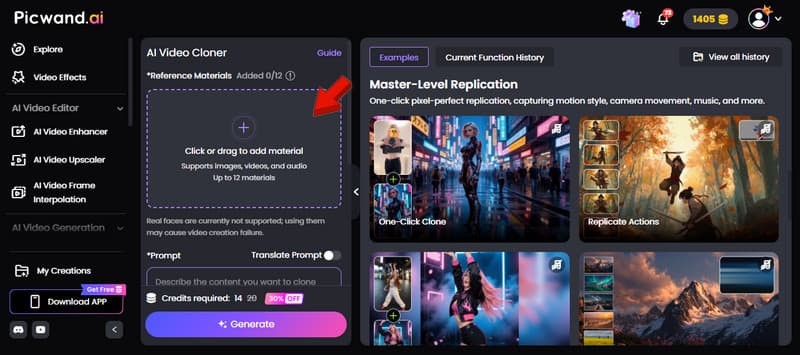
Step 1. Reach the official website of Picwand AI Video Cloner by clicking the link provided. On the homepage, proceed to the Reference Material section and click + to upload the files you want the AI to clone. You can add audio clips, videos, images, or a mix of these media types.
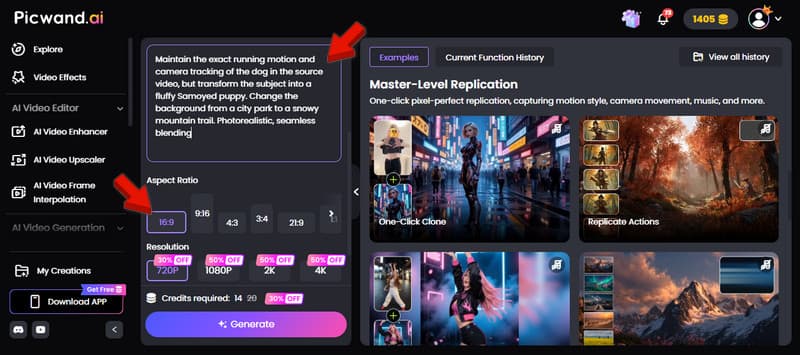
Step 2. In the Prompt field, type a detailed description of the exact content you want to clone from the uploaded reference video or media. Be specific about the style, movement, mood, or effects you want the AI to recreate. After entering the prompt, select an aspect ratio.
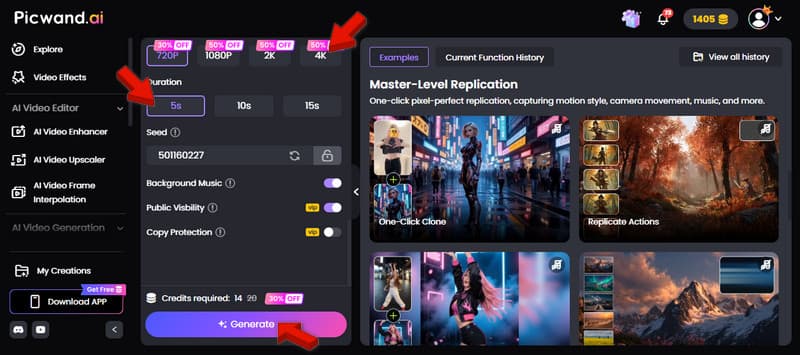
Step 3. Choose your preferred video duration, such as 5, 10, or 15 seconds. You can also enable background music to make the cloned video more engaging. After finalizing the settings, click Generate to automatically create your cloned video.
Picwand AI Video delivers Cloner, high-quality AI cloning features for modern content creators. It supports mixed media references, customizable outputs, and multiple export resolutions. To get inspiration for creating more engaging and accurate cloned videos, explore AI prompt examples here.
InVideo
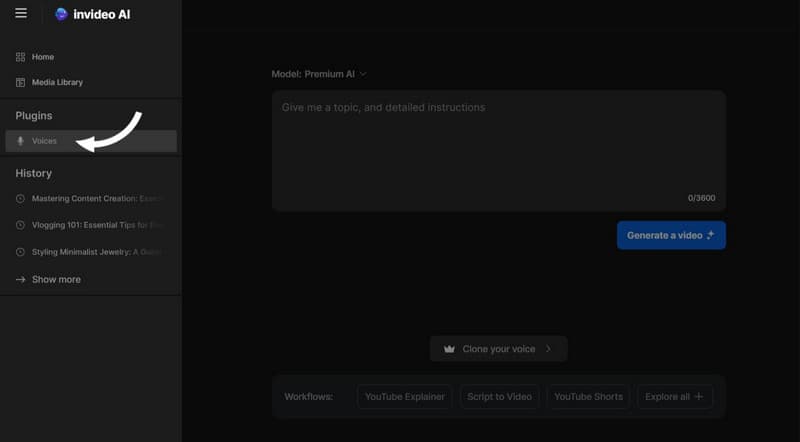
InVideo is an AI-powered content creation platform that operates as an AI app cloner. It includes advanced voice cloning capabilities for videos, podcasts, training modules, and social media content. It allows you to create a realistic digital copy of a voice by uploading a short audio sample. It can generate AI-generated voiceovers for videos without manual audio recording.
What to Expect With InVideo:
- • AI voice cloning using a short voice sample.
- • Generates realistic and natural-sounding voiceovers.
- • Supports video narration for YouTube, TikTok, and podcasts.
- • Offers multilingual voice support in 50+ languages and accents.
InVideo is an excellent option for fast, realistic, and professional AI voice cloning for videos and presentations. Its multilingual support and natural voice quality make content production easier and more scalable. However, it focuses only on cloning voices and generating voiceovers.
Part 4. FAQs about AI App Cloners
What can an AI clone do for you?
An AI clone can recreate voices, videos, images, and editing styles to speed up content creation. It helps automate repetitive tasks, generate realistic voiceovers, and produce different versions of media. These tools are useful for marketing, education, entertainment, and social media.
What are the risks of using app cloners?
Using clone AI apps can come with risks to privacy, copyright, and security. These tools may copy copyrighted content without permission, which can lead to legal problems. There is also a risk that some apps may misuse uploaded files or personal data, so users need to be careful when using them.
What are the benefits of using an app cloner?
App cloning speeds up content creation and reduces production costs. They allow creators to copy media styles, generate voiceovers, and produce different versions of content in less time.
Conclusion
AI app cloners are changing how we create digital content. These tools make it faster and easier to copy and create videos, audio, and images using AI. They can help with things like voiceovers, AI-generated visuals, and simple automated tasks, while still maintaining high creative quality. If you want an easy tool to get started, use Picwand AI Video Cloner. It supports mixed media inputs, prompts, various aspect ratios, and high-resolution exports.
AI Picwand - Anyone Can be A Magician
Get Started for Free