AI Replace People in Video: Top Guide to AI Video Editing Technology

Video editing has changed a lot because of intelligence. One of the things that has happened is that we can now use artificial intelligence to replace people in videos. This used to be a hard thing to do and it needed a lot of experts and a lot of time. Now we can do it in a few minutes because of smart computer programs. Today artificial intelligence tools can find people in videos separate them from the background and replace them with people really easily. In this guide we will talk about AI replacing people in videos, how it works and how people are using it in the real world. We will also show you how you can use the Picwand AI Video Editor to replace people in videos.
Contents:
Part 1. What Does AI Replace People in Video Mean
When you want to "Replace people in video" it means you are using computers to take someone out of a video or switch them with someone. It is different from the way of editing videos. With artificial intelligence you do not have to look at each frame one by one and fix it by hand. Computer programs are used for "Replace people in video" to make the changes:
- • Human body shapes and movements
- • Video depth and motion tracking
- • Background separation
- • Lighting consistency
This allows the AI to realistically replace a person while maintaining natural motion and visual coherence. For example, you can:
- • Replace an actor in a scene with a different person
- • Swap yourself with a virtual avatar
- • Remove unwanted individuals from footage
- • Insert AI-generated characters into real environments
This technology is now becoming mainstream due to its accessibility and speed.
Part 2. How AI Person Replacement Works
AI-based person replacement in videos relies on several advanced technologies working together:
1. Object Detection and Segmentation
The AI first identifies humans in the video frame. It separates the subject from the background using segmentation models.
2. Motion Tracking
It tracks how the person moves across frames to ensure consistency in replacement.
3. Deep Learning Reconstruction
AI reconstructs missing parts of the video when a person is removed or replaced, filling gaps naturally.
4. Face and Body Mapping
If a replacement subject is inserted, AI aligns facial features, body posture, and proportions.
5. Rendering and Blending
Finally, lighting, shadows, and color grading are adjusted so the new subject blends into the scene.
The combination of these steps allows AI to produce realistic, professional-level video edits without manual intervention.
Part 3. Common Use Cases for Replacing People
AI replacing people in video is no longer limited to Hollywood studios. It is widely used in many industries:
1. Content Creation & Social Media
People who make videos can use avatars or famous people or characters from stories to make their videos more interesting.
2. Marketing & Advertising
Companies can change the people in their ads to people from an area without having to film the whole thing again.
3. Film & Entertainment
People who make movies can fix mistakes replace people in the background or make actors look younger using computers.
4. Education & Training Videos
Teachers can use the videos and just change the person talking or the avatar to show different groups of people.
5. Privacy Protection
Some people use AI to replace people with fake characters in videos so nobody knows who they are.
6. Gaming & Virtual Production
People who make games and stream videos use AI to replace things in their videos to make the stories more real and fun. AI video editing is really powerful. Can be used in many different ways like AI video editing and that is what makes AI video editing so useful like, in AI video editing applications.
Part 4. How to Replace a Person in a Video with Picwand
One of the easiest tools for AI-based video editing is Picwand AI Video Editor. It is designed for users who want professional results without technical complexity.
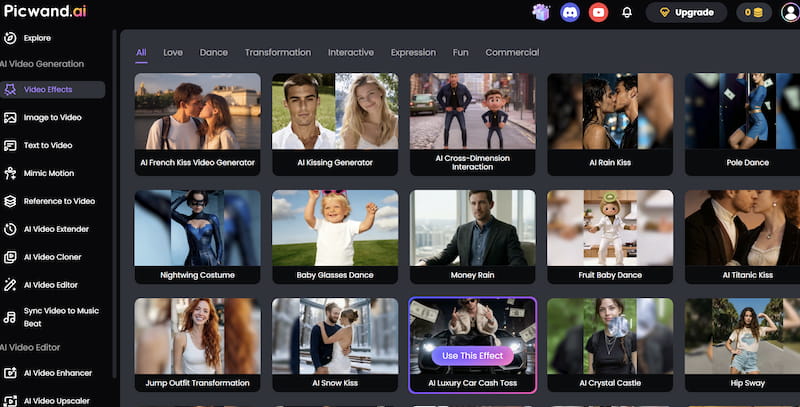
Picwand AI Video Effects
Picwand AI Video Effects leverages advanced AI that replaces people in videos to make video editing easier. It helps with tasks such as removing objects replacing backgrounds and swapping people in videos. The AI models, in Picwand are designed to keep the video quality high. They make sure that the edits blend in smoothly and look real. Picwand makes it simple to edit videos like a pro.
Key Features
Picwand AI Video Editor offers several advanced features for replacing people in videos:
- • AI Human Detection – Automatically identifies people in video frames
- • Smart Background Reconstruction – Fills removed areas naturally
- • Face & Body Replacement Engine – Ensures accurate subject substitution
- • High-Resolution Output – Maintains video clarity after editing
- • No Manual Masking Required – Fully automated editing process
- • Fast Processing Speed – Saves time compared to traditional tools
Similar to TikTok photo editor, these features make it suitable for beginners and professionals alike.
Step: How to Change Face Using Picwand
Using Picwand is simple and beginner-friendly. Here is a step-by-step guide:
Step 1. Upload Media
Open Picwand AI Video Effects and upload your image or video file.
Step 2. Select the Effect you like
Picwand will analyzes facial structure, skin tone, lighting, and motion to create a seamless swap.
Step 3. Export file.
Check the output and make adjustments if needed. Download your final face-swapped video or image in high quality.
Picwand AI Video Effects is a tool for anyone who wants to try replacing people in videos with AI. It is easy to use and fast. It produces high-quality results, which makes it perfect for people who are just starting out and for experts who make content for a living. Some big movie studios might still use advanced special effects systems but this face enhancer app is a good option for regular people who want their videos to look professional without having to learn a lot of complicated technical stuff.
Part 5. FAQs about AI Replace People in Video
Is AI video person replacement legal?
Yes, but it depends on usage. You should always ensure you have rights or permission to use someone’s likeness.
Can AI completely replace a person in a video realistically?
Modern AI can achieve highly realistic results, especially in controlled lighting and simple motion scenes.
Do I need editing skills to use Picwand?
No. Picwand is designed for beginners and automates most of the process.
Conclusion
That’s all about AI replace people in videos. Video editing is changing because of intelligence. This means we can make and watch content in new ways. We can now replace people in videos. This opens up new ideas for telling stories selling things teaching and having fun. We do not need to spend a lot of money on teams of people to make videos anymore. Now we have tools that can do the work for us. One of these tools is Picwand AI Video Effects. It is easy to use and very good at replacing people in videos. As artificial intelligence gets better video editing will become more fun. We will be able to make videos in new and exciting ways. Intelligence and video editing are going to keep changing and this will be very good, for people who make videos. Video editing and artificial intelligence will make a difference.
AI Picwand - Anyone Can be A Magician
Get Started for Free