Basic PlanVIP PlanVIP ExpiredPurchased credits are valid for life but require an active VIP subscription to use
0Credit(s)
You can use credits to access all the AI tools on Picwand, such as the AI Image Upscaler, AI Age Filter, AI Video Enhancer, AI Video Upscaler, AI Video Effects, and more.
When you search for a free, customizable way to increase video resolution and enhance quality, you may consider using an open-source AI video upscaler.
This post introduces you to three popular open-source AI video upscaling options. The 3 best open-source AI video upscalers are Video2X (general-purpose), Waifu2x (anime), and Real-ESRGAN (real-world footage). When you want to convert your videos to a higher resolution, like 4K or 8K, you can start with them.
An open-source video upscaler refers to an upscaling tool that uses artificial intelligence to increase the resolution. The software often adopts advanced algorithms to upscale videos and improve quality. It is freely available with publicly accessible source code. Unlike commercial programs, open-source upscalers are usually modifiable and community-driven. They are free and transparent.
Most open-source AI-powered upscalers use deep learning models to analyze video content and reconstruct details. Their AI models are trained by all types of high/low-resolution videos. Videos will be split into individual frames to upscale and then reassemble.
Part 2. Comparison Table of the 3 Best Open-Source AI Video Upscalers
Many local AI video upscalers are available to help you upscale videos. They use deep learning to intelligently increase resolution, reconstruct detail, reduce noise, and make other enhancements. Check the popular open-source AI video upscalers if you don’t want commercial solutions.
I tested all 3 tools on the same 480p clip of an old family video. Video2X produced the most natural output. Waifu2x struggled with the live-action footage (as expected — it's made for anime). Real-ESRGAN gave the sharpest details but introduced slight oversharpening. Below are detailed introductions to three open-source AI video upscaling tools.
1. Video2X
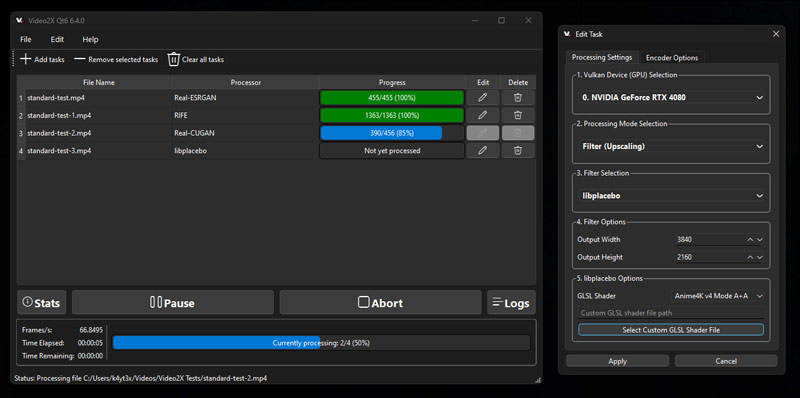
Video2X is a powerful open-source AI video upscaler that serves as a wrapper around several leading image super-resolution engines. It automates frame extraction, AI upscaling, and video reconstruction, making it one of the most practical solutions for video enhancement.
Key Features
• Supports multiple AI backends including Real-ESRGAN and Waifu2x
• Native video processing workflow
• Automatic frame extraction and reassembly
• GPU acceleration support
• User-friendly graphical interface for Windows
• Batch video upscaling support
Pros
Supports both anime and live-action videos
Easy installation through GUI
Flexible AI engine selection
Active open-source community
Suitable for large video projects
Cons
Requires a relatively powerful GPU for optimal performance
Processing times can be lengthy for high-resolution videos
Setup may be complex on Linux systems
Best For
• General video upscaling
• Content creators
• YouTube video restoration
• Home video enhancement
• Users who want an all-in-one video upscaling workflow
User Experience
Video2X offers one of the smoothest user experiences among open-source video upscalers. Users can simply load a video, choose an AI backend, and start the enhancement process without manually extracting video frames.
2. Waifu2x
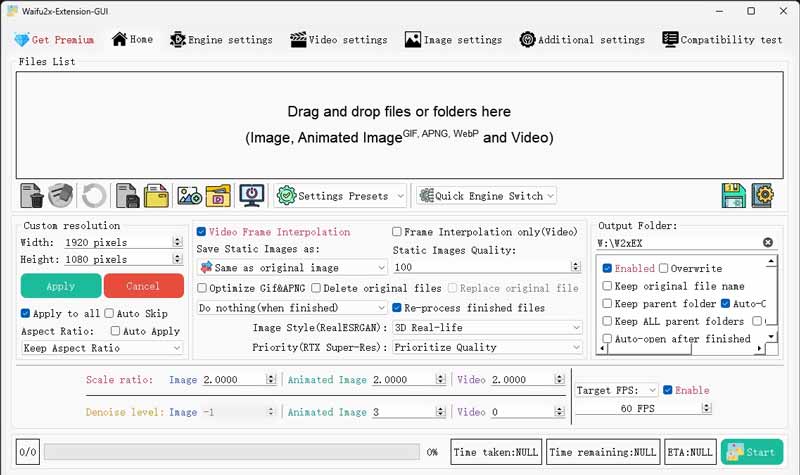
Waifu2x is one of the most recognized AI upscaling tools and remains the benchmark for anime and cartoon enhancement. It uses convolutional neural networks to upscale images while removing noise and compression artifacts.
Key Features
• AI-powered denoising and upscaling
• Optimized for anime and illustrations
• Preserves line art and character details
• Lightweight compared to many newer AI models
• Available through multiple GUI implementations
Pros
Exceptional anime upscaling quality
Excellent noise reduction capabilities
Free and open-source
Fast processing compared to larger AI models
Strong community support
Cons
Primarily designed for images rather than videos
Requires frame extraction for video processing
Limited scaling options compared to Real-ESRGAN
Less effective on real-world footage
Best For
• Anime videos
• Cartoons
• Manga scans
• Animated content restoration
• Low-resolution anime archives
User Experience
Users appreciate Waifu2x for its simplicity and reliable results. Anime enthusiasts often consider it the easiest way to improve older animated content while maintaining original artwork quality.
3. Real-ESRGAN
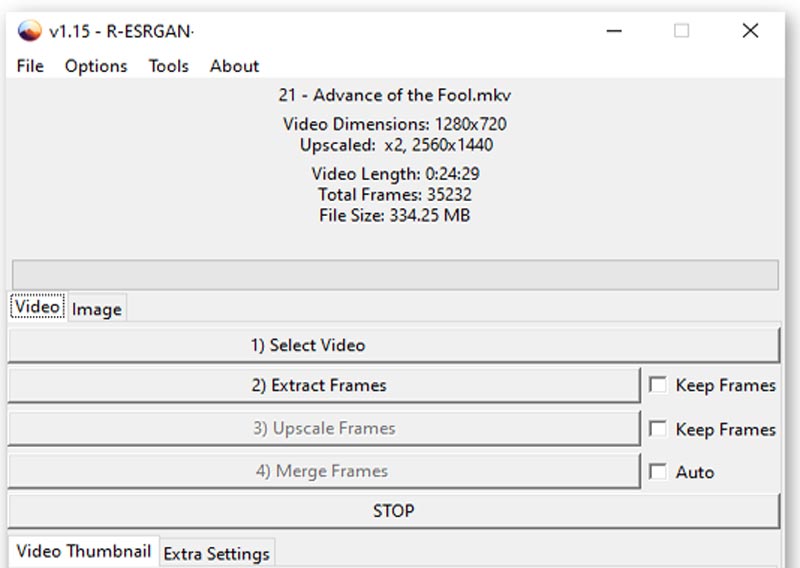
Real-ESRGAN is an advanced AI upscaling framework based on ESRGAN technology. It is specifically designed to restore real-world images and videos while reducing blur, noise, and compression artifacts.
Key Features
• Real-world image restoration
• Advanced GAN-based super-resolution
• Multiple pre-trained models available
• Strong detail reconstruction
• Excellent artifact removal
• Supports GPU acceleration
Pros
Outstanding quality for live-action footage
Superior texture and detail recovery
Handles compressed videos effectively
Highly customizable
Frequently updated by the community
Cons
Higher hardware requirements
Video processing typically requires frame extraction
Longer rendering times for large projects
Can occasionally over-sharpen details
Best For
• Old video restoration
• Live-action footage
• YouTube content enhancement
• Historical video archives
• Professional video remastering
User Experience
Real-ESRGAN is widely regarded as one of the best open-source AI upscalers for realistic video content. While setup can be slightly technical for beginners, the visual improvements often rival commercial AI upscaling software.
Part 4. Alternative to Open-Source Video Upscalers
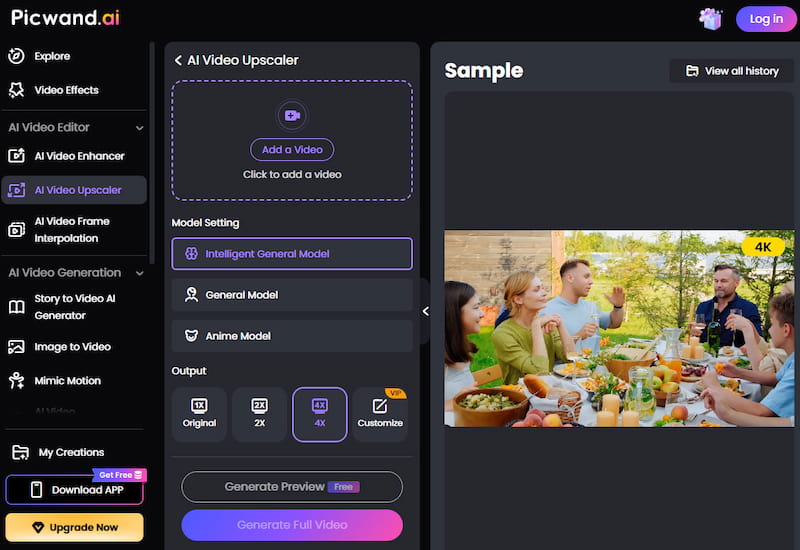
While tools like Video2X, Real-ESRGAN, and Waifu2x provide powerful open-source upscaling capabilities, they may require installation, model configuration, and hardware acceleration. Users who want a simpler workflow may prefer online AI video upscalers. Picwand AI Video Upscaler is one such option. As a browser-based tool, it allows users to upload videos and enhance them directly online. The platform uses AI to improve resolution, reduce noise, sharpen details, and optimize color quality, making it suitable for restoring older footage or improving low-resolution videos.
Compared with many open-source solutions, online upscalers generally offer a more streamlined experience, while open-source tools often provide greater flexibility and control. The best choice depends on your workflow, hardware resources, and video quality requirements.
To enhance a low-resolution video, simply upload your file to the platform and choose an upscaling option such as 2×, 4×, or a custom setting. After processing, you can preview the enhanced result and export the upscaled video in higher quality.
Part 5. FAQs of Open-Source AI Video Upscaler
Question 1. Can AI upscale a poor-quality video to 4K?
Yes, you can upscale a poor-quality video to 4K using AI. As mentioned above, many related AI-powered upscaling tools can transform low-resolution sources into high-resolution videos. However, the final results vary based on the source file quality and the specific video enhancer apps used. The recommended Picwand AI can also reduce noise, sharpen edges, optimize colors, and restructure details to ensure enhanced outputs. Advanced AI algorithms can intelligently interpolate pixels to fill in missing information while the video is upscaling.
Question 2. Is AI video upscaling free?
Many AI video upscaling tools claim to increase resolution and enhance quality for free. Popular websites like Kapwing, AVCLabs, CapCut (click here to check out how to upsacel videos in CapCut), Topaz Labs Online AI Video Upscaler, and more offer basic AI upscaling for free. However, these free options often have significant limitations. Most free AI video upscalers will add a watermark to your outputs. Moreover, free tiers usually limit output to 720p or sometimes 1080p. They may also set restrictions on features, AI models, input file size, processing speed, and more.
Question 3. Can VLC upscale videos?
Yes, VLC can upscale videos in real time while playing. But it can’t increase the resolution and output a video with a higher resolution. When you play a low-resolution video like 480p or 720p, you can enlarge it to fit your high-resolution screen. VLC uses video filters and scaling algorithms to make the image larger. The viewing quality depends heavily on the original video quality. If you want to output your video with a resolution higher than the source, you should turn to dedicated video upscaler tools.
Conclusion
Open-source video upscalers such as Video2X, Real-ESRGAN, and Waifu2x provide powerful options for improving video quality and increasing resolution. Each tool has its own strengths, whether you're enhancing anime, restoring old footage, or upscaling videos to 4K or 8K. If you prefer a simpler workflow without software installation or model configuration, an online AI video upscaler such as Picwand AI Video Upscaler can offer a more convenient alternative.