*Image

Add an Image
Add an Image
Video Resolution
Video Duration
Background Music
Public Visibility
VIP
Copy Protection
VIP
Sample
View all history
'/%3e%3cpath%20d='M9.34735%205.07241C11.8356%205.07241%2013.9133%206.66418%2014.4578%208.83779C14.5265%209.20482%2014.5341%209.42424%2014.462%209.87377C14.3473%2010.4315%2013.9838%2010.9592%2013.3677%2011.4305L18.6592%2011.5945C18.8793%2010.9561%2018.9982%2010.2749%2018.9982%209.56752C18.9982%205.94038%2015.8716%203%2012.0148%203C9.47604%203%207.25371%204.27403%206.03125%206.17934C6.93603%205.48726%208.09017%205.07241%209.34735%205.07241Z'%20fill='url(%23paint1_linear_1934_63555)'/%3e%3cpath%20fill-rule='evenodd'%20clip-rule='evenodd'%20d='M11.481%2011.5949C14.3855%2011.5949%2016.7401%209.38049%2016.7401%206.64894C16.7401%205.77328%2016.4981%204.95076%2016.0736%204.2373C17.8326%205.42984%2018.9777%207.37338%2018.9777%209.56846C18.9777%2013.1956%2015.8511%2016.136%2011.9943%2016.136C11.8476%2016.136%2011.7019%2016.1317%2011.5574%2016.1233V16.1558C11.4179%2016.1471%2011.2771%2016.1427%2011.1352%2016.1427C8.15594%2016.1427%205.66016%2018.0896%205.00781%2020.7043V15.0129C6.1949%2012.9801%208.49286%2011.6023%2011.133%2011.6023C11.2191%2011.6023%2011.3049%2011.6037%2011.3902%2011.6066V11.5941C11.4204%2011.5946%2011.4506%2011.5949%2011.481%2011.5949Z'%20fill='url(%23paint2_linear_1934_63555)'/%3e%3cdefs%3e%3clinearGradient%20id='paint0_linear_1934_63555'%20x1='11.9834'%20y1='3'%20x2='11.7463'%20y2='16.6886'%20gradientUnits='userSpaceOnUse'%3e%3cstop%20stop-color='%23E5007C'/%3e%3cstop%20offset='0.585'%20stop-color='%239351FF'/%3e%3cstop%20offset='1'%20stop-color='%23873DFF'/%3e%3c/linearGradient%3e%3clinearGradient%20id='paint1_linear_1934_63555'%20x1='12.5147'%20y1='3'%20x2='15.6761'%20y2='9.09519'%20gradientUnits='userSpaceOnUse'%3e%3cstop%20stop-color='%23FA0BFF'/%3e%3cstop%20offset='1'%20stop-color='%23EF500C'/%3e%3c/linearGradient%3e%3clinearGradient%20id='paint2_linear_1934_63555'%20x1='6.39714'%20y1='14.8007'%20x2='19.3204'%20y2='13.5723'%20gradientUnits='userSpaceOnUse'%3e%3cstop%20stop-color='%23FF2B5B'/%3e%3cstop%20offset='1'%20stop-color='%23FFAA72'/%3e%3c/linearGradient%3e%3c/defs%3e%3c/svg%3e)


Step 1
Upload a single-person female photo. Either half-body or full-body.

Step 2
Click "Generate" to create a winter snowfall video and check the effect.

Step 3
Suppose you are satisfied with the video effect. Click "Download" to download the video.
The snow effect lets you quickly add natural, falling snow effects to your photos. Simply upload a portrait photo, and the AI will automatically detect the person and background, transforming an ordinary scene into a romantic winter video with gently falling snow. With one-click generation and no complicated steps, even beginners can create a real snowflake background in just seconds.
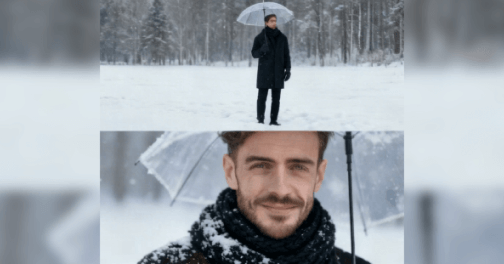
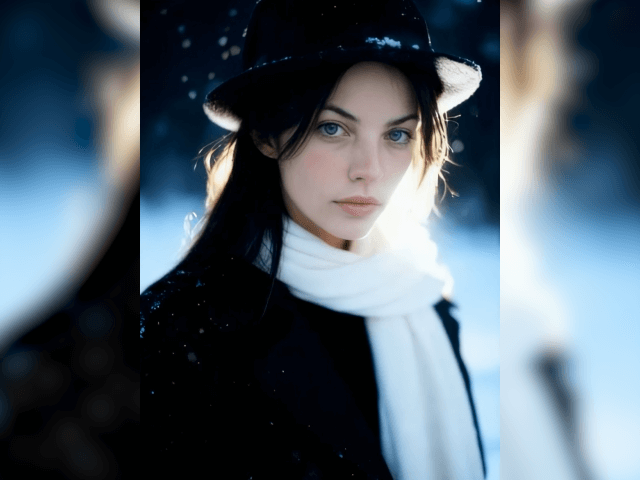
Use the snow filter to turn your photo into a realistic snow background video. You can clearly see snowflakes falling, with a beautiful winter landscape behind the subject. The snow effects look natural and lifelike, making you feel as if you're truly standing in a snowy scene. The video also preserves the subject's original features, allowing you to create cinematic winter snow scenes effortlessly.
Snowfall effects are currently trending on social media. With our AI snowfall, you can instantly join the AI snow trend by turning your photos into realistic snow scene videos in seconds. These videos are perfect for sharing on platforms like TikTok, Instagram, and Facebook, helping you enhance visual quality, increase engagement, and attract more attention.
What is AI Snow Filter?
AI snow is an AI video effect with a winter atmosphere that can turn photos into dreamy winter snow videos. Easily add snow to photos.
How to add snow to a photo?
Use Picwand snow filter to add snow to an image. Open snow video effects, upload photos, and click Generate to generate beautiful snow scene videos in seconds.
Do I need any editing skills to use the snowflake filter?
No need, our AI snow effect is easy to operate. Just upload a photo, and the AI will automatically analyze the image and generate high-quality winter snow scene videos, suitable for beginners to use.
Also available for mobile:
Copyright © 2026 Picwand Studio. All rights reserved.