How to Add Elements to Video with AI

Making videos is not about cutting and putting pieces together anymore. If you make videos for media, YouTube or just for fun, you can add a lot of cool things to make them more interesting and look professional. In the past, you had to be really good at editing and use programs to do this.. Now there are tools that use artificial intelligence to make editing videos a lot easier. In this guide you will learn about adding elements to video with AI: what kinds of things you can add to your videos, how artificial intelligence makes editing easier and how to edit your videos using Picwand AI Video Editor.
Contents:
Part 1. What Does Add Elements to Video with AI Mean
Adding things to a video, with AI means using computer intelligence to put stuff in a video or make it better. This happens automatically. With a little help. You do not have to change every part of the video by hand. The AI tools look at your video. Help you put things in it or make new things for it.
- • Text captions
- • Background music
- • Sound effects
- • Images or overlays
- • Visual filters
- • Animated stickers
- • Transitions
- • AI-generated effects
- • Motion graphics
For people who need to get results AI editing tools are a lifesaver. They save you a lot of time and effort because they can automatically add images to video. At the time, they also help improve the quality of your video production.
Part 2. Types of Elements You Can Add to a Video
AI video editors support many creative elements that can improve the visual appeal and storytelling of your content.
Music
Adding music to a video is easily accessible. Background music adds emotion and rhythm to videos. AI tools can recommend music tracks based on the video mood, pace, or content style.
For example:
- • Travel videos may use cinematic music
- • Product ads may use energetic beats
- • Tutorials may use soft background audio
- • Vlogs may use upbeat pop tracks
AI audio tools can also automatically:
- • Adjust music volume
- • Remove background noise
- • Synchronize music with cuts
- • Generate AI voiceovers
This helps creators avoid spending too much time editing audio manually.
Images
Images and overlays can make videos more informative and visually dynamic. You can add images to a video like:
- • Logos
- • Emojis
- • Product photos
- • Watermarks
- • Stickers
- • Decorative graphics
AI editors usually let you move pictures around and put them where you want them. They can get rid of the background of a picture really fast using AI segmentation technology.
Adding images is useful, for:
- • Branding
- • Tutorials
- • Educational videos
- • Marketing campaigns
- • Presentation-style videos
Images can also emphasize important information or create smoother visual storytelling.
Visual Effects
Visual effects are another important part of AI video editing. These effects improve aesthetics and create more engaging content.
Popular visual effects include:
- • Filters
- • Transitions
- • Motion blur
- • AI animations
- • Color grading
- • Glitch effects
- • Green screen effects
- • Background replacement
AI can analyze scenes automatically and apply suitable effects without requiring advanced editing knowledge.
For example, AI may:
- • Detect faces for beauty enhancement
- • Replace backgrounds automatically
- • Stabilize shaky footage
- • Enhance lighting and colors
- • Track moving objects
These features help creators achieve professional-looking results with minimal effort.
Part 3. How AI Makes Video Editing Easier
Video editing used to be really hard to do. It was something that only experts could handle. Now, with the help of AI technology, video editing is something that anyone can do. You do not have to be a professional to make a video. AI technology has made video editing a lot easier for users.
AI technology helps people make videos without having to deal with editing timelines and manual adjustments. Now creators can use AI to add elements to video. Here are several ways that AI technology simplifies video editing.
Automatic Editing
AI can identify scenes, highlights, and transitions automatically. Some editors can even generate short videos from long footage by selecting the most important moments.
This is especially useful for:
- • Social media creators
- • YouTubers
- • Online marketers
- • Small businesses
Automatic editing reduces repetitive tasks and speeds up content production.
AI-Powered Effects
AI can apply visual enhancements based on scene analysis. Instead of adjusting brightness, saturation, and contrast manually, users can apply intelligent presets.
AI effects can also:
- • Smooth skin
- • Sharpen blurry footage
- • Remove unwanted objects
- • Replace backgrounds
This allows beginners to achieve professional-looking videos without technical expertise.
Part 4. How to Add Elements to a Video Step by Step by Using Picwand
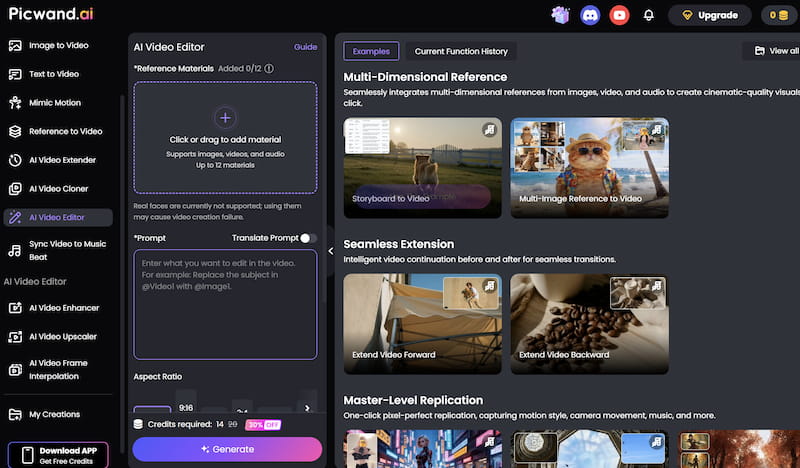
Picwand AI Video Editor is an AI-powered editing tool designed for users who want fast and simple video enhancement. It allows users to add multiple creative elements without requiring professional editing skills.
Features
PicWand AI Video Editor offers several practical features for modern content creation.
Music and Audio Editing.
Users can add background music and adjust audio levels easily. AI helps synchronize music with video pacing.
Visual Effects and Filters.
Picwand provides various AI-powered filters and effects to improve visual quality instantly.
Image and Sticker Support.
You can add logos and images and emojis. Overlays right into your videos. It is really easy to do.
Beginner-Friendly Interface.
The editor is simple and easy to use so you can add logos and images and emojis. Overlays to your videos, without any trouble.
It’s hailed as one of the best AI video optimization for social media platforms.
Steps
Here is how to add elements to a video using PicWand AI Video Editor.
Step 1. Upload Your Video
Open the PicWand AI Video Editor website and Click or drag to add material. After uploading, the AI system will process the video automatically.
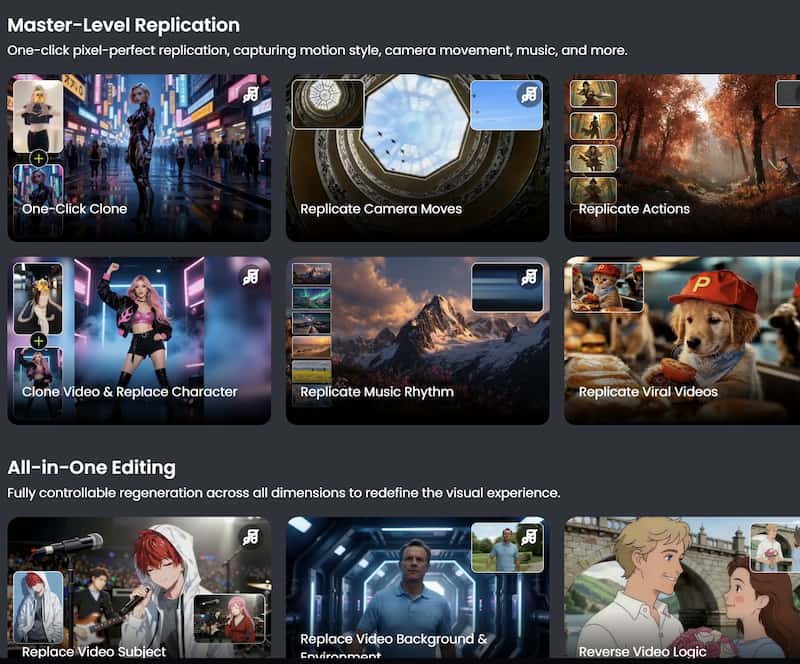
Step 2. Apply Visual Effects
Browse available AI filters and effects and choose the one you need.
Step 3. Preview and export the Final Video
After finishing the edits, export the video in your preferred resolution. Download the final video and share it directly on your preferred platforms.
Picwand AI Video Editor is a tool for people who want to make their videos look creative without spending too much time, also functioning as an app to make you look skinny. It uses intelligence to make things like adding subtitles applying effects and editing audio really easy.
The tool is especially good, for:
- • Content creators
- • Social media users
- • Beginners
- • Small businesses
- • Online marketers
While professional editors may still prefer advanced desktop software for complex projects, Picwand provides an efficient balance between simplicity and functionality for everyday editing needs.
Part 5. FAQs about Add Elements to Video with AI
Is Artificial Intelligence video editing for beginners?
Absolutely. Most Artificial Intelligence editors are designed with interfaces and automated tools making them accessible even for users without video editing experience.
What types of effects can Artificial Intelligence add to videos?
Artificial Intelligence can apply filters, transitions, animations, beauty effects, background replacement, motion tracking and color correction to videos. Artificial Intelligence has a lot of effects that users can choose from.
Does Artificial Intelligence reduce video editing time?
Yes. Artificial Intelligence automation significantly speeds up video editing by handling tasks such, as subtitle generation, scene detection and visual enhancement.
Conclusion
People can now add elements to video with AI. This has made making videos a lot easier. They can use intelligence tools to add words, music, pictures and special effects to their videos in just a few steps. You can make videos for things like social media, marketing, learning or just for fun. Artificial intelligence editors help people make videos faster. There are tools like Picwand AI Video Editor that make it easy for anyone to make their videos better without having to know a lot about technology.
AI Picwand - Anyone Can be A Magician
Get Started for Free