Best AI Video Generators in 2026: Tested & Ranked

AI video production has advanced significantly from basic text-to-video efforts. In 2026, the true question will be, "Which AI video generator fits the way I actually work?" rather than, "Can AI make a video?" Hollywood-caliber cinematography may matter less to a social artist than speed, free credits, and 9:16 output. A brand team may prioritize repeatable workflows and commercial rights. In contrast, if the model offers superior physics, camera control, character consistency, and sound, a director could be willing to pay more. 11 best AI video generators are tested. Treat the data below as a current snapshot rather than permanent specifications because pricing and model availability are subject to sudden changes.
Contents:
1. Quick Answer
In 2026, which AI video generator is the best?
Picwand is the best AI movie generator for speed, value, and an end-to-end workflow for most producers. Google Veo 3.1 is the best option for cinematic quality.
The three-line variant is as follows:
- • Picwand is free to use, offers a variety of creative pathways, integrates generation with editing and refinement, and permits commercial use.
- • Excellent realism, fast adherence, physics, reference-image control, and native audio are all features of Veo 3.1, premium generation may get pricey.
- • Use Veo 3.1 when maximal cinematic quality matters more than budget, and use Picwand for daily production and efficiency.
Picwand, the best AI video maker, says its platform supports creating commercial videos, including social media and advertising, and that users can start for free with new-user prizes and in-app credits.
Google DeepMind positions Veo 3.1 as its leading video-generation model, with text-to-video, image-to-video, audio generation, reference images, first/last-frame transitions, and object insertion. Google also reports strong results for prompt alignment and visual quality in its benchmark comparisons.
2. Two Camps: Speed vs Cinema
Not every creator needs the same kind of “best.” A more useful distinction is between two camps.
Efficiency Creation: Speed & Value
This camp prioritizes:
- • Fast generation and iteration
- • Low entry cost
- • Simple interfaces
- • Templates and ready-made workflows
- • Vertical social-media formats
- • Editing and enhancement in the same workflow
Representative tools: Picwand, CapCut, Canva, InVideo AI, HeyGen, Hailuo, and Pika.
These best AI video editors are particularly useful for daily creators, marketing teams, e-commerce sellers, small businesses, educators, and social-media managers.
The goal is not necessarily to produce one spectacular eight-second shot. It is to turn an idea into usable content repeatedly.
Cinematic Quality: Quality & Control
The second camp prioritizes:
- • Realistic motion and physics
- • Cinematic composition
- • Character consistency
- • Camera control
- • Complex action
- • Native audio
- • Greater control over individual shots
Representative tools: Veo 3.1, Runway, Kling 3.0, and Luma Dream Machine.
These platforms make more sense for advertising films, brand campaigns, narrative projects, professional visual production, and creators willing to spend more time and credits refining a shot.
Google's own published evaluation, for example, reports that Veo 3.1 performs strongly on overall preference, text alignment, and visual quality across benchmark comparisons.
3. How We Tested
The ideal test should keep the creative contribution constant so a Top-list comparison is helpful rather than promotional.
We score each platform across eight dimensions:
- • Generation quality — realism, motion, detail, and overall visual appeal.
- • Prompt adherence — how accurately the generated clip follows the requested action, composition, and style.
- • Generation speed — how practical the tool is for repeated production.
- • Ease of use — onboarding, interface, controls, and learning curve.
- • Free access — free generations, credits, previews, or trial availability.
- • Price/value — what creators receive for their spending.
- • Format support — vertical video, resolution options, image-to-video, text-to-video, and related workflows.
- • Commercial use — whether the applicable plan allows commercial projects.
The resulting scores should be read as an editorial buying guide rather than a laboratory benchmark. AI video models update too frequently for one test to remain definitive for months.
That is also why the review methodology follows a recurring-update principle: We re-test every month — the leaderboard changes fast.
4. Overall Comparison
Pricing should always be checked on the provider's current pricing page before publication or purchase. For example, Picwand currently lists a $14.90 monthly plan, $84.90 yearly billing, and a $147.90 perpetual option, alongside separate credit packs.
5. 11 Best AI Video Generators
Efficiency Creation Camp:
1. Picwand — Overall Best AI Video Generator
Camp: Speed & Value
Best for: Creators who want one workflow for video generation, editing, enhancement, and publishing.
Highlights:
- • AI Agent for creating images and videos through natural conversations
- • Workflows from text to video and image to video
- • AI editing, video enhancement, and other artistic tools
- • Production of short-form content optimized for vertical viewing
- • Free initial credits and support for commercial use
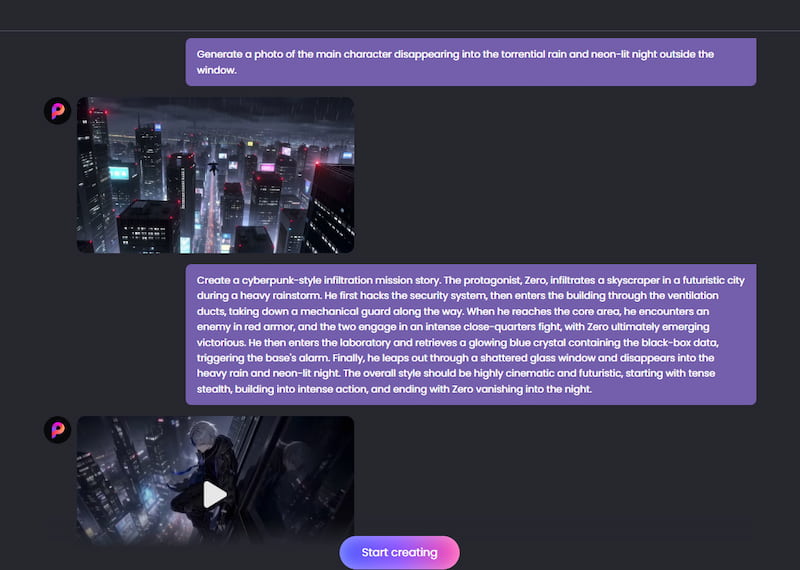
Picwand's biggest advantage is breadth. Instead of treating AI generation as an isolated step, it connects creation with post-production. Its AI Agent simplifies the creative process, letting users generate images and videos through natural conversation without writing complex prompts. Users can simply describe their ideas or upload reference materials to create ads, stories, product videos, and social media content. The platform also allows users to start for free and supports commercial video creation for TikTok, Instagram, Facebook, YouTube, and other social channels.
Picwand's current pricing also makes it accessible to creators who don't want a large monthly commitment: the listed monthly VIP plan is $14.90, with annual and perpetual options available.
Pricing: Picwand offers free access, with paid plans starting at $14.90/month or $7.08/month when billed annually.
2. CapCut — Best Free Editor
Camp: Speed & Value
Best for: Social creators who want editing and AI generation together.
Highlights:
- • Familiar short-form editing workflow
- • Templates and social-media tools
- • AI video generation integrated into editing
CapCut has expanded beyond conventional editing and now offers AI video creation using models including Veo 3.1.
Real-world impression: Excellent when generation is only one part of a larger TikTok/Reels/Shorts workflow.
Pricing: Free features with paid options depending on region and feature.
Why isn't it first? Its strongest advantage is editing; Picwand offers a more balanced AI-first generation and enhancement workflow.
3. Canva — Best for Beginners & Brand Consistency
Camp: Speed & Value
Best for: Beginners, marketers, and teams already using Canva.
Highlights:
- • Extremely accessible interface
- • Templates and brand assets
- • Strong presentation and marketing ecosystem
When a film needs to complement an existing visual brand, Canva's AI image-to-video generator is especially useful. Users can include AI-generated media with templates, fonts, brand assets, and campaign materials instead of starting with a blank timeline. Refer to Canva's Enhance Photo for more information.
Real-world impression: Less intimidating than specialised AI-video platforms.
Pricing: Paid memberships and a free plan.
Why doesn't it come first? Instead of becoming a specialised AI-video powerhouse, Canva is a general design platform.
4. InVideo AI — Best Script-to-Video at Scale
Camp: Speed & Value
Best for: High-volume marketing and script-driven production.
Highlights:
- • Automated script-to-video workflow
- • Large model ecosystem
- • Stock-media integration
InVideo's current paid platform provides access to more than 200 image, video, audio, and music models, including Veo 3.1 and Kling 3.0. The free plan lets you use it without entering card details and provides limited credits. Refer to prompt AI Veo 3 for more information.
Real-world impression: Especially helpful when production volume, not individual-shot excellence, is the barrier.
Costs include credit-based generation, premium programs, and a free tier.
Why doesn't it come first? Because of its scope, the approach may seem less generator-focused and more platform-like.
5. HeyGen — Best AI Avatars
Camp: Speed & Value
Best for: Presenters, training videos, sales content, and multilingual communication.
Highlights:
- • AI avatars and digital twins
- • Voice cloning
- • 175+ languages and dialects on Creator-level access
HeyGen 's current Creator plan is listed at $29/month with 600 credits, 1080p export, voice cloning, watermark removal, and 175+ languages and dialects. Its Pro plan is $49/month and adds 4K export.
Real-world impression: One of the easiest choices when a person needs to “appear” in a video without filming.
Pricing: Free plan; Creator from $29/month.
Why isn't it first? Avatar production is its strength, while Picwand covers a broader range of visual-generation scenarios.
6. Hailuo — Best Free Text-to-Video Value
Camp: Speed & Value
Best for: Creators experimenting with affordable generative video.
Highlights:
- • Strong motion generation
- • Good prompt responsiveness
- • Competitive cost positioning
MiniMax's Hailuo 2.3 is the best free AI image-to-video update, focused on physical action, facial micro-expressions, stylization, and understanding motion commands. The company also positioned the model around cost-effectiveness and introduced a faster model for lower-cost batch generation.
Real-world impression: Remarkably competent on a short budget.
Cost: Credit-based; depending on the current program, admission may be free.
Why isn't it first? The overall workflow is less comprehensive than Picwand.
7. Pika — Best for Creative & Fun Clips
Camp: Speed & Value
Best for: Social content, visual effects, memes, and playful concepts.
Highlights:
- • Novel effects
- • Instruments for turning pictures into movies
- • An emphasis on social media
Pika, the best free AI video generator, now offers a free plan with monthly video credits, watermark-free downloads, 480p access to Pika 2.5, and commercial use; premium plans increase credits and resolution.
Real-world impression: Outstanding when the video's primary goal is the impact.
Cost: Free; the premium alternatives that are presently offered start at $10 a month.
Why is it not the first? It performs very well with creative clips, but being less complete as a general production platform.
Cinematic Quality Camp:
8. Google Veo 3.1 — Best Overall Cinematic Quality
Camp: Quality of Film
Ideal for: Cinematic shots, narrative, and premium advertising.
Highlights:
- • Superb physics and realism
- • Strong, timely adherence
- • Reference-image control and native audio
In this comparison, Veo 3.1 is the most obvious quality-first winner. Beyond text-to-video, image-to-video, text-to-audio/video, reference pictures, first-and-last-frame creation, and object insertion, Google DeepMind calls it its top video model.
Real-world impression: Start here if a single shot has to appear costly.
Cost: Depending on the Google product, plan, model, and generation method, access varies.
Why is it not the best overall? It is less appealing for high-volume daily content due to cost and procedural complexity.
9. Runway Gen-4 — Best Camera & Creative Control
Camp: Quality of Cinema
Ideal for: Skilled artists seeking a regulated visual creation.
Emphasis:
- • Strong world/character consistency
- • Generation of images to videos
- • The environment for professional editing and generation
According to Runway, Gen-4 is designed to keep items, people, and settings consistent across scenes. Aleph, Gen-4.5, Gen-4 Turbo, and specialised tools are all part of its current model ecosystem.
Real-world impression: As your filmmaking expertise grows, it will be more fulfilling.
Cost: Credit-based.
Why is it not the first? For casual makers, the credit economy and learning curve are less accommodating.
10. Kling 3.0 — Best Budget Cinematic Alternative
Camp: Quality of Film
Ideal for: Artists who want sophisticated cinematic elements without constantly paying for expensive models.
Highlights:
- • Generation of multiple shots
- • Native audio
- • Excellent topic coherence
Kling 3.0 supports text-to-video, image-to-video, reference-based workflows, native audio, and multimodal inputs. Kuaishou's release also highlights improved consistency, photorealism, narrative control, and up to 15-second video creation.
Real-world impression: A solid compromise between production cost and cinematic ambition.
Pricing is credit-based and depends on model, resolution, and audio.
Why doesn't it come first? For artists who need both generation and more extensive post-production, Picwand remains simpler.
11. Luma Dream Machine — Best for Multi-Model Iteration
Camp: Quality of Film
Ideal for: Artists who enjoy quick visual experimentation.
Highlights:
- • Powerful motion production
- • Several model choices
- • Workflows for upscaling and modification
Luma's current Dream Machine plans include a free tier, premium plans, and Plus and above plans that allow business use. Currently, the Web Plus package costs $29.99 per month, while the Unlimited plan costs $94.99.
Pricing: Free; monthly premium subscriptions start at $9.99.
Why doesn't it come first? Plans differ greatly in terms of generating economics and commercial rights.
6. How to Choose the Best AI Video Generator
Instead of memorizing a ranking, match the tool to your production identity.
Picwand → Content Creators & Social Media Marketers
Content creators often need to turn ideas into engaging visuals quickly without complicated production workflows. Picwand offers Text-to-Video, Image-to-Video, and Reference-to-Video capabilities, alongside editing and enhancement tools. Its AI Agent further simplifies creation by letting users generate images and videos through natural conversation, making it a versatile option for social media content, creative storytelling, and marketing videos.
Digital presenter → HeyGen
If your main requirement is a realistic presenter, multilingual narration or a digital twin, HeyGen is the more specialized option.
TikTok / Shorts / Reels - Picwand, CapCut or Pika
For short-form video, creation speed and editing flexibility typically outweigh the final few percentage points of visual realism.
7. Step-by-Step: Make Your First AI Video
Picwand offers multiple ways to create AI videos, including Text-to-Video, Image-to-Video, and Reference-to-Video. For an even simpler experience, use Picwand AI Agent to turn your ideas into videos through natural conversation, without complicated prompts or manual settings.
Step 1. Open Picwand AI Agent
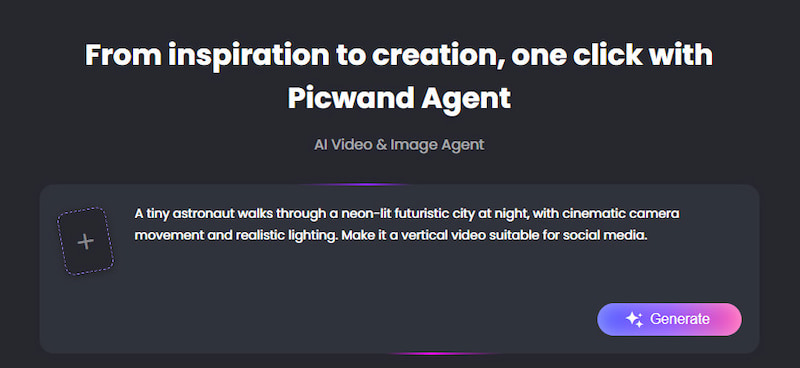
Visit Picwand AI Agent to get started. Simply enter your idea in the chat box or upload images as references.
Step 2. Describe Your Video Idea
Tell the AI Agent what you want to create in everyday language. For example:
“A tiny astronaut walks through a neon-lit futuristic city at night, with cinematic camera movement and realistic lighting. Make it a vertical video suitable for social media.”
You can also upload an existing image and ask the Agent to bring it to life.
Step 3. Generate Your AI Video
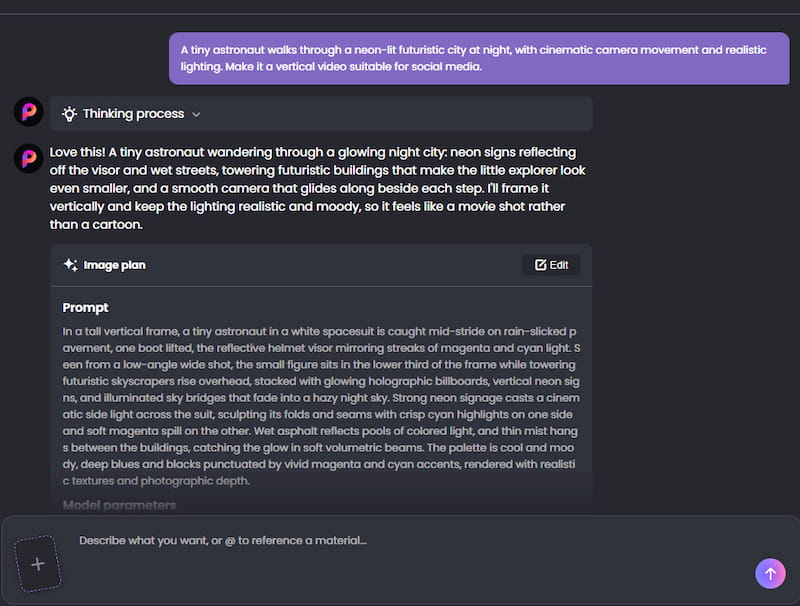
Send your message and let the Picwand AI Agent handle the creative process and optimize the Prompt. It understands your request and turns your idea or reference materials into a video without requiring you to manually adjust complex parameters.
Step 4. Refine and Download
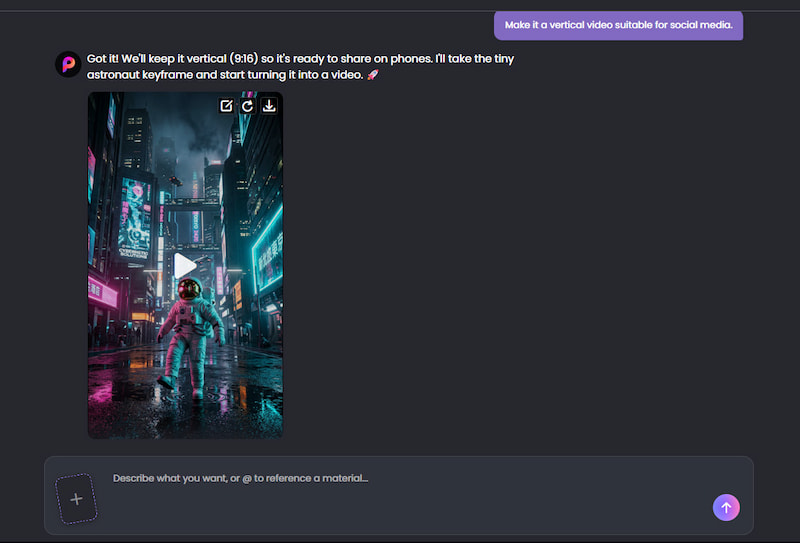
Not quite satisfied with the result? Simply continue chatting with the Agent to refine your video, whether you want to change the background, adjust the lighting, or try a different visual style.
Once you're happy with the final output, download your video and share it on TikTok, Instagram, YouTube, or other social media platforms.
8. FAQs about Best AI Video Generator
What is the best AI video generator in 2026?
The best AI video generator depends on your creative needs. Picwand is a versatile option for creators looking for an all-in-one platform that combines AI video generation, editing, and enhancement. Veo 3.1 is worth considering for cinematic video quality, while other tools may be better suited to specific styles, workflows, or budgets.
Which AI video generator is best for beginners?
Picwand, Canva, and CapCut are among the easiest places to start. Picwand is particularly useful if the beginner wants generation, enhancement, and editing in one workflow.
Which AI video generator has the highest quality?
Google Veo 3.1 clearly wins on quality in this comparison. Google cites good benchmark results for overall preference, fast alignment, and graphic quality, with realistic physics and native audio capability.
Can I commercialise AI-produced videos?
Depends on the platform and the plan. Picwand gives clear permission for commercial use, including advertising and AI-generated social-media video.
Other providers limit business usage on free plans too. For example, the current free and Lite plans of Luma are non-commercial, Plus and above are for business use. Always review the current licence conditions before publishing sponsored advertising.
Conclusion
There is no one best AI video generator for everyone. If you want to make meaningful movies fast, experiment without a big upfront budget, create vertical social content, improve existing footage, or handle multiple production phases in one place, choose Picwand. Its free starter plan and commercial-use support make it particularly valuable for creators, marketers and e-commerce retailers. The bigger takeaway is simple: don’t pick an AI video generator just because of model hype. Select it for the work you need to be done.
AI Picwand - Anyone Can be A Magician
Get Started for Free