Imagen 4 Vs Nano Banana: Google's Top AI Tools Compared

Imagen 4 and Nano Banana are powerful AI models for generating images from text prompts. However, both are limited when it comes to true, hands-on editing. For more precise control and detailed adjustments, Picwand AI Photo Editor is a more reliable option.
In 2025, Google introduced two of its most talked-about AI image generation models: Imagen 4 and Nano Banana. While both models create images from text prompts, they perform differently in practice. While they share the same core function, the difference shows up in how each model handles quality, speed, and overall output style. If you're wondering what exactly sets them apart, this breakdown will walk you through it. In this post, we'll compare Imagen 4 vs Nano Banana based on their key differences and real-world performance. We will help you understand which model best fits your needs.
Contents:
Part 1: Introduction to Imagen 4 and Nano Banana
AI image generation keeps moving fast, and Imagen 4 and Nano Banana show just how different that progress can look depending on the goal.
Imagen 4, integrated into Gemini, is an AI image gener6ation model developed by Google. It converts text prompts into highly detailed, realistic, and visually consistent images. You can describe a scene with specific elements, and it will match that description as closely as possible. It focuses less on quick experimentation and more on delivering production-ready results.
On the other hand, Nano Banana, also developed by Google, is an image generation and editing model. Like the Imagen 4, it turns text prompts into images. However, it puts less pressure on precision and more on speed and flexibility. Instead of carefully crafting long, detailed prompts, you can keep things simple and still get interesting results.
Part 2: Imagen 4 Vs Nano Banana: Key Differences at a Glance
Part 3: In-Depth Performance Comparison
Key Features Comparison
What to Expect with Imagen 4:
- • Render text accurately to ensure readability within generated images.
- • Interpret prompts with an advanced understanding of descriptive inputs.
- • Deliver high image quality with sharp details, clean textures, and realistic lighting.
- • Enhance composition control for precise placement of subjects and visual elements.
- • Produce consistent outputs that maintain style and structure across multiple generations.
What to Expect with Nano Banana:
- • Enables quick iteration to produce multiple variations quickly.
- • Supports flexible styles that favor creative and stylized results.
- • Delivers decent quality suitable for casual and social media use.
- • Handles simple prompts by processing short, basic inputs with ease.
- • Allows instant edits for fast tweaks without needing complex instructions.
Use Case Comparison
Pricing
Imagen 4:
Nano Banana:
Note: Unspent Nano Banana credits stay in your account for the next billing period.
Pros & Cons
Imagen 4:
Nano Banana:
Part 4: Which is More Suitable for Me, Imagen 4 or Nano Banana?
When comparing Imagen 4 vs Nano Banana, the better choice depends on how you plan to use it and what results you expect. Some people need polished, reliable visuals they can use right away. Others want something fast and flexible to explore ideas.
• Choose Imagen 4: If you're working on a visual that needs to look refined and consistent, Imagen 4 is the better fit. It handles detailed prompts well and gives you control over composition, lighting, and overall output. It may take a bit more effort, but the results are far more reliable and production-ready.
• Choose Nano Banana: If your goal is to create images quickly, test ideas, or experiment without overthinking prompts, Nano Banana is the easier choice. It's fast, beginner-friendly, and great for generating multiple variations quickly, even if the results aren't always perfectly detailed.
Part 5: Best Alternatives to Imagen 4 Vs Nano Banana: Picwand AI
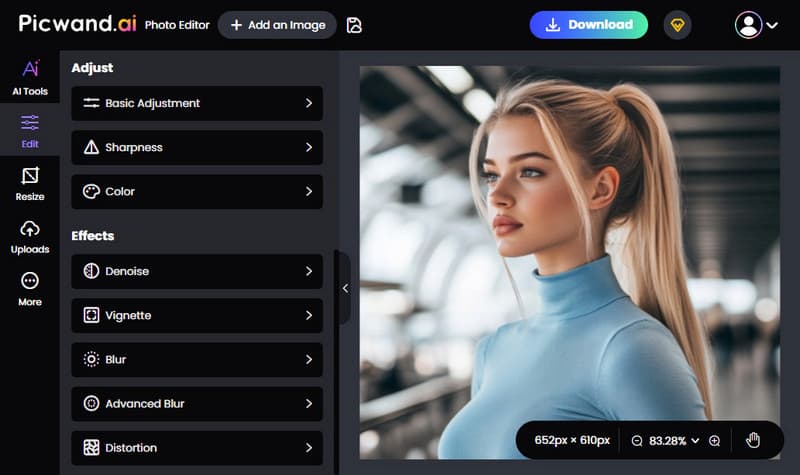
Picwand AI Photo Editor is a solid AI-powered photo editing tool that works well with AI generators, giving you the control they lack. It combines basic editing tools with smart AI features, so you're not limited to just simple tweaks. For standard adjustments, you can fine-tune brightness, contrast, sharpness, and colors. It also lets you apply effects such as denoise, vignette, blur, advanced blur, and distortion.
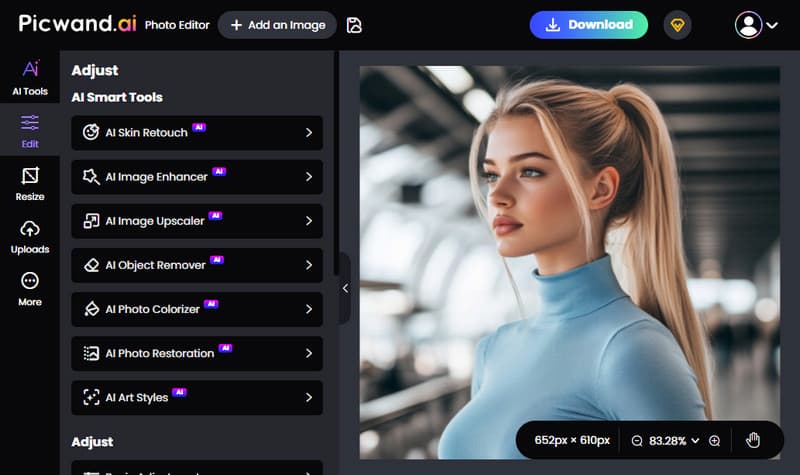
When it comes to framing, you can crop images freely or use preset ratios. You can also resize images by entering exact dimensions, which is especially helpful for platform-specific uploads. It also includes lens correction, so you can rotate or flip images for better alignment. On top of that, it offers a set of AI smart tools that go beyond basic editing. These include skin retouch, image enhancer, image upscaler, object remover, photo colorizer, photo restoration, and even art style transformations.
Why Choose Picwand AI Photo Editor:
- • Supports 1:1, 3:2, 2:3, 4:3, 3:4, 16:9, 9:16, and freeform ratios.
- • Includes over 10 smart AI tools that extend beyond basic manual editing.
- • Saves images in JPG, PNG, and WEBP formats with up to 4K resolution.
- • Comes with essential photo adjustments and creative effects for everyday editing.
My Verdict:
When comparing Nano Banana vs Imagen 4, both are great at generating high-quality images from prompts. But when it comes to true editing, that's where they fall short. Yes, you can tweak results through prompts, but you're still relying on the model to interpret changes. You don't get full, hands-on control over the image itself. If you want precise adjustments, Picwand AI Photo Editor is still the more reliable option.
Conclusion
Imagen 4 vs Nano Banana shows two different strengths in AI image generation. Imagen 4 focuses on high-quality, detailed, and consistent outputs, while Nano Banana prioritizes speed and easy experimentation. Both are powerful, but for final polishing and real editing control, use Picwand AI Photo Editor to enhance and refine your AI-generated images for better results.
AI Picwand - Anyone Can be A Magician
Get Started for Free