Imagen AI Review: Features, Speed, and Real Performance Test

Imagen AI is a powerful AI tool that automates photo editing by learning a user's style and applying it across large batches of images. It saves time in culling, color correction, and polishing galleries. While efficient and consistent, it works best when paired with tools like Picwand AI for precise editing.
Editing is one of the biggest time sucks for many content creators. The time it takes to cull, color correct, and polish an image can easily eat up hours of your week, and in some cases, even your personal time. That's exactly why so many people start searching for AI tools that can speed up and automate the process. One tool that is now making a name in the AI image space is Imagen AI. It learns your specific editing style and applies it automatically across large batches of photos. But is it worth spending your time and money on? This Imagen AI review will conduct an in-depth analysis of the tool. We will break down its features, performance, speed, pricing, pros and cons, and provide a simple guide to using it. We will also compare it with its competitors to help you understand which AI tool best fits your workflow and creative needs.
Contents:
What Is Imagen AI
What is Imagen AI? It is Google DeepMind's text-to-image model that turns written descriptions into highly detailed and realistic images. It combines language understanding with diffusion-based image generation to accurately interpret prompts. It allows the AI to produce visuals with strong photorealism, sharp textures, and fine artistic detail. It can handle various styles while maintaining strong alignment between the text prompt and the generated image. Imagen can render intricate details such as lighting, fabrics, water droplets, and facial features with high clarity.
Image Generation Features
Image Rendering:
Imagen can generate images that look very close to real photographs. It understands lighting, shadows, and natural color tones, which helps create lifelike results. The result feels like it was captured by a real camera, not made by AI.
Image Details:
This feature allows Imagen AI to produce highly detailed visuals. Small elements such as hair strands, fabric textures, skin details, and tiny background objects are clearly visible. Even when zoomed in, the image stays sharp and realistic.
Clean Text in Images:
Unlike many AI tools, Imagen can generate readable, properly arranged text within images. This feature is useful for creating posters, signs, book covers, and social media graphics. The text usually appears neat, well-placed, and easy to read. (Learn more about how to write AI prompt examples here.)
Art Styles:
Imagen AI supports various visual styles. It can create realistic photos, digital paintings, illustrations, cartoons, and abstract artwork. This flexibility allows users to match different creative needs, from professional design work to artistic experimentation.
Text-to-Image Creativity:
Google Imagen AI's strongest feature is its ability to turn simple text prompts into full visual scenes. Users can describe an idea, and the AI will generate a matching image. This makes it very useful for brainstorming, storytelling, concept design, and creative exploration.
Performance and Speed Review
Fast Image Creation Speed:
Imagen generates images quickly, especially in its newer versions. It can produce results in just a few seconds, depending on the mode used. Google also introduced faster versions of Imagen that can create images up to 10× quicker than older AI models.
Balanced Speed and Quality:
Imagen does not sacrifice quality for speed. Even when generating images quickly, it still produces sharp, realistic, and detailed visuals. This balance makes it useful for anyone who needs reliable results without long waiting times.
Quick Idea Testing:
Imagen AI editing allows users to test many ideas quickly. You can change your text prompt and instantly see new results. It is very helpful for those who need to explore multiple visual concepts quickly before choosing the best one.
Stable Performance Under Complex Prompts:
Even when prompts are long or detailed, Imagen AI keeps good speed and stability. It can still understand complex descriptions and generate matching images without slowing down too much, which helps maintain a smooth user experience.
Pricing and Cost Analysis
When discussing the cost of Imagen AI, it is important to understand that it does not charge a one-time fee. Instead, it uses a usage-based pricing system: you pay based on how many images you process and the plan you choose.
Pros and Cons of Imagen AI
Before using the Imagen AI image generator, it is important to know both its strengths and weaknesses. The pros help you understand what the tool does well and when to use it effectively. Meanwhile, the cons help you avoid limitations, mistakes, and unrealistic expectations. Knowing both sides ensures better decision-making and smarter use of the technology.
Pros
- It generates images quickly.
- It produces highly realistic images.
- It supports many different art styles.
- It understands text prompts very well.
- It creates very fine details with strong clarity.
Cons
- It has usage limits.
- It is not fully accessible to the public.
- It struggles with highly complex prompts.
- It is expensive for high-volume or professional use.
- It sometimes produces slightly incorrect details in images.
How To Use Image AI
Understanding how to write a prompt is the most important part of using Imagen effectively. A good prompt helps the AI clearly understand what kind of image you want. The better your prompt, the better and more accurate your image result will be.
Here's how to use Imagen AI:
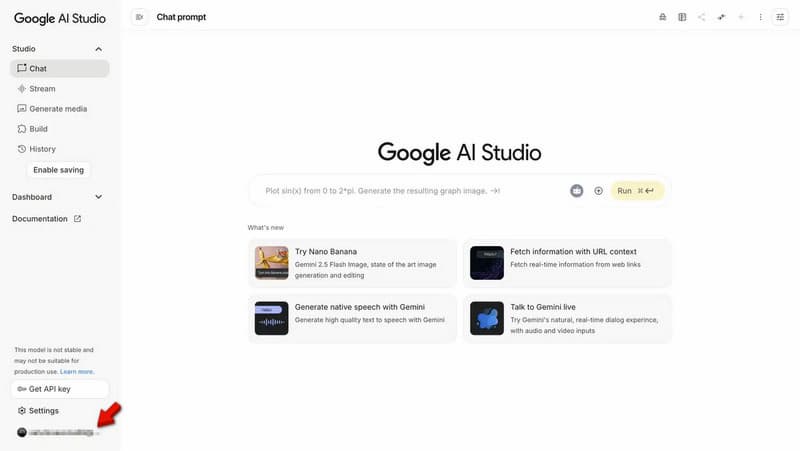
Step 1. Sign in to your Google Account to save your work/project automatically. After logging in, open Google AI Studio to access various AI tools, including image generation models.
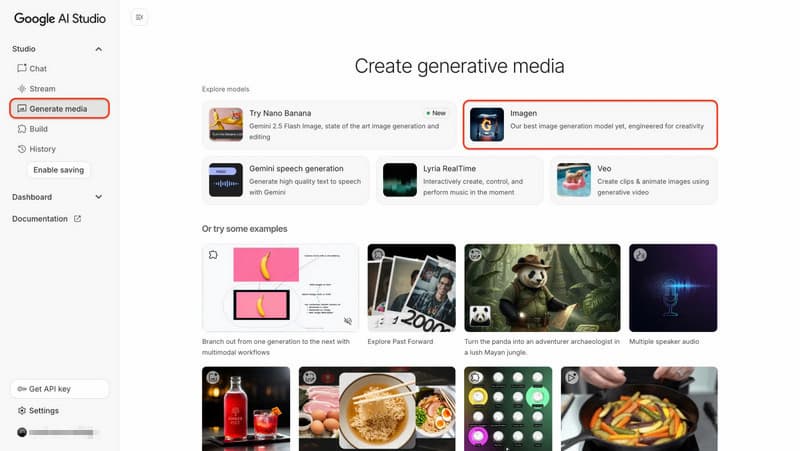
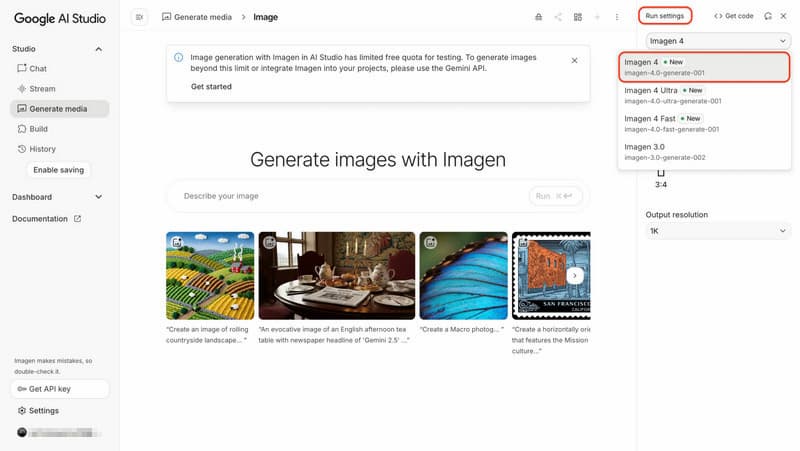
Step 2. On the main dashboard, click Generate Media to access AI creation tools. From there, choose Imagen to open the image generation workspace.
Step 3. In the top-right settings menu, click Run settings to view model options. Choose Imagen 4. You may also see options like Imagen 4 Ultra or Imagen 4 Fast.
Step 4. Type a clear and detailed description of what you want to see. Include style, mood, colors, and background details. Once everything is ready, click Run to generate your image.
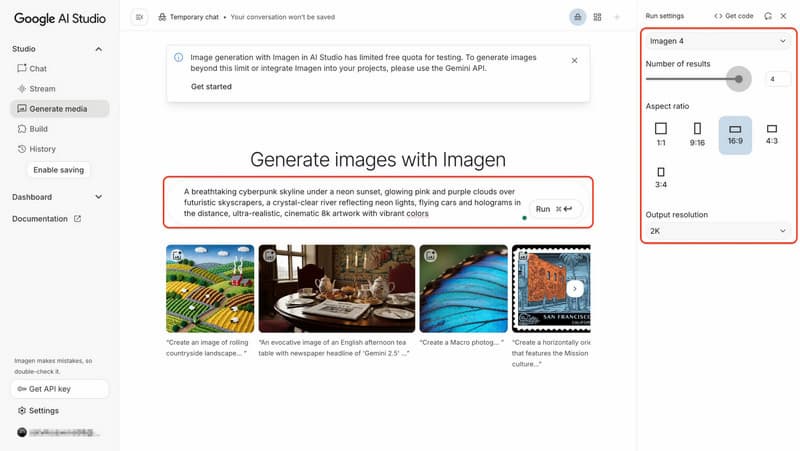
A strong prompt should be simple but detailed. Instead of just saying 'a cat,' try a fluffy white cat sitting on a wooden chair in soft sunlight, in a realistic style. It helps Imagen AI produce more accurate and high-quality results.
Imagen AI Vs Competitors
Imagen is often compared with other AI photo tools because each platform is built for different workflows. Some focus on portrait editing, some on speed, and others on full automation. Understanding these differences helps you pick the right tool.
Imagen AI Vs Evoto
Imagen AI vs Evoto highlights two tools with very different purposes. Imagen AI is primarily for full workflow automation. It learns your editing style and applies it consistently across large batches of photos. On the other hand, Evoto focuses more on detailed portrait retouching. It gives users manual control through sliders, allowing precise beauty adjustments.
Aftershoot Vs Imagen AI
Aftershoot vs Imagen AI is a comparison of two popular tools for speeding up workflows. Imagen AI focuses mainly on learning your personal editing style and automatically applying it to your photos in the cloud. It ensures consistent results across entire projects. However, Aftershoot combines AI culling and editing into a single offline system. It allows users to sort and edit images directly on their computers without an internet connection.
Batch AI Vs Imagen AI
Batch AI vs Imagen AI compares two tools designed for handling large volumes of images. However, they approach the task differently. Imagen AI uses machine learning to study a photographer's editing style and apply it automatically. It produces highly consistent and professional results across batches. In contrast, Batch AI focuses more on fast bulk processing without deep style learning. This makes it suitable for simple and repetitive editing tasks.
Conclusion
In this Imagen AI review, we explored how the tool helps speed up photo editing. It is clearly a strong option for those who want to save time and maintain a unified editing style across large galleries. While it is powerful for workflow automation, it remains limited for precise, hands-on editing and fine adjustments. For more accuracy and true editing flexibility, Picwand AI Photo Editor is a better choice. It allows more detailed, manual-level control combined with smart AI tools, making it ideal for refining images with precision.
AI Picwand - Anyone Can be A Magician
Get Started for Free