Best AI Photo Enhancer App of 2026: Top 5 Compared & Tested

High-quality photos used to be the realm of professional photographers. Thanks to AI-powered tools, anyone can produce great-looking images with relative ease. Whether you want to fix blurry images, restore old photos, or just want your friend’s social media posts to shine, you might be amazed at how much difference the best photo enhancer app can make. There are supposedly hundreds of apps on the market in 2026, and sorting through them all can feel overwhelming. We researched the best AI photo enhancers for this year, including Picwand AI Photo Enhancer, YouCam, Remini, Fotor, and icWish, noting their features, pricing, pros and cons, and more. With this complete guide of photo enhancer apps, you’ll discover the right app that has the perfect combination of ease of use, power, and price for your photo-editing purposes.
Contents:
- How We Test These Apps
- Quick Comparison of the Best Photo Enhancer Apps in 2026
- Top 1: Picwand AI Photo Enhancer – Best for All-in-One Photo Enhancement
- Top 2: YouCam Enhance – Best for Realistic Face & Selfie Enhancements
- Top 3: Remini – Best for Restoring Old & Blurry Photos
- Top 4: Fotor – Best for Creative Editing & Filters
- Top 5: PicWish – Best for Background Removal & Quick Enhancements
- FAQs about the Best Photo Enhancer App
How We Test These Apps
With so many AI photo enhancer apps available, choosing the right one can be challenging. To select the best photo enhancer apps for 2026, we evaluated each tool based on several important factors, including image quality, AI performance, speed, pricing, and overall usability.
We tested these apps by enhancing different types of images, including portraits, selfies, old photos, blurry images, and product pictures. This helped us compare how well each app handled different editing needs and real-world use cases.
Our evaluation focused on the following criteria:
- • AI Enhancement Quality: How effectively the app improves sharpness, details, colors, and overall image clarity while keeping results natural.
- • Processing Speed: How quickly the app completes AI enhancement and delivers the final image.
- • Features & Formats: Whether the app supports different image types and provides useful tools such as upscaling, restoration, noise reduction, background removal, and portrait enhancement.
- • Pricing & Value: The availability of free features, subscription costs, and whether premium plans offer meaningful upgrades.
- • Ease of Use: How simple it is for beginners and everyday users to upload, edit, and export enhanced images.
Based on these criteria, we selected five AI photo enhancer apps that provide the best balance of quality, features, performance, and value for different types of users.
Quick Comparison of the Best Photo Enhancer Apps in 2026
| Tool | Key Features | Best For | Rating |
| Picwand AI Photo Enhancer | • AI sharpening • Noise reduction • Portrait enhancement • Background editing | Users looking for an all-in-one AI photo enhancer | ⭐⭐⭐⭐⭐ |
| YouCam Enhance | • Natural face retouching • Selfie enhancement • Beauty filters | Selfies, portraits, and social media creators | ⭐⭐⭐⭐ |
| Remini | • AI photo restoration • Face recovery • Image sharpening | Restoring old, blurry, or low-resolution photos | ⭐⭐⭐⭐ |
| Fotor | • Creative filters • AI retouching • Collage and design tools | Creative editing and aesthetic social media content | ⭐⭐⭐⭐ |
| PicWish | • Background remover • Object remover • Quick AI enhancement | Ecommerce sellers and fast background editing | ⭐⭐⭐⭐ |
This quick comparison helps you choose the right AI image enhancer based on your editing needs, whether for selfies, old photo restoration, creative filters, or product photography.
Top 1: Picwand AI Photo Enhancer – Best for All-in-One Photo Enhancement
Best for: Users who want an easy-to-use AI photo enhancer for sharpening images, restoring old photos, and improving overall image quality with one click.
Picwand AI Photo Enhancer is a practical AI-powered photo enhancement tool that can turn blurry photos into clear, high-quality images within seconds. It supports old photo restoration, portrait enhancement, noise reduction, and one-click image upscaling to 4K.

Main Features
• Enhance photos to 4K online with one click.
• AI-powered sharpening and noise reduction.
• Automatic color and lighting adjustments.
• Enhances portraits, selfies, and product images.
• Cloud-based platform accessible on multiple devices.
Pricing
• A free plan is available with basic editing options.
• Premium starts at approximately $14.90/month, offering advanced AI tools and unlimited edits.
Pros
- Easy-to-use interface.
- Delivers fast and accurate enhancements.
- Multiple editing functions in one platform.
- Accessible online. No big downloads are necessary.
Cons
- A premium plan is necessary for full functionality.
- Use requires an internet connection.
Why Choose Picwand
Picwand AI Photo Enhancer is a 4k image enhancer for casual and professional users who need quick and effective photo enhancements. Smart AI technology enables users to save time while creating clear and vivid images.
Top 2: YouCam Enhance – Best for Realistic Face & Selfie Enhancements
Best for: Selfie lovers, influencers, and social media creators who want natural-looking portrait enhancements and beauty retouching.
Among selfies and portraits, YouCam Enhance is one of the highest-rated AI tools that enhances photos. The app incorporates beautiful filters and advanced AI adjustments, often making YouCam Enhance a top product among all because users find what natural and flawless results it provides. As an enhance photo quality app, YouCam Enhance provides sharper and fuller images, regardless of the detail, skin texture, lighting, or color.

Main Features
• AI skin smoothing and blemish removal.
• Real-time lighting and color adjustments.
• Automatic sharpening for sharper facial details.
• Portrait enhancement with natural beauty filters.
• Supports both photo uploads and real-time editing.
Pricing
• Free version with basic tools.
• Premium starts around $9.99/month for Plus and $19.99/month for Pro, unlocking advanced editing features and unlimited exports.
Pros
- Easy-to-use interface for beginners.
- Delivers natural-looking photo improvements.
- Works on both photos and videos.
- Available on mobile for editing on the go.
Cons
- The free version has limited export options.
- Some advanced filters require a subscription.
YouCam Enhance is a fantastic app for users who like to take studio-quality selfies and portraits without over-editing. It is a well-balanced app that offers natural beauty enhancements as well as very powerful AI tools for both social media creators and casual app users.
Top 3: Remini – Best for Restoring Old & Blurry Photos
Best for: Users looking to restore old family photos, fix blurry images, or improve low-resolution pictures with AI.
Remini has become one of the best-known tools in AI that brings old, low-quality, or blurred images back to life. With its robust restoration and sharpening technology, Remini can take blurry, grainy, or pixelated photos and produce sharp, detailed images in seconds. Remini's smooth mobile compatibility and powerful AI processing make it a great option if you're searching for a dependable photo enhancement app for iPad.

Main Features
• AI restoration for old and damaged photos.
• Sharpening tool for blurry or pixelated images.
• Face enhancement for clearer and defined portraits.
• Batch edit for multiple photos.
• Available on iOS and Android.
Pricing
• Free version with daily usage limits.
• In-app purchase
Pros
- Restores old and low-quality photos with impressive results.
- Works well on portraits and group shots.
- User-friendly with fast AI processing.
- Great for both casual and professional editing.
Cons
- The free version comes with limited daily credits.
- Some features are locked behind a subscription.
- Occasional over-sharpening on faces.
Remini is the ideal app for anyone who wants to restore old photos, enhance blurry selfies, and increase photo resolution. Remini utilizes AI technology to ensure that even severely damaged images are restored with clarity and detail. It makes it extremely useful for personal and professional uses.
Top 4: Fotor – Best for Creative Editing & Filters
Best for: Content creators and designers who want AI photo enhancement alongside creative filters, effects, and design tools.
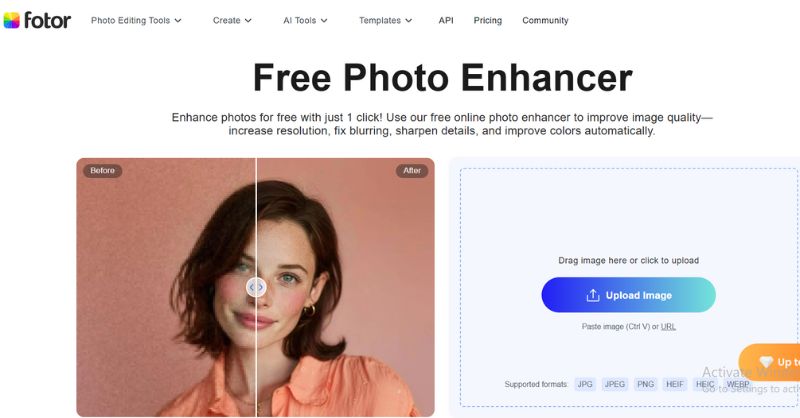
Fotor is a flexible photo editing app suitable for users who want more than minor edits. It offers AI-based retouching and advanced editing tools with creative filters and effects to change normal images into stunning and professional photos. Fotor is for those who want to touch up their portraits, adjust their lighting, or create stylish designs, and is a trustworthy app to enhance selfies for social media users who love aesthetic outcomes.
Main Features
• AI one-tap photo enhancement.
• Advanced filters, overlays, and effects.
• Retouching tools for skin, blemishes, and makeup adjustments.
• Design templates and a collage maker.
• Edits can be saved and accessed from anywhere with cloud storage.
Pricing
• The free version has basic features.
• Premium (Fotor Pro) costs about $3.33 a month, while Pro Plus costs $7.49.
Pros
- A vast scope of editing tools and filters.
- An easy-to-use interface for beginners.
- Excellent for improving portraits and selfies.
- Offers design features beyond photo editing.
Cons
- The free version has specified features and watermarks.
- Some advanced tools require a subscription.
- AI enhancement results may vary depending on photo quality.
One of the reasons Fotor stands out is that it combines photo enhancement powered by AI with creative editing capabilities. It's not only a photo enhancer. It's also a design tool for creative users who want to explore novel filters, effects, and layouts. In that way, it is suitable for both consumers who take quick selfies and creative professionals.
Top 5: PicWish – Best for Background Removal & Quick Enhancements
Best for: Online sellers, marketers, and everyday users who need fast background removal and quick photo enhancements for products or social media.
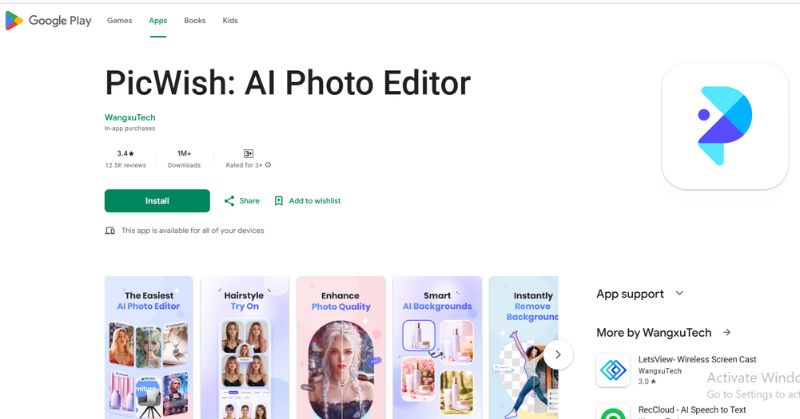
PicWish is a simple yet powerful photo-enhancing app featuring background removal and instant cleaning. PicWish is an AI-based app that enables users to retouch portraits, remove unwanted things, or even touch up an old image in only a few taps. It's also one of the best photo-enhancing apps for Android due to its efficiency. The app works flawlessly to give mobile users speedy editing without added complexity.
Main Features
• AI-powered background remover.
• One-click photo enhancement.
• Retouching tools for portraits.
• Object remover for cleaning images.
• Batch editing for multiple photos at once.
Pricing
• Free version with basic tools.
• In-app purchase for mobile devices.
• Premium plans start at around $5.99/month or $19.99/year for full access to AI features.
Pros
- Fast and user-friendly interface.
- Accurate background removal.
- Works well on both portraits and product photos.
- Batch editing saves time.
Cons
- Limited advanced editing tools compared to competitors.
- The free version comes with restrictions.
- Best features require internet access.
PicWish is great for users who want ease and speed. Although it lacks the creative editing features of some other apps, it actually provides some of the best editing solutions for background editing, while still bringing fast and professional-looking results. This app is especially useful for online sellers, casual photographers, and anyone looking to have professional-looking images in a matter of minutes.
FAQs about the Best Photo Enhancer App
What is the best app for photo enhancing in 2026?
The best photo enhancer app depends on your needs. For all-in-one editing, Picwand AI Photo Enhancer is highly recommended. If you prefer an app to enhance selfies, Fotor is a great pick, while PicWish is perfect for quick background removal.
Do photo-enhancing apps work offline?
Some apps have limited offline functionality, like Fotor. For optimal results, an internet connection is typically necessary, though, as the majority rely on AI-powered cloud processing.
Which is the best photo-enhancing app for Android users?
PicWish and Remini are among the best photo-enhancing apps for Android, offering easy-to-use tools and high-quality results.
How to enhance the quality of a photo?
You can use a photo enhancement tool such as Picwand AI Photo Enhancer to improve image quality. Simply upload your photo, and it can be easily enhanced and upscaled to 4K resolution.
Conclusion
The best photo enhancer app ultimately depends on what you want to improve. Picwand AI Photo Enhancer is a great all-in-one choice for everyday photo enhancement, YouCam Enhance excels at selfies and portraits, Remini is ideal for restoring old or blurry photos, Fotor offers creative editing tools and filters, and PicWish stands out for fast background removal and quick edits. Most of these apps also provide free versions, making it easy to test their features before upgrading.
Quick Pick
| If you want to… | Recommended App |
| Enhance photos with one all-in-one AI tool | Picwand AI Photo Enhancer |
| Improve selfies and portraits naturally | YouCam Enhance |
| Restore old, blurry, or low-resolution photos | Remini |
| Create social media content with creative filters | Fotor |
| Remove backgrounds and edit product photos quickly | PicWish |
No matter your experience level, choosing the right AI photo enhancer can help you create clearer, sharper, and more professional-looking images in just a few clicks.
AI Picwand - Anyone Can be A Magician
Get Started for Free