Enhance Image Quality Guide: Picwand AI, Photoshop & Pro Methods

Have you ever found an old photo that looked too blurry, dark, or low-quality to share? I recently restored a 10-year-old vacation photo using Picwand AI Photo Enhancer, and the result was surprising — details that were barely visible became clear again, and the colors looked much more natural.
Improving photo quality is no longer limited to professional photographers or expensive editing software. With AI-powered tools like Picwand, anyone can enhance images, fix blur, increase resolution, and improve colors in just a few clicks. In this guide, we’ll explore different ways to enhance image quality, from AI solutions to Photoshop techniques and simple editing adjustments, so you can make your photos sharper, brighter, and more professional.
Quick Answer: How to Enhance Image Quality
You can enhance image quality by improving sharpness, increasing resolution, reducing noise, and adjusting brightness and colors. AI photo enhancers like Picwand can automatically enhance photos in seconds, while Photoshop provides advanced manual editing tools for more precise adjustments.
Contents:
Part 1. What is Image Enhancement
The process of enhancing an image or photo's quality, clarity, and overall appearance is known as image enhancement. It is a way of improving an image to make it look better, more natural, more vivid, and more detailed. Image enhancement can refer to various techniques, depending on the issues detected in the image, which may include color correction, noise reduction, sharpening image edges, or adjusting brightness and contrast. It helps restore details, improve clarity, and make everyday photos look cleaner and more refined.
To enhance photo quality does not alter the photo, but only improves the conditions under which the photo is seen. For example, a slightly out-of-focus photo can be sharpened, a dull photo can be color-balanced, and an underexposed photo can be brightened. These enhancements help to showcase the subject more effectively and enhance the image's visual impact.
Image enhancement is commonly utilized in everyday life, from personal selfies and travel shots to professional trades, including product photography, medical imaging, and even satellite imagery analysis. Regardless of the context, enhancing your images allows you to ensure they look their best and tell the story you wish to speak.
Part 2. Top Pick: Picwand AI Photo Enhancer for Quick Results
If you're looking for a tool that will help you improve your photos in no time and you don't want to sit around in editing software for hours, an AI photo enhancement tool may be the best shortcut for you. One of the best available options now is Picwand AI Photo Enhancer. There is simply no easier way to enhance picture quality. Picwand is designed for anyone who wants to improve personal photos, prepare images for social media, or create professional-looking visuals without spending hours on manual editing. Picwand uses advanced AI technology to automate adjustments to lighting, sharpness, and color condition (balance). The best part? You can enhance photo online free, making them accessible to users who don’t want to install heavy programs or pay for expensive subscriptions.
Key Features
• Automatically fixes blur, noise, and low resolution.
• Increases photo resolution up to 4K without losing quality.
• Restores clarity to shaky or out-of-focus images.
• Balances tones for more vibrant photos.
• No software download. Works on any browser.
• Offers options to enhance photos online for free for quick edits.
• Delivers results in just a few seconds.
How to Use Picwand AI Photo Enhancer
Step 1: Go to Picwand AI Photo Enhancer's website and upload the raw satellite image you want to improve.
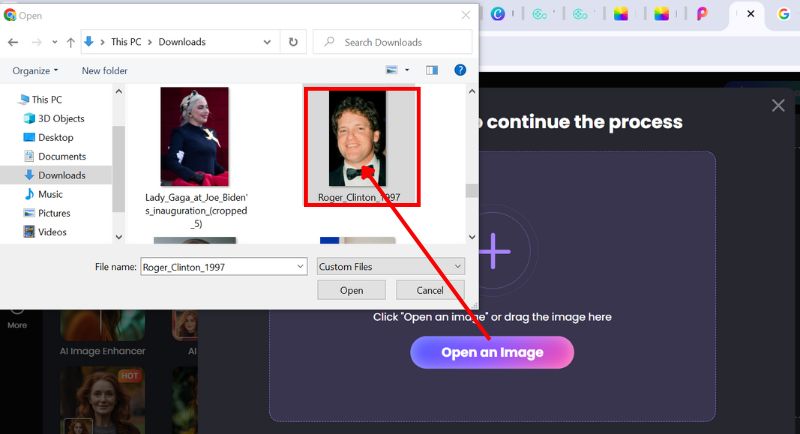
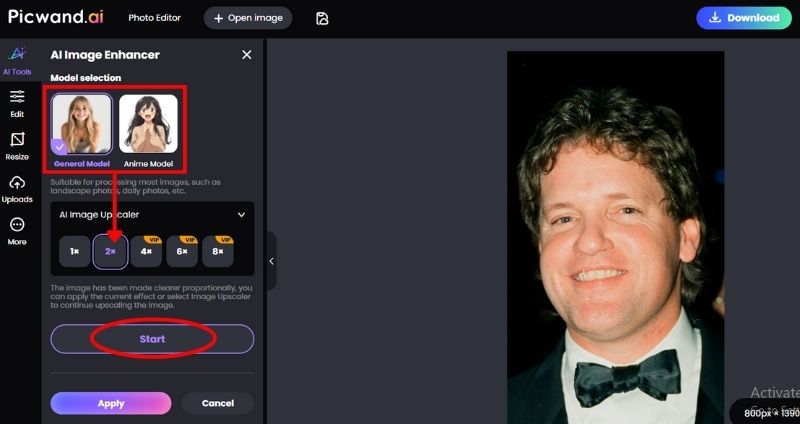
Step 2: Before that, select your image model and choose the upscaling level that you prefer. After that, click Start to proceed with the photo enhancement process.
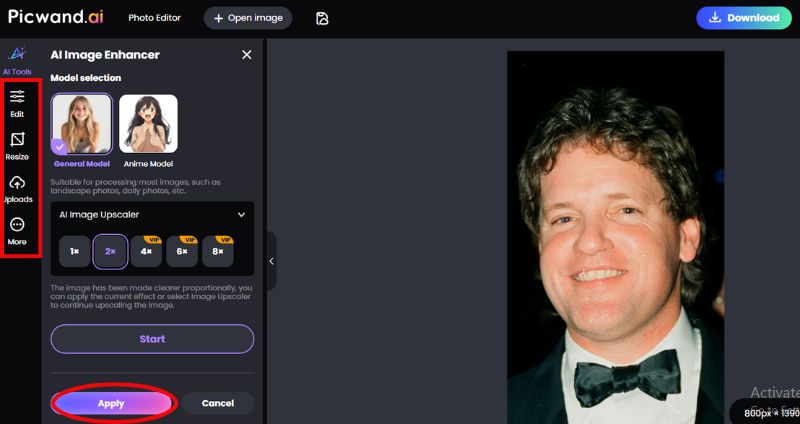
Step 3: Picwand provides options such as deblurring, sharpening, upscaling, or general enhancement. You can also customize your photo enhancement by exploring the tools on the left side. After the changes, you can click the Apply button.
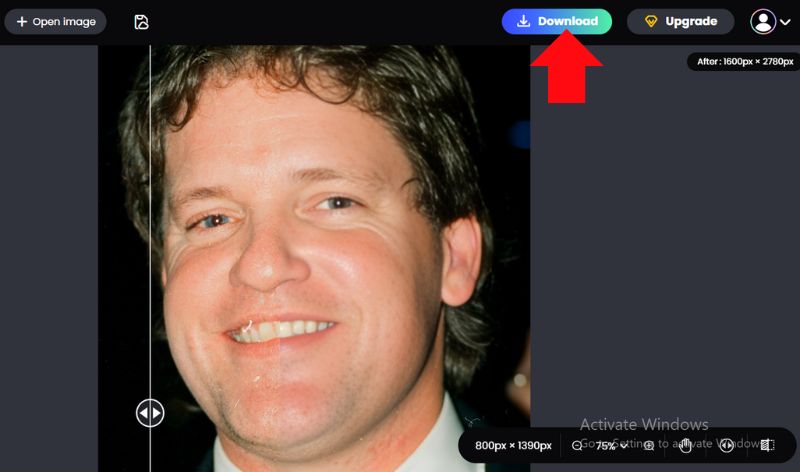
Step 4: Within seconds, you'll see a clearer and sharper version of your photo. Compare the before and after images, then download your enhanced image in high resolution.
Verdict: Why Choose Picwand AI
Picwand AI Photo Enhancer stands out for its speed, simplicity, and professional-quality results. It’s especially handy if you don’t have editing skills but still want polished photos.
• Simple to use, even for novices
• AI-driven outcomes in a matter of seconds
• No installation is required; it operates directly online.
• Provides options for free enhancement.
• Multiple enhancement modes (sharpening, deblurring, and upscaling) are supported.
In short, if you want a hassle-free way to make an image higher resolution or are looking for a way to enhance photo online free, Picwand is a tool worth trying.
Part 3. How to Enhance Photos in Photoshop
Adobe Photoshop is one of the most suitable options you have available when you want total control over a photo edit and prefer a more manual setup. Unlike many AI tools that simply automate the entire process, Photoshop allows you to make adjustments to every single detail. Whether you’re wondering how to make a photo less blurry or how to make a picture unblurry, Photoshop offers multiple features to help you achieve professional results.
Method 1. Enhance Photos in Photoshop (Super Resolution)
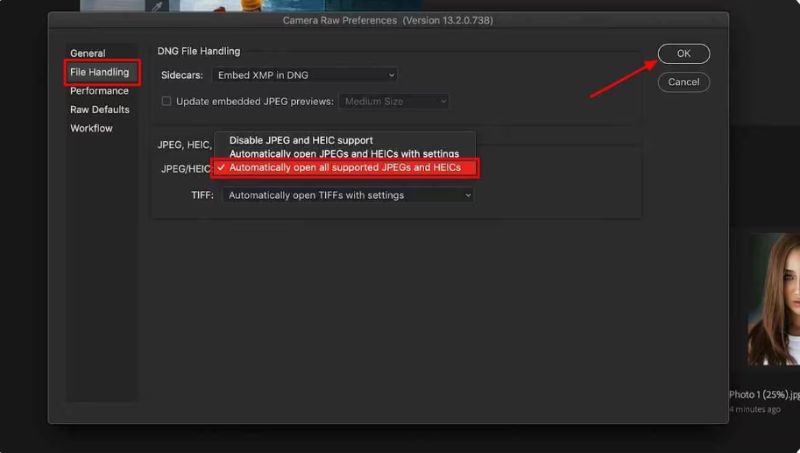
Note: You have to adjust the settings in Photoshop before you can open any images. Hover your mouse pointer over the Preference option in the drop-down menu after selecting the Edit option. In the extended menu, choose Camera Raw or just click File Handling to open the Camera Raw Preferences window.
Step 1: In the Camera Raw Preferences window, check the option Automatically open all supported JPEGs and HEICs in the supported JPEG/HEIC drop-down menu, then click the OK button.
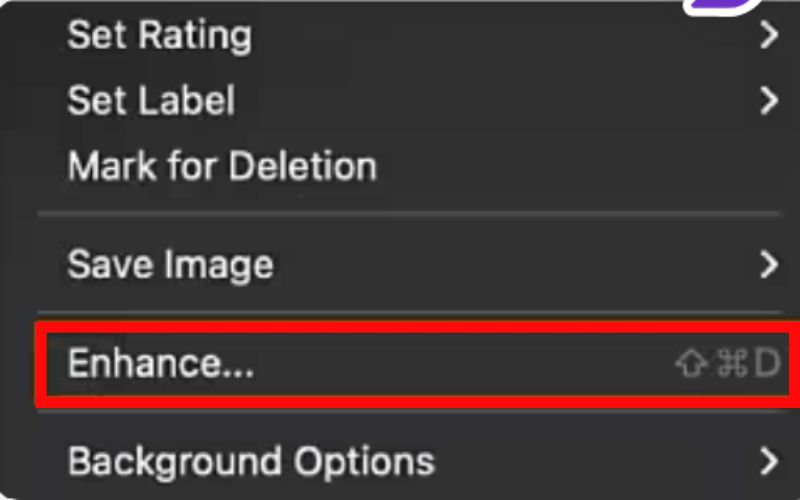
Step 2: Launch the picture in Camera Raw. To expand a small window, right-click on the image and select the Enhance option.
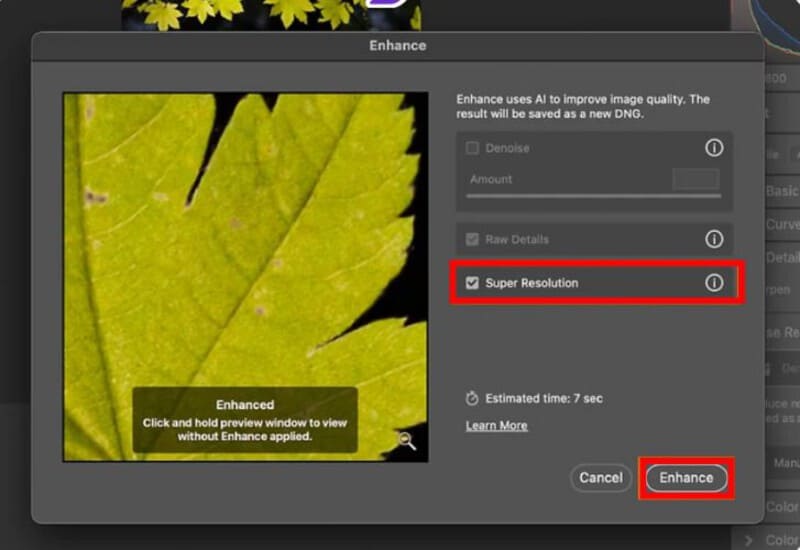
Step 3: You can control your enhancement settings through the Enhance preview window. Toggle on the Super Resolution option to enable AI to double the resolution of your image. Now, click the Enhance button and obtain an enhanced image.
Method 2. Enhance Photos in Photoshop’s Filter
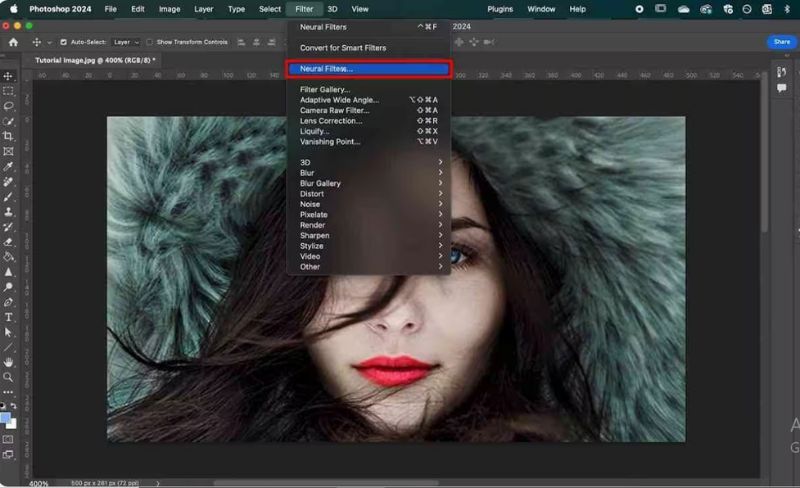
Step 1: To maximize clarity in the pixelated image, click the Filter option. In this drop-down menu, you'll also find additional filters, such as Camera Raw Filter and Lens Correction. From here, select Neural Filters. A right-side panel will open.
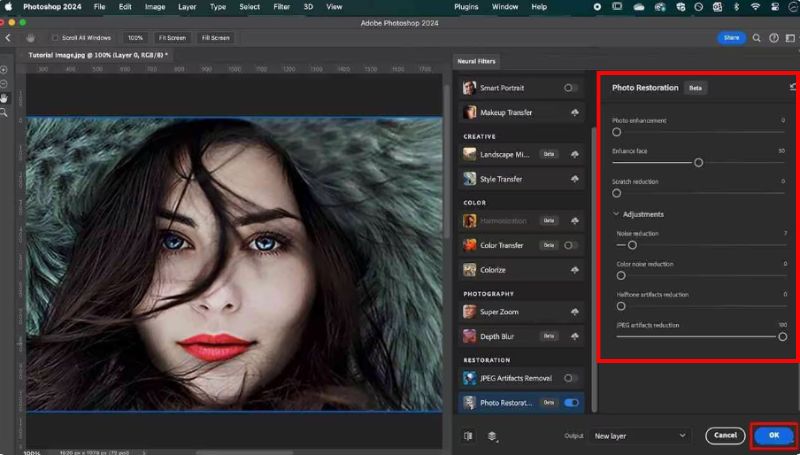
Step 2: Locate the Photo Restoration filter and enable it. After you turn it on, you can get a bunch of photo restoration options. Slide left and right to enhance the face and photo in your image. Finally, click on the Adjustments drop-down button for possibilities such as noise reduction, JPEG artifact reduction, and more. When you complete the adjustments, click the OK button.
Step 3: Save your project and check if your photo is enhanced using Photoshop!
Verdict: Is Photoshop Worth It?
Photoshop is an ideal option for anyone seeking accurate and high-quality photo retouching. It offers the most control over the end product but is slower than an AI tool.
Pros
- Full customization and superior editing
- Multiple tools for color correction, noise reduction, and sharpening
- Great for designers and advanced users
Cons
- steep learning curve for novices
- subscription-based (not free)
- Taking longer than AI tools
Photoshop is a dependable and robust choice if your primary objective is to enhance the clarity of an image or the quality of significant photographs.
Part 4. 6 Best Ways to Improve Image Quality for Stunning Photos
You can easily learn how to improve photo quality with the right adjustments. Below are six practical ways to fix a blurry photo, refine colors, and create more professional-looking shots.
Quick Guide: Choose the Right Image Enhancement Method
1. Adjust Contrast, Brightness, and Color Balance
Best for: Dark photos, indoor shots, and images with poor lighting
One of the fastest ways to enhance the vibrancy of your images is to adjust the lighting and tones. Increasing the contrast can add depth to your image. Adjusting the brightness will ensure that your subject is visible. Adjusting the color balance will ensure that your image does not have a warm or cool tint. If you are working to understand how to take good pictures without the ability to retake them, this final step is crucial.
2. Upscale to Increase Image Resolution
Best for: Low-resolution images, old photos, and images prepared for printing
Occasionally, images look pixelated because the original was taken at a low resolution. Luckily, there is now the availability of AI upscalers and software for professionals, to enhance blurry photo by enlarging images without losing quality. This process is useful if you want to improve the quality of your image for printing or high-resolution displays.
3. Crop to Enhance Focus and Composition
Best for: Portraits, product images, and social media posts
Cropping removes distractions and directs attention to the main subject. A well-cropped image often looks sharper and more professional. If you’re wondering how to improve quality of a photo, better framing through cropping is a simple yet powerful method.
4. Deblur the Image
Best for: Handheld photos, moving subjects, and action shots
Blurry photos are one of the most common problems. With tools like Photoshop or AI photo enhancers, you can effectively fix a blurry photo. By reducing shake blur or motion blur, you’ll end up with a much clearer and sharper picture.
5. Adjust Saturation for More Vibrant Colors
Best for: Social media photos, travel pictures, and lifestyle images
While decreasing saturation will produce a softer, more subdued color scheme, increasing saturation makes the colors more vivid and full-bodied. Just don't overdo it with saturation! The best images come when saturation is balanced to create a both stunning and natural visual.
6. Apply Filters for a Creative Touch
Best for: Creative content, personal branding, and social media posts
Filters can quickly change the mood of your image. The correct filter enhances quality and facilitates creative expression for everything from vintage effects to cinematic tones. When used effectively, filters can be the finishing touch in learning how to improve quality of a photo for both social media and personal use.
Verdict
Improving your photo quality doesn’t always require advanced tools. Simple steps, such as adjusting lighting, cropping, or utilizing deblurring features, can significantly improve your results. The more you experiment, the easier it becomes to understand how to enhance blurry photos and make your pictures look professional.
How to Choose an Image Enhancer
Choosing the right image enhancer depends on your needs, editing experience, and the type of photos you want to improve. Consider these factors before selecting a tool:
Choose Based on Your Needs
- • For beginners: Choose an AI image enhancer that automatically improves photos without requiring editing skills.
- • For social media photos: Look for tools that enhance colors, brightness, and sharpness quickly.
- • For old or blurry photos: Choose an enhancer with AI upscaling and deblurring features.
- • For product images: Prioritize accurate colors, clear details, and high-resolution output.
- • For professional editing: Use tools that provide advanced manual controls.
For most everyday users, an AI-powered enhancer like Picwand AI Photo Enhancer offers a good balance of simplicity, speed, and image quality. It allows you to improve photos quickly without spending time learning complex editing software.
Part 5. FAQs about Enhance Image Quality
Can I improve the quality of old or low-resolution pictures?
Yes. With modern AI tools, you can increase a picture's quality by upscaling the resolution, adjusting brightness and contrast, and reducing noise. It works especially well for scanned images or old family photos.
How do I make a picture less blurry in Photoshop?
Photoshop provides a Shake Reduction filter under the Sharpen menu. It is one of the most effective techniques if you’re searching for how to make a picture blurry or how to make a photo less blurry.
What filters are best for enhancing images?
Photo quality can be improved without excessive editing by using subtle filters that increase warmth, contrast, and saturation. Steer clear of heavy filters that distort photos.
Can I enhance image quality for free?
Yes. Free AI image enhancers like Picwand can improve image sharpness, clarity, and resolution without requiring professional editing skills.
Is AI enhancement better than manual editing?
AI enhancement is faster and easier for automatic improvements, while manual tools like Photoshop offer more control for advanced editing.
Conclusion
Anyone can certainly by using various tools and techniques available. This can include using Picwand AI Photo Enhancer, Photoshop, or making simple image adjustments such as brightness, cropping, or deblurring, among many other photo enhance solutions. All of these processes enable you to transform a blurry/dull picture into a clear, sharp, and vibrant image with ease.
AI Picwand - Anyone Can be A Magician
Get Started for Free