Basic PlanVIP PlanVIP ExpiredPurchased credits are valid for life but require an active VIP subscription to use
0Credit(s)
You can use credits to access all the AI tools on Picwand, such as the AI Image Upscaler, AI Age Filter, AI Video Enhancer, AI Video Upscaler, AI Video Effects, and more.
AI video upscaling is the process of using machine learning models to increase video resolution while preserving or enhancing visual details. If you want to restore vintage movies, optimize YouTube Content, or prepare 4K video displays, give AI video upscaling tools a try. This guide explores how to upscale video to 4K using three different methods.I've tested each one on identical footage to give you an honest comparison.
My Quick Take After Testing 3 AI Upscalers
I tested three AI video upscalers to find out which one truly delivers 4K quality. Here's my honest take: Picwand is the easiest for quick results, Topaz delivers the best visual fidelity, and Adobe gives you full creative control — but each has trade-offs you need to know.
How We Tested These AI Video Upscalers
To give you a reliable comparison, I tested all three tools with the same 5-minute 480p MP4 video clip on the same machine (Intel Core i9, 32GB RAM, NVIDIA RTX 4080). Metrics measured: output resolution quality, processing time per minute of footage, detail retention in dark areas, and visible artifacts.
Why Use an AI Video Upscaler? Key Benefits at a Glance
Leveraging machine learning and advanced algorithms, an AI video upscaling tool can:
Enhance Resolution: Fill in the missing pixels, refine textures, and enhance resolution.
Reduce Noise: Remove noise and speckles from grainy and low-quality videos.
Sharpen Videos: Apply colour correction and balance brightness during processing.
Restore Details: Use artificial intelligence to identify and polish details to give 4K results.
AI video upscaler perfectly fits the needs of content creators, marketers, and photographers. Whether you're an occasional user or a professional, upscaling videos couldn't be easier.
Comparing the Best AI Video Upscalers — Which One Fits You?
Tool
Use Case
Ease of Use
Key Features
Picwand AI
Quick online 4K upscaling without installation
Very easy
Browser-based upscaling, noise reduction, detail enhancement, preview before export
Topaz Video AI
High-quality professional video enhancement
Moderate
AI model selection, motion smoothing, noise reduction, 4K upscaling
Adobe Premiere Pro
Editing + manual video enhancement workflow
Advanced
Detail-preserving upscale, color grading, After Effects integration
How to Upscale Video to 4K with AI — Step-by-Step Methods
Method 1: Picwand AI Video Upscaler Bringing Stunning Results
Picwand AI Free Video Upscaler supports upscaling videos to 4K, sharpening details, and boosting clarity to HD quality. It lets you enhance resolution online for free, without watermarks or any loss of details.
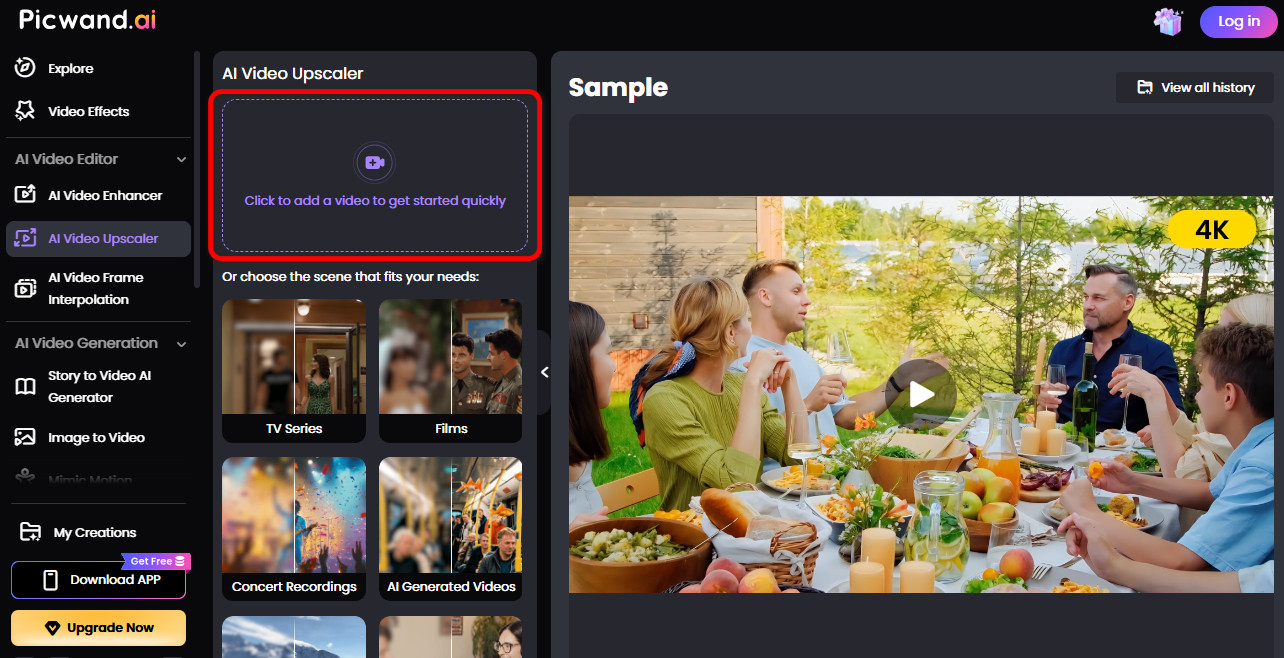
Step 1: Click on Add a Video to upload your video.
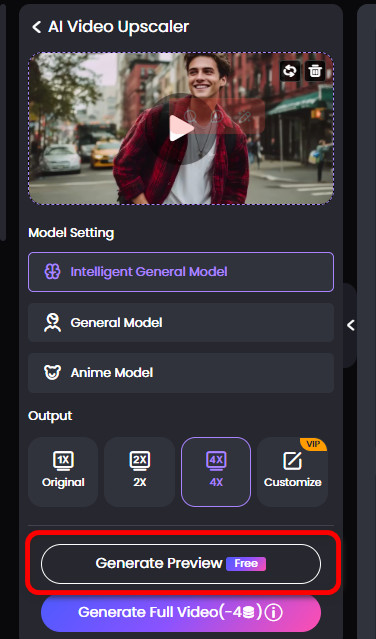
Step 2: Choose Generate Preview and wait for a few seconds to see the finished video.
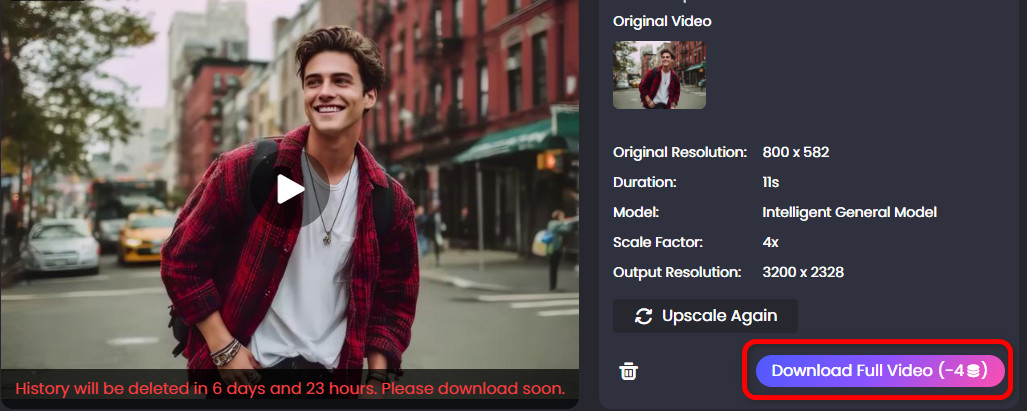
Step 3: Compare the video before and after upscaling; you can see that the video becomes much clearer. Finally, click "Download Full Video" to save the complete video.
Thanks to its intuitive interface and fast rendering, Picwand AI provides video upscale online free and allows users to enhance video quality in just a few clicks. I was genuinely surprised by Picwand's speed — a 3-minute 480p video was upscaled to 4K in under 60 seconds on my test. The facial details came out crisp, though some fine text in the background lost a bit of sharpness compared to Topaz's output. Picwand supports files up to 500MB (MP4/AVI/MOV) and requires no sign-up, making it the fastest option for quick online upscaling. Whether you want to improve low-quality pictures or upgrade low-resolution videos, Picwand delivers clear results — no learning curve and no installation required.
Method 2: Topaz Video AI Leading to Natural Effect
With sophisticated algorithms, Topaz Video AI supports upscaling videos with natural and authentic quality. The following are the procedures.
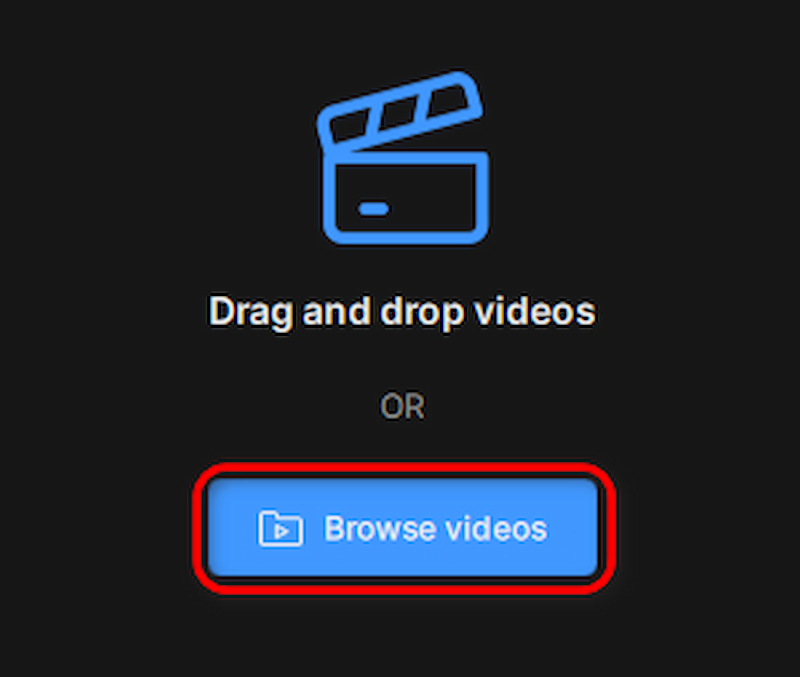
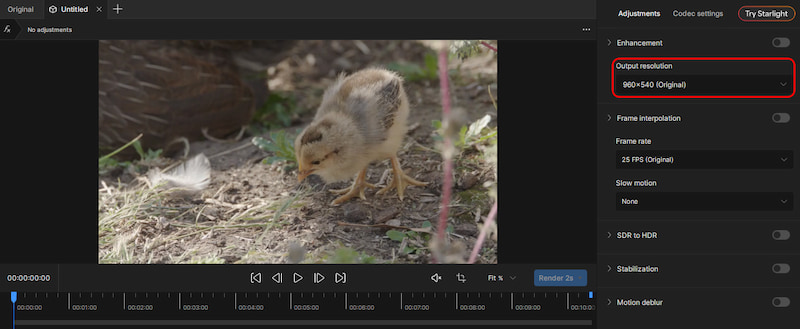
Step 1: Click on Browse videos to upload your video.
Step 2: Choose Output resolution to choose the upscale model you want.
Deleted:
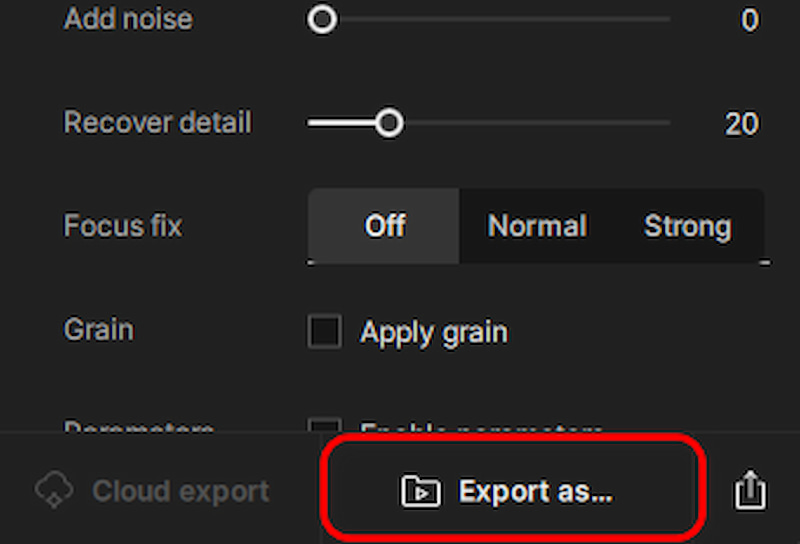
Step 3: Click on Export to download your finished video.
Topaz took nearly 3x longer than Picwand on the same clip, but the difference was visible — shadow detail and edge sharpness were noticeably superior. It's GPU-dependent and requires 8GB RAM minimum. Its detail score in my test was 8.5/10, the highest of the three. However, it comes with a $249 one-time fee and requires installation.
Method 3: Adobe Premiere Pro Giving Precise Upscaling
You've probably known Adobe Premiere Pro if you're a video editor. It also has an upscaling function but without the aid of artificial intelligence like the previously mentioned tools. While it still does a decent job at sharpening low-resolution videos for screen display.
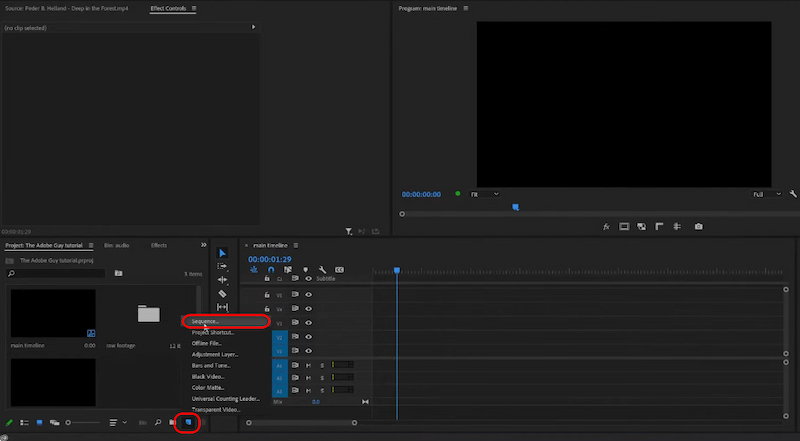
Step 1: Add your low-resolution footage in Adobe Premiere Pro by creating a new Sequence or opening the existing project.
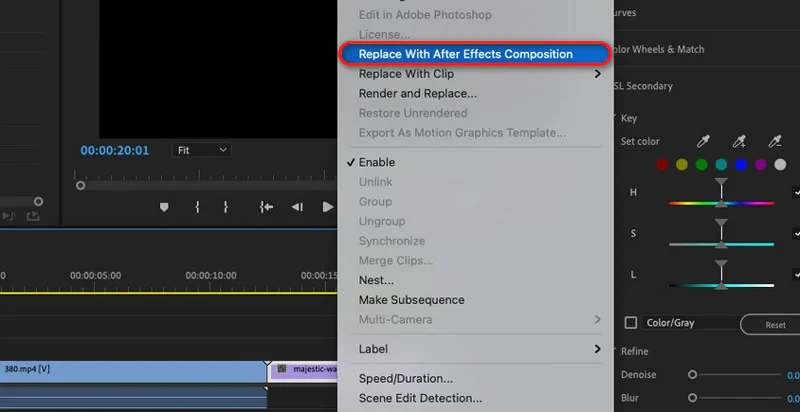
Step 2: Right-click on your timeline and choose Replace With After Effects Composition. This will send the video to After Effects to apply the upscale.
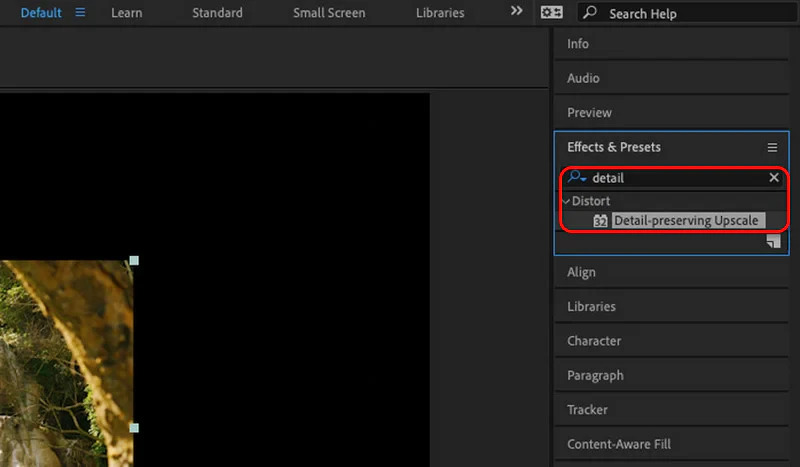
Step 3: In the Effect & Preset panel, type Detail-preversing Upscale and double click on it.
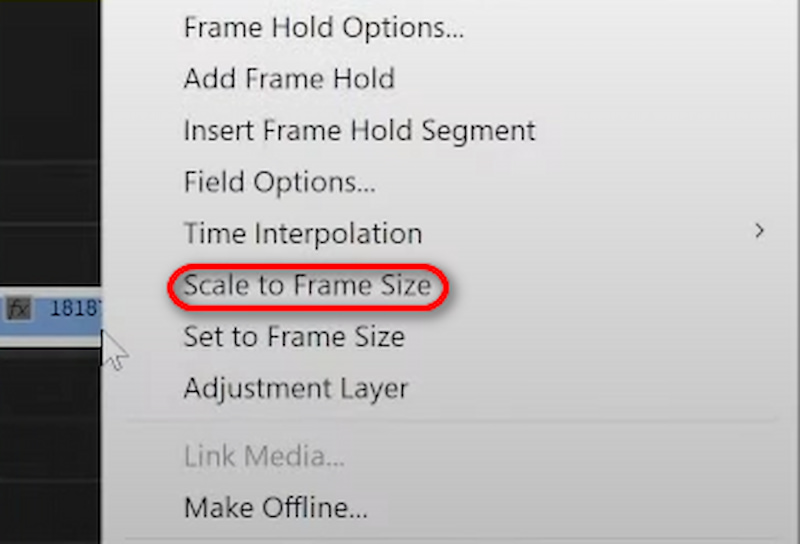
Step 4: After adding the upscale, right click the timeline and choose Scale to Frame Size to make it precisely match the screen.
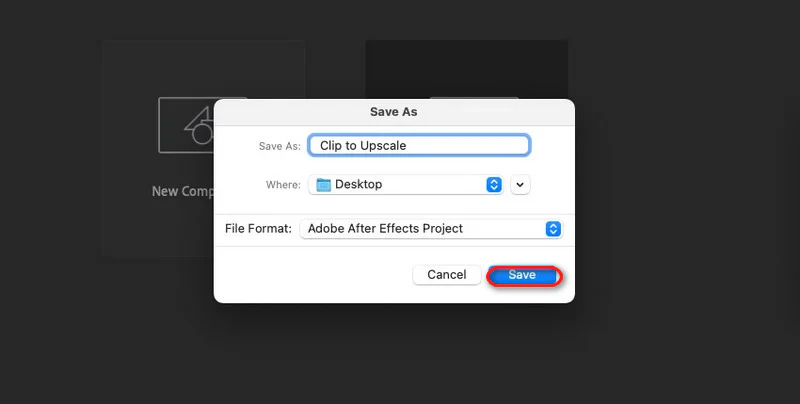
Step 5: Finally, Save your After Effects project and turn back to Premiere. You can notice that the clip is updated with the upscale procedure we've conducted. Save it as usual.
Adobe's approach is fundamentally different — it relies on After Effects' "Detail-preserving Upscale" effect rather than dedicated AI. In my test, it took over 5 minutes per minute of footage, making it the slowest by far. The result scored 8.0/10 on detail retention — decent but not as sharp as Topaz. Best for editors who already use Premiere Pro and After Effects.
Frequently Asked Questions About AI Video Upscaling
What's the effect of Picwand AI Video Upscaler?
Aided with AI and advanced algorithms, free Picwand AI Video Upscaler is powerful in enhancing resolution and restoring details with authentic texture and natural visualisation.
Is preview allowed by Picwand AI Video Upscaler?
Yes. Free online Picwand AI Video Upscaler endeavours to provide you with the best user experience. After upscaling videos online, you can preview before downloading the completed video.
Are there any system requirements for Topaz Video AI?
Topaz Video AI demands robust hardware for optimal performance. For GPU, NVIDIA or AMD isrecommended, and the minimum RAM is 8GB.
Can Adobe Premiere Pro upscale any video format?
Adobe Premiere Pro handles every common format: from MP4, AVI, MOV, and MPEG. Namely, it can process almost all common video formats on the market.
Picwand vs Topaz vs Adobe — which has the best value?
It depends on your needs. Picwand is completely free with no sign-up required — ideal for occasional users who need quick 4K upscaling. Topaz Video AI costs $249 one-time and delivers the best visual quality, making it worth the investment for professionals. Adobe Premiere Pro ($22.99/month) is best for editors who already use Adobe's ecosystem and need upscaling as part of a larger workflow.
Conclusion
Above are the three detailed methods for how to increase video resolution. AI upscale video bridge the gap between outdated footage and modern video standards. For free and quick fixes, Picwand AI Video Upscaler offers simplicity with professional-level output, which is the best online AI video upscaler suitable for both casual users and professionals. For precision, Topaz Video AI and Adobe Premiere Pro offer advanced customisation with a subscription fee. Start upscaling now, you will see the difference.