Basic PlanVIP PlanVIP ExpiredPurchased credits are valid for life but require an active VIP subscription to use
0Credit(s)
You can use credits to access all the AI tools on Picwand, such as the AI Image Upscaler, AI Age Filter, AI Video Enhancer, AI Video Upscaler, AI Video Effects, and more.
Nothing is more frustrating than replaying an old video and realizing it’s blurry, noisy, or pixelated — especially when it captures an important memory or moment. Whether you're restoring old home recordings or improving professional footage, cleaning up video quality can dramatically improve how your content looks. In this guide, we compare the best video software to clean up video quality across online, mobile, and desktop tools. Let’s get started!
Part 1: How to Clear Up Video Quality Online on Windows and Mac
When improving video quality, online tools provide users with powerful, flexible, and convenient options. Online video enhancers are the fastest way to fix blurry footage without installing any software. Just use it online and get a satisfying result. Among them, Picwand AI Video Enhancer has become the first choice for many people with its powerful features, recommended usage, and satisfactory results.
Picwand AI Video Enhancer is one of the best online tools to clean up video quality instantly. Here are the detailed features.
Features:
• Removes grain and noise automatically for clearer video output.
• Enhances brightness, contrast, and color for improved clarity.
• Compatible with MP4, MOV, MKV, and other usual video formats.
• Free preview and no watermark output.
• It uses advanced AI to upscale video resolution up to 1080p or 4 K.
Let’s walk through how to enhance your video using this tool.
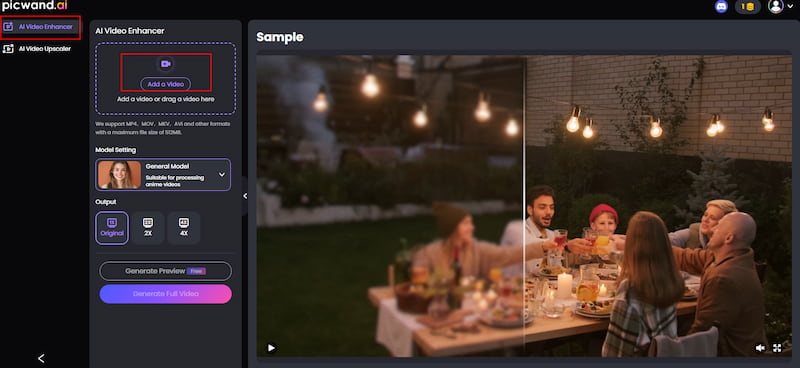
Step 1: Click Add a Video and upload your desired improvement video.
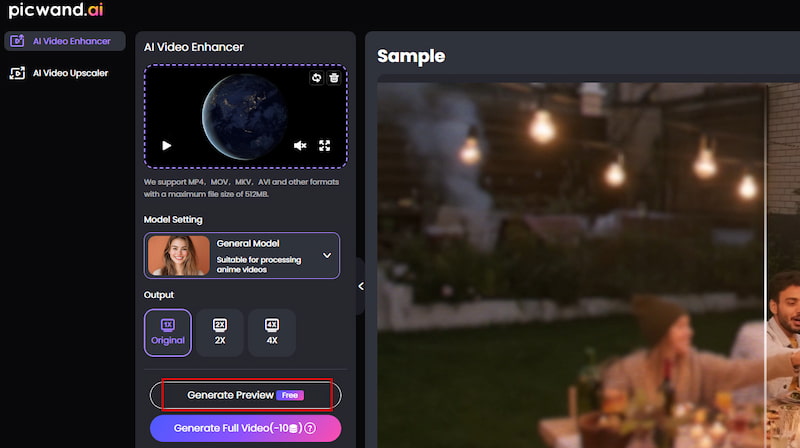
Step 2: Click Generate Preview to see the enhanced result.
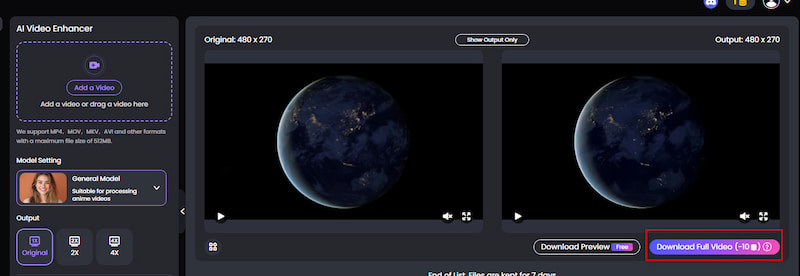
Step 3: Your enhanced video will be ready in just a few seconds. Click Download Full Video to save it.
If you're looking for a video denoiser to help you denoise video and , Picwand AI Video Enhancer is a fantastic starting point. It’s especially great for beginners who want to clean videos online quickly without any extra experience.
Part 2: How to Clear Up Video Quality on Android
After we have learned how to clean up video online, we will now explain several methods that can be performed on Android phones. They are equally effective and fast.
1. InShot
InShot is one of the most popular Android video editing apps for quick video cleanup and enhancement. It provides a fast and convenient way to enhance blurry videos. You can adjust sharpness, brightness, saturation, contrast, and more. You can fine-tune your video with just a few taps to remove noise and grain. InShot also supports exporting in high resolution. So, it is also an excellent choice for users who want to improve video quality during processing.
2. Adobe Premiere Rush
Adobe Premiere Rush is a powerful mobile video editor that was developed by Adobe. Unlike many free tools, it offers professional-grade editing features in a simplified format suitable for mobile use. It’s beneficial when you need to clean up video fast.
You can easily enhance shaky or grainy clips and export HD or 4 K. While some features require a subscription, the free version gives basic enhancements for quick fixes.
Part 3: How to Clear Up Video Quality on iPhone
iPhones include built-in tools that can significantly improve blurry videos without installing any apps. Here’s how to clear up video quality on iPhone without third-party apps. These tools are built to enhance the visual quality of your videos by reducing blur and sharpening the overall image.
Step 1: Open the blurry video in the Photos app and tap Edit in the top-right corner.
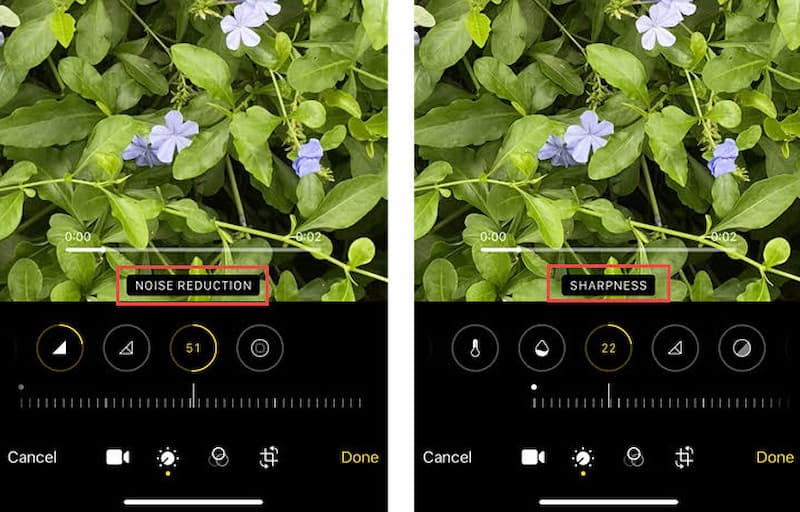
Step 2: Swipe through the adjustment options and select Noise Reduction. Increase the slider to reduce visual noise.
Step 3: Find and raise the Sharpness setting to enhance the video’s clarity.
Step 4: Once satisfied, tap Done to save the edited video.
While iPhone doesn’t have a built-in video denoiser, its editing tools help reduce the appearance of grain and enhance clarity. For basic fixes, they’re surprisingly effective.
FAQs
What is the best free video software to clean up video quality?
Several free tools can improve video quality, including Picwand AI Video Enhancer, CapCut, and iPhone built-in editing tools. Among them, Picwand offers the most complete AI-based cleanup and enhancement features online without requiring installation.
What is the difference between video denoising and upscaling?
Video denoising focuses on removing grain, noise, and visual artifacts to make the footage clearer. Upscaling increases the resolution (for example, from 1080p to 4K). Many modern AI tools combine both processes to improve clarity and detail at the same time.
Can I clean up video quality on Android for free?
Yes. Apps like InShot and CapCut allow Android users to adjust sharpness, contrast, and noise levels for free. While they don’t offer full AI restoration, they are effective for quick improvements and social media content.
Can iPhone improve blurry video without apps?
Yes. The built-in Photos app on iPhone allows you to enhance video clarity by adjusting sharpness and noise reduction. Although it is not a full AI enhancer, it is useful for basic video cleanup without installing additional software.
What is the best AI tool for video cleanup in 2026?
In 2026, Picwand AI Video Enhancer is one of the best AI tools for cleaning up video quality. It can automatically reduce noise, sharpen details, and upscale resolution directly in the browser, making it ideal for beginners and fast workflows.
Does cleaning up video quality always improve resolution?
Not always. Video cleanup mainly improves visual clarity by reducing noise, blur, and compression artifacts. Increasing resolution requires a separate upscaling process, although many AI tools now combine both functions.
What is the best software to clean up old blurry videos?
For old or low-quality footage, Picwand AI Video Enhancer and CapCut are strong options. Picwand is better for AI restoration and detail recovery, while CapCut is more suitable for quick editing and social media use.
Conclusion
Improving video quality has become much easier with modern AI tools and mobile editing apps. Whether you are fixing old home videos, enhancing social media content, or improving professional footage, there is always a suitable solution available.
For most users, Picwand AI Video Enhancer is the best overall choice in 2026, thanks to its balance of simplicity, speed, and AI-powered restoration. It allows you to clean up blurry or noisy videos directly online without installation or technical skills.
However, different tools serve different needs:
• CapCut and InShot are ideal for mobile editing and quick fixes
• iPhone built-in tools work for basic adjustments without apps
• Desktop AI tools offer deeper control for advanced users
No matter which option you choose, modern video software makes it possible to restore clarity and bring new life to low-quality footage in just a few steps.