Basic PlanVIP PlanVIP ExpiredPurchased credits are valid for life but require an active VIP subscription to use
0Credit(s)
You can use credits to access all the AI tools on Picwand, such as the AI Image Upscaler, AI Age Filter, AI Video Enhancer, AI Video Upscaler, AI Video Effects, and more.
Your old, precious DVDs (480p resolution) look painfully dated on today’s 4K TVs and monitors. A fuzzy, pixelated mess often replaces cherished movie memories. You may wonder if you can enhance DVDs and increase their clarity. Thankfully, DVD upscaling offers a solution.
DVD upscaling is the process of converting standard-definition DVD videos (480p or 576p) into higher resolutions such as 720p, 1080p, or 4K. Modern AI DVD upscalers can reduce noise, sharpen details, and improve image quality, making old movies look better on today's HD and 4K displays. Some AI-powered upscaling tools can analyze frames more deeply, reconstruct details, sharpen edges, and adjust colors. To upscale DVDs to 1080p or 4K, follow this two-step workflow:
1. Rip the DVD to a digital file using HandBrake (free and open-source).
2. Upscale the digital file using Picwand AI Video Upscaler (AI-powered and online).
I tested this workflow on five classic DVDs and achieved 4K output in under 10 minutes per 90-minute film. Here's exactly how.
Ripping DVDs to digital files can give you various benefits. When you have digital copies, you can then easily access your movie collection from your computer, mobile device, hard drive, or media server. You don’t need to search for discs and play them with a hardware player. That also helps to manage your DVD collection. You can also make digital backups of your physical media for better preservation. That can effectively protect against DVD damage or loss.
Ripping DVDs you own for personal backup is legal in many countries. You should check your local copyright laws and then rip your DVD discs.
You can rip your DVDs (not commercial) into digital files using HandBrake. It is a free, open-source DVD-to-video transcoder. It lets you create MP4 or MKV videos from your DVD content.
Step 1. Insert your DVD disc into the drive of your computer or an external drive and launch HandBrake.
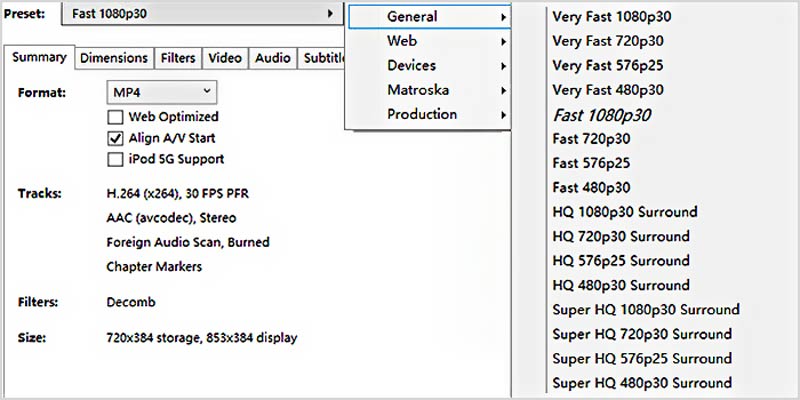
Step 2. Click Open Source and select your DVD drive from the list. Find the main movie from the DVD and rip it to an MKV/MP4 file. HandBrake offers many built-in presets on the right-hand panel. You can choose a desired Preset to rip the DVD quickly.
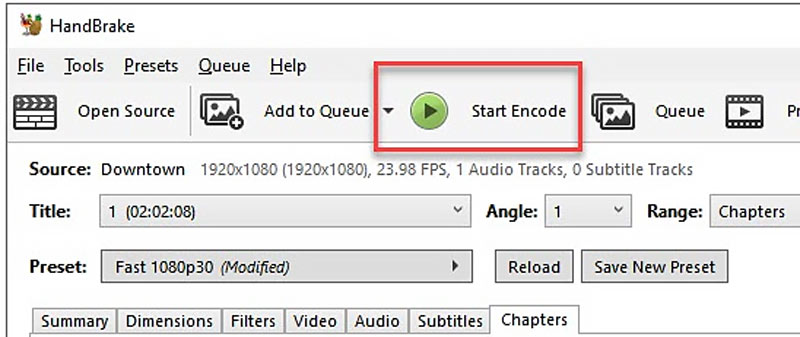
Step 3. Select a destination folder and save the output video. You can customize related settings based on your needs and click Start Encode to begin the DVD ripping and transcoding process.
How to Upscale DVDs with Picwand AI Video Upscaler
Ripping your DVDs to a digital format is the first step towards upscaling for better quality. After creating a digital copy of your DVD, you can rely on a dedicated video upscaler to improve its clarity and quality. As mentioned, you’d better use a DVD video enhancer to upscale DVDs.
I tested Picwand AI Video Upscaler and found it to be an excellent choice for quick and efficient video upscaling. It can enhance a 480p video to a much higher resolution with impressive quality.
I used it to upscale one of my old videos from 480p to 4K. I was amazed by the amount of detail that Picwand restored—details I had never noticed before. The difference between 480p and 4K was truly night and day, with the upscaled video looking significantly sharper, clearer, and more lifelike.
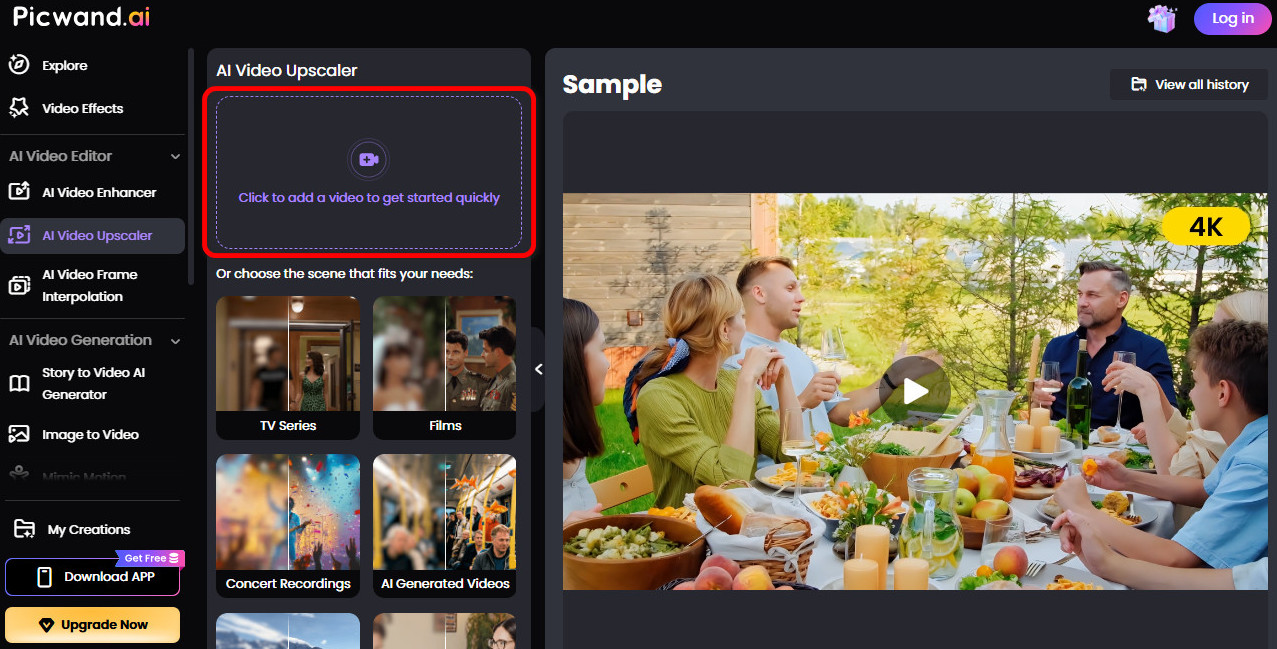
Step 1. Click Add a Video to upload your DVD video.
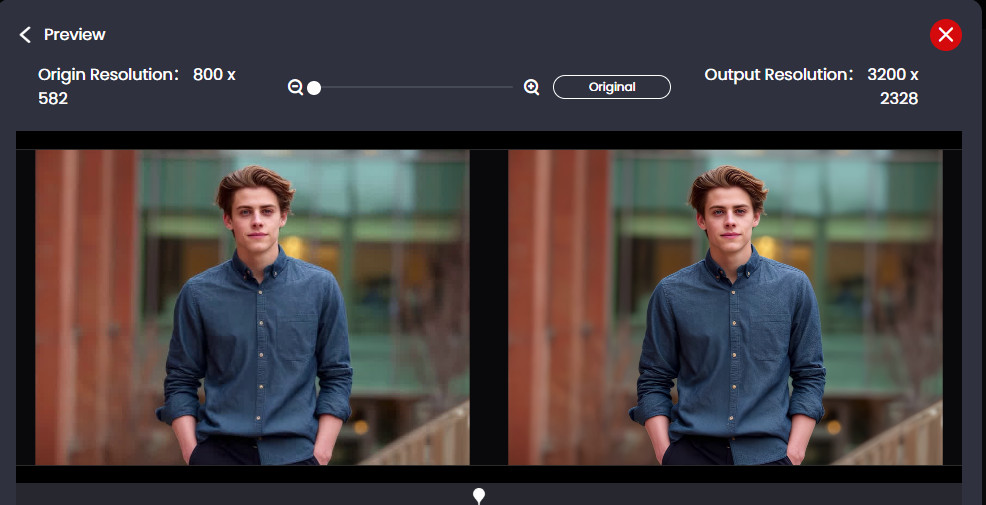
Step 2. Click Generate Preview to view an enhanced DVD video.
During the DVD upscaling, Picwand AI DVD to 4K converter will automatically add details to the source, sharpen blurry or pixelated elements, optimize overall colors, and do other necessary enhancements intelligently. This web-based upscaler provides a straightforward way to upscale DVDs. You can upload your video file (all commonly used formats), select the upscaling level, generate a preview, and then save the enhanced file.
Before vs. After Comparison
Original DVD
AI Upscaled Version
480p resolution
1080p or 4K output
Visible noise
Reduced noise
Soft edges
Sharper details
Less color depth
Improved color balance
DVD Upscaling Before and After Comparison
FAQs on How to Upscale DVDs
Question 1. Does upscaling DVDs really work?
Yes, DVD upscaling does work. First, you can rip your DVD disc to a digital file, then upscale the 480p/576p source to a higher-resolution video like upscaling videos to 4k, 1080p or 720p . You should know that upscaling DVDs has significant limitations. Traditional upscaling methods and basic video editors can’t create/add accurate details while increasing the resolution. You may get a blurry video with high definition. Considering that, it’s essential to use an AI-powered upscaler to upscale your DVD and improve its clarity and quality.
Question 2. What is the highest quality a DVD can be?
The highest possible video quality for a standard DVD is 720x480 (NTSC) or 720x576 (PAL) resolution. This is known as Standard Definition (SD). Compared with high-definition (HD) formats like Blu-ray (1080p) or Ultra HD Blu-ray (4K), DVDs have significantly lower quality.
Question 3. Do DVDs lose quality over time?
Unlike old VHS tapes, which degrade gradually with each playback, DVDs usually won’t lose quality due to playback. The DVD player’s laser doesn’t touch the disc while playing. So, the playback itself won’t wear out DVDs. DVDs are made of layers of plastic and metal. DVD degradation often happens when it is caused by physical or chemical deterioration. That will lead to sudden data loss or complete failure. Moreover, scratches and other reasons may cause the laser not to read the data pits accurately. This leads to playback errors and loss of specific data.
Question 4. What Is the Best Way to Upscale DVDs?
For most users, the best workflow is to rip the DVD using HandBrake and then enhance the video using an AI DVD upscaler. This approach offers better quality than traditional DVD player upscaling and allows output up to 4K resolution.
Question 5. Does Picwand preserve the original DVD audio and subtitles?
Yes. Picwand AI Video Upscaler enhances only the video quality, so the original audio track and embedded subtitles remain unchanged during the upscaling process.
Conclusion
Standard old DVDs are 480p resolution. Modern displays are 1080p, 4K, or even 8K. They will look pretty fuzzy on new TVs or monitors. So, it’s quite necessary to upscale DVDs. You can follow the guide above to create digital copies of your DVDs and then easily increase their resolution. DVD upscaling, particularly using AI-powered software like Picwand AI Video Upscaler, is an efficient way to enhance your cherished movies for viewing on high-definition screens.