Basic PlanVIP PlanVIP ExpiredPurchased credits are valid for life but require an active VIP subscription to use
0Credit(s)
You can use credits to access all the AI tools on Picwand, such as the AI Image Upscaler, AI Age Filter, AI Video Enhancer, AI Video Upscaler, AI Video Effects, and more.
Knowing how to write effective AI prompts has become increasingly important in today’s digital world. Writing clear and structured prompts helps you get accurate, meaningful, and high-quality results from AI tools. They are commonly used for tasks such as generating blog posts, creating images, and producing videos, among others. This post will guide you through the basics of how to write AI prompts the right way. We will explain what a prompt is, how to respond to prompts, its practical applications, and real AI prompt examples you can use. Our aim is to help you understand how to communicate effectively with AI. This way, you can produce better, more precise, and more creative outputs with ease.
This “How to” guide is simple, practical, and written to help beginners, content creators, and marketers directly improve their workflow.
Part 1. What is a Prompt and How to Respond to Prompts
A prompt is the text input, command, or question that you provide to an AI system. Think of it as a conversation starter, directing the AI to generate a specific output immediately. The goal of an AI prompt is to establish the topic, purpose, and constraints of the required response. Responding to prompts effectively involves being specific, clear, and providing the necessary context for the AI to understand. It ensures the AI generates an output that is accurate and tailored to your needs. The best responses result from clearly defining the task and detailing the desired format.
Part 2. Core Principles of How to Write an Advanced AI Prompt
Specificity & Detail
The more precise you are about what you want, the more accurately the AI can deliver its output. Instead of giving vague instructions, a specific AI prompt guide defines the exact format, tone, length, target audience, and purpose. Specificity removes guesswork, reduces irrelevant content, and ensures the AI’s answer matches your vision.
Suitable Context & Detail
Providing the right context helps the AI understand why you need something and how it will be used. AI models don’t know your goals unless you tell them. This means that giving background details can make a huge difference in the final result. Context also prevents misunderstandings and provides the AI with a broader perspective to follow.
Clear Instructions
Clear instructions provide the AI with precise, step-by-step guidance. Without clear instructions, artificial Intelligence prompts may provide incomplete or unfocused answers. Clarity helps the AI follow a logical path and produce consistent, well-formatted results. When writing advanced prompts, it helps to include specific directives to give the AI a definite task.
Part 3. Practical Applications and AI Prompt Examples
For Blog
Prompts are widely used in content creation, particularly for writing blogs to generate text quickly. By giving the AI a specific prompt, you can generate blog post ideas, outlines, introductions, and more. A specific prompt guides the AI to produce content tailored to your audience and purpose. Advanced prompts can even instruct the AI to include headings, bullet points, or internal links.
For Image
AI image generation relies on descriptive prompts that communicate visual ideas to the model. The more detailed the AI prompt writing, the more accurate and visually appealing the output will be. A clear prompt provides the AI with precise guidance on elements, style, colors, and atmosphere. Using AI for images also allows quick experimentation with concepts, aesthetics, and compositions.
AI video generation uses prompts to create storyboards, scripts, or full-motion video content. By providing detailed instructions, you can create videos for marketing, education, social media, or entertainment purposes. A good prompt directs the AI to create a structured, ready-to-produce video concept. Advanced AI video prompts can include scene transitions and even style references.
Part 4. Use Prompts to Generate Interesting Videos With Picwand AI Text-to-Video
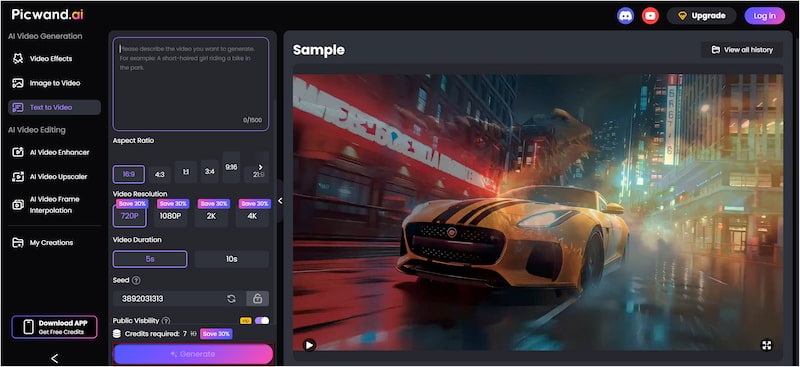
Picwand AI Text-to-Video Generator is the highest-rated AI tool for converting text descriptions into videos. It can turn your written ideas into full-motion video content without requiring editing skills. It supports prompts of up to 1,500 characters, enabling you to describe a video in detail for more precise and accurate results.
It provides various aspect ratio options, including 16:9, 4:3, 1:1,and more. You can select the resolution of your video ranging from 720p and 1080p to 2K and 4K. Video durations can range from 0 to 10 seconds, making them perfect for social media posts, short clips, and quick videos. Additionally, it includes no watermark on the final video.
Why Choose Picwand AI Text-to-Video Generator:
• Enter prompts in many different languages, not just English.
• Create videos in a range of visual styles tailored to your prompt.
• Supports high-quality video outputs, ranging from SD to 4K resolution.
• Final videos are generated without a watermark, giving a clean output ready to share.
Here’s how to prompt AI to generate a video from text:
Step 1: Open a browser and reach the official Picwand AI Text-to-Video Generator site through the provided link. In the prompt box, type a detailed description of your video idea. Be specific about what is happening, who or what is in the scene, where it takes place, and so on.
Step 2: Select the aspect ratio that matches your device's screen resolution. Then, choose your preferred resolution and set the video duration to 10 seconds. These settings ensure that your video meets your platform's requirements and maintains high quality.
Step 3: Optionally, toggle the Public Visibility option to keep your video private. Once all settings are ready, click Generate to allow the tool to process your prompt. Picwand will create your video by generating frames and motion based on your detailed prompt.
That’s how to write prompts for AI video generation. Picwand AI Text-to-Video Generator enables anyone to transform ideas into polished video content quickly and affordably. Aside from text-to-video creation, you can also explore turning your photos into line-drawing art with AI.
Part 5. FAQs about Writing AI Prompts
How to effectively use AI prompts?
Be clear, specific, and detailed about what you want the AI to produce. Start by stating the goal, such as writing, explaining, summarizing, or creating content. Then, include important details like tone, style, format, and target audience.
Why are good prompts important for AI?
Good prompts are important because they guide the AI’s understanding and shape the final output. AI models rely on the prompt to determine what information is needed and how the response should look.
How do AI prompts work?
AI prompts work by giving the model instructions that help it predict the most relevant and useful response based on patterns it has learned. When you type a prompt, the AI analyzes your inputs and generates text, images, or videos that match those instructions.
Conclusion
Learning how to write AI prompts is the key to unlocking the full potential of modern AI tools. Understanding what prompts are, how to respond to them, and how they work across different applications is essential. This allows you to generate clearer, more accurate, and more creative outputs. If you want to turn your written ideas into high-quality video content, use Picwand AI Text-to-Video Generator. It is a powerful tool that transforms detailed prompts into stunning video clips in just seconds.