Basic PlanVIP PlanVIP ExpiredPurchased credits are valid for life but require an active VIP subscription to use
0Credit(s)
You can use credits to access all the AI tools on Picwand, such as the AI Image Upscaler, AI Age Filter, AI Video Enhancer, AI Video Upscaler, AI Video Effects, and more.
Sora AI is a video-generation model developed by OpenAI. It is designed to transform any textual descriptions into short, high-quality video clips. With the ability to render videos on descriptive prompts, Sora is gaining popularity today. However, generating a polished video requires more than just typing any idea into the prompt box. The quality of your video heavily depends on how you craft your prompt. Knowing the proper ways to structure and describe prompts is crucial for achieving the best results from Sora. In this post, we will guide you through the best practices for Sora AI video prompts. We will share actionable tips and strategies to maximize video quality and creativity. By the end of this guide, you’ll understand how to create prompts that produce professional videos efficiently and effectively.
Sora, developed by OpenAI, is a text-to-video model. It is best at generating high-quality videos of up to 25 seconds using only text prompts. It can generate complex scenes featuring multiple characters, specific motions, varied camera angles, and distinct settings. This AI model understands the input entered in the prompts and how objects exist in the physical world. Beyond generating videos, Sora can also animate a still image or extend an existing video.
Part 2. AI Video Prompt Examples
For Character-Driven Storytelling
Use Case: Brand narratives, emotional scenes, testimonial-style content.
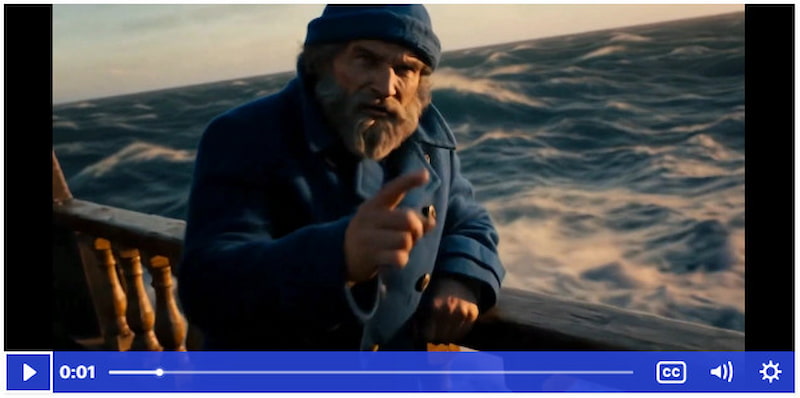
Here’s one of the Sora prompt examples for character-driven storytelling:
An older sailor with a rugged grey beard and a faded blue knit cap stands on the deck of his ship. He points toward stormy ocean waves. Capture a tight cinematic close-up as the camera slowly moves inward, emphasizing every crease on his face. The lighting is warm and dramatic, set during golden hour with deep contrasting shadows. He says: The sea teaches respect, one wave after another. The audio includes only the sound of rushing waves and strong wind; there is no music. Color tones lean toward rich navy blues, warm amber light, and distressed wood browns.
For Product Showcase
Use Case: Online stores, product promotion, tech demonstrations.
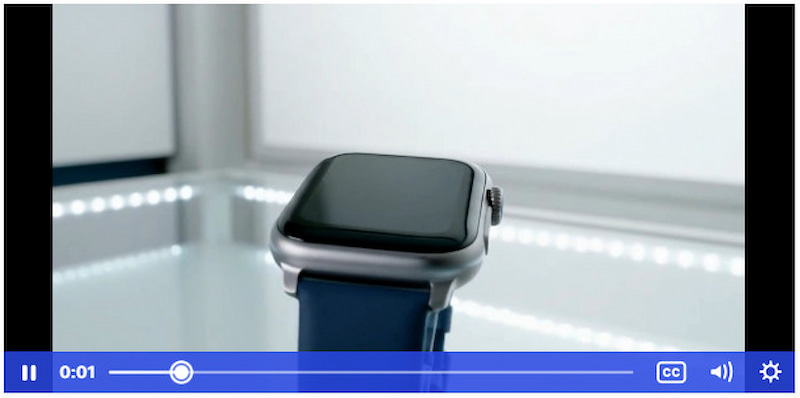
Here are some Sora AI text-to-video prompt examples for a product showcase:
A high-end smart watch rotates gracefully atop a polished glass platform in a clean, contemporary studio. The camera performs a full 360-degree sweep, revealing every detail of the device. Bright, crisp lighting creates gentle reflections that highlight the premium build. A confident female narrator describes the smartwatch’s standout capabilities. The audio features soft corporate background music paired with a clear voice-over. The visual palette features bright whites, sleek metallic silvers, and subtle hints of blue for a modern technology vibe.
For Social Media Content
Use Case: Viral posts, entertainment clips, awareness campaigns.
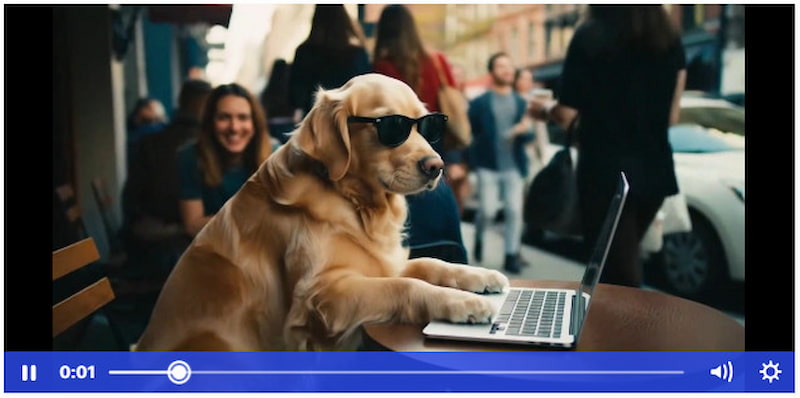
Here’s a Sora example prompt for social media content:
A golden retriever wearing stylish sunglasses sits at an outdoor café table, tapping on a laptop with its paws as if it’s working. The scene is filmed with a handheld, casual look to maintain the moment's playful and spontaneous feel. People walking by give surprised and amused reactions. Background sound includes cafe chatter, keyboard taps, and lively upbeat indie music. Colors reflect cozy cafe tones, the dog’s warm golden coat, and vibrant outdoor street elements.
For Professional Results
Use Case: Corporate explainers, business presentations, training videos.
Here’s a Sora AI video prompt example for professional results:
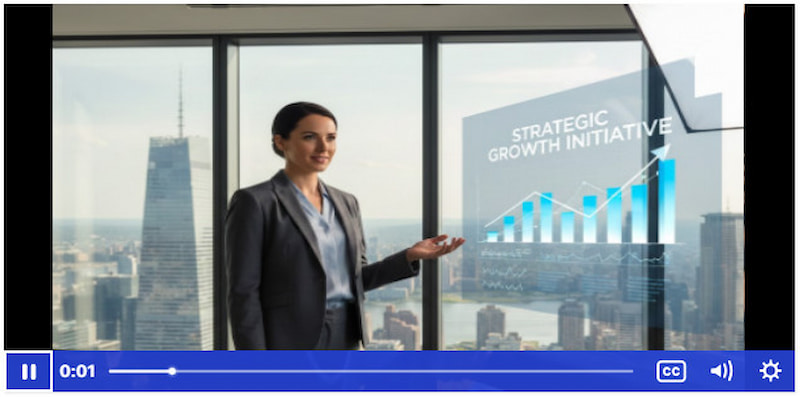
A business professional stands inside a sleek office with floor-to-ceiling windows overlooking a bustling skyline. The camera moves smoothly from left to right as clean, animated charts appear beside her in polished motion graphics. She speaks with confident gestures as she explains a strategic concept. The lighting is studio-grade, producing soft shadows and crisp highlights. Audio is a light corporate background track with clear, authoritative narration. Colors are cool grey, professional blues, and bright whites. The style is refined, credible, and corporate-ready.
Part 3. Use These Perfect Prompts Examples to Generate Videos with Picwand AI Text-to-Video Generator
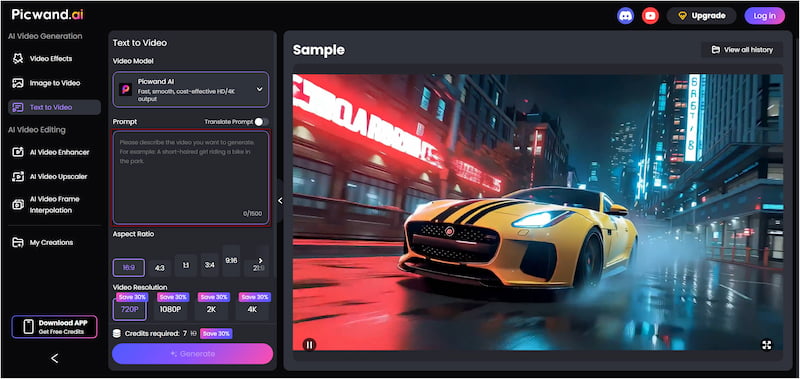
Picwand AI Text-to-Video Generator is the internet’s leading prompt-based video generator available today. It can convert textual prompts into high-quality video content with no editing experience required. It offers a generous prompt limit of up to 1,500 characters per generation. It allows you to describe scenes in detail, ensuring that it accurately interprets your vision.
For good measure, it provides multiple aspect ratio options, including 16:9, 1:1, and 3:4, among others. Remarkably, you can export videos in 720p, 1080p, 2K, or even 4K resolution. For the supported video resolution, it can generate up to 10 seconds of content. These features make the tool ideal for storytelling, product showcase, social content, and professional use.
Why Choose Picwand AI Text-to-Video Generator:
• Supports video outputs of up to 10 seconds long.
• Offers a wide range of aspect ratios tailored for any platform.
• Exports videos in multiple resolutions, including 720p, 1080p, 2K, and 4K.
• Generous limit of 1,500 characters, perfect for describing scenes in rich detail.
Step 1: On your browser, access the official Picwand AI Text-to-Video Generator page through the provided link. Type a clear and descriptive idea for your video. Explain what is happening, who or what appears in the scene, the setting, etc.
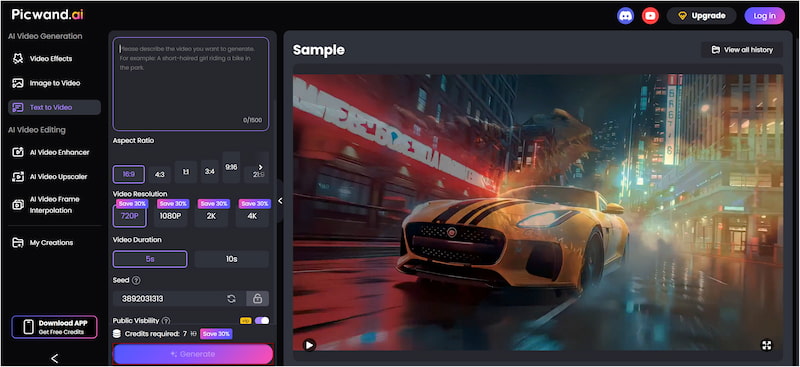
Step 2: Switch to the Aspect Ratio options and select the format that best suits your publication platform. Next, choose your desired resolution; select 4K for the highest clarity. Then, set the video length to a maximum of 10 seconds.
Step 3: Toggle Public Visibility OFF if you prefer to keep your creation private. Once all settings are finalized, click Generate to begin processing your prompt. The tool will automatically build the frames, motion, and visual elements based on the description you provided.
Picwand AI Text-to-Video Generator is a trusted tool for turning text ideas into real video content. It produces clean, watermark-free outputs and requires no editing expertise, just your imagination and a detailed prompt. Aside from text-to-video generation, there are also AI age detectors, allowing you to see your younger self or your older version.
Part 4. FAQs about Sora AI Video Prompt Best Practices
How long does it take Sora AI to generate a video?
Sora AI can generate short video clips within 30 seconds to a few minutes. Still, it depends on the length, resolution, and complexity of the prompt you have entered.
How many videos can you create with Sora?
Sora imposes usage limits depending on the account type. Free users can currently generate up to 30 videos per day. Meanwhile, ChatGPT Plus subscribers are limited to 50 videos per month when exporting at 480p or lower resolution, or 720p resolution.
How many credits does Sora use per video?
Sora operates on a credit-based system, with each video consuming a set number of credits. Short, SD clips require 100 credits, while longer or higher-resolution videos consume more.
Conclusion
Mastering the Sora AI video prompt best practices is the key to unlocking its full potential. By paying attention to details, you can create videos that accurately reflect your original vision. Understanding these best practices saves you time and ensures that your creative ideas are effectively translated into high-quality outputs. While Sora is an excellent tool, combining it with Picwand AI Text-to-Video Generator can take your content creation to the next level. Picwand AI Text-to-Video Generator enables you to effortlessly transform written ideas into dynamic videos. It supports multiple aspect ratios and high-resolution exports, producing watermark-free videos.