Fix Underexposed Photos in Lightroom (Step-by-Step Guide)

Underexposed photos are a common frustration. Whether you shot in low light, forgot to adjust camera settings, or simply captured a moment too quickly, ending up with dark, shadowy images can feel like a waste of a great shot. Fortunately, fixing underexposed photos in Lightroom is possible. This platform offers powerful tools to brighten and recover details in underexposed photos—if you know where to look.
This guide shows you exactly how to fix an underexposed photo in Lightroom, step by step. And if Lightroom feels too complex or you want a faster, online-based solution, we’ll also introduce Picwand AI Photo Enhancer, a simple, browser-based alternative that brightens and enhances photos automatically using AI. Let’s start with Lightroom, then explore an easier method anyone can use.

Contents:
Part 1. How to Use Lightroom to Fix Underexposed Photo
Lightroom is designed to rescue difficult exposures, and with its RAW-editing capabilities, it can bring back surprising amounts of detail from dark images. Here’s how to brighten an underexposed photo quickly and effectively.
Steps
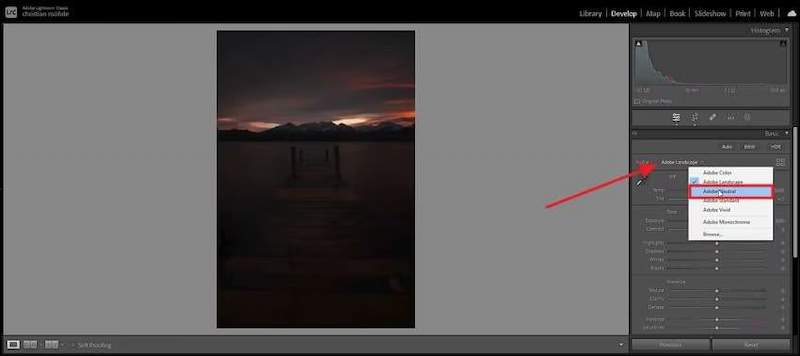
Step 1: Upon adding the dark image to Adobe Lightroom, change the "Profile" to Adobe Natural from the right editor panel. This will slightly brighten up the picture and allow you to move to the next steps.
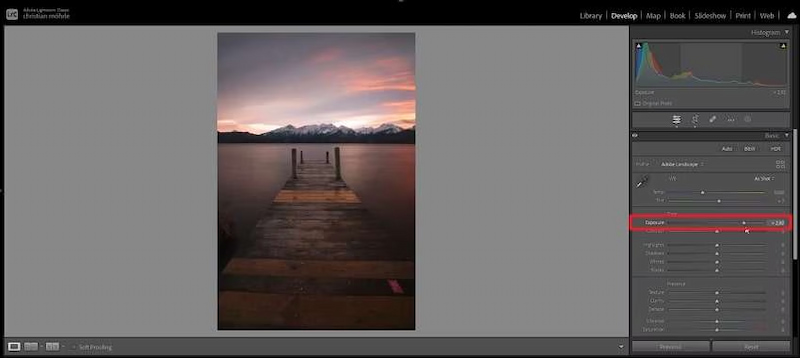
Step 2: Now, locate the Exposure option and increase it by moving the scroll bar towards the right.
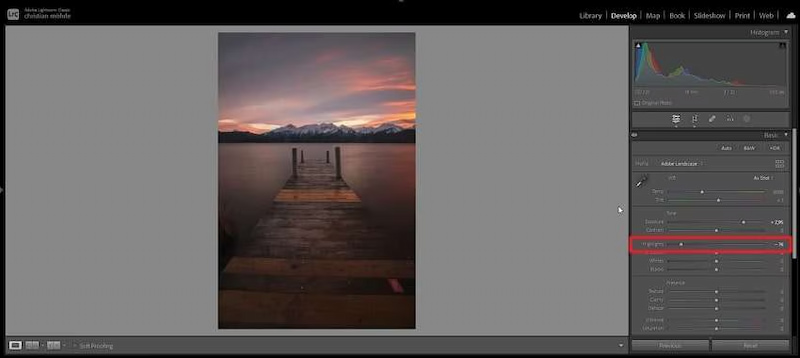
Step 3: Next, navigate to the Highlights section and reduce it by moving the arrow towards the left. This reduces the dark areas in the pictures and turns the focus on the main elements.
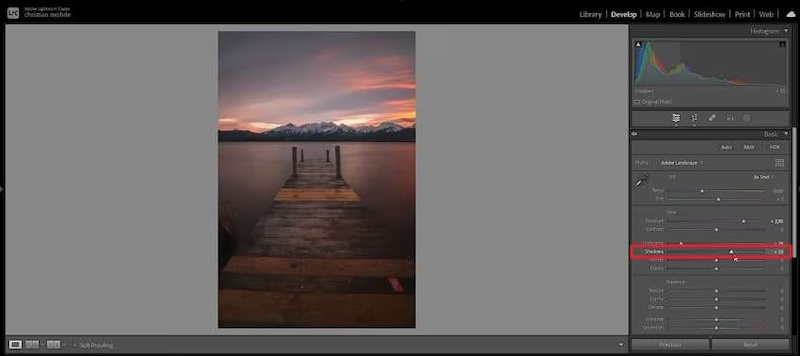
Step 4: Lastly, the Shadows are adjusted to enhance the image by brightening it. In the end, you can download the picture to your desktop device once everything seems perfect.
Using Lightroom to fix an underexposed photo is a powerful method, but it comes with its own set of challenges.
Cons
- Steep Learning Curve: Understanding how the Highlights, Shadows, and Exposure sliders interact takes time and practice. It's easy to create an unnatural, "over-edited" look.
- Time-Consuming: This is a manual, multi-step process. If you have a batch of underexposed photos from an event, correcting each one can take hours.
- Limited Recovery: If a photo is severely underexposed, the data may simply not be there. Lightroom can only recover so much detail from deep shadows before introducing significant color noise and artifacts.
- Subscription Cost: Lightroom requires a ongoing monthly subscription to Adobe, which can be expensive for hobbyists.
Your concern on how to make PDF clearer now can be resolved. However, if you want a simpler and much faster solution, using an AI photo enhancer like Picwand Online might be a better choice—especially for users who need one-click brightening without complex sliders.
Part 2: Best Lightroom Alternative – Picwand (Online)
Fixing underexposed photo in Lightroom is pretty convenient while some users prefer a tool that doesn’t require subscriptions, software installation, or advanced editing knowledge. This is where Picwand AI Photo Enhancer stands out. It’s a simple, all-online tool that fixes exposure issues—including underexposure—in seconds using AI. Whether your photo is too dark, lost in shadows, or lacks detail, Picwand automatically restores brightness, contrast, and clarity with a single click.
Features
• AI Exposure Correction: The AI doesn't just brighten the image; it analyzes different regions, intelligently lifting shadows while protecting highlights to create a naturally balanced exposure.
• Smart Denoise: Automatically removes the grain and noise that inevitably appear when you brighten a dark photo, a problem you'd have to fix manually in Lightroom.
• Detail Enhancement: The AI sharpens and enhances textures, ensuring the recovered details are crisp and clear.
• One-Click Operation: The core of Picwand's appeal. You don't need to understand sliders or curves.
• Cloud-Based & Accessible: As an online tool, it works on any device with a web browser, without draining your computer's processing power.
Steps
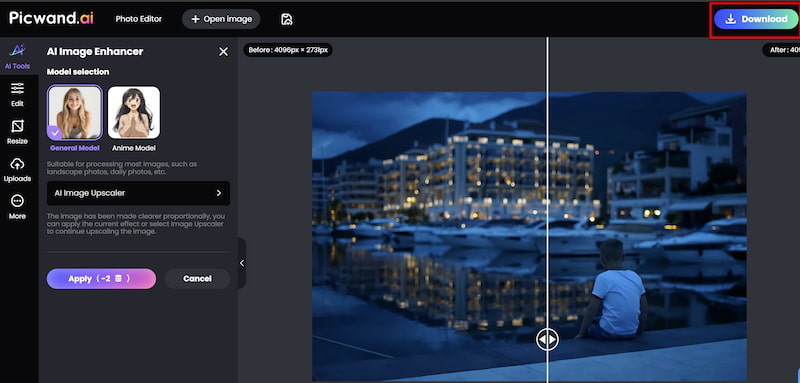
Step 1: Click Add your photo(s) to upload the old image in Picwand AI Photo Enhancer.

Step 2: Beside Photo enhancement, if you want to improve the resolution, you can also achieve image upscaler by adjusting the parameter. Then click on Start to begin processing.

Step 3: Wait for seconds. And then you can click Download to save the finished work.
Lightroom is great for professionals, but Picwand AI Photo Enhancer offers a much easier and faster workflow for everyday users.
Pros
- Beginner-friendly
- Fully online—no installation
- Fast, automated corrections
- Excellent exposure recovery
- Fixes noise and blur at the same time
- Affordable with free daily credits
Ideal for social media users, students, and content creators
If you want a simple, no-friction way to repair underexposed photos or enhance old photos, Picwand is the most user-friendly alternative available.
Part 3. FAQs about Fixing Underexposed Photo Lightroom
What is the best way to avoid underexposed photos in the first place?
Use your camera's histogram! Ensure the graph is weighted towards the center without cramming up against the left (shadow) edge. Also, using exposure compensation (+/- button) to brighten your shots can help.
Can I fix a severely underexposed photo?
Both tools have limits. Lightroom can recover a surprising amount if the photo is in RAW format, but it will likely introduce noise. Picwand's AI is often more effective at intelligently reconstructing detail and managing noise in severely underexposed JPEGs.
Is Picwand a free tool?
Picwand typically offers free trial enhancements so you can test its capabilities. For regular use, it operates on a credit-based or subscription model, which is generally more flexible and affordable than Lightroom's subscription.
Conclusion
Fixing underexposed photos in Lightroom doesn’t have to be difficult. This platform provides professional tools that allow detailed exposure adjustments, but they require time, skill, and a paid subscription.
If you want a faster, simpler, and fully online solution, Picwand AI Photo Enhancer offers an effortless way to brighten photos, recover shadows, and improve clarity with one click.
Whether you’re a photographer, a content creator, or simply want your personal photos to look better, Picwand is the most user-friendly Lightroom alternative for fixing underexposed images instantly.
AI Picwand - Anyone Can be A Magician
Get Started for Free