Basic PlanVIP PlanVIP ExpiredPurchased credits are valid for life but require an active VIP subscription to use
0Credit(s)
You can use credits to access all the AI tools on Picwand, such as the AI Image Upscaler, AI Age Filter, AI Video Enhancer, AI Video Upscaler, AI Video Effects, and more.
When creating AI-generated videos, having a clear and well-written prompt is crucial. A good prompt directs the AI and helps turn your ideas into reality. Including the right details can greatly improve the results. In this post, we will share AI prompt examples to show how prompts are written and used effectively. We will help you to create prompts that give accurate, creative, and visually engaging outputs. This way, you can make it easier to bring your video ideas to life.
Before we move to the AI prompts examples, let us first understand what a prompt is. In generative AI, a prompt is the input or instruction given to an AI model. It could be a text, an image, code, or a combination of these. It functions as a command, question, or set of instructions that tells the AI what to create. It can be as simple as a short sentence or keyword, or as detailed as a multi-line description. In text generation, a prompt may specify the topic, target audience, writing style, and length. Meanwhile, in image or video generation, it can describe subject, setting, lighting, camera angle, mood, and artistic style.
Important Note: The quality and clarity of a prompt directly influence the output. Well-crafted prompts enable the AI to understand user intent, yielding more accurate and creative results.
Using effective AI prompts examples is the key to generating high-quality, accurate, and compelling results. A great prompt goes beyond a simple idea. It must clearly communicate what the AI should create, how it should look or feel, and the context in which it exists. By breaking prompts into structured components, you give the AI precise guidance, which reduces randomness. Below are the essential elements of strong AI prompts:
Subject and Action:
The subject and action define the core focus of your prompt. You should include who or what the AI should generate and what that subject is doing. This element answers the most basic yet critical question: what is happening in the scene? Clearly identifying the subject and pairing it with a specific action helps the AI avoid vague or generic results.
Environment and Context:
Environment and context provide the setting and background that support the subject and action. This includes location, time period, weather, cultural elements, and situational details. By describing where and when the scene takes place, you help the AI build a coherent world around the subject.
Visual Style and Atmosphere:
Visual style and atmosphere determine how the output should appear and evoke emotional responses. This part of the prompt influences artistic direction, color palette, lighting, mood, and overall aesthetic. Clearly stating it helps the AI match your creative vision. The atmosphere also sets an emotional tone, which significantly affects the viewer's perception.
Camera Movement and Composition:
Camera movement and composition control how the scene is framed and viewed. This includes camera angles (close-up, wide shot), movement (pan, zoom), and framing rules (rule of thirds, centered composition). Specifying these details guides the AI in presenting the subject effectively and enhances storytelling.
Here are some of the examples of AI prompts you can try:
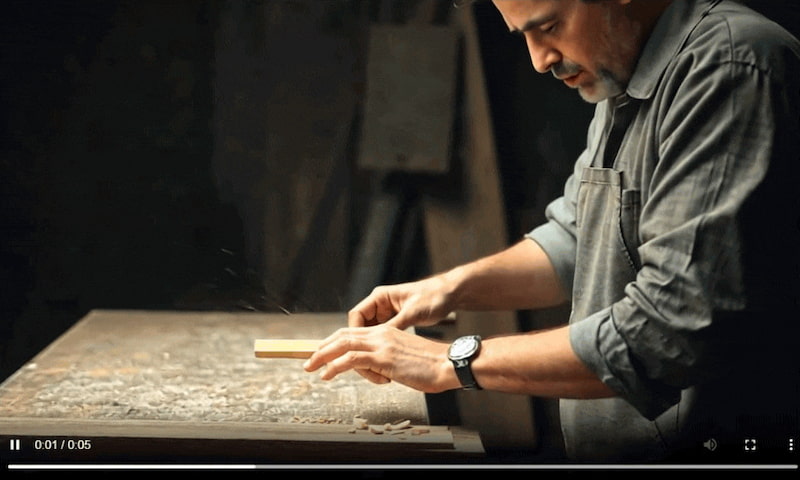
Example 1:
A skilled artisan shaping a block of wood inside a softly lit workshop. The camera moves into a tight close-up, focusing on the craftsman’s hands and tools as fine wood shavings fall under warm, concentrated light.
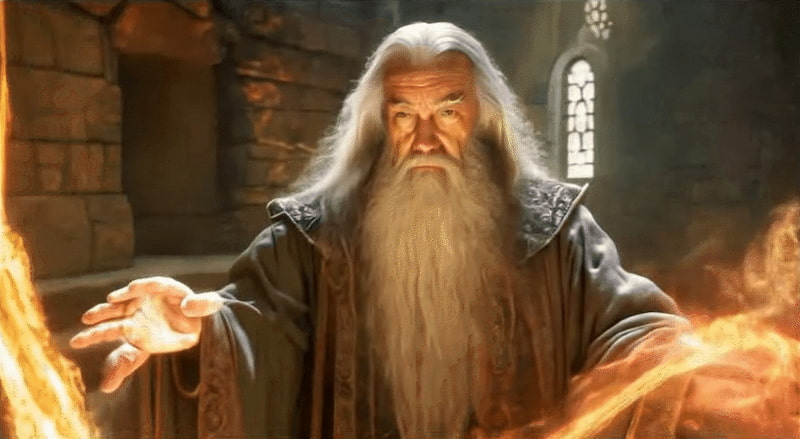
Example 2:
The camera smoothly circles an elderly sorcerer as they perform a powerful spell, radiant energy spiraling around their body while the arc motion creates a dramatic, magical atmosphere.
Example 3:
A slow close-up pan across a luxury perfume bottle filled with shimmering golden liquid, resting on delicate fabric. Chamomile flowers and smooth stones surround it, illuminated by gentle natural light to create a calm and soothing atmosphere.
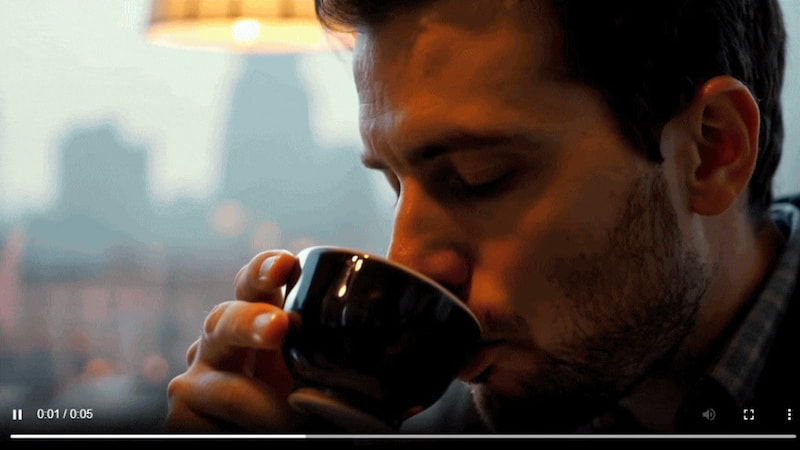
Example 4:
The camera gradually zooms toward a man’s face as he takes a sip of coffee, with a blurred city skyline behind him. As the shot tightens, distant mountains subtly emerge in the background, adding depth and contrast.
Example 5:
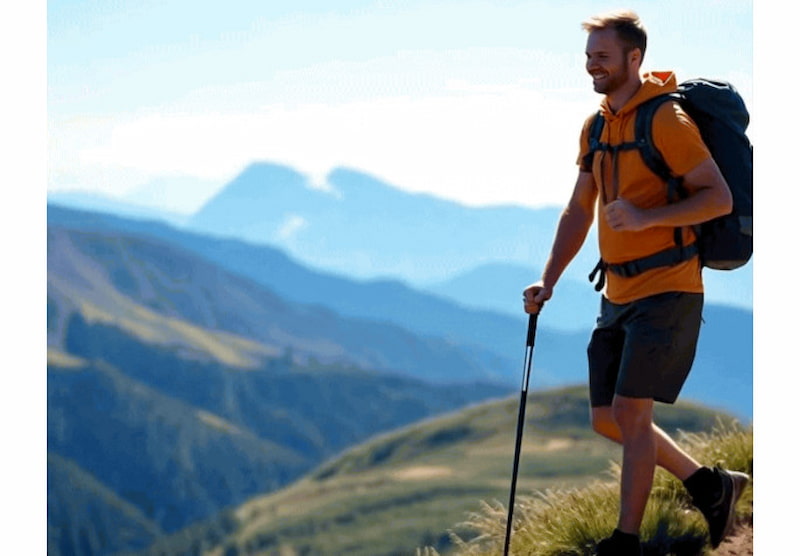
A lone hiker walking along a scenic trail, framed by towering mountains beneath a bright, clear sky, conveying a sense of freedom, exploration, and adventure.
Part 3. Use These Special Prompts to Generate Videos Using Picwand AI Text-to-Video Generator
After learning the best practices for writing AI prompts and reviewing strong prompt examples, the next step is to put that knowledge into action. This is where special, well-structured prompts truly shine, especially when generating videos.
Picwand AI Text-to-Video Generator is a highly intelligent generative AI tool designed specifically for prompt-driven video creation. It can transform pure text prompts into videos, allowing you to write detailed prompts of up to 1,500 characters. Additionally, you can generate videos as long as 10 seconds in various aspect ratios. On top of that, you can export the generated videos in high-quality resolutions up to 4K.
Why Choose Picwand AI Text-to-Video Generator:
Write prompts in different languages to generate diverse content.
Use up to 1,500 characters to describe scenes, actions, camera movement, etc.
Download videos in various resolutions: 720p, 1080p, 2K, or up to stunning 4K quality.
Generate clips up to 10 seconds long, which is longer than most image-to-video AI tools.
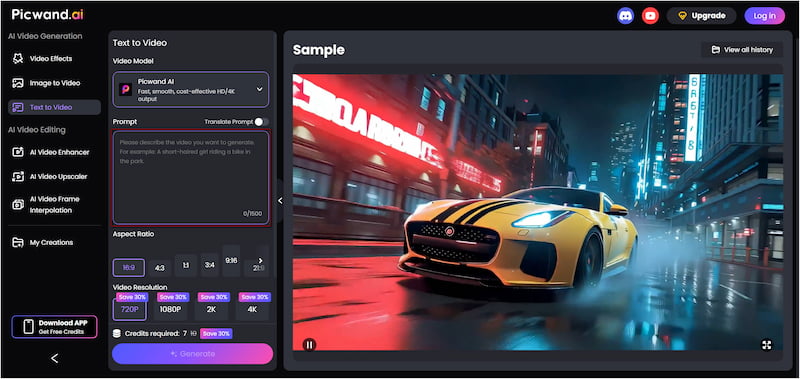
Step 1. Access the official Picwand AI Text-to-Video Generator website through the provided link. In the prompt box, paste the AI prompt example or enter your text prompt. Make your prompt specific and descriptive to achieve accurate results.
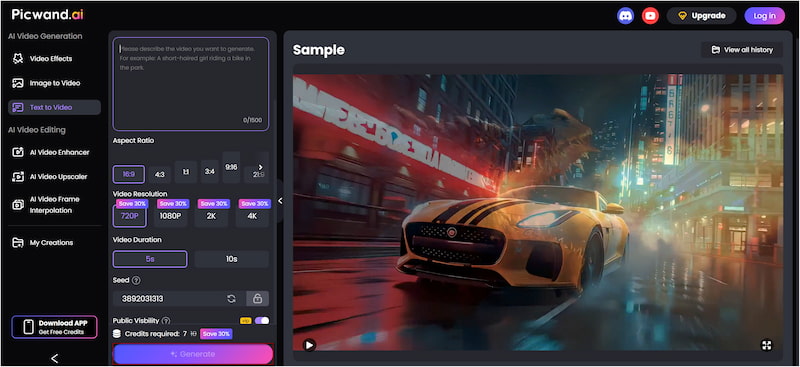
Step 2. Proceed down to the Aspect Ratio section and choose the format that best suits your content. Next, select your desired output resolution, up to 4K resolution. For video durations, Picwand AI supports lengths of up to 10 seconds.
Step 3. If you prefer to keep your project private, simply turn off Public Visibility. Once all settings are finalized, click the Generate button. It will process your text prompt and render a video that matches your written description.
By combining special, detailed prompts with Picwand AI Text-to-Video Generator, you can easily turn ideas into high-quality AI-generated videos. For good measure, you can also use Picwand AI Text-to-Video Generator to create YouTube videos from a text prompt.
Part 4. AI Prompt Examples FAQs
Q: What makes an AI prompt effective?
A: An AI prompt is effective when it clearly communicates your intent using natural, precise language. This requires specifying the details necessary for the AI to understand exactly what you want it to do.
Q: How does an AI prompt work?
A: When you enter a prompt, the AI model analyzes the input. It identifies key concepts, relationships, and instructions in your text and uses that understanding to generate a response that matches your request.
Q: What are the benefits of using prompts?
A: Using prompts increases the likelihood of receiving accurate and relevant outputs from AI. Prompts help reduce errors and misinterpretations by explicitly stating what is expected.
Conclusion
Crafting effective AI prompts is essential for generating high-quality, accurate, and engaging content. By understanding how to structure prompts with clear elements, you can guide AI to bring your ideas to life exactly as you imagine. To try this out yourself, use Picwand AI Text-to-Video Generator. This tool can transform your text-based prompts into high-quality videos, allowing you to see your AI prompt examples come to life on screen.