Basic PlanVIP PlanVIP ExpiredPurchased credits are valid for life but require an active VIP subscription to use
0Credit(s)
You can use credits to access all the AI tools on Picwand, such as the AI Image Upscaler, AI Age Filter, AI Video Enhancer, AI Video Upscaler, AI Video Effects, and more.
AI has made many creative tasks faster and easier, from writing content to creating artwork. With the rise of AI image generators, anyone can now turn simple text into digital art. By typing a prompt, an AI tool can quickly generate an image that reflects your description. At first glance, AI art creation may seem effortless. However, getting truly impressive results requires more than basic instructions. You need to understand how to write clear prompts and the best prompt for AI image generator. The quality of your prompt directly affects the quality of the artwork. This post will cover how to craft effective image art prompts and share best practices for creating AI image generation prompts. We will explain how prompts work, how to structure them effectively, and how to get better results from any AI image generator you use.
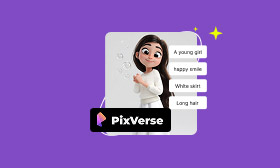
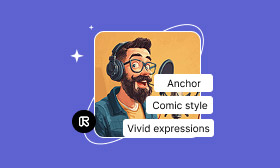
Mastering the best AI prompts for images is essential to create art that truly matches your imagination. Please be informed that AI image generators don’t just guess what you want. They rely entirely on the words you provide to interpret style, mood, composition, and detail. That’s why the most effective AI art prompts are layered and descriptive. Below are the key elements when structuring a strong image art prompt:
Subject or Scene:
The subject or scene defines what the image is about. It could be a single character, an object, an environment, or an entire moment frozen in time. Being specific here is crucial. It helps prevent generic results and ensures the AI focuses on the right visual elements from the start.
Artistic Style or Influence:
The best AI prompt for images should include an Artistic style that tells the AI how the image should be rendered. This could reference an art movement, a medium, or even the aesthetic of a specific era. Including style guidance shapes the overall look and texture of the artwork.
Precise Details:
Details are what elevate an image from ordinary to compelling. This includes clothing textures, facial features, environmental elements, props, lighting effects, or background objects. Precise details guide the AI’s attention, adding depth, realism, and uniqueness to the final image.
Mood or Emotion:
The best AI image generation prompts must convey mood and emotion to effectively define the emotional impact of the image. This could be expressed through words like peaceful, dramatic, or joyful. Including emotional direction helps the AI capture the intended feeling that viewers are meant to experience.
Composition:
Composition refers to the arrangement of elements within the frame. This includes camera angle, perspective, framing, and focus. Without this guidance, the AI may choose a default framing that doesn’t match your vision. Clear composition cues result in artwork that appears more intentional.
Color Palette:
The color palette sets the visual tone and harmony of the image. You can describe this using specific colors or general tones. By defining the palette, you help the AI maintain consistency and avoid clashing or unintended colors.
After learning how to craft effective prompts for AI artwork, the next step is mastering how to write AI prompts for video generation.
Part 2. Best Practices for AI Image Generation Prompts
The best practices for AI image generation prompts are not just about having a great idea. It’s about how effectively you communicate that idea to the AI. This ensures the AI understands your intent while still producing visually compelling results.
Give Clear and Detailed Instructions:
Clarity is one of the most important factors in writing effective AI image prompts. Instead of short phrases, describe the subject, environment, lighting, and important characteristics in complete, descriptive terms. Clear instructions help the AI prioritize what matters most in the image.
Specify Artistic Styles:
Artistic style influences how the AI interprets and renders your idea. By specifying a style, you provide visual context that shapes the final result. Style guidance ensures consistency and helps the AI avoid producing visuals that feel mismatched or confusing.
Use Action Verbs:
The best prompt for an AI image generator must use action verbs. It brings your prompts to life by describing what the subject is actively doing rather than just what it looks like. This helps the AI generate more dynamic compositions instead of static images.
Try Incorporating Negative Prompts:
Negative prompts tell the AI what to avoid, which can be just as important as describing what you want. Negative prompts refine the output by filtering out unwanted styles, objects, or distortions. This results in cleaner and more polished outcomes.
Give the AI Tool Freedom to Create Images:
While detailed prompts are important, over-controlling every aspect can sometimes limit creativity. Instead of micromanaging every detail, focus on defining the core idea, mood, and style. Then, let the AI fill in the finer points.
Part 3. Advanced AI Video Generation: Picwand AI Text-to-Video Generation
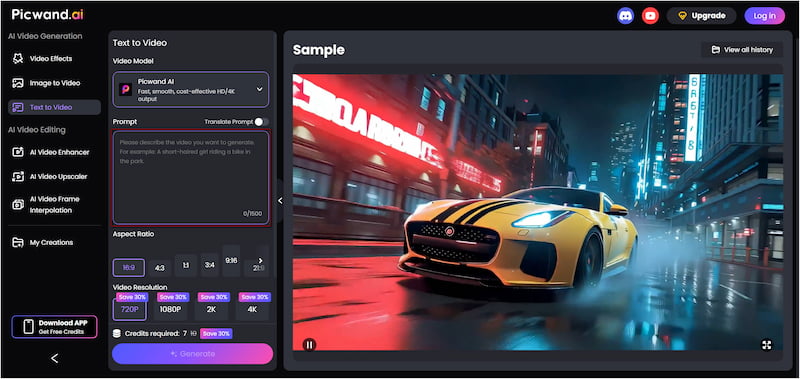
The best AI image prompts can also be applied to AI video creation. By expanding image-style prompts into scene-based narratives, you can guide AI to generate short clips from text alone. Picwand AI Text-to-Video Generator is a generative AI platform built to convert detailed text prompts directly into videos. It focuses on pure text-to-video generation, allowing you to write prompts of up to 1,500 characters in length. You can generate videos up to 10 seconds long, which is longer than many competing tools. Plus, you can export them in multiple resolutions, ranging from 720p and 1080p to 2K and 4K quality.
Why Choose Picwand AI Text-to-Video Generator:
Exports videos in multiple resolutions: 720p, 1080p, 2K, and up to 4K.
Supports prompt lengths of up to 1,500 characters for rich scene descriptions.
Generates videos up to 10 seconds long, longer than many image-to-video tools.
Offers multiple aspect ratio options for different platforms, including 16:9, 1:1, 3:4, etc.
Step 1. Navigate to the official Picwand AI Text-to-Video Generator website through the provided link. In the prompt box, paste your AI prompt example or write a new one from scratch. The more detail you include, the more accurately it can translate your text into a video.
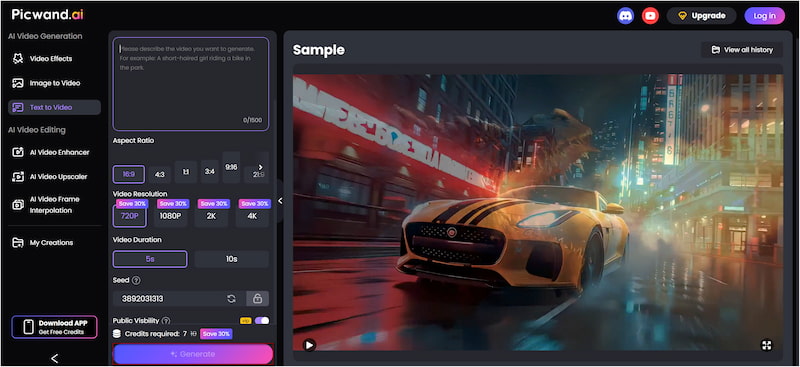
Step 2: After entering your prompt, scroll down to the Aspect Ratio section and select the desired format. Next, select your desired output resolution, with options ranging up to 4K. It also allows you to set video duration, supporting clips of up to 10 seconds.
Step 3: If you want to keep your creation private, simply toggle off Public Visibility before generating. Once all settings are finalized, click the Generate button. Picwand AI will process your text prompt and render a video that matches your description.
Picwand AI Text-to-Video Generator makes it remarkably easy to turn text into videos. With support for long prompts, flexible aspect ratios, extended video duration, and high-quality exports, it stands out as a reliable solution for prompt-driven video creation.
Part 4. FAQs about the Best Prompt for the AI Image Generator
Q: How to properly prompt AI images?
A: Start by clearly defining the main subject of your artwork. Then, gradually add specific details such as environment, style, lighting, mood, and composition.
Q: What is the purpose of a prompt?
A: The purpose of a prompt is to communicate your intent to a generative AI system using natural language. A prompt instructs the AI on the task to perform and how to accomplish it.
Q: What are the best AI image prompts?
A: The best AI image prompts are simple, clear, and well-structured. They avoid unnecessary complexity while still providing enough detail to guide the AI effectively.
Conclusion
In conclusion, mastering the best prompt for AI image generator is key to creating high-quality AI artwork. By carefully crafting your prompts, you give the AI the guidance it needs to bring your ideas to life. Clear and well-structured prompts lead to better results, making the creative process faster and more enjoyable. To take your AI creations to the next level, try using Picwand AI Text-to-Video Generator. It lets you transform your prompts into dynamic videos, giving life and motion to your ideas.