Basic PlanVIP PlanVIP ExpiredPurchased credits are valid for life but require an active VIP subscription to use
0Credit(s)
You can use credits to access all the AI tools on Picwand, such as the AI Image Upscaler, AI Age Filter, AI Video Enhancer, AI Video Upscaler, AI Video Effects, and more.
Summarizing a video’s story through text has always been a challenging task. It requires a lot of time and effort, as you need to carefully watch the entire video while manually writing a detailed summary. Fortunately, in today’s era of AI, this process has become much easier. Advanced AI tools now exist that can automatically generate textual prompts directly from videos. In this post, we will show you exactly how to turn a video into a prompt efficiently. This guide will help you understand the process, explore the available tools, and start generating accurate and detailed prompts from your videos with ease.
Video to Prompt Generator is an advanced AI-powered software descriptive text prompts from video content. It analyzes video content and generates descriptive prompts within seconds. This tool can generate prompts in multiple languages, making your content accessible to a global audience. It guarantees in-depth prompts that accurately capture the essence of your video.
What to Expect With the Video to Prompt Generator:
Process videos securely and quickly with encrypted uploads.
Generate comprehensive descriptions of your videos instantly.
Create prompts in multiple languages to cater to a global audience.
Use AI-driven insights to inspire new content, replicate scenes, or enhance projects.
Here’s how to convert a video to a prompt using Video to Prompt Generator:
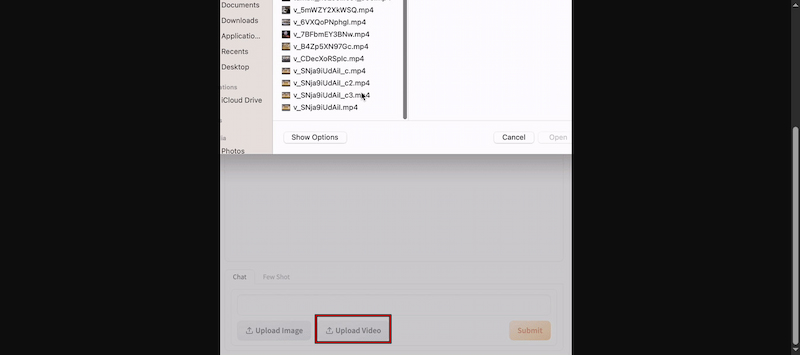
Step 1. On the homepage, click the Upload Video button and select the video you want to analyze. Please note that the tool supports various video formats. It is compatible with almost any file you have.
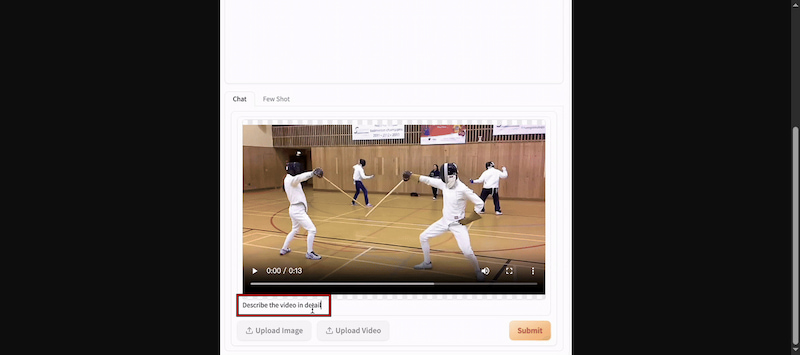
Step 2. After adding the video, copy and paste Describe the video in detail into the dialog box. Click the Submit button to allow the AI to process your video and generate a comprehensive description. This detailed textual representation provides a clear understanding of your video’s content.
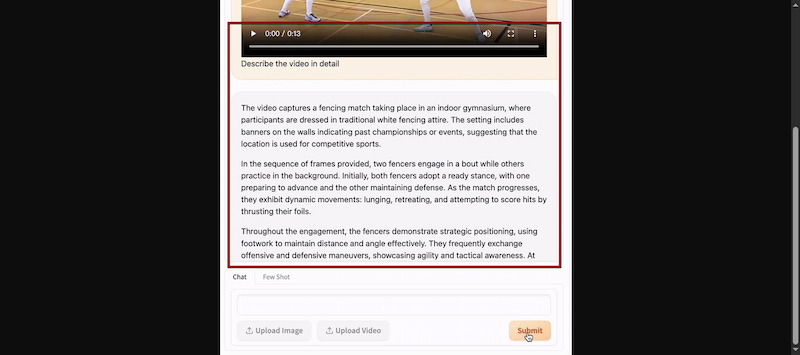
Step 3. Once the AI generates your video description, you can interact further. Ask follow-up questions, focus on specific parts of the video, or use the description as inspiration for creating new content. The generated prompts serve as a powerful starting point for crafting unique videos or enhancing creative projects.
The free Video to Prompt Generator effortlessly transforms video content into detailed prompts. It delivers instant AI-generated descriptions and provides a solid foundation for creating new content. However, there are instances where the AI-generated descriptions miss subtle details or misinterpret complex scenes, which require manual refinement.
Part 2. Use Prompt to Generate Video in a More Interesting Way
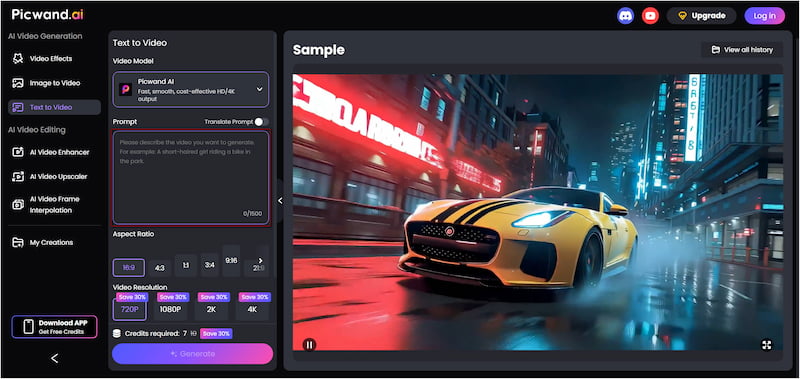
After learning video-to-text prompt generation, the next exciting step is to do the reverse. With a specialized tool, you can turn text prompts into fully generated videos. This is where Picwand AI Text-to-Video Generator comes in. It is a highly intelligent generative AI tool that can create videos purely from text prompts. It allows you to write prompts of up to 1,500 characters per generation. This provides the AI with sufficient detail to produce highly accurate and visually rich scenes. Additionally, it supports video clips of up to 10 seconds in various aspect ratios. Notably, you can export your creations in multiple resolutions, from 720p and 1080p to 2K and 4K.
Why Choose Picwand AI Text-to-Video Generator:
Supports multiple aspect ratio formats, including 16:9, 1:1, 3:4, and more.
Export videos in 720p, 1080p, 2K, or 4K resolutions to meet various quality requirements.
Creates video clips up to 10 seconds long, longer than many competing tools.
Allows up to 1,500 characters per prompt for detailed and accurate scene descriptions.
Accepts prompts in multiple languages, making it easy to create videos for global audiences.
Step 1. Access the Picwand AI Text-to-Video Generator’s official site through the provided link. In the prompt box, paste an existing text-to-video prompt or write a new one. Make sure your prompt is descriptive and detailed to ensure the AI generates precise and accurate scenes.
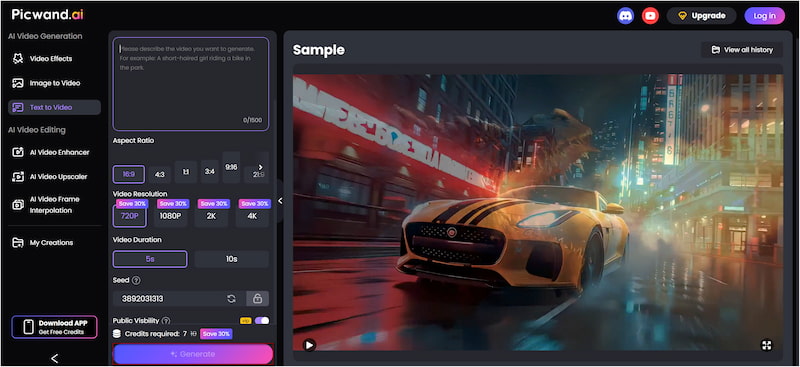
Step 2. Switch to the Aspect Ratio section and select the format that best fits your project. Then choose your desired output resolution; Picwand AI supports up to 4K. You can also adjust the video duration, with a maximum of 10 seconds per clip.
Step 3. If you want your video to remain private, toggle off Public Visibility. Once all settings are configured, click the Generate button. Picwand AI will process your prompt and render a video that closely matches your description.
Picwand AI Text-to-Video Generator enables you to transform detailed text prompts into high-quality videos. Its support for long prompts, flexible aspect ratios, extended video duration, and professional-level exports makes it a perfect tool for anyone.
A: To make AI prompts more effective, you should be specific and structured. Define the Role, task, context, and expectation. Use natural language with examples through few-shot prompting to guide the AI. Also, break down multi-step requests into smaller, manageable components.
Q: What is the best AI tool to create prompts?
A: For generating AI prompts from existing content, the Video to Prompt Generator is highly recommended. It can analyze a video and automatically generate detailed, structured textual prompts. It saves time, ensures accuracy, and provides a solid foundation for creating AI-driven content.
Q: Can I generate videos from a text prompt?
A: Yes, you can generate videos from text prompts, and a top recommendation is Picwand AI Text-to-Video Generator. This tool allows you to input detailed prompts, which the AI uses to create realistic, cinematic-quality videos. It supports flexible aspect ratios, video clips up to 10 seconds, and multiple export resolutions.
Conclusion
Turning videos to prompts no longer has to be a time-consuming task. With AI-powered tools, you can quickly summarize video content and create structured prompts that can be used for content creation, AI projects, or inspiration for new ideas. While the process of manually writing summaries was once slow and prone to omissions, modern solutions make it fast, accurate, and efficient. To take your video content to the next level, consider using Picwand AI Text-to-Video Generator. It can turn text prompts into fully generated videos.