AI Snow Trend Tutorial: 2 Easiest Ways to Make Winter Videos

Quick Summary:
The viral AI Snow Trend allows creators to turn any photo or text prompt into a cinematic winter video. While many use the Meitu app, Picwand AI offers a high-quality 4K alternative for web browsers using two main methods: Photo-to-Video effects and Text-to-Video generation.
Are you someone living in a country that doesn't experience winter or snowfall? The good news is that you can now experience snow using AI tools. With today's technology, you don't need to travel to snowy countries just to enjoy or join the viral AI snow trend. Now, with just a browser and an internet connection, you can create winter-themed photos and videos in seconds. In this post, we will show you two easy ways to create the trending AI snow video using modern AI tools. We will help you understand how to generate eye-catching snow effects and join the trend effortlessly, even without real winter experience.

Contents:
Part 1. What is the AI Snow Trend on Social Media?
The AI Snow Trend on social media is a viral content style where users turn ordinary photos into short winter scenes using AI tools. These videos feature falling snow, dreamy lighting, and atmospheric winter scenes that bring static images to life and feel magical. Creators use AI video generators to quickly transform selfies, portraits, or landscape photos into short clips. The trend became popular because it's easy to make, visually appealing, and highly shareable.
Part 2. How to Catch AI Snow Trend Without Meitu
Method 1. Make AI Snow Trend Using Picwand AI Video Effect
The AI Snow Video Effect is a Picwand AI video effect that creates trendy snow videos from photos. It allows you to add snow to a photo and apply a realistic snowfall animation. It gives you flexible customization options to match your content style. You can customize the aspect ratios to 16:9, 9:16, 4:3, 3:4, or 1:1. It also supports high-quality exports in 720p, 1080p, 2K, and even 4 K. Plus, you can set the video length between 5 and 8 seconds.
Why Choose Picwand AI Snow Video Effect:
- • Turn any photo into a winter scene with realistic falling snow.
- • Add background music to the snow video to enhance the mood.
- • Download videos in 720p, 1080p, 2K, or 4K for professional-looking results.
- • Copy Protection option to protect content from unauthorized use or downloads.
- • Public Visibility control to keep content public for sharing or private for personal use.
Here's how to do a snow background aesthetic:
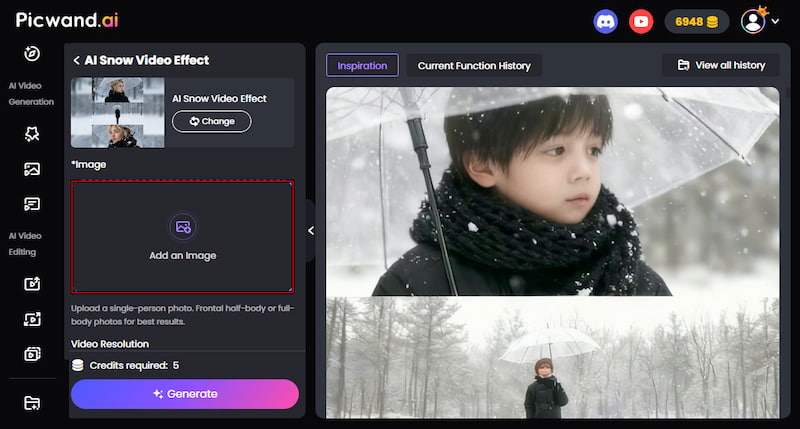
Step 1. Using a browser, reach the official Picwand AI Video Effect website and select the AI Snow Video Effect. On the homepage, click Add an Image and upload the photo you want to animate. Once uploaded, choose your preferred aspect ratio to match your platform.
Tips:
For the most realistic animation, use a photo where the subject is wearing a coat or scarf. AI recognizes these winter cues to blend snow layers more effectively.
Step 2. Next, customize your video settings. Select your desired resolution and set the video length. For the best video quality, choose 4K. Optionally, turn on Background Music to enhance the overall mood of your snow video. For VIP users, turn off Public Visibility to keep your content private.
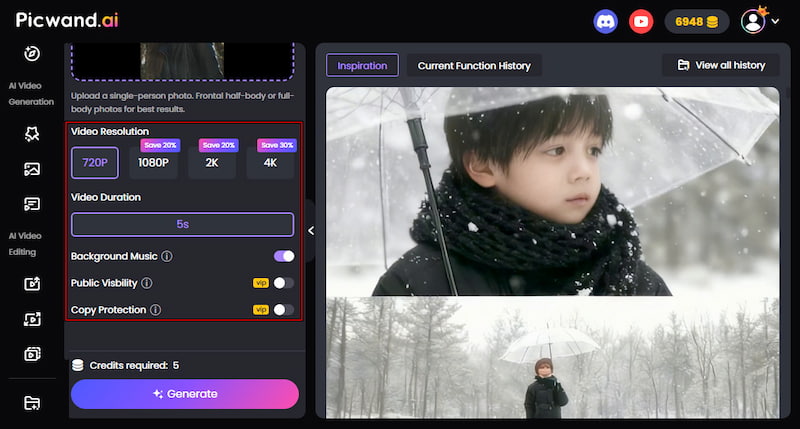
Step 3. Click Generate and let the AI process your AI snow video. After a minute or two, preview the result to check the snow animation and overall effect. If everything looks good, click Download to save your finished AI snow video.
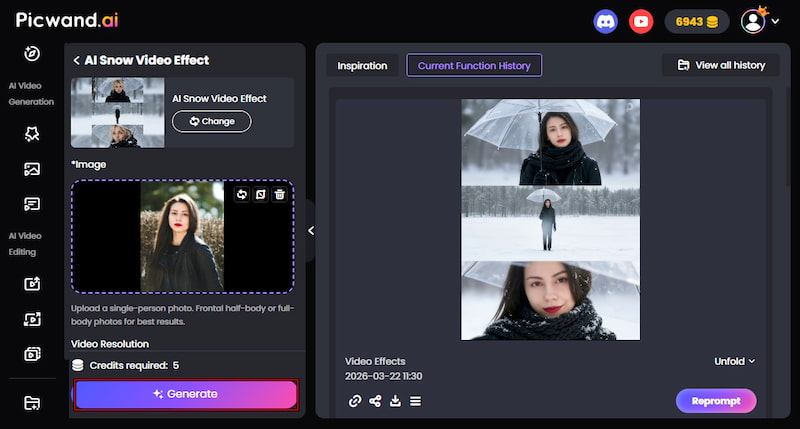
The AI Snow Video Effect in Picwand AI makes it easy to turn uploaded photos into winter videos. With just a few clicks, you can convert photos into a video without any editing skills. It offers flexible customization, allowing you to choose aspect ratios, adjust video length, and export videos in high-quality resolutions.
Method 2. Generate AI Snow Trend in Picwand AI Text-to-Video Generator
Picwand AI Text-to-Video Generator is a powerful generative AI tool that can create a Let It Snow background using text prompts. It supports detailed input, allowing you to enter prompts up to 1000 characters. You also get flexible formatting options, including 16:9, 9:16, 4:3, 3:4, 21:9, and 1:1. Once your video is ready, you can export it in high quality, from 720p and 1080p to 2K or 4 K. For short-form content, you can set the video length between 5 and 10 seconds.
Why Choose Picwand AI Text-to-Video Generation:
- • Choose from 16:9, 9:16, 4:3, 3:4, 21:9, or 1:1 to fit different platforms.
- • Create stunning AI winter-themed videos by typing a detailed text prompt.
- • Describe your scene with precision using longer prompts, 1000 characters.
- • Set video duration from 5 to 10 seconds, perfect for short, engaging content.
- • Download videos in 720p, 1080p, 2K, or 4K for clear and professional results.
Here's how to make AI snow trend through prompts:
Step 1. Navigate to the official site of Picwand AI Text-to-Video Generator by clicking the provided link. In the prompt box, enter or paste your snow-themed scene description. The more specific your prompt, the better the generated video will look.
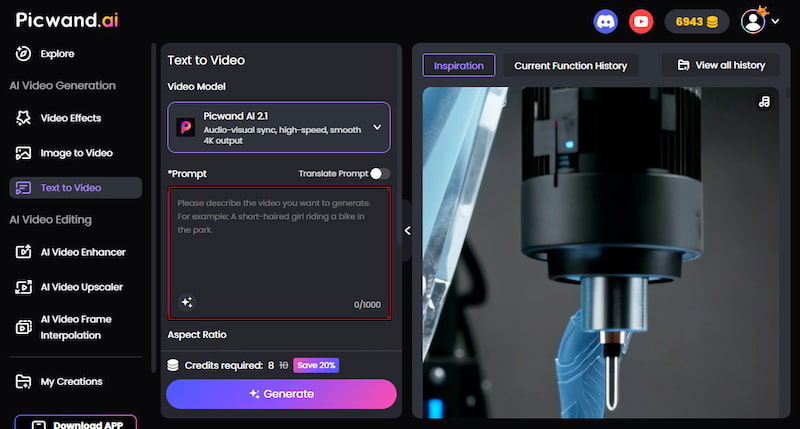
For an AI snow trend example, you can use:
A person wrapped in a thick wool blanket, holding a steaming mug, watching heavy flakes fall in slow motion.
Step 2. After entering the prompt, scroll down to configure the output settings. Choose your preferred aspect ratio, depending on where you plan to share it. Then set the video length to 5-10 seconds and select your desired resolution.
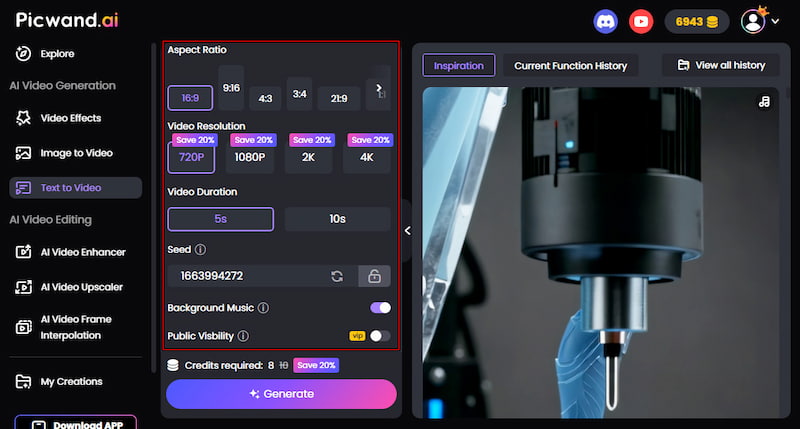
Step 3. Optionally, enable Background Music to make your snow video feel more immersive. Once everything is set, click Generate and wait for the AI to process your video. Preview the result, and if you're happy with it, click Download to save your final AI snow trend video.
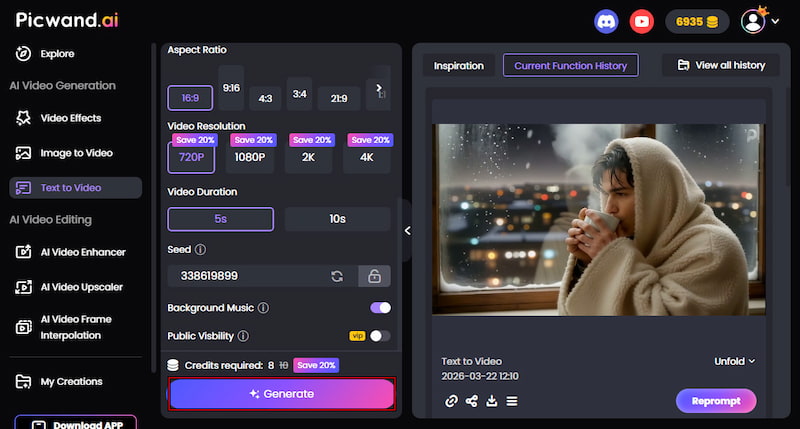
The Picwand AI Text-to-Video Generator makes it easy to create beautiful AI winter videos using text prompts. You only need to describe your desired snowy scene, and the AI transforms it into a short video. To get the most realistic AI results, it's important to write AI prompts in detail. The better you describe your idea, the more accurate the output will be.
Tester's Note: We found that setting the duration to 8 seconds provides the smoothest snowfall loop for Instagram Reels and TikTok.
Viral AI Snow Prompts to Copy & Paste:
The K-Drama Aesthetic: Cinematic winter portrait, soft blue tones, a person holding a clear umbrella, heavy snowflakes resting on eyelashes and hair, 85mm lens, emotional atmosphere.
The 3-Panel Story: Vertical 9:16 triptych: Top - close up of eyes in snow; Middle - walking through a snowy forest; Bottom - footprints in deep snow, consistent character.
Cozy Indoor/Outdoor: A frosty window view from a warm candlelit room, heavy blizzard outside, steam rising from a hot mug, hyper-realistic textures.
Part 3. FAQs about AI Snow Trend
Q: What app is everyone using for the AI snow effect?
A: Many creators use different tools, but one of the most popular apps for hyper-realistic results is Meitu. It's known for its strong AI filters and beauty enhancements. Another commonly used tool is Picwand AI, which is also popular for generating AI snow videos and photo effects.
Q: How do I make the 3-panel snow photo?
A: You can create the 3-panel snow photo using the AI Snow Video Effect in Picwand AI. Upload your image, adjust settings, and click Generate. The tool will automatically generate and present the subject in different snowy variations.
Q: Is there an AI snow kissing trend?
A: Yes, there is a growing AI winter romance trend, including effects like the AI Winter Streetlight Nose Kiss with snow effect available in Picwand AI video effects. These trends combine romantic poses with falling snow and cinematic lighting to create emotional short videos. In addition to AI snow and the kissing effect, it also includes an Age Filter that can make yourself look younger or older.
Conclusion
The AI snow trend shows how easily anyone can experience the beauty of winter using modern AI tools. It transforms simple photos or text prompts into snowy videos that are perfect for social media and creative storytelling. This trend continues to grow because it is simple, accessible, and highly engaging for short-form content platforms. To get started, you can use Picwand AI Text-to-Video Generator to create winter scenes from text prompts. On the other hand, try the AI Snow Video Effect in Picwand AI to turn your photos into realistic snow animations.
AI Picwand - Anyone Can be A Magician
Get Started for Free