Automatic Video Editing: A Beginner’s Guide to AI Video Editing

Video content is a good way to talk to people online. We see this on YouTube and TikTok and even in ads and educational videos. Editing these videos by hand can take a long time even days, especially for people who are just starting out. That is why people like to use automatic video editing. These tools use intelligence to help with editing. Automatic video editing software like PicWand AI Video Editor can make editing easier and faster and more creative. In this guide you will learn about video editing and how it works with artificial intelligence. You will also learn about automatic video editing and the best tools you can use today.
Contents:
Part 1. What Is Automatic Video Editing
Automatic video editing refers to the use of artificial intelligence and machine learning technologies to edit videos with minimal manual work. Instead of manually cutting clips or adjusting settings frame by frame, AI tools analyze video content and complete editing tasks automatically.
- • Cutting unnecessary scenes
- • Detecting highlights automatically
- • Adding transitions and effects
- • Enhancing video quality
- • Generating subtitles
- • Removing video backgrounds
- • Synchronizing music with video clips
- • Adjusting colors and lighting
- • Creating short videos from long footage
Traditional video editing software usually needs you to have skills and some experience with editing. Automatic video editing tools are made to be easy to use and save you time. For example, an AI editor can find the parts where nobody is talking and remove them automatically. It can also see faces, objects or movements in the video to make the edits more interesting.
Part 2. How AI Automatic Editing Works
AI automatic editing uses machine learning. Looks at what is in the video and what people are saying to make decisions, about editing. Here is a simple breakdown of how AI video editing works:
• Scene Detection
AI looks at the video. Finds different parts, like where the camera changes or something big happens. It automatically cuts the video into clips, which makes editing simpler.
• Facial and Object Recognition
Modern AI tools can spot faces, people, products and objects in the video. They can even tell what's, in the background. This helps the AI to add effects or focus on whats really important like people or products.
• Smart Trimming
The artificial intelligence finds parts of the video that are not needed like when someone stops talking for a moment makes a mistake or records the thing twice. It gets rid of these parts on its own.
• Video Enhancement
Some artificial intelligence tools make the video look better by making it clearer fixing parts stopping the shaking and changing the brightness or colors. All of this happens automatically.
Part 3. Benefits of Automatic Video Editing
Automatic video editing offers several advantages for both beginners and professional creators.
• Saves Time
Manual editing can take many hours, especially for long videos. AI tools automate repetitive tasks, significantly reducing editing time.
• Beginner-Friendly
Many people stay away from video editing because professional software can seem complicated. Automatic editors make it easier with interfaces and one-click features.
• Improves Productivity
Lots of content creators and marketers need to make videos all the time. Using AI editing they can make videos in a shorter time. This is really helpful for them. They can focus on things.
• Reduces Technical Barriers
You do not need to be a pro, at editing to make looking videos. Automatic editors help you create videos. AI handles complicated adjustments automatically.
• Enhances Video Quality
AI enhancement features can sharpen footage, improve lighting, remove noise, and upscale low-resolution videos.
• Encourages Creativity
Since users spend less time on technical editing, they can focus more on storytelling and creative ideas. With these advantages, AI automatic editing is transforming the video creation industry.
Part 4. Best Automatic Video Editing Tools
Picwand AI Video Editor is a video editing tool that uses artificial intelligence. It is designed for people who want to edit videos easily. The tool combines AI technology with a to-use interface. This makes it suitable for content creators, marketers, students and casual users who want to edit videos.
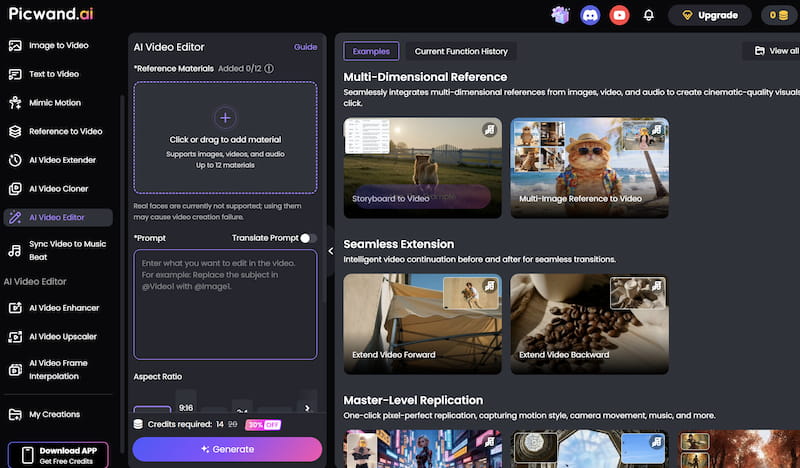
Features
• AI Video Enhancement
The tool can automatically improve video quality by sharpening details, reducing blur, and enhancing resolution.
• Noise Reduction
AI audio processing helps reduce unwanted background noise and improve voice clarity.
• Smart Editing Tools
Users can automatically trim clips, adjust colors, and apply visual improvements with minimal effort.
• User-Friendly Interface
The platform is designed for beginners, allowing users to edit videos easily without advanced technical knowledge.
• Fast Processing
AI automation speeds up editing tasks and reduces manual work significantly.
Steps to Use PicWand AI Video Editor
Using PicWand AI Video Editor is simple. Follow these steps:
Step 1. Upload Your Video
Open the PicWand AI Video Editor website and Click or drag to add material. After uploading, the AI system will process the video automatically.
Step 2. Apply Visual Effects
Browse available AI filters and effects and choose the one you need.
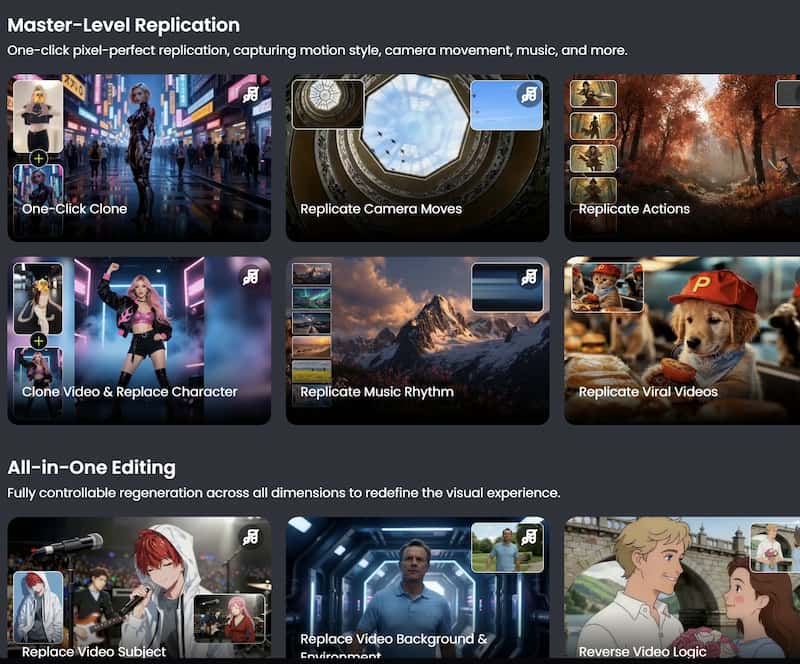
Step 3. Preview and export the Final Video
After finishing the edits, export the video in your preferred resolution. Download the final video and share it directly on your preferred platforms.
The free online automatic video editing is really helpful for people who want to edit videos easily. It has features that use intelligence to make complicated editing tasks simpler and the videos still look good.
Adobe Premiere Pro

Adobe Premiere Pro uses intelligence with something called Adobe Sensei. This includes things like reframing videos finding the best parts of a scene to edit and turning speech into text for captions. Denoise video in Adobe is automatic, which is a choice for professional editors who need to be able to customize their videos in advanced ways and also want some help from artificial intelligence.
CapCut is popular among TikTok and social media creators. It offers automatic captions, AI effects, templates, and quick editing tools optimized for short-form content. By the way, Canva enhancing photo is excellent.
Canva provides beginner-friendly AI video editing features combined with drag-and-drop templates. It is ideal for presentations, social media posts, and marketing videos.
Descript allows users to edit videos by editing text transcripts. Its AI features include automatic transcription, filler-word removal, and voice enhancement.
Part 5. FAQs about Automatic Video Editing
Is video editing good for people who are just starting out?
Yes. Most automatic video editing tools are made to make editing and you do not need to know a lot about technology to use them.
What kinds of videos can automatic video editing tools edit?
Automatic video editing tools can edit types of videos, such as videos for YouTube clips for TikTok, tutorials, advertisements, interviews and educational videos.
Which automatic video editor is the best?
The automatic video editor depends on what you need. PicWand is a choice for people who are just starting out and want to edit videos quickly while Adobe Premiere Pro is better, for big professional projects that need a lot of work.
Conclusion
That’s all about automatic video editing. Video editing is getting a lot easier for people who make videos. This is because of computer programs that can think for themselves. There are a lot of programs like Picwand AI Video Editor which is really good because it is easy to use and has smart features. It helps people make looking videos quickly even if they do not know a lot about editing.
AI Picwand - Anyone Can be A Magician
Get Started for Free