Best AI Video Generator for Reels: 3 Tools Worth Trying

Instagram Reels are built for fast-paced storytelling with visuals, but shooting them regularly sometimes takes longer than viewers expect. You may need to write a hook, shoot or source footage, edit clips, add transitions, create captions, choose music and scale everything for vertical viewing. AI video creators are transforming that process. Instead of a blank editing timeline, producers can start with a word prompt or a picture and let the AI develop the concept into a moving clip. The trick is to choose the correct tool. Some AI video generators specialize in cinematic text-to-video production, while others are geared toward visual animation, social content, or rapid experimentation. In this guide, we'll compare the best AI video generators for Reels to help you find the best AI video generator for Reels.
Contents:
Part 1: What Is an AI Video Generator for Reels?
AI Reel Generator Definition
An AI video generator for Reels is a tool that uses artificial intelligence to create or edit short-form video content for social platforms.
Depending on the platform, you can start with:
- • A text prompt
- • A reference image
- • An existing video
- • A script
- • A story idea
The AI then generates video content based on the information you provide. For example, you could enter: “A glass perfume bottle floating above a moonlit ocean, soft reflections, luxury commercial style, slow camera movement.” Instead of photographing the product and creating the effect manually, an AI video generator can turn the concept into a short visual sequence.
How AI Creates Short-Form Videos
A typical workflow looks like this: Prompt → AI interpretation → Scene generation → Editing → Export
For text-to-video, AI analyzes the description and generates visual frames that follow the prompt. With image-to-video, the starting image provides visual information while the AI creates movement around it. For Reels, the generated content can then be edited into a vertical sequence with captions, music, transitions, and other elements.
Part 2: How to Choose the Best AI Video Generator for Reels
Not every AI video generator is ideal for Instagram. Consider these five variables before choosing a tool.
1. Video Resolution
Look past resolution. “Reels is just as important for the quality of motion.
Check whether the generated video has:
- • Natural movement
- • Stable subjects
- • Consistent lighting
- • Clean details
- • Fewer visual artifacts
A high-resolution clip is not useful if the subject changes shape halfway through the shot.
2. Text-to-Video and Image-to-Video
Having both options gives you more creative freedom.
- • Text-to-video is ideal when you have an idea but no visual assets.
- • Image-to-video is useful when you already have product photos, illustrations, AI artwork, or other reference images.
For commercial Reels, image-to-video can be especially useful because you can start with an existing product visual rather than generating everything from scratch.
3. Effects and Templates
Reels often depend on quick visual changes. Look for tools that offer effects, transitions, templates, camera movements, or other editing capabilities. These features can help transform individual AI clips into a complete social video.
4. Ease of Use
A powerful model is not necessarily the best choice if it takes too long to learn. For everyday Reel creation, an intuitive interface can matter more than having dozens of advanced settings.
5. Pricing
AI video generation often uses credits because generating video requires more computing resources than generating text or static images. Compare not only the subscription price but also:
- • Monthly credits
- • Generation limits
- • Output resolution
- • Watermarks
- • Commercial-use terms
- • Access to different AI models
Part 3: Best AI Video Generator Tools for Reels
1. Picwand AI
Best for: Creators who want a flexible AI agent workflow with text-to-video and image-to-video generation.
Picwand AI is our best AI reel video generator for producers who want to create AI-powered Reels without establishing a complex production pipeline. The company’s AI video tools, Text to Video and Image to Video, let producers start with a concept or an existing graphic, and are hailed as an effective AI video editor for YouTube.
Features
- • Text/image to Video Creation
- • Chat to create images and videos
- • Computer generated pictures
- • AI Image Upscaling
- • Workflow from story to video.
- • AI-powered tools for social content creation
Pros
- Getting Started Workflow
- Text and picture inputs supported
- Great for creative and marketing videos.
- Enables designers to play around with different visual themes
Cons
- Generation is credits
- Complex sceneries could take a few attempts
- The motion generated by artificial intelligence may depend on the prompt
Price
Picwand AI offers both subscription and lifetime-style plans, with pricing according on the plan chosen and current discounts. Before you subscribe, check their updated pricing page.
2. Pika
Best for: Creators who desire playful AI effects and brief experimental video creation.
Pika is one of the best free video editor, known as one of the best AI video generator for Instagram reels, that focuses on creating and altering short videos. It has text-to-video and image-to-video procedures, and has been especially popular for creative effects and experimental social material.
Characteristics
- • Text to film
- • Video to image
- • Video effects with AI
- • Creative transformations
- • Creation of Short-Form Video
Pros
- A powerful creative drive
- Great for playing with crazy visual ideas.
- Great for short social video
- Moderately beginner-friendly
Cons
- Results will differ based on the prompt
- Some sophisticated functions require paid access
- Not great if you want a thorough editing workflow
Price
Pika has free and premium plans with additional credits and features on paid plans. Prices and features are subject to change, verify current plan details before purchase.
3. Kling AI
Best for: Creators looking for detailed AI-generated video and more cinematic results.
Kling AI is an AI video generation platform known for generating relatively detailed scenes from text and images. This best AI video generator for reels can be useful when you want a Reel to feel more like a short cinematic sequence than a conventional social-media template.
Features
- • Text to film
- • Image to video
- • AI-produced characters and scenes
- • Cinematic video production
- • Multi-Generation Modes
Pros
- Visual quality is good
- Good for cinematic ideas.
- Useful picture-to-video features
- Suitable for creative storytelling
Cons
- Complex generations may take longer
- Prompt refinement may be necessary
- Advanced use can have a steeper learning curve
Pricing
Kling AI provides free access with limitations, as well as paid plans or credit-based options. Because pricing and generation allowances can change, verify the current plans on the official website.
Part 4: How to Make AI Reels with Picwand AI
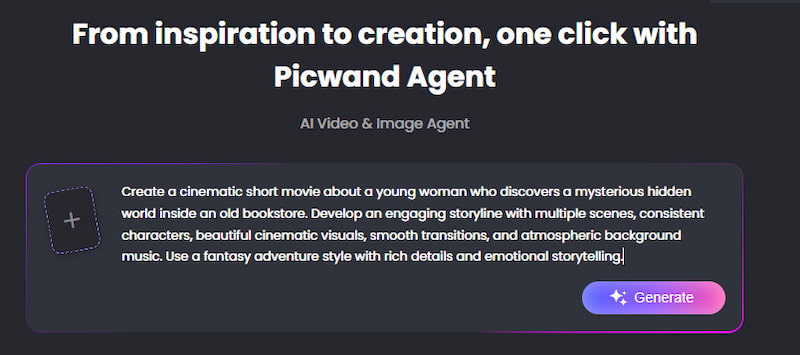
Picwand AI Agent offers a practical way to create AI Reels from simple ideas. You can describe the type of Reel you want to make or upload reference images, and the AI Agent will help develop your concept, refine the script, and generate visual content.
Step 1: Enter Your Idea
Describe the Reel you want to create, including its topic, characters, setting, or visual style. You can also upload reference images to help the AI understand your creative direction.
Step 2: Generate and Refine Your Content
Picwand AI Agent can help write and refine your video script based on your instructions. Continue chatting with the AI to adjust the storyline, scenes, and visual details until you're satisfied with the creative direction.
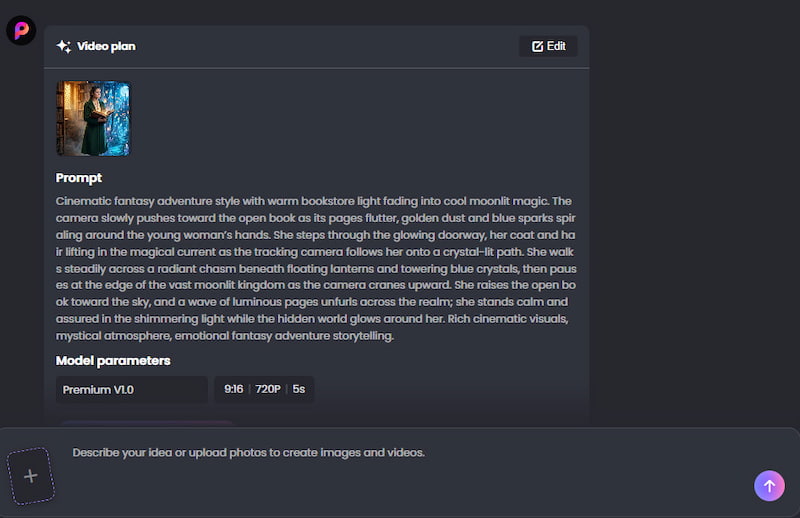
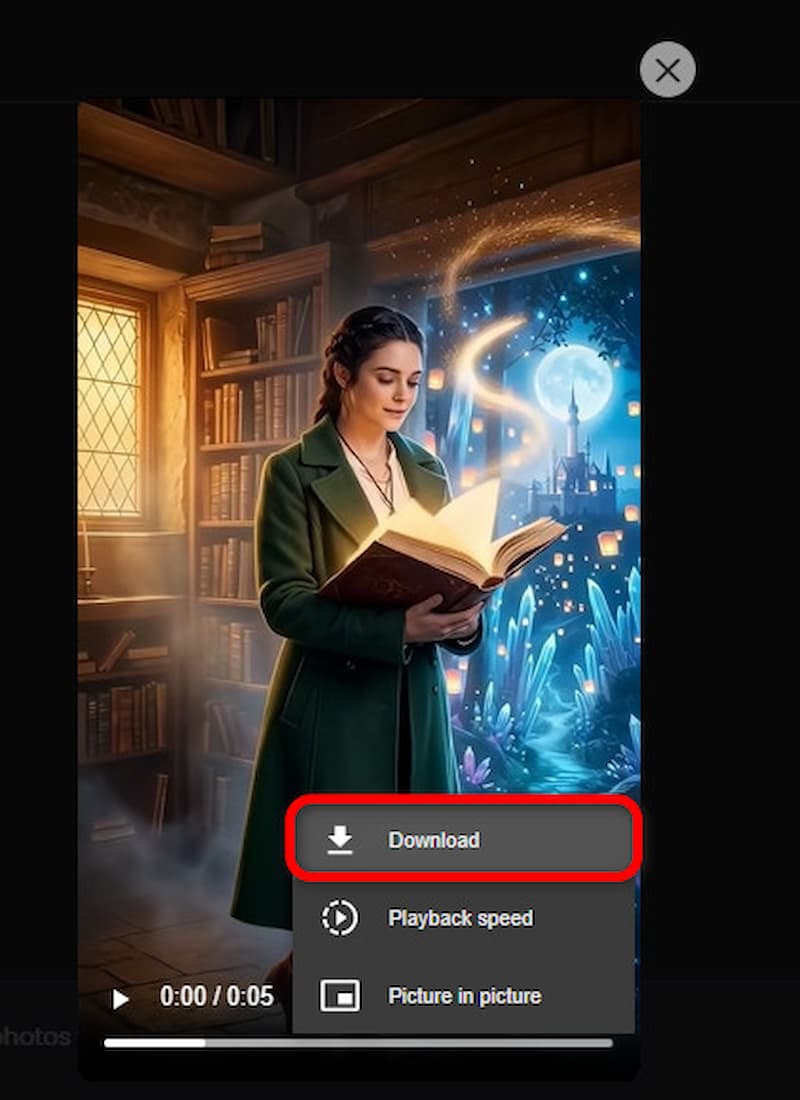
Step 3: Generate and Download Your Reel
Ask the AI Agent to generate your video based on the finalized idea and creative instructions. Preview the result, then click Download to save your finished Reel.
Part 5: FAQs About the Best AI Video Generator for Reels
What’s the greatest AI video generator for Reels?
There’s not a single winner for every creator. For consumers wanting a beginner-friendly process for text-to-video and image-to-video generation, Picwand AI is a decent all-around alternative. Pika is good for artistic effects, Kling AI is a terrific option for more cinematic generations.
Can AI make Instagram Reels from text?
Yes. Text-to-video devices are able to translate a textual description into a short video clip. Then you may merge many clips, add captions and audio, and edit it into a whole Reel.
Can AI make Instagram Reels from an image?
Yes. Image-to-video tools animate a still image by creating movement around its visual features. This is especially handy for product photographs, artwork, illustrations and advertising images.
What Is the Best Aspect Ratio for Instagram Reels?
9:16 vertical is the best match for full-screen viewing of Reels in general on mobile devices.
How do I make AI Reels look more realistic?
Use detailed prompts, provide high-quality reference images when possible, avoid overly complicated actions, and generate shorter clips. Reviewing and regenerating individual scenes can also produce better results than trying to create an entire complex Reel in one generation.
Conclusion
The best AI video generator for reels should help you create faster, but not at the expense of your creative control. Picwand AI is a great choice for creators who wish to work with both Text to Video and Image to Video workflows. Pika is worth exploring for creative effects and experimental content, whereas Kling AI is a good choice when detailed, cinematic visuals are the priority.
Whatever technique you choose to use, don’t depend on AI generation alone. Start with a good idea, write a short prompt, make short clips, then polish the final cut to be viewed vertically. The AI speed combined with human ingenuity is what makes a Reel out of an automatically created clip that people actually want to watch.
AI Picwand - Anyone Can be A Magician
Get Started for Free