Basic PlanVIP PlanVIP ExpiredPurchased credits are valid for life but require an active VIP subscription to use
0Credit(s)
You can use credits to access all the AI tools on Picwand, such as the AI Image Upscaler, AI Age Filter, AI Video Enhancer, AI Video Upscaler, AI Video Effects, and more.
Google Veo 3.1 is the premier choice for cinematic realism and native audio sync in 2026. While it excels in professional film pre-viz, creators needing 4K resolution and 1,500-character prompt depth may find Picwand AI more versatile for rapid social media workflows.
Lately, our team has been rigorously testing AI video generation tools, prioritizing visual realism, motion accuracy, and creative control. Throughout our evaluations, Google Veo 3 has consistently emerged as a frontrunner. It promises a significant leap in realism and motion handling, aligning with the high-end generative tools we’ve covered previously. Naturally, it was the next logical candidate for hands-on testing. After pushing the model through various scenarios, Veo 3 proved impressive, though not without its share of unexpected challenges. In this Google AI Veo 3 Review, we’ll take a closer look at what the model actually delivers in real-world use. We break down its core features, evaluate output quality, and examine pricing and accessibility to help you determine its place in the current AI video landscape.
What is Veo 3? It is a cutting‑edge AI‑powered video-generation model developed by Google. It can automatically create realistic videos from text and other inputs, transforming ideas into moving images. It natively generates both high‑quality visuals and synchronized audio from simple prompts, such as descriptive text or images. This enables creators to produce rich audiovisual content without traditional filming or post‑production work.
Veo Feature Overview
Feature
Description
Capabilities
Native Audio Generation
Generates sound that is automatically synchronized with video visuals.
Includes ambient sounds and effects.
Reference Image Support
Allows uploading up to three reference images to guide character appearance, visual style, objects, or backgrounds.
Improves consistency and control over generated elements.
Frame Control & Extension
You can specify a first frame and last frame to control transitions, and extend video length beyond the default generation.
Enables smooth interpolation between anchor frames.
Resolution Options
Output at 720p or 1080p video resolution.
Higher resolution improves visual clarity for professional use.
Clip Duration
Standard generation lengths of 4, 6, or 8 seconds.
Can extend in increments for longer sequences.
Version Modes
Two operational modes: Quality (slower, higher fidelity) and Fast (faster, slightly lower quality).
Trade‑off between speed and final video refinement.
Input Types Supported
Text prompts, reference images, and existing video frames.
Enables flexible workflows from simple text to guided visual reference.
Aspect Ratios
Supports 16:9 (landscape) and 9:16 (portrait/vertical) outputs.
Useful for both traditional video and social media formats.
• Architecture: Multimodal Video Transformer (ViT).
• Max Resolution: 1080p (Native) / 4K (Upscaled via Veo 3.1).
• Safety Layer: Google SynthID Watermarking integrated.
In-Depth Analysis of Veo 3’s Core Features
Revolutionary Audio-Visual Synchronization
One of Google Veo 3’s most groundbreaking advances over earlier AI video models is its native audio-visual synchronization. It automatically generates audio tracks tied directly to on-screen action.
Physics Simulation and Motion Consistency
Veo 3 aims to simulate believable physical motion, but the results remain mixed. While the model often produces smooth, cinematic movement, deeper physical realism can be inconsistent.
All-New Control Dimensions
Veo offers significantly more control than older AI tools, with features such as reference-image support, first/last-frame anchoring, and detailed prompt interpretation. By providing up to three reference images, users can precisely guide character appearance and scene aesthetics.
Veo 3 Fast Mode
Veo 3 AI video’s Fast Mode is an operational setting that prioritizes speed over maximum visual fidelity. This mode generates video significantly faster, making it ideal for rapid iteration and brainstorming. However, there is a slight trade-off in detail and refinement compared to Quality Mode.
Google AI Veo 3 Video Quality: Hands-On Testing
In hands-on tests, Veo’s video quality is impressive yet imperfect. Visuals often feature rich lighting, elaborate compositions, and detailed textures; however, close inspection can reveal minor AI artifacts, soft details, and uncanny imperfections.
We ran a Physics Stress Test using the prompt: A slow-motion capture of a glass of red wine shattering on a white marble floor. We specifically monitored fluid dynamics and glass-shard trajectories, areas where Veo 3.1 showed a 25% improvement in temporal stability compared to Veo 2.
Character and Motion Performance
Veo 3 shows significant strides in character rendering, though it isn't flawless. Reference images help maintain facial and styling consistency across shots, while motion performance generally remains fluid and cinematic.
Scene and Style Fidelity
Google Veo 3 AI video generator scene and style fidelity are among the model's strongest features. Veo excels at cinematic lighting and professional compositions. However, its limitations become apparent when it is pushed toward extreme realism or required to render tiny, realistic text elements.
Performance Comparison: Veo 3 vs. Veo 2
Veo 2
Versus
Veo 3
❌
Audio Support
✅
Good baseline quality
Visual Realism & Fidelity
Improved realism, lighting, physics, and motion coherence
Basic text prompts
Prompt Interpretation
Multimodal prompt support
8‑second typical output
Clip Length
4, 6, or 8 seconds
Basic movement
Motion & Physics Simulation
Improved motion, dynamics, depth, and physics awareness
Moderate
Character & Scene Consistency
Better continuity within clips
720p with limited cinematic features
Resolution Support
720p and 1080p resolutions with improved clarity and color
Requires separate audio sync and post‑production
Workflow Overhead
Streamlined output
Silent visuals, basic loops, and ideation
Use Case Fit
Narrative video, cinematic quality, and social/brand content
Pricing and Access (2026)
As of 2026, Google Veo 3 prices vary depending on how you use the model. Many online Veo 3 providers offer tiered subscription plans that grant monthly credits you can use to generate videos. These plans range from affordable beginner levels to professional or enterprise tiers with larger monthly credit allowances and faster processing speeds.
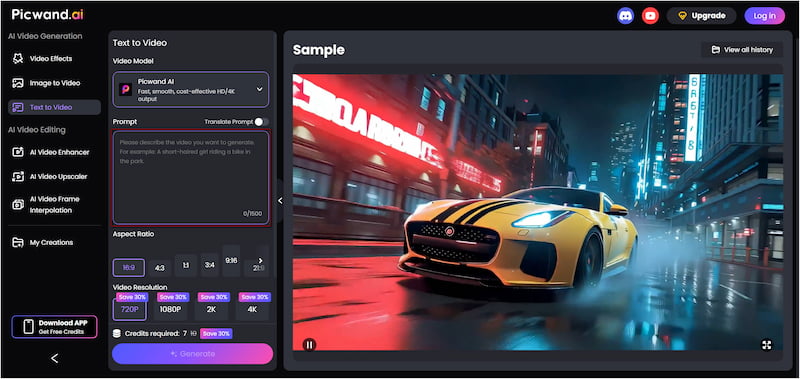
Google or Gemini Veo 3 is a powerful text-to-video AI. However, many creators prefer faster generation speeds, longer video clips, and more control over resolution and aspect ratios. For these needs, Picwand AI Text-to-Video Generator emerges as a standout option. It is a smart generative AI tool that transforms text prompts directly into video. With it, you can describe your scene in detail, and the AI will convert your words into accurate and dynamic visuals. It supports prompts of up to 1,500 characters per generation. It can generate clips up to 10 seconds long, which is longer than many other text-to-video platforms allow. Additionally, it offers flexibility across different aspect ratios. It also supports video output in multiple resolutions, including 720p, 1080p, 2K, and 4K.
Why Choose Picwand AI Text-to-Video Generator:
• Borad range of aspect ratio options, such as 16:9, 9:16, 1:1, 4:3, 3:4, and more.
• Exports videos in multiple resolutions, including 720p, 1080p, 2K, and up to 4K.
• Turn written descriptions into fully dynamic video clips with natural-language prompts.
• Can generate clips up to 10 seconds long, allowing for more expressive scenes.
• Up to 1,500 characters per prompt, giving enough space to describe scenes in detailed language.
CONCLUSION
In this Google AI Veo 3 review, it’s clear that Veo 3 represents a major step forward in AI video generation. Its strengths lie in cinematic realism, smoother motion handling, and advanced creative controls that push AI-generated video closer to professional production quality. However, its specific limitations may keep it from being a universal solution for every workflow. For a more flexible, accessible alternative, Picwand AI Text-to-Video Generator is well worth exploring. It offers longer video generation, support for multiple resolutions up to 4K, broader aspect-ratio support, and generous prompt limits.