Basic PlanVIP PlanVIP ExpiredPurchased credits are valid for life but require an active VIP subscription to use
0Credit(s)
You can use credits to access all the AI tools on Picwand, such as the AI Image Upscaler, AI Age Filter, AI Video Enhancer, AI Video Upscaler, AI Video Effects, and more.
Hailuo AI is a text-to-video platform that allows creators to transform simple text descriptions into video clips. While it is powerful, achieving the best results requires more than just a brief sentence. The secret? It lies in crafting detailed, specific, and structured instructions that guide the AI. This post is designed to help you master the Hailuo AI video prompt guide. We will cover everything from basic prompt structure to tips for writing clear prompts. Understanding how to write effective prompts is the key to unlocking Hailuo’s full creative potential.
In generative AI, writing a clear prompt is crucial because it provides the instructions that guide the AI toward the desired result. The quality of your prompt directly determines the accuracy, usefulness, and efficiency of the output. A well-written prompt reduces ambiguity and saves time by eliminating the need for endless edits. Effective prompt-writing transforms vague ideas into reliable, actionable outcomes.
Part 2. Basic Prompt Structure for Hailuo AI
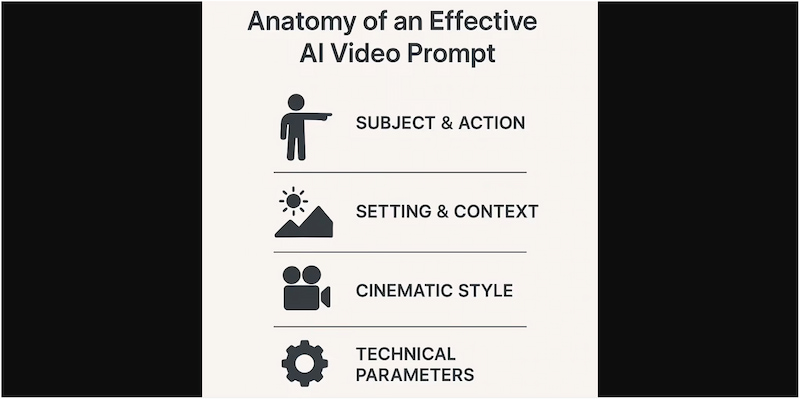
Understanding the basic structure of Hailuo AI prompts is essential to generating high-quality AI videos. Since it relies on descriptive prompts, knowing how to structure them helps the system interpret your vision accurately.
Camera Shot + Motion:
The camera shot and motion define how the viewer perceives the scene, acting almost like the director’s instructions. Camera shots determine the framing and emotional impact of the moment. Meanwhile, motion adds cinematic movement that brings life and depth to the video.
The subject is the main focus of the scene, and the description provides identity, detail, and clarity. The more descriptive you are, the more accurately it can visualize your intended subject. This section ensures the AI doesn’t guess or fill in missing details with random elements.
Action:
The action is among the most essential features of the Hailuo AI image-to-video prompt guide. It explains what the subject is doing and helps transform a static scene into a dynamic one. Using clear verbs tells Hailuo exactly how to animate the movement. You can enhance clarity by adding adverbs or context to refine the tone of the action.
Scene + Description:
The scene description sets the environment where the action takes place. This includes details about the location, time of the day, weather, and background elements. By providing a detailed scene description, it prevents the AI from creating generic or mismatched backgrounds.
Lighting:
Lighting is a powerful tool in visual creation because it shapes mood, depth, and realism. In AI video generation, specifying lighting tells Hailuo how to illuminate the subject and environment. Good lighting descriptions enhance clarity, highlight details, and create emotional tone.
Style / Mood:
The style and mood define the artistic direction of the entire video. Style ensures the video's look matches the creator’s goal, while mood helps convey emotional resonance. A clear style/mood description makes your video feel purposeful and cohesive.
Part 3. Tips for Writing Hailuo AI Prompts
Writing powerful prompts for Hailuo AI goes beyond describing a scene. It requires cinematic thinking, character consistency, and intentional visual control. Here are the best tips to elevate your Hailuo AI video generation prompts with clear explanations and examples:
Avoid the Cartoon Look:
AI videos may sometimes look plastic, animated, or overly stylized. To counter this, anchor your prompt with realism-focused keywords and quality cues. Use style terms like photorealistic, hyper-detailed, cinematic movie style, etc.
Using filmmaking terminology helps Hailuo understand exactly how you want your scene to look and move. Directors and cinematographers use dolly zoom, Dutch angle, over-the-shoulder shot, and more to guide camera behavior.
Maintain Consistent Characters:
Character consistency is the biggest challenge in AI video generation. Hailuo may alter facial features, age, or clothing if instructions are vague. The solution is to anchor your character through detailed, repeated descriptions.
Build a Narrative with Shot Sequencing:
Hailuo excels when prompts mimic real filmmaking. Instead of generating random standalone clips, build a story by planning sequential shots. Breaking scenes into establishing, medium, and close-up shots helps the AI maintain continuity and pacing.
Part 4. Picwand AI Text-to-Video Generator: Turn Prompt into a Real Video
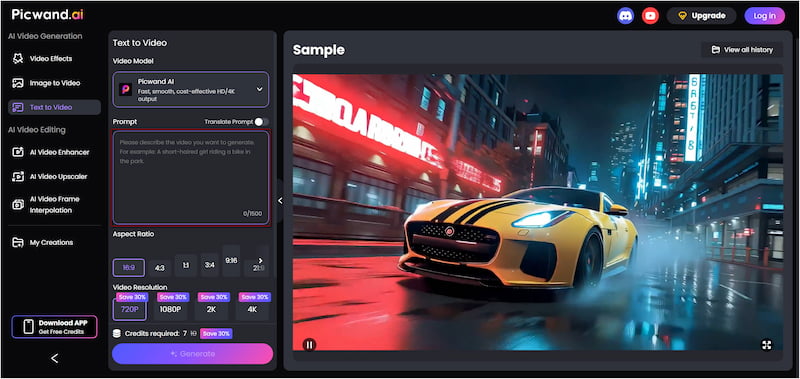
Picwand AI Text-to-Video Generator is a high-end generative AI tool that converts text prompts to videos. With it, you can turn detailed prompts, up to 1,500 characters long, into full, rich video clips. It supports multiple aspect ratios, including 16:9, 4:3, 1:1, and 3:4, among others. You can also export your creations in high-quality resolutions such as 720p, 1080p, 2K, and 4K. Best of all, it generates videos up to 10 seconds long.
Why Choose Picwand AI Text-to-Video Generator:
• Supports 720p, 1080p, 2K, and 4K resolutions, making it perfect for professional projects.
• Generates videos of up to 10 seconds, ideal for creating short, creative content.
• Choose from 16:9, 4:3, 1:1, 3:4, 9:16, 21:9, and more aspect ratio options.
• Accepts up to 1,500 characters, enabling detailed descriptions for precise output.
Step 1. On your browser, access the Picwand AI Text-to-Video Generator’s official page through the provided link. In the prompt box, type a clear and detailed description of the video you want the AI to create. Please specify any additional elements you would like to include.
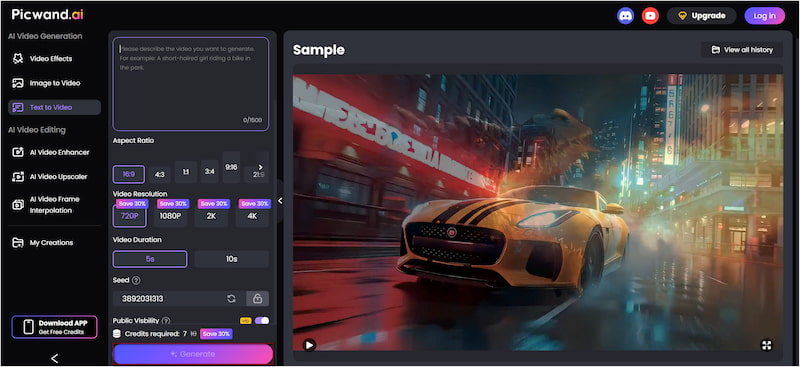
Step 2. Proceed to the Aspect Ratio section and choose the format most suitable for your platform. Next, select your preferred export quality and adjust the duration of your video. You can set the quality to 4K, and the maximum supported duration is 10 seconds.
Step 3. If you prefer your creation to remain private, toggle off Public Visibility to keep it hidden from the public gallery. Once all settings are finalized, click Generate. The AI will begin analyzing your prompt and automatically render the video based on your description.
Picwand AI Text-to-Video Generator excels at converting any written text into high-quality video clips. With its rich features, you can create impressive videos without any editing software or technical skill. If you want fast, powerful, and creative AI-driven video generation, Picwand is the perfect tool to start with.
Part 5. FAQs about Hailuo AI Video Prompt Guide
How long does it take for Hailuo AI to generate a video?
Hailuo AI generates a video in under 5 minutes. This quick turnaround applies even for HD-quality outputs with cinematic effects.
What are the limitations of Hailuo AI?
Hailuo AI video length is restricted, supporting only short clips of up to 6 seconds. Additionally, you cannot make adjustments to frames, timing, or transitions after the video has been generated.
Why is Hailuo AI not working?
If Hailuo AI is not functioning correctly, the issue may be related to network settings or IP verification. Hailuo can be sensitive to VPNs or privacy software that mask your IP address.
Conclusion
Understanding the Hailuo AI video prompt guide lets you create high-quality video clips directly from text. By understanding the basic structure of the prompt, you can consistently turn your ideas into compelling clips. With practice, even complex narratives and cinematic effects become achievable. If you want to take your AI-generated videos to an advanced level, Picwand AI Text-to-Video Generator is an excellent companion tool. It simplifies the process of transforming prompts into professional-quality videos.