How Does AI Image Generation Work?

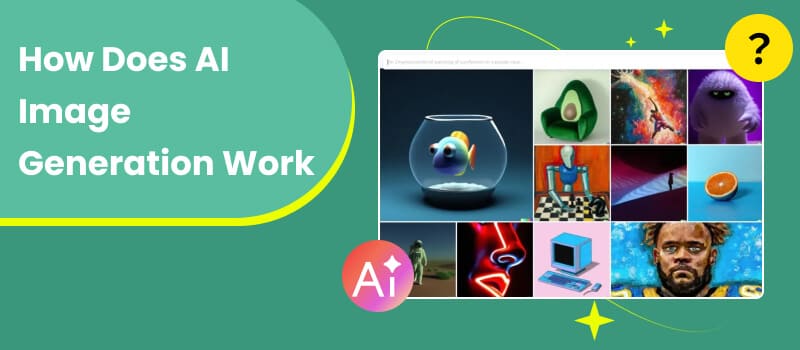
Artificial intelligence has dramatically changed the way visual content is created. In the past, producing a high-quality image required artistic skill, design software, and significant time. Today, AI image generation allows users to create complex visuals simply by typing a few words. This technology uses advanced machine learning models that analyze huge datasets of images and visual patterns. After learning how shapes, colors, textures, and objects appear in real images, the system can generate entirely new pictures that match a user’s description. The result is a powerful creative tool that can turn ideas into visuals in seconds. In this article, we will explore how does AI image generation work, what technologies make it possible, and what types of AI image generators are commonly used today.
Contents:
Part 1. What Is AI Image Generation?
AI image generation refers to the process of creating images using artificial intelligence algorithms instead of traditional drawing or photography. The system analyzes patterns from existing image datasets and learns how visual elements combine to form realistic pictures.When a user enters a prompt such as “a futuristic city at night with glowing skyscrapers,” the AI model interprets the request and create AI generated images that matches the description. The image does not come from a database of existing pictures; instead, it is synthesized pixel by pixel based on what the AI has learned during training. The core goal of AI image generation is to simulate human creativity through data-driven learning. These systems study millions—or even billions—of images to understand visual relationships such as:
- • How objects appear in different environments
- • How lighting and shadows affect colors
- • How textures and shapes combine to form realistic scenes
By learning these patterns, the AI model can create entirely new visuals that did not previously exist.
Today, AI-generated images are used in many areas, including:
- • Digital marketing graphics
- • Concept art for films and games
- • Social media content
- • Product mockups
- • Website illustrations
As AI models continue to improve, the quality and realism of generated images have become increasingly impressive.
Part 2. How AI Image Generation Works
How does ai generate images? Although AI image generators appear simple to use, the underlying technology involves several complex steps. The process generally includes prompt interpretation, image synthesis, and refinement.
1. Training the AI Model
Before an AI system can generate images, it must first be trained on large image datasets. These datasets contain millions of images along with descriptive text captions. During training, the AI model learns relationships between words and visual features. For example, it learns what “mountain,” “sunset,” or “golden lighting” typically look like in images. The training process allows the system to understand how visual concepts connect with language.
2. Understanding the User Prompt
When a user enters a prompt, natural language processing models analyze the text to determine what visual elements should appear in the image.
The system identifies key elements such as:
- • Objects (dog, building, ocean)
- • Style (realistic, cartoon, painting)
- • Lighting conditions
- • Perspective and composition
This step essentially converts language into visual instructions.
3. Image Generation Using Diffusion Models
Just like Canva image enhancer, many modern AI image generators rely on diffusion models. These models work by gradually transforming random noise into a coherent image.
The process works like this:
- • The model starts with a random pattern of pixels.
- • It repeatedly adjusts the pixels while referencing the text prompt.
- • With each step, the noise becomes more structured.
- • Eventually, the pattern turns into a recognizable image.
Diffusion models are powerful because they allow the AI to generate highly detailed and realistic images.
4. Refinement and Enhancement
After the base image is created, additional processes may refine it. These improvements can include:
- • Increasing resolution
- • Enhancing colors and contrast
- • Sharpening details
Image enhancement tools such as Picwand AI Photo Editor can further improve clarity, upscale resolution, and optimize visual quality for different platforms.
5. Final Image Output
Finally, the generated image is rendered and delivered to the user. Most AI tools allow users to regenerate variations, adjust prompts, or modify styles to achieve the desired result.
Part 3. Types of AI Image Generation
After knowing how do AI image generators work, next you need to know that AI image generation technologies can be categorized based on how users interact with them and what type of input they require.
1. Text-to-Image Generation
Text-to-image systems create visuals based on written descriptions. This is one of the most popular forms of AI image generation.
Users simply type a prompt such as:
“a fantasy castle floating above the clouds”
The premise is that users need to know how to write AI prompts. The AI interprets the text and generates an image representing the scene. These systems are widely used by artists, marketers, and content creators.
2. Image-to-Image Generation
Image-to-image generation transforms existing images into new styles or variations. Instead of creating a picture from scratch, the AI modifies the original input.
Examples include:
- • Converting photos into paintings
- • Changing artistic styles
- • Adding visual effects
This technique is useful for designers who want to experiment with creative variations quickly.
3. Style Transfer
Style transfer applies the artistic style of one image to another image. For instance, a photograph can be transformed to resemble a watercolor painting or a classic oil painting.
This technology allows users to explore artistic effects without manual editing.
4. AI Image Editing and Enhancement
Some AI tools focus on improving existing images rather than generating new ones. They can automatically remove noise, enhance details, and upscale low-resolution images.
Tools such as Picwand AI Photo Editor provide AI-powered enhancement features that improve image clarity and visual quality, making them suitable for websites, presentations, and digital marketing materials.
Part 4. FAQs about How Does AI Image Generation Work
Are AI-generated images original?
AI-generated images are typically considered new creations because they are synthesized from learned patterns rather than copied from specific images.
How long does AI image generation take?
The process usually takes only a few seconds. However, higher-resolution images or complex prompts may require slightly longer processing times.
Can AI improve existing photos?
Yes. Many AI tools can enhance and upscale images. Platforms such as Picwand AI Photo Editor provide AI-based enhancement features that improve sharpness, resolution, and overall image quality.
Conclusion
That’s all about the content: how does AI image generation work. AI image generation represents one of the most exciting developments in digital creativity. By combining machine learning, computer vision, and natural language processing, AI systems can transform simple text prompts into detailed images within seconds.
This technology is changing the way people approach visual content creation. Designers can quickly test creative ideas, businesses can generate marketing graphics efficiently, and individuals can produce professional-looking visuals without advanced design skills.
Although AI image generation still faces challenges—such as occasional inconsistencies and ethical concerns—the technology continues to evolve rapidly. As models become more advanced, AI-generated images will likely become even more realistic, customizable, and accessible.
For creators looking to improve or refine AI-generated visuals, enhancement tools like Picwand AI Photo Editor can help optimize image quality and prepare graphics for professional use.
AI Picwand - Anyone Can be A Magician
Get Started for Free