Basic PlanVIP PlanVIP ExpiredPurchased credits are valid for life but require an active VIP subscription to use
0Credit(s)
You can use credits to access all the AI tools on Picwand, such as the AI Image Upscaler, AI Age Filter, AI Video Enhancer, AI Video Upscaler, AI Video Effects, and more.
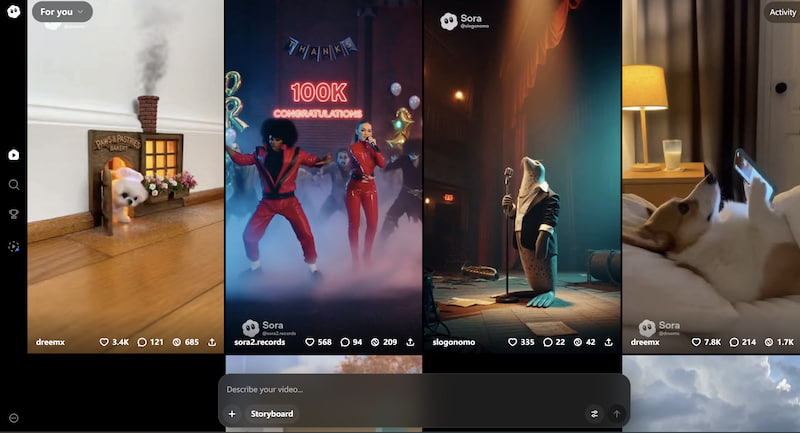
AI video generation has moved from experimental labs to mainstream creative workflows. With the launch of Sora, creators, marketers, and filmmakers gained a glimpse of what text-to-video AI can truly achieve. Now, many users are searching for one specific thing: how to access Sora 2.
If you’ve tried looking for it and felt confused by limited availability, regional rollout, or invitation systems, you’re not alone. In this guide, you’ll learn exactly what Sora 2 is, who can access it, and how to increase your chances of getting in. We’ll also introduce a powerful alternative if Sora 2 isn’t available in your region yet.
Sora 2 refers to the updated generation of the Sora text-to-video model developed by OpenAI. It builds upon the original Sora system, which was introduced as a groundbreaking AI capable of generating realistic videos from simple text prompts.
Unlike earlier AI video tools that produced short, low-resolution clips, Sora models are designed to:
• Generate longer video sequences
• Maintain visual consistency across frames
• Understand complex prompts and scene transitions
• Simulate camera motion and cinematic effects
Access to Sora technology is currently managed through the ChatGPT ecosystem and controlled release programs. Availability may vary depending on region, subscription level, and platform updates. Because Sora remains under gradual rollout, users often encounter confusion about how to actually access Sora 2. The following section breaks it down clearly.
Part 2. How to Access Sora 2 Step by Step
Step 1: Create or Log In to Your OpenAI / ChatGPT Account
• To access Sora 2, you must first have an active account with OpenAI.
• Visit the official ChatGPT website.
• Sign up using your email, Google account, or Apple ID.
• Verify your account.
• Log in to your dashboard.
In most cases, Sora features are linked to premium subscription tiers. If video generation is not visible in your interface, you may need to upgrade your plan when it becomes available in your region.
Step 2: Download the Official App
Sora access may be integrated into the official ChatGPT mobile or desktop app.
To ensure eligibility:
• Download the official app from the App Store or Google Play.
• Update to the latest version.
• Log in using your registered account.
How to access new Sora? Early access features are often rolled out through app updates before becoming fully available on the web version.
Step 3: Access via the Web
If you prefer desktop access:
• Open the ChatGPT website in your browser.
• Log in to your account.
• Check for a “Video” or “Sora” option in the tools menu.
If the automatic smooth skin app is enabled for your account, you’ll see an interface allowing you to enter text prompts and generate AI videos directly.
Step 4: Obtain Access
How to access Sora 2 for free? Since Sora 2 is not universally available yet, access generally falls into three categories:
Option 1 — Direct Access (Available in Some Regions)
In selected countries, Sora tools may be immediately available to eligible subscribers. This typically requires:
• A supported region
• An active paid subscription
• Compliance with usage policies
If available, the feature appears automatically in your dashboard.
Option 2 — Wait for Invitation / Rollout
OpenAI often releases advanced AI tools gradually. If Sora 2 is not visible:
• Join official waitlists if available
• Monitor platform announcements
• Ensure your subscription is active
Rollouts may occur in waves based on infrastructure readiness and safety testing.
Option 3 — Use an Invitation Code
In some early phases, invitation codes are distributed to:
• Selected creators
• Enterprise partners
• Beta testers
If you receive a code, redeem it in your account settings to unlock Sora access.
Step 5: Start Using Sora 2 to Generate AI Videos
Once access is granted:
• Navigate to the Sora interface.
• Enter a detailed text prompt.
• Adjust settings (duration, style, resolution).
• Click Generate.
• Download or share your AI video.
For best results, use clear, cinematic descriptions such as:
• “A slow drone shot over a futuristic city at sunset.”
• “A close-up of raindrops hitting a neon-lit street.”
The more descriptive your prompt, the better the output. Questions on is Sora 2 on Android: Sora 2 is not available as a standalone Android app. Access to Sora features typically happens through the official ChatGPT app or web version, depending on regional availability and account eligibility. Android users can download the ChatGPT app from Google Play and check whether Sora functionality is enabled in their account.
Part 3. Best Sora 2 Alternatives
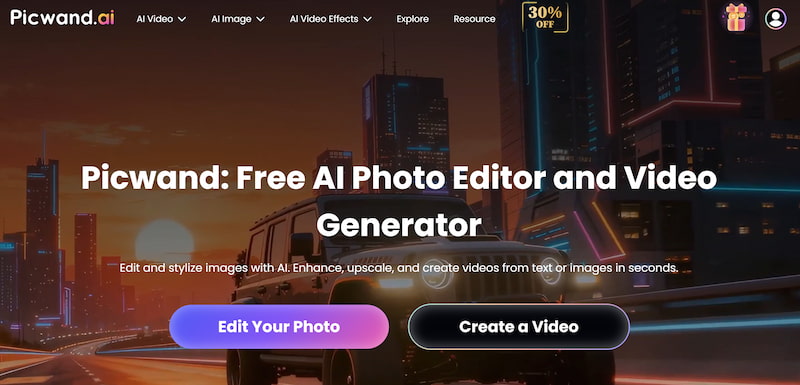
If you cannot access Sora 2 due to regional restrictions or rollout delays, Picwand AI Text-to-Video Generator provides an immediate and user-friendly alternative.
Features
Picwand offers:
• AI video generation without complicated waitlists
• Image-to-video capabilities
• Fast rendering speed
• Beginner-friendly interface
• Web-based access (no heavy downloads required)
• High compatibility across devices
Unlike limited beta tools, Picwand focuses on accessibility and ease of use, supporting AI video skin retouching. You can start generating AI content within minutes instead of waiting for an invitation. Additionally, Picwand emphasizes stable performance and predictable output quality, making it suitable for marketers, content creators, and educators.
While Sora 2 represents cutting-edge research technology, access is currently controlled and region-dependent. Picwand, on the other hand, offers practical, immediate usability.
• If your priority is experimentation with next-generation AI, Sora 2 is worth pursuing.
• If your priority is reliable content production today, Picwand is a smart choice.
Part 4. FAQs about How to Access Sora 2
Why can’t I see Sora 2 in my account?
Possible reasons include regional restrictions, phased rollout, or subscription tier limitations.
How long does it take to get access?
There is no fixed timeline. Some users gain immediate access, while others must wait for official release updates.
Can Sora 2 be used offline?
No. Sora 2 requires an active internet connection because it runs on cloud-based AI servers.
Conclusion
Understanding how to access Sora 2 requires clarity about accounts, subscriptions, regional rollout, and invitation systems. While the technology behind Sora continues to evolve under OpenAI, public access remains selective.
If you qualify for direct access, simply ensure your account and app are updated. If not, joining the waitlist or monitoring announcements is your best option. For users who want immediate AI video generation without uncertainty, Picwand AI Text-to-Video Generator provides a practical and accessible alternative. Whether you’re a marketer, educator, or creative professional, the right tool ultimately depends on your timeline and workflow needs. By following the steps outlined above, you’ll know exactly how to access Sora 2 — or choose a powerful alternative that keeps your creative projects moving forward.