Basic PlanVIP PlanVIP ExpiredPurchased credits are valid for life but require an active VIP subscription to use
0Credit(s)
You can use credits to access all the AI tools on Picwand, such as the AI Image Upscaler, AI Age Filter, AI Video Enhancer, AI Video Upscaler, AI Video Effects, and more.
• Best for Original Scenes: Picwand Text-to-Video (Uses Neural Motion Synthesis for 4K rendering).
• Best for Personal Photos: Picwand AI Kissing Generator (One-click animation for 1 or 2 reference images via Video Effects).
• Performance Note: In our tests, generating a 10-second 4K cinematic scene with Text-to-Video took 85 seconds. Meanwhile, the Picwand AI Kissing Generator (Video Effects) produced high-quality 4-second clips in under 40 seconds.
Are you someone who explores imaginative situations that don't exist in real life? Well, simulating what-if romantic scenarios for entertainment can be a fun way to visualize alternate stories and creative moments. Fortunately, making AI kiss videos is now easier than ever. With the right tools, you can experiment with different ideas, moods, and relationship dynamics in a safe and controlled digital space. In this post, you'll learn two simple ways on how to make a kiss video using AI tools. One through a text-to-video method and the other using AI video effects. We will help you understand how each method works so you can choose the best approach for creating AI-generated kissing videos.
If you're wondering how to make AI kissing videos, the key is the idea behind the scene. A well-crafted prompt can turn a simple concept into a realistic kissing video. In this section, you'll find 20 creative ideas and prompts designed to help you explore different moods and styles. But before that, learn how to write AI prompts effectively here.
Romantic:
• A slow-motion close-up of a couple sharing a tender kiss in a field of sunflowers during sunset, warm golden light catching their hair.
• A romantic couple kissing under the soft glow of a streetlamp with the Eiffel Tower blurred in the rainy background, cinematic bokeh.
Casual:
• A young couple sitting at an outdoor cafe, leaning over their lattes to share a quick, sweet kiss while laughing.
• A couple in pajamas making breakfast together; one pulls the other in for a casual morning kiss while holding a mug.
• A simple, high-definition shot of two students sitting on a park bench, sharing a shy and sweet first-date kiss.
Dramatic:
• Two lovers running toward each other on a foggy bridge, meeting in the center for an intense, sweeping cinematic kiss.
• A cinematic shot of a couple kissing in the middle of a busy, frozen-in-time battlefield or protest, highlighting love against all odds.
Fantasy/Sci-Fi:
• Two celestial beings made of stardust are kissing in deep space, nebulae and galaxies swirling around them as they touch.
• A mermaid and a human sharing a magical kiss underwater, bubbles rising slowly, and sunlight filtering through the surface.
• A prince and princess kissing on a high balcony under a sky filled with two moons and flying dragons in the far distance.
Part 2. How to Make AI Kiss Through Text Prompts
Picwand AI Text-to-Video Generator is a leading generative AI platform for creating AI kissing videos. It enables you to input scene descriptions, which the AI then renders into high-quality animation. With a generous 1,000-character limit, you can define every detail with precision. The tool also offers formatting flexibility with multiple aspect ratios, including 16:9, 9:16, 4:3, 3:4, 21:9, and 1:1. In terms of quality, you can export your video in 720p up to 4K resolution. You can also control the video length to generate clips between 5 and 10 seconds.
Why Choose Picwand AI Text-to-Video Generation
• Converts simple text prompts into AI-generated videos.
• High-quality export options: 720p, 1080p, 2K, to 4K resolution.
• Multiple aspect ratio options including 16:9, 9:16, 4:3, 3:4, 21:9, and 1:1.
• Generates short video clips with flexible duration settings, up to 10 seconds.
• Supports detailed prompt input to control characters, actions, environment, and mood.
Here's how to kiss in a video through text prompts:
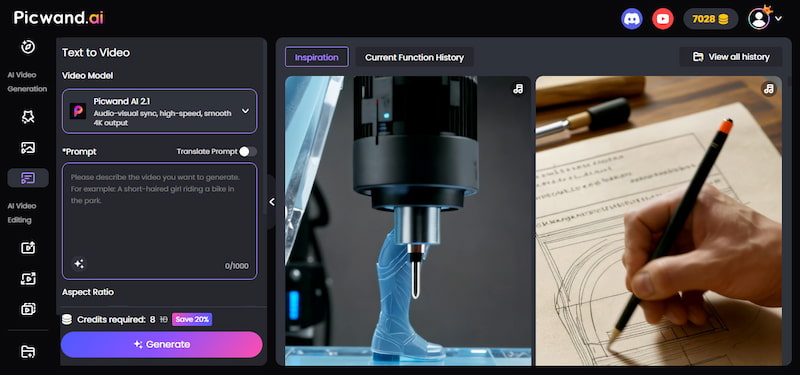
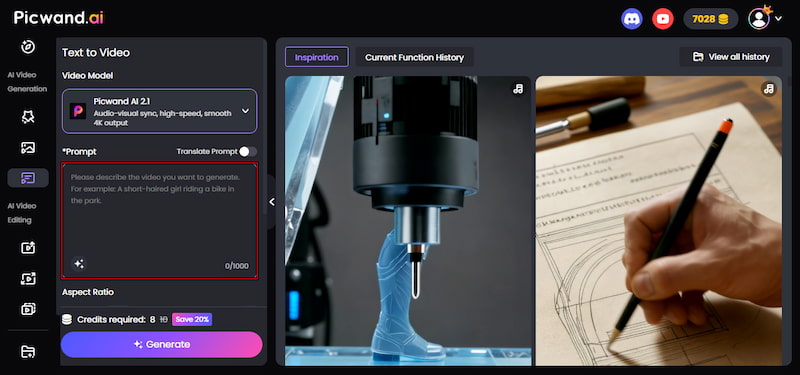
Step 1. Navigate to the official Picwand AI Text-to-Video Generator website through the provided link. In the Prompt box, paste your AI prompt or write one from scratch. The more detailed your description, the better the result.
For this example, we used the prompt:
A mermaid and a human sharing a magical kiss underwater, bubbles rising slowly, and sunlight filtering through the surface.
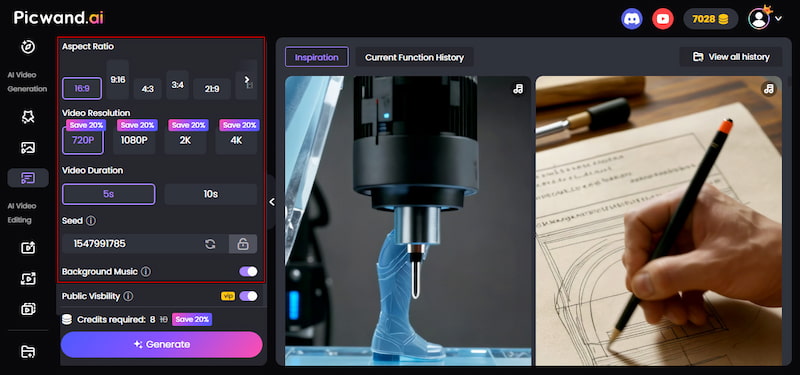
Step 2. After entering your prompt, scroll down to customize your video output. Select your preferred aspect ratio depending on where you plan to use the video. Then, choose your desired resolution and set the video duration.
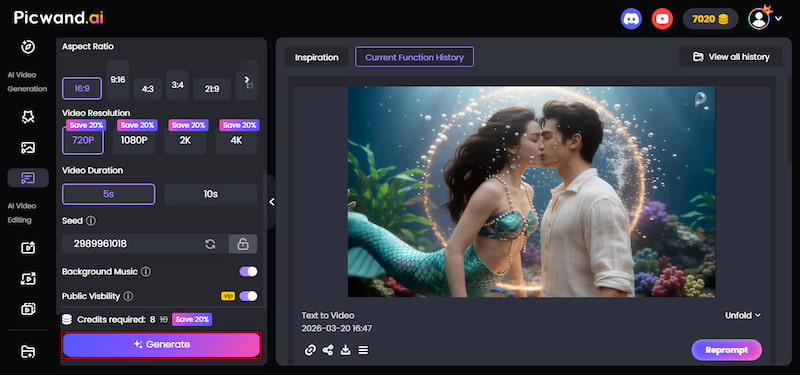
Step 3. Once everything is ready, click the Generate button to process your prompt. The process usually takes about 1-2 minutes and may vary based on the AI model, prompt complexity, and resolution. If satisfied, click Download to save the kiss video on your system.
Picwand AI Text-to-Video Generator offers a creative way to generate AI-kissing videos directly from text prompts. It allows you to quickly turn detailed descriptions into short, cinematic scenes with realistic motion, lighting, and emotion.
Part 3. How to Make an AI Kiss Via Video Effects
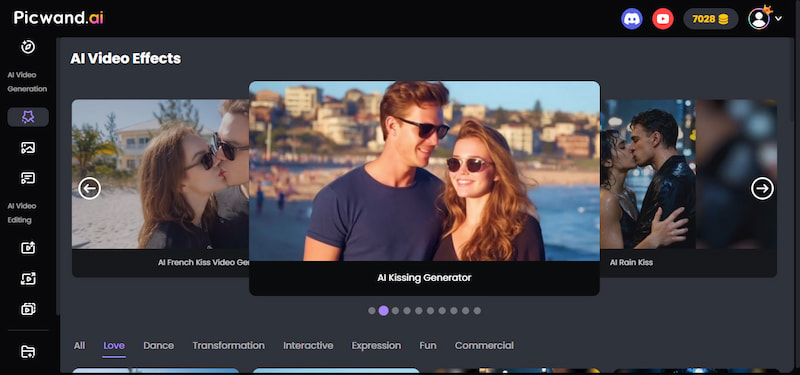
Picwand AI Video Effects is a creative tool that lets you make 2 photos kiss using a wide range of built-in effects. It lets you choose from different kissing styles and have the AI handle the animation. It offers a variety of classic kiss effects, including French kiss, rain kiss, sunset beach kiss, kiss from dawn till dusk, and romantic garden kiss. For more creative results, it also includes unique effects like firefly forest kiss, kiss me more, firework kiss, aurora kiss, and winter streetlight nose kiss. Within seconds, you'll get a polished kissing video that looks lively.
Why Choose Picwand AI Video Effects:
• Generates short-form videos up to 5 seconds long.
• Offers a wide range of AI kiss video effects for instantly creating scenes.
• Allows adding background music to enhance mood and emotional impact.
• Supports video export in multiple resolutions, including 720p, 1080p, 2K, and 4K.
• Includes popular kiss styles such as French kiss, rain kiss, sunset beach kiss, etc.
Here's how to make a kiss video via video effects:
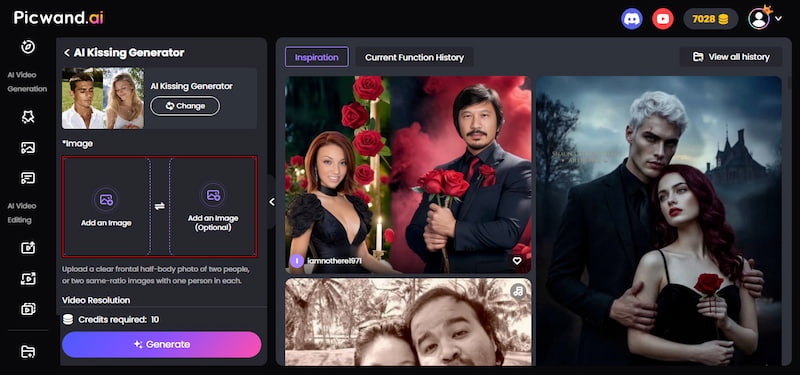
Step 1. Access the official Picwand AI Kissing Generator (Video Effects) site via the provided link. On the homepage, click Add an Image to upload the first photo. You can also click Add an Image (Optional) to upload a second reference image for a more accurate animation. After each upload, choose your preferred aspect ratio based on where you plan to use the video.
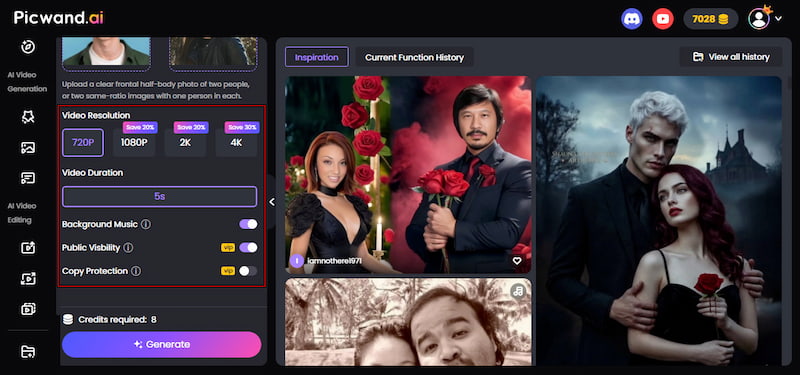
Step 2. Next, select your desired video resolution, ranging from 720p to 4K. Then set the video length to up to 5 seconds for AI kiss effects. Additionally, you can toggle Background Music to add a more emotional and cinematic feel to your AI kissing video.
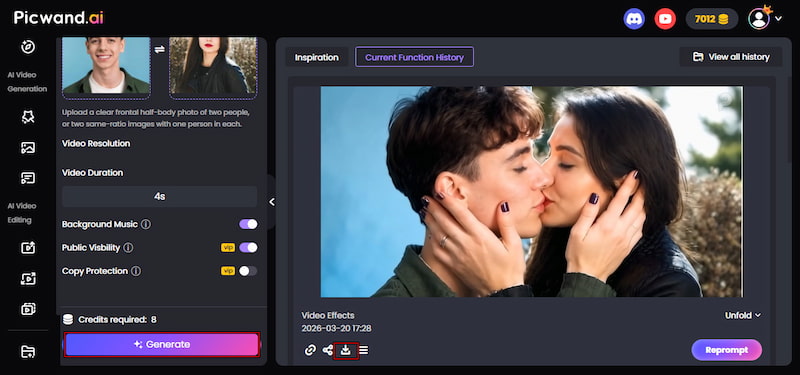
Step 3. Once all settings are ready, click Generate and wait for the AI to process your images. After processing, preview the output to check if the kissing animation looks natural. If you are satisfied with the result, click Download to save your final AI-generated kissing video.
Picwand AI Kissing Generator (Video Effects) offers an effortless way to create engaging kissing videos. With a variety of kiss effects, you can customize the mood and style of every creation. These videos are smooth, realistic, and perfectly optimized for sharing on social media. In addition to the kiss effect, you can also access the Age a Photo effect in Picwand AI Video Effects.
Part 4. FAQs about Making a Kiss Video
Q: Is making AI kiss videos legal?
A: Making AI kiss videos is legal as long as the content is original and does not violate laws or platform rules. If you are using your own images or properly licensed materials, then AI-generated videos are treated like any other form of digital creative work.
Q: Can you get sued for making AI kiss videos?
A: Yes, you can get sued if you use someone else's image, likeness, or personal photos without permission. In particular, when you use it for public sharing or commercial use. It becomes a legal issue related to privacy rights, consent, and image misuse.
Q: How can you protect your video from being copied?
A: You can protect your AI-generated videos by enabling the Copy Protection feature in tools like Picwand AI Text-to-Video Generation or Picwand AI Kissing Generator (VIP feature). It helps prevent unauthorized downloading, reuse, or redistribution of your content.
Conclusion
Learning how to make a kiss video is now easier with AI tools. Whether you use a text-to-video approach or AI video effects, both methods let you quickly create expressive kissing videos. With tools like Picwand AI Text-to-Video Generator and Picwand AI Kissing Generator (Video Effects), you can either build scenes from detailed prompts or instantly animate photos with ready-made kiss effects. Both options make the process fast, beginner-friendly, and visually engaging.
Disclaimer: Always use these tools responsibly. Create and share AI-generated content respectfully, using only images for which you have consent. Treat these videos as simulated experiences, not real interactions.