How to Make AI Videos: A Beginner's Guide

In the past, creating a video meant hiring a camera team, writing a full script, and spending hours in editing software. How to make AI videos is a question that is hard to answer. In 2026, all it takes is one sentence to produce a completed vertical clip in a matter of minutes. By 2033, the market for AI video generators is expected to have grown from an estimated $788.5 million in 2025 to $3.44 billion.
Because Picwand includes text-to-video, image-to-video, and reference-based creation, this tutorial covers the entire process using Picwand as the demo tool. You will discover two paths: a manual prompt approach for artists who want more control, and a Story to Video path that turns a single line into a full video.
Contents:
1. Quick Answer: How to Make an AI Video in 3 Minutes
You only need three things to make an AI video: an AI video tool, an idea, and one sentence.
Get free credits for your account by registering with Picwand. Then launch Story to Video, type one line, and let the AI create a narrative, storyboard, and video based on that concept. You don't have to learn complex prompts or prepare an entire script beforehand.
- • Select a tool: Start with an AI video generator that allows you to try its workflow for free.
- • Type one sentence: Picwand’s text-to-video can develop a brief concept into a well-organized tale and storyboard.
- • Enhance and export: Review the scenes, improve the finished footage if necessary, choose the right vertical format, and export.
[ANCHOR LINK → #Step by Step] Jump to the Step-by-Step
For example, type:
“An orange cat waits outside a small coffee shop on a rainy evening for its owner to return.”
You do not need to turn that sentence into a complicated prompt first. Picwand's workflow takes a simple idea, develops the narrative, generates scene-level visuals, and produces a final video. The storyboard can also be edited before final rendering.
2. What You Need Before You Start
You do not need a camera, footage, editing software, or a script. You need one of three inputs and a tool that can work with it.
Choose your input type
| Input | What it means | Best for |
| Text or idea | A sentence, paragraph, or rough concept | Faceless channels, storytelling, explainers |
| Image | A product photo, portrait, or illustration | Ecommerce ads, product demos, photo animation |
| Reference video | An existing clip to clone or adapt | Trend replication, style matching, motion transfer |
Pick a tool that fits beginners
How to make AI video? First, your tool should meet four criteria: free credits to start, no editing skills required, vertical-format support, and commercial-use permission. Picwand meets all four — it provides free credits for new users (10 via the mobile app), generates video from text or images with no editing experience needed, lets you select a 9:16 aspect ratio for vertical output, and permits commercial use with ad templates for major platforms
3. Step-by-Step: Make Your First AI Video
How to make an AI video?
Actually, AI video production may be approached in two ways.
The first option is Route A, which involves outlining the concept and letting AI story extenders handle the first stages of production.
In Route B, write the script and prompts yourself, which is the control route. Below, we will teach you to make AI videos step by step.
Both of them can be achieved in Picwand
Route A: One-Sentence Video with Story to Video
This is the route I would recommend if you have never made an AI video before, because you don’t need to learn how to choose an AI model.
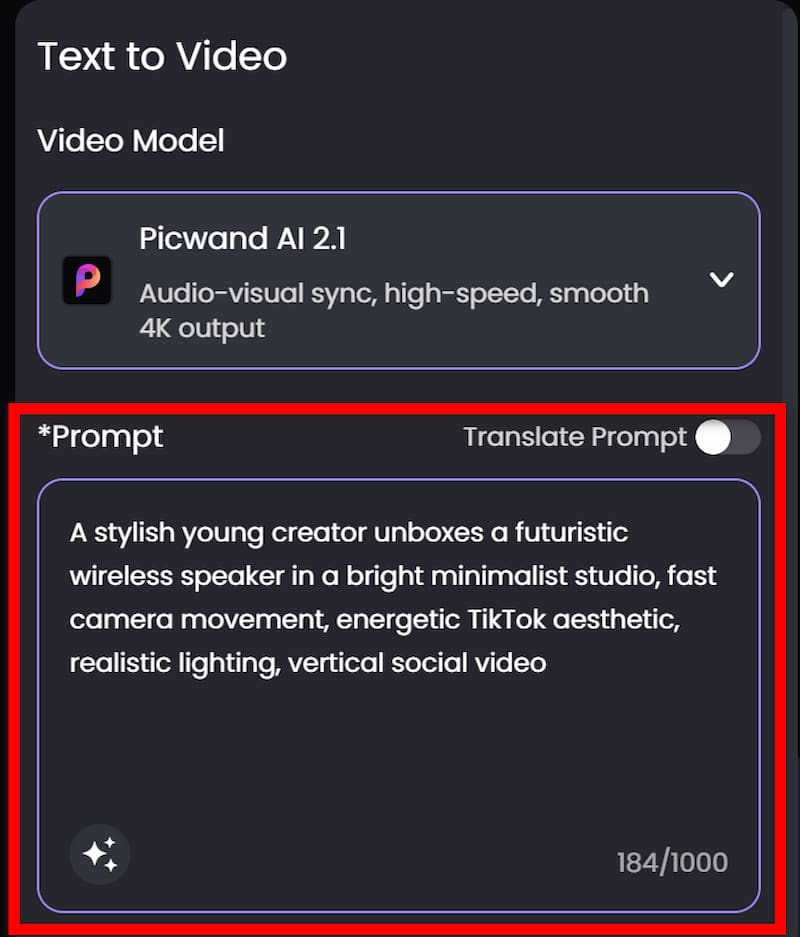
Step 1. Enter a prompt
Choose Text-to-Video, Image-to-Video, or other functions in Picwand as you like. If you only have an idea, start with text-to-video and enter a prompt.
For example:
“A stylish young creator unboxes a futuristic wireless speaker in a bright minimalist studio, fast camera movement, energetic YouTube aesthetic, realistic lighting, vertical social video.”
Step 2. Adjust parameters
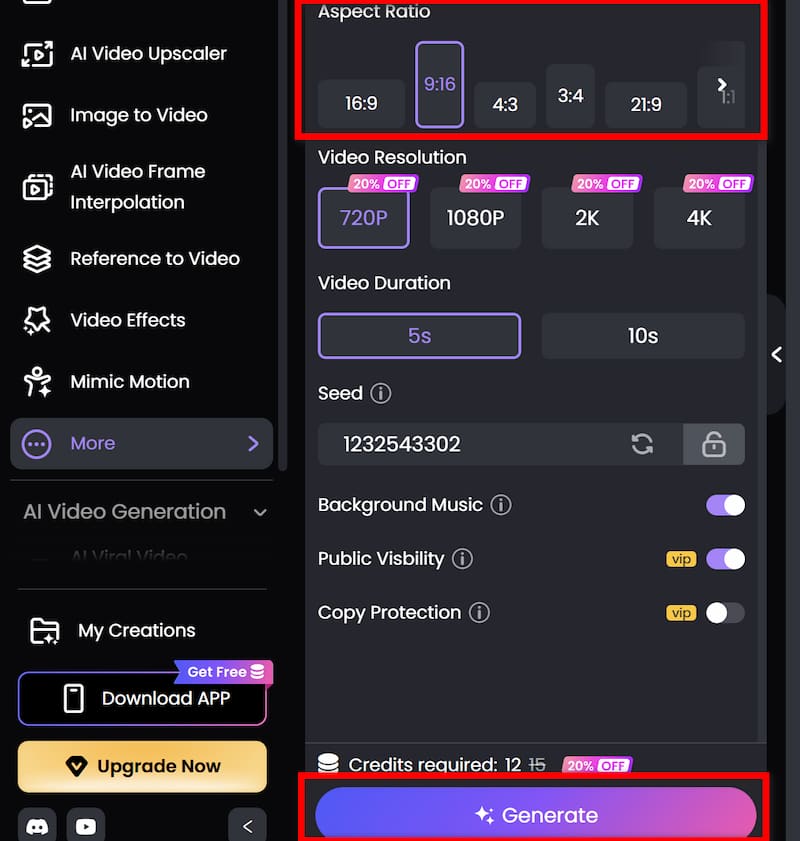
Use a 9:16 vertical composition and choose other visual effects you need. After finishing, click on Generate.
Step 3. Download
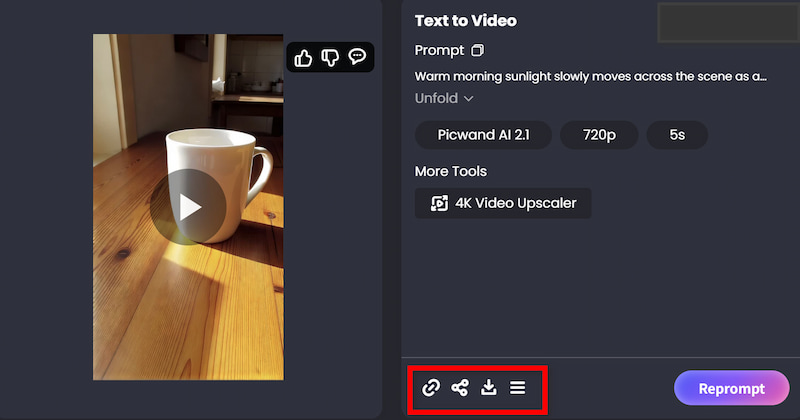
If you are satisfied with the final output, download the finished video and share it to other social media platforms.
Route B: Manual Prompt Workflow
Those who want more control should choose route B. If you want to know how to make AI product videos, Picwand AI Ad Generator may help you.
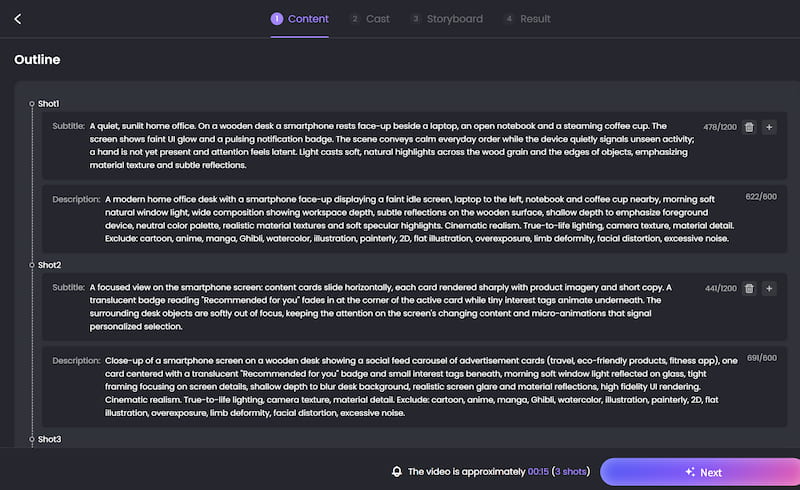
Step 1. Enter a prompt
Type in a prompt explaining the type of video you want, and you will get an outline designed for you. You can manually edit the script to fit your requirements.
For example: A modern digital marketing scene showing a smartphone displaying personalized advertisements based on user interests.
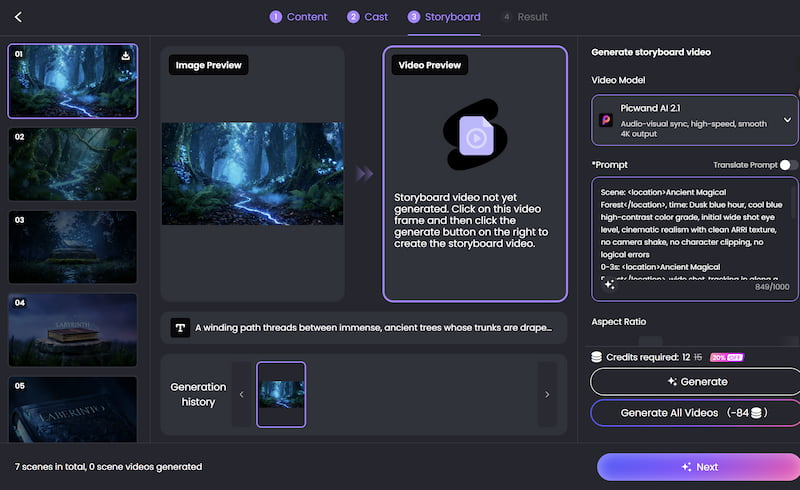
Step 2. Pick a style and produce
Choose a visual style that suits your genre and demographic, then start producing.
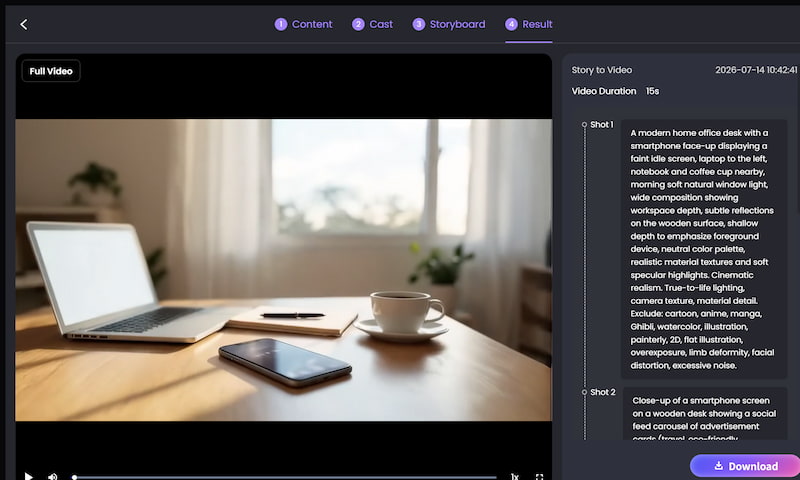
Step 3. Confirm and download
Choose your design and make any final tweaks. Then export the ad in high resolution for social media, websites, online bookshops, email newsletters, or print materials. For more information, check story extenders.
Route A vs Route B: Which should you use?
| Factor | Route A (Story to Video) | Route B (Manual Prompts) |
| Script writing | AI does it automatically | You write each scene prompt |
| Creative control | Edit storyboard before rendering | Full control over every prompt |
| Best for | Beginners, faceless channels | Experienced creators, branded content |
4. Four Types of AI Videos You Can Make
1. Product videos for e-commerce
Product picture → picture-to-Video → Motion prompt → Improvement → export is the workflow.
Add a picture of the product and describe how you want it displayed.
"Luxury skincare bottle on a marble surface, soft sunlight, slow camera push-in, subtle reflections, premium beauty commercial, vertical 9:16" is an example.
Picwand's image-to-video approach especially supports product showcases and social clips. As a result, a still product image becomes a brief advertisement.
Ideal for: product sites, social media advertisements, TikTok Shop, and e-commerce companies.
2. Entertainment and meme-style videos
Workflow: Reference video → Video Cloner → custom instruction → generated video.
Instead of copying someone else's video directly, use a reference to understand the structure you want.
For example: “Use the fast camera movement and comedic timing of the reference, but replace the character with an orange cat in a coffee shop.”
Picwand's Video Cloner replicates elements such as camera trajectories, motion logic, pacing, transitions, and visual style while generating a new result.
Important: Only use reference material you have permission to use or that you are legally entitled to process.
Result: A new video inspired by a recognizable format rather than a direct repost.
3. Brand promotional videos
Workflow: Text-to-video → branded visual concept → enhancement → vertical export.
Try: “Modern sustainable fashion brand, minimalist studio, recycled fabric textures, soft daylight, premium editorial photography, slow camera movement, clean neutral aesthetic, vertical 9:16.”
Picwand also positions its AI video and ad-generation tools for product campaigns across platforms such as TikTok, Instagram Reels, and YouTube Shorts.
Result: A short visual identity piece that can be adapted for social campaigns.
5. 10 Copy-Paste AI Video Prompt Templates
How to create AI videos? The easiest way to improve prompting is to stop at an empty box.
1. Promotion of products
"A high-end [product] on a spotless [surface], dramatic soft lighting, slow cinematic camera push-in, realistic product texture, subtle reflections, luxury commercial style, smooth motion, vertical 9:16."
Input: Text-to-video or image-to-video
Ten to fifteen seconds is the ideal duration.
Style: refined, cinematic, and organized
2. Cinematic scenery
"A stunning [location] at sunrise, with soft mist drifting across the landscape, warm golden light, slow aerial camera movement, cinematic realism, atmospheric depth, highly detailed, vertical 9:16."
Input from text to video
Suggested time: 8–15 seconds
Style: cinematic, realistic, and ambient
3. Anime Scene
"Anime scene of a young [character] walking in a futuristic city at night with glowing neon signs, light rain, dramatic reflections, expressive anime style, dynamic camera movement, detailed background, vertical 9:16."
Video to text input
Suggested time: 10-20 seconds
Style: vibrant, neon, anime
4. The beginning of a faceless tale
"Open with an intriguing picture of [topic], stimulate interest straight away, utilize theatrical lighting, move the camera slowly, create an emotional mood, employ a composition that is storytelling-focused, and use vertical 9:16. This is the most effective AI video tutorial for beginners.
Text-to-video or story-to-video input
Estimated time: 15-30 seconds
Style: cinematic and suspenseful
5. Explainer Scene
"Create a clear visual explanation of [topic] that is readable on a smartphone, vertical 9:16, has simple scene transitions, clean graphics, and an easy-to-follow composition in a professional educational style."
Text-to-video input
Recommended duration: 20–40 seconds
Style: tidy and instructive
6. A video on food
"Cinematic food photography, warm restaurant lighting, delicious texture, slow camera movement across the food, steam rising naturally, close-up of freshly prepared [dish], vertical 9:16."
Input: Text-to-video or image-to-video
Recommended duration: 8–15 seconds
Style: Warm, realistic food photography
7. Travel Reel
“A traveler explores [destination], moving from a quiet street to a scenic viewpoint, natural sunlight, handheld documentary feeling, smooth transitions, immersive travel-film style, vertical 9:16.”
Input: Text-to-video
Suggested length: 15–30 seconds
Style: Travel, documentary, immersive
8. Fashion clip
“A fashion model wearing [outfit] walks through a minimalist modern location, editorial lighting, confident movement, slow tracking shot, premium fashion campaign aesthetic, vertical 9:16.”
Input: Text-to-video or image-to-video
Suggested length: 8–15 seconds
Style: Editorial, premium, minimalist
9. Viral-style product hook
“Start with an extreme close-up of [product], immediately reveal an unexpected feature, fast visual transition, energetic camera movement, bold social-media advertising style, vertical 9:16.”
Input: Image-to-video
Suggested length: 8–12 seconds
Style: Fast, energetic, social-first
10. Reference-video recreation
“Use the reference as inspiration for camera movement and pacing. Create a new scene featuring [subject] performing [action]; keep the visual rhythm but change the characters, setting, and creative details; original result, vertical 9:16.”
Input: Reference-to-video / Video Cloner
Suggested length: 10–15 seconds
Style: Match the reference structure without duplicating its content
6. Common Mistakes to Avoid
Since we know how to make AI videos, here are some common mistakes to avoid.
Mistake 1: Creating a prompt that is too brief
"A woman strolling." There is too much room for interpretation in it.
Try "A young woman strolls through a rainy Tokyo street at night; slow tracking shot, realistic style, cinematic lighting, neon reflections on wet pavement, vertical 9:16."
You are giving the model something to work with.
Mistake 2: Forgetting the aspect ratio
If your destination is TikTok, Shorts, or Reels, specify vertical 9:16 where the generation interface allows it. Do not create a landscape video and assume the crop will always work.
Mistake 3: Publishing the first generation automatically
AI video generation is probabilistic.
The first result can contain:
- • Strange hands
- • Inconsistent faces
- • Unwanted objects
- • Awkward movement
- • Incorrect camera direction
Generate alternatives when the first result misses the brief. Think of generation as selection, not just creation.
Mistake 4: Skipping enhancement
A video can be technically done and still seem undone. If the result is soft, noisy, unsteady or compressed, utilize an improvement pass before publishing. Picwand’s enhancer offers options for sharpening, denoising, stabilization, deblurring and upscaling.
Mistake 5: Disregarding commercial rights
“Made with AI” is not necessarily “safe for commercial use.”
Here, take a look:
- • Terms used by the AI tool
- • Stock footage license
- • Music licenses
- • Voice permissions
- • Rights to pictures and characters
- • Video rights reference
- • Brand property
You also don’t want to clone someone else’s image or voice without authorization.
7. Where to Post Your AI Video
Different platforms have different requirements, so export for the destination rather than resizing at the last second.
TikTok
After learning how to make AI videos for TikTok, you can then post them on the platform. The official TikTok advertising guidelines suggest a vertical 9:16 aspect ratio and a 5–60 second length for this ad style, with a preferred duration of 15 seconds. Treat the ad specification as a technical guide rather than a general guideline for each post, as platform behavior and suggestions may vary for organic videos.
YouTube Shorts
After learning how to make AI videos for YouTube, you can post them next. Under its current rules, YouTube categorizes square or vertical videos up to three minutes as Shorts.
That gives creators more room for:
- • Mini tutorials
- • Storytelling
- • Product demonstrations
- • Educational explainers
But a three-minute maximum does not mean every video should be three minutes.
Instagram Reels
For Reels, a vertical-first workflow is the safest choice for full-screen mobile viewing. Make a clean master file before creating platform-specific copies for captions, music, and UI-safe sections if you are releasing the same video on several devices.
Try: Make a video, publish it, monitor retention, pinpoint weak points, and then improve it.
AI aims to do more than just create more videos. It is to lower the cost of testing innovative concepts.
8. FAQs about How to Make AI Videos
Can I make AI videos for free?
Yes, you can start without paying for a subscription right away. Picwand currently offers free-credit opportunities through its rewards and app programs. Its Rewards Center lists profile- and app-related rewards, including 30 credits for downloading and logging into the app. Promotions can change, so check the current terms when you register.
Do I need to write a script to make AI videos?
No. That's one of the main advantages of Picwand's Story to Video workflow. You can start with a short idea, and the tool can develop it into a structured story, storyboard, and final video. If you want more creative control, you can still write your own script and prompts.
Can I make an AI video from just one sentence?
Yes. That is exactly the use case for a story-to-video workflow. For example: “A little astronaut discovers a hidden garden on Mars.” From there, the AI can develop the narrative and storyboard rather than requiring you to describe every shot manually. Picwand's Story to Video tool specifically supports simple ideas and rough concepts as inputs.
Do I need video editing skills to make AI videos?
Not for basic AI video generation. A tool such as Picwand can handle much of the generation workflow automatically. Its Story to Video system handles script development, scene breakdown, storyboard generation, and final rendering.
How long does it take to make an AI video?
A simple project can take only a few minutes from idea to first draft. But there is no universal generation time. Picwand's Video Enhancer notes that enhancement time depends on video size and resolution, with most videos processed in about three minutes, according to its current product page.
What's the best tool for making AI videos?
No single tool is best for every workflow. For a beginner who wants to start with one sentence, Picwand's Story to Video workflow is particularly straightforward because it combines idea development, storyboard generation, and video creation.
Can I utilize AI videos on YouTube and TikTok?
In general, yes, as long as you have the required permissions and the video complies with the platform's guidelines. In some cases, YouTube requires video providers to disclose realistic AI-generated or significantly AI-altered material. This includes content that makes a real person seem to say or do something they didn't, as well as realistic scenarios that never happened.
Can I use AI films to earn money?
Yes, but AI doesn't guarantee monetization. "Generate hundreds of random clips" is typically not the best business strategy. Additionally, YouTube's revenue standards prohibit ineligible content such as fake views and non-original Shorts.
Can I use Picwand for free?
Picwand offers free trials of its AI products through promotional incentives and credits. Its pricing page offers paid credit packages for those who want more generation capacity, while its current Rewards Center offers several credit-earning opportunities. Before deciding whether you need a subscription plan, create your first video using your free credits to test the workflow.
Conclusion
That’s all about How to Make AI Videos. The entire workflow is now yours. Create your first AI video in less than 12 minutes by using Story to Video after registering for Picwand and claiming your free credits. Utilize the aforementioned prompt templates, apply the AI Video Enhancer before publishing, and ensure that your export complies with platform requirements.
AI Picwand - Anyone Can be A Magician
Get Started for Free