Basic PlanVIP PlanVIP ExpiredPurchased credits are valid for life but require an active VIP subscription to use
0Credit(s)
You can use credits to access all the AI tools on Picwand, such as the AI Image Upscaler, AI Age Filter, AI Video Enhancer, AI Video Upscaler, AI Video Effects, and more.
AI image generation has rapidly evolved from an experimental creative tool into a practical solution for branding, marketing, and content production. Today, businesses, designers, and individual creators rely on AI image generators to produce visuals faster and at a lower cost than traditional design workflows. Among the many platforms available, Ideogram AI has gained particular attention for one standout capability: generating images with readable, accurate text. While most AI image generators still struggle with spelling errors, distorted lettering, or unreadable typography, Ideogram places text generation at the center of its design philosophy.
In this in-depth free Ideogram AI review, we explore what makes Ideogram unique, how it performs in real-world scenarios, and whether it is the right tool for designers, marketers, and everyday creators. We will also compare Ideogram with DALL·E 3 and introduce a flexible alternative—Picwand—for users who want to enhance, refine, or repurpose AI-generated images.
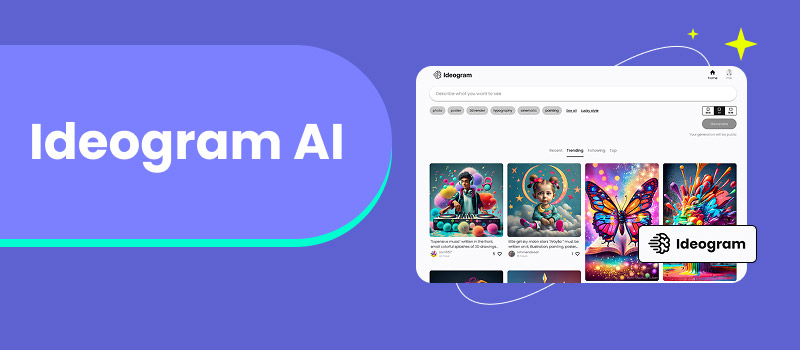
Ideogram AI is a text-to-image generation platform designed to produce visually appealing images with highly accurate text rendering. Unlike many AI tools that treat text as a secondary element, Ideogram places typography at the center of image creation.
The platform is especially popular for:
Posters and flyers
Logos and branding visuals
Social media graphics
Concept designs involving slogans or labels
Behind the scenes, Ideogram uses advanced diffusion-based AI models that are fine-tuned for text placement, alignment, spacing, and legibility. As a result, it often produces images where words are spelled correctly, evenly spaced, and visually integrated into the design—something that remains a major challenge for most AI image generators.
For users who have struggled with unreadable AI-generated text in the past, Ideogram offers a refreshingly practical solution.
Part 2. Key Features of Ideogram AI
Accurate Text Rendering
Ideogram’s strongest and most recognizable feature is its text accuracy. Headlines, brand names, and short slogans typically appear clean and correctly spelled, making Ideogram ideal for marketing and branding visuals.
Multiple Style Options
Users can generate images in a variety of visual styles, including:
Minimalist and clean layouts
Futuristic and tech-inspired designs
Illustrated and hand-drawn styles
Poster-style compositions
This flexibility allows Ideogram to serve both creative and commercial needs.
Prompt-Based Customization
Ideogram responds well to detailed prompts. Users can control mood, tone, layout, color schemes, and text placement simply by describing their vision in natural language.
Web-Based Interface
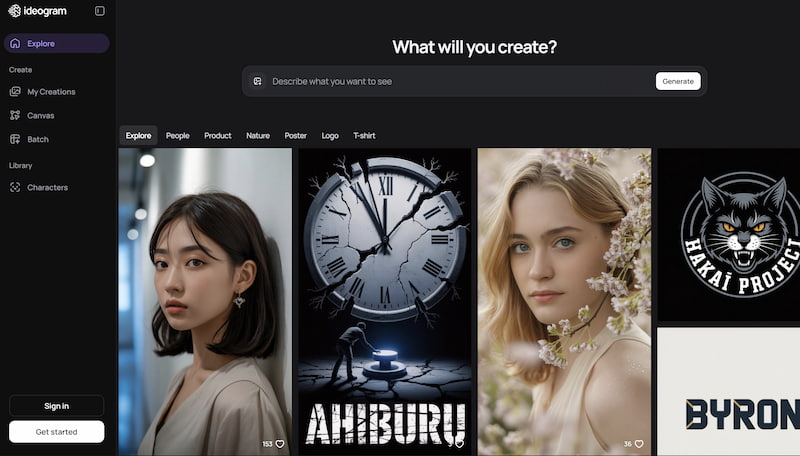
No installation is required. The platform works directly in the browser, offering a clean and beginner-friendly experience.
Fast Image Generation
Compared to many competitors, Ideogram delivers results quickly, even during peak usage times. This makes it suitable for rapid content creation and experimentation.
Part 3. How to Use Ideogram AI for Free
Using Ideogram AI is straightforward, even for first-time users, which supports AI improving image quality.
Step 1. Visit the Ideogram Website
Open the official Ideogram platform and sign in.
Step 2. Enter Your Prompt
Describe the image clearly, including the exact text you want displayed.
Step 3. Choose a Style
Select a visual style or allow the AI to interpret your prompt freely.
Step 4. Generate Images
Ideogram will produce multiple variations for you to review.
Step 5. Download or Refine
Download the image or adjust the prompt to refine the result.
This simple workflow makes Ideogram accessible to non-designers while still offering enough control for professionals.
Part 4. Image Generation Results
In practical testing, Ideogram performs best in scenarios where text clarity matters more than artistic complexity.
Posters and banners: Clean layouts with readable headlines
Logo concepts: Clear lettering, though refinement is often needed
Social media visuals: Balanced composition and legible text
However, Ideogram is less focused on photorealism or cinematic lighting. Its strengths lie in clarity and structure rather than artistic depth.
Part 5. Prompt Practice and Tips: How to Write Prompts
Writing effective prompts is key to getting high-quality results from Ideogram AI.
Poster Prompt Example
"Modern event poster with bold typography, text reading ‘Tech Future 2025’, dark background, minimalist layout"
Logo Prompt Example
"Clean logo design with the word ‘NovaLab’, geometric font, white background, professional branding style"
Marketing Image Prompt
"Social media ad image featuring the text ‘Limited Offer’, bright colors, modern layout, eye-catching design"
Emoji Prompt
"Cute emoji-style illustration of a smiling robot, simple lines, flat design"
Illustration Prompt
"Book cover illustration with hand-drawn style, text ‘The Silent City’, muted colors, artistic layout"
Part 8. The Best Alternative to Ideogram AI – Picwand
While Ideogram AI performs well in text-based image creation, many users need more flexibility after images are generated. This is where Picwand becomes a valuable complement.
Picwand is not just an image generator—it helps users enhance, refine, and repurpose AI-generated images. With Picwand, creators can:
Upscale low-resolution images
Improve clarity and details
Adjust visuals for different platforms
Enhance images generated by Ideogram or DALL·E
For marketers and content creators, Picwand bridges the gap between AI creation and real-world usage, making visuals more polished and presentation-ready.
FAQs about Ideogram AI
Is Ideogram AI free to use?
Yes, Ideogram AI offers a free tier suitable for personal users and small projects. Free users typically receive a limited number of generations per day or month, but may experience slower generation speeds, watermarks, or restricted access to some advanced features. For higher volume usage, faster processing, commercial licensing, or watermark-free downloads, Ideogram provides several paid subscription plans tailored for professionals, teams, and businesses.
Can I use Ideogram images commercially?
Generally, yes. Images generated with Ideogram can be used for commercial purposes under its Terms of Service. The free tier usually allows commercial use, but generated images may include a platform watermark. Paid plans typically grant full commercial rights, higher-resolution downloads, and remove watermarks. It is always recommended to review Ideogram's current Licensing and Usage Policy for specific details, especially regarding trademarked content, recognizable personalities, or sensitive subjects.
How does Ideogram compare with other AI image tools in terms of speed?
Ideogram is generally fast and efficient, especially for text-centric image generation. Its diffusion models are optimized for integrating typography, often resulting in quicker generation times for posters, logos, and graphics compared to some general-purpose AI image generators. This makes it a practical tool for rapid content creation and iterative design.
Conclusion
Ideogram AI stands out in the crowded AI image generation market by solving one of the most persistent problems in the field: text accuracy. For users who prioritize readable typography, clean layouts, and efficient visual production, Ideogram is a strong and reliable choice.That said, no single AI tool can handle every creative need. Pairing Ideogram with enhancement tools like Picwand allows creators to improve image quality, adapt visuals for different platforms, and achieve more professional results. As AI image generation continues to mature, combining specialized tools—rather than relying on just one—often leads to the best creative outcomes.