Basic PlanVIP PlanVIP ExpiredPurchased credits are valid for life but require an active VIP subscription to use
0Credit(s)
You can use credits to access all the AI tools on Picwand, such as the AI Image Upscaler, AI Age Filter, AI Video Enhancer, AI Video Upscaler, AI Video Effects, and more.
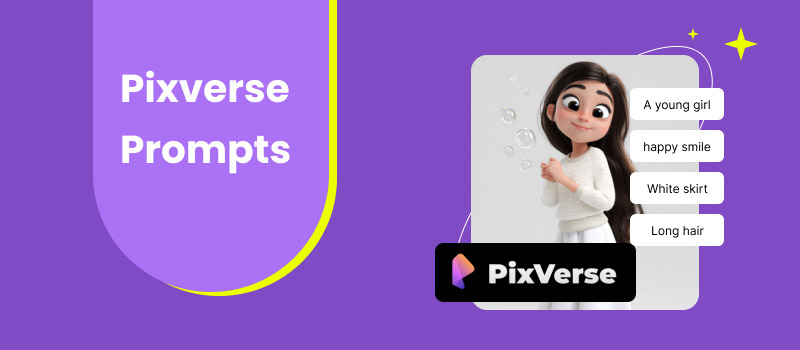
PixVerse is a video generation platform that allows users to create videos from text descriptions. It can produce short-form content without requiring advanced editing or animation skills. By simply describing a scene, action, or style, you can turn your ideas into AI-generated videos. However, to achieve the best and most accurate results, it is essential to understand how to write effective prompts. In this post, we will discuss everything you need to know about PixVerse. We will explain what a PixVerse prompt is, why it matters, and how to write effective prompts. Additionally, we will share practical tips for prompts to achieve better results. Our goal is to help you fully understand how prompts work and empower you to create more effective AI-generated videos.
PixVerse prompts are written instructions that you provide to the PixVerse AI to guide its video generation. These prompts serve as a blueprint, instructing the AI on what to create, how it should appear, and which elements to include. A well-written prompt can describe elements such as subject, action, environment, details, motion, camera, and style. The more specific and structured the prompt is, the more accurately PixVerse can translate your ideas.
Part 2. How to Write Effective PixVerse AI Prompts
Creating effective PixVerse AI prompts determines the quality of the video output. Not to mention, PixVerse relies entirely on text instructions to understand your creative vision. This means incomplete prompts often lead to generic, inaccurate, or inconsistent results.
The subject and action form the core of any prompt. This part clearly defines who or what appears in the video and what they are doing. A strong subject description includes specific details, while the action clearly explains movement or behavior. Clear subject and action details ensure the AI understands the main narrative of the scene.
Environment & Details
The environment sets the context and atmosphere of the video. This aspect describes the setting of the scene and includes background elements. The more vivid and sensory your environment description is, the more immersive the final output becomes. Well-defined settings also help the AI maintain visual consistency throughout the video.
Motion & Camera
Motion and camera instructions control how the video feels and flows. This includes character movement, environmental motion, and camera behavior. Motion details make the video feel dynamic rather than static. Meanwhile, camera instructions add a professional, cinematic quality that elevates the overall result.
Style
Style defines the artistic and visual identity of the generated video. Style cues help PixVerse match your creative direction, ensuring the visuals align with your intended aesthetic. A well-specified style makes the output more cohesive and visually appealing, especially when aiming for a consistent look across multiple videos.
Part 3. BONUS: Picwand AI Text-to-Video Generator: The Best PixVerse Alternative
Picwand AI Text-to-Video Generator is a highly intelligent generative AI tool that serves as an alternative to PixVerse prompts. It can turn both simple and highly detailed prompts into rich videos with smooth action and a cinematic look. It supports detailed prompts up to 1,500 characters per generation, ensuring your instructions are fully captured. You can generate videos up to 10 seconds long and select from various aspect ratios, including 16:9, 4:3, 1:1, and 3:4. Notably, the software can export the generated video in resolutions ranging from 720p to 4 K.
Why Choose Picwand AI Text-to-Video Generator:
• Generates videos with a maximum duration of 10 seconds.
• Exports videos in 720p, 1080p, 2K, and up to 4K resolution.
• Supports multiple aspect ratios, such as 16:9, 9:16, 1:1, 4:3, and 3:4.
• Allows highly detailed prompts, up to 1,500 characters per generation.
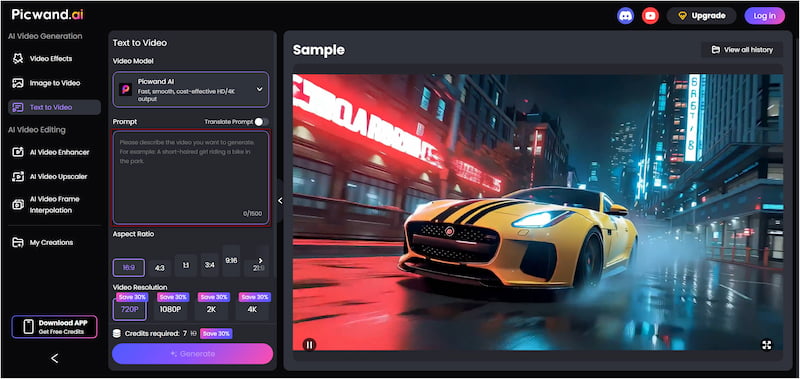
Step 1: Access the official Picwand AI Text-to-Video Generator page using the provided link. In the prompt box, write your own detailed text instructions. Be clear about the information to help the AI generate a more accurate and engaging video.
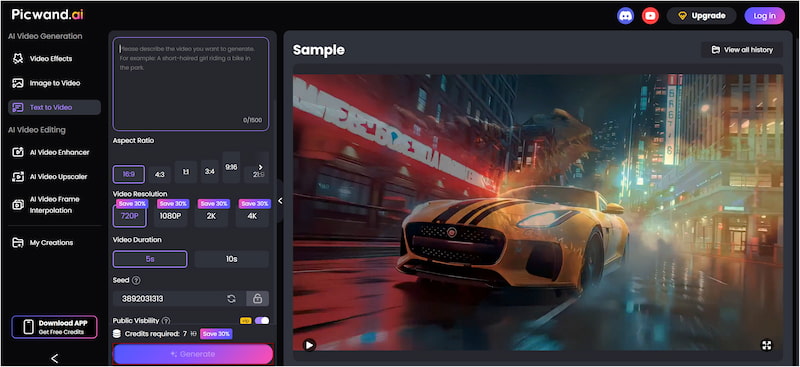
Step 2: Navigate to the Aspect Ratio section and select the format suitable for your specific platform. Next, select your desired output quality, up to 4K, and set the video duration. Please note that the tool supports a maximum video length of 10 seconds.
Step 3: If you prefer privacy, turn off Public Visibility to keep your project hidden from other users. Once all settings are finalized, click Generate. Picwand will analyze your prompt and render the video based on your description.
Picwand AI Text-to-Video Generator is an excellent alternative to PixVerse AI Prompt. It excels at handling rich, imaginative prompts and turns them into engaging videos. Its intelligent text-to-video generation makes it a go-to tool for fast, high-quality AI video creation.
Part 4. PixVerse Prompts Tips for Better Results
Writing effective prompts is the key to getting high-quality and accurate AI-generated videos. Even slight changes in wording can significantly impact the final output. Understanding how to structure your prompts, using negative prompts correctly, and avoiding common mistakes can significantly improve results.
• Specify movement to avoid stiff or static-looking videos.
• Replace generic filler words with concrete visual details.
• Focus on a single scene or action for more coherent results.
• Avoid mixing opposing terms, as this can lead to unpredictable results.
• Be clear and specific so PixVerse understands exactly what to generate.
• Add negative prompts to prevent common AI artifacts and improve visual quality.
• Combine strong prompts with proper aspect ratio, resolution, and duration settings.
• If the first result isn’t perfect, adjust small parts of the prompt instead of rewriting everything.
Part 5. FAQs about Pixverse Prompts
Q: Can PixVerse V3 create realistic images?
A: Yes, PixVerse V3 can create highly realistic images and videos, provided the prompts are detailed. It is capable of producing near-photorealistic visuals suitable for various use cases.
Q: Is PixVerse good for beginners?
A: Yes, PixVerse is beginner-friendly and ideal for users with little to no AI or video-editing experience. Beginners can start with short, descriptive prompts and gradually refine them as they become more experienced.
Q: What are PixVerse AI NSFW prompts?
A: PixVerse AI NSFW prompts include explicit descriptions of adult content, sexual acts, nudity, or other material meant for mature audiences. Most AI prompt generator platforms, including PixVerse, have policies that prohibit or strongly restrict the generation of such content.
Conclusion
In conclusion, the PixVerse prompt determines the quality, realism, and success of AI-generated videos. By understanding what prompts are, how they work, and how to structure them effectively, you can gain greater control over your videos. If you’re looking for a powerful and reliable alternative, Picwand AI Text-to-Video Generator is an excellent option to explore. It supports detailed prompts, flexible aspect ratios, and high-resolution exports up to 4K resolution. It can easily turn your ideas into professional-quality videos in seconds.