Basic PlanVIP PlanVIP ExpiredPurchased credits are valid for life but require an active VIP subscription to use
0Credit(s)
You can use credits to access all the AI tools on Picwand, such as the AI Image Upscaler, AI Age Filter, AI Video Enhancer, AI Video Upscaler, AI Video Effects, and more.
As we are increasingly dominated by AI tools, numerous prompt generation tools are available online. These tools provide us with numerous ways to create images, videos, and visual content. Among these powerful AI generative tools, Runway AI stands out as one of the most advanced platforms. It enables you to transform simple ideas into professional-looking outputs through generative features. However, achieving truly impressive and accurate results with Runway AI depends on how prompts are written. Knowing what Runway AI prompts to apply can make the difference between a generic output and a visually stunning, cinematic result. This post will explore why using prompts is important, share the best examples of prompts, and break down the key aspects of a high-quality prompt. This way, you can write effective prompts that maximize Runway AI’s capabilities.
Runway prompting is essential as it serves as a bridge between your idea and the AI-generated output. By clearly describing what you want, prompts help Runway understand the subject and how it should look, feel, and move. Instead of relying on trial and error, clear prompts give you precision, creative control, and predictability.
Key Reasons to Use Prompts:
• To Specify Content: Prompts define exactly what should appear in the output.
• To Control Style & Mood: Prompts allow you to set the visual style and emotional tone.
• To Save Time & Resources: Clear prompts reduce repeated generations and manual edits.
• To Guide Motion & Camera: Prompts help direct movement, camera angles, pacing, and transitions.
• To Achieve Consistency: Structured prompts ensure consistent visuals across multiple scenes, clips, or generations.
• To Animate Existing Media: Prompts enable you to transform static images or footage by instructing how elements should move, evolve, or react over time.
Part 2. Best Runway Prompts Examples
Strong Runway prompts are all about clarity, detail, and creative direction. A clear prompt helps the AI understand everything you want to include in the scene. Below are some examples of effective prompts.
Example 1:
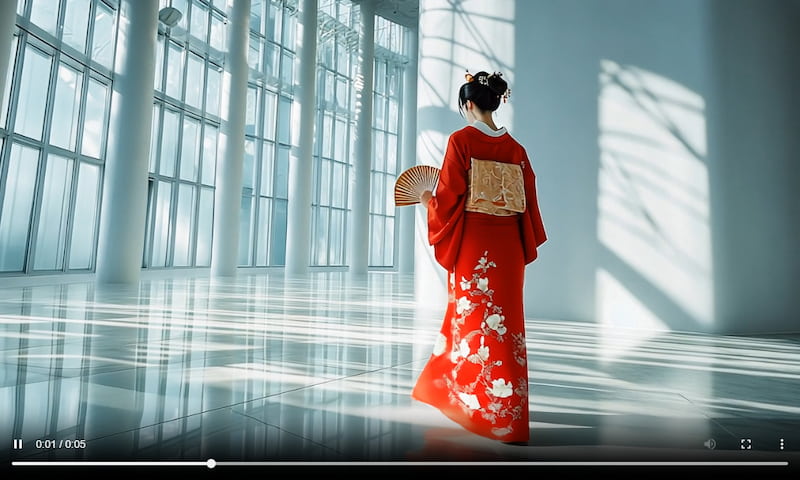
A smooth tracking shot, captured with a 50mm lens, follows a geisha in a red kimono as she walks calmly through a bright, minimalist interior filled with tall glass windows. The camera trails behind her, highlighting the gentle movement and intricate embroidery of her kimono while she delicately carries a fan. Soft daylight pours in, stretching subtle shadows across the floor and bathing the scene in a calm, dreamlike glow. As she moves, the camera glides naturally, capturing a quiet, poetic mood inspired by Wong Kar-wai’s visual storytelling, where vivid red contrasts beautifully against clean white surroundings.
Example 2:
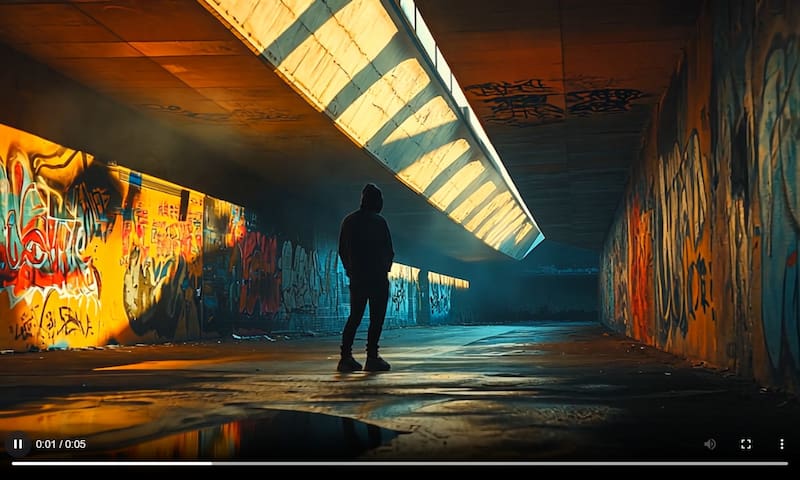
A low-angle tracking shot with a 35mm lens focuses on a solitary hooded figure standing motionless inside a graffiti-filled tunnel. Warm sunlight spills through openings above, casting golden highlights onto the wet pavement below as the camera slowly advances forward. Reflections shimmer across the ground while thick shadows deepen the tunnel’s atmosphere. Wisps of smoke drift through the air, heightening the sense of mystery, isolation, and urban melancholy, resulting in a visually intense and atmospheric composition.
Example 3:
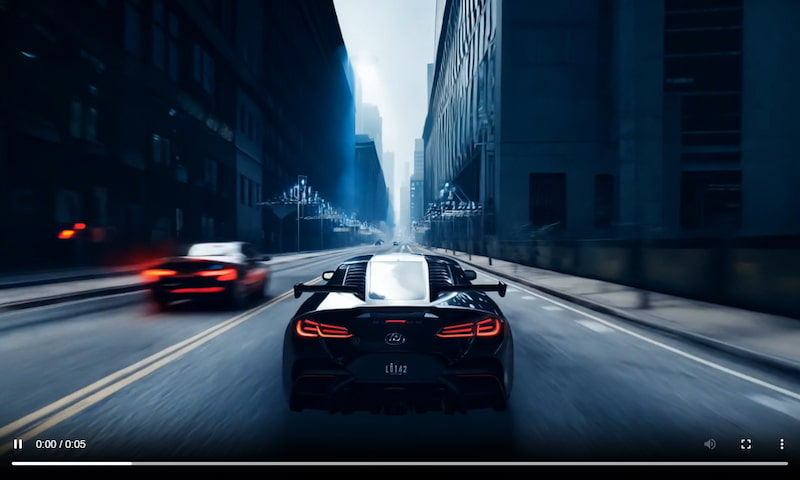
Wide, low-angle shot of a sleek getaway car racing through a tight city alley at night. The narrow walls and streetlights form strong leading lines that amplify the sense of speed and urgency. Harsh urban lighting reflects off metallic surfaces, casting a cool blue glow over the scene. The cinematic style emphasizes motion, intensity, and momentum, making the chase feel fast, dangerous, and relentless.
You can also create YouTube videos from text prompts using Runway. The resulting videos can then be posted as Reels, Shorts, or uploaded as a regular video on YouTube.
Part 3. What are the Key Aspects of a Quality Runway AI Prompts
The best Runway AI prompts clearly communicate both creative intent and technical direction. This ensures the generated output closely matches your vision. Structuring prompts around essential visual and storytelling elements allows you to achieve more professional results.
Key Aspects of Quality Prompts:
• Camera Type/Shot: Define the camera angle and shot type, including lens details if needed.
• Main Subject: Clearly specify who or what the scene centers on so the AI understands the primary point of attention.
• Subject Action: Describe what the subject is doing to add motion, context, and narrative clarity to the scene.
• Camera Movement: Explain how the camera moves to guide the flow and dynamism of the shot.
• Lighting/Atmosphere: Specify lighting conditions, time of day, and environmental details to shape mood, realism, and visual depth.
• Cinematographer/Visual Style: Reference a specific cinematic style or filmmaker to influence composition, color grading, and aesthetic.
• Mood/Emotional Tone: Convey the intended feeling or emotional impact to ensure the scene resonates with the desired audience response.
Part 4. Best Runway Alternative: Picwand AI Text-to-Video Generator
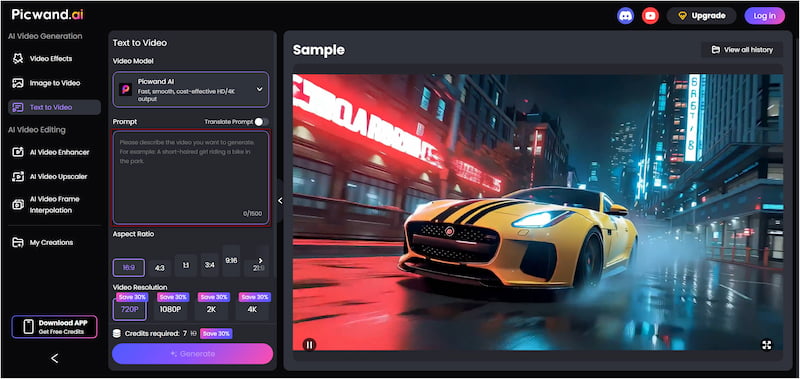
Picwand AI Text-to-Video Generator is a powerful alternative to Runway, focusing on transforming text prompts into high-quality videos. It uses advanced AI models to transform simple and highly detailed text descriptions into short-form videos. This tool supports prompts up to 1,500 characters per generation. It allows you to generate videos up to 10 seconds long and export them at resolutions of up to 4K.
Why Choose Picwand AI Text-to-Video Generator:
• Create videos up to 10 seconds long, ideal for reels, shorts, ads, and more.
• Export generated videos in 720p, 1080p, 2K, and up to crisp 4K resolution.
• Create videos from rich, descriptive text prompts of up to 1,500 characters.
• Choose from formats like 16:9, 9:16, 1:1, 4:3, 3:4, and more to match any platform.
Step 1: Reach the official site of Picwand AI Text-to-Video Generator using the provided link. In the prompt box, write a clear and detailed description of the video you want to generate. The more specific your prompt, the better it can interpret your vision and produce accurate visuals.
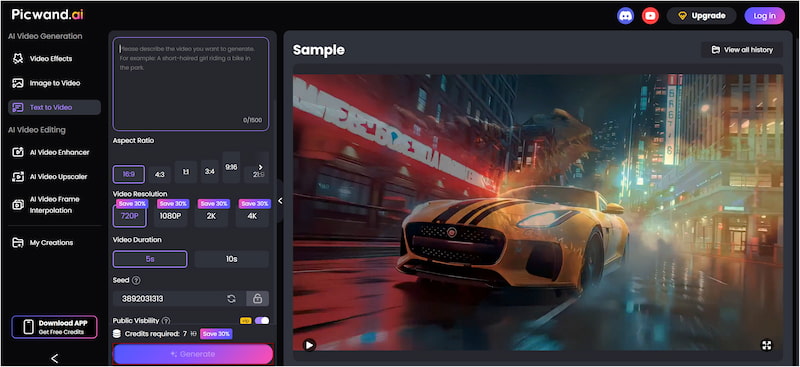
Step 2: Proceed to the Aspect Ratio section and select the format that best suits your intended platform. Then, select your preferred output quality, which can range from 1080p to 4K. Please be informed that the maximum video duration is 10 seconds.
Step 3: If you want your project to remain private, turn off Public Visibility so other users cannot view it. After you’ve finalized the settings, click Generate. Picwand AI will process your text prompt and render a video that matches your description.
While tools like Runway offer strong generative capabilities, they are not always optimized for advanced text-to-video workflows. If you depend on detailed prompts, flexible output options, and fast, high-quality video generation, Picwand AI Text-to-Video Generator is a reliable alternative worth trying.
If you want to achieve a perfect result using Picwand AI Text-to-Video Generator, use these guides on how to write AI prompts.
Part 5. Runway AI Prompts FAQs
Q: How to get the best results from Runway AI?
A: To get the best results from Runway AI, focus on writing clear, structured, and highly descriptive prompts. Define the subject, action, camera movement, lighting, style, and mood.
Q: How accurate is Runway AI?
A: Runway AI is known for achieving unprecedented physical accuracy and visual precision. Its advanced video models can generate realistic camera movement, natural-looking subject motion, and coherent scenes.
Q: Which AI has the highest accuracy?
A: For creators prioritizing accuracy in text-to-video generation, Picwand AI Text-to-Video Generation is a strong recommendation. It excels at understanding prompts, delivering outputs that align with the written description.
Conclusion
Mastering Runway AI prompts unlocks the platform’s full creative potential. By understanding why prompts matter, studying effective prompt examples, and applying the core elements of a high-quality prompt, you can create perfect content. Well-structured prompts enhance accuracy and transform ideas into professional-looking results with fewer trials and errors. That said, if your main goal is to turn detailed text descriptions directly into high-quality videos, it’s worth exploring a dedicated alternative. Picwand AI Text-to-Video Generator provides advanced prompt understanding, supports multiple aspect ratios, and offers high-resolution exports up to 4K.