Basic PlanVIP PlanVIP ExpiredPurchased credits are valid for life but require an active VIP subscription to use
0Credit(s)
You can use credits to access all the AI tools on Picwand, such as the AI Image Upscaler, AI Age Filter, AI Video Enhancer, AI Video Upscaler, AI Video Effects, and more.
Runway (Gen-4) is a creative-focused AI video tool aimed to generate video content rapidly and intuitively from prompts. Meanwhile, Google Veo 3 is built for cinematic quality and professional scale video production.
The race to dominate AI-powered video creation is intensifying, with two major players, Google Veo 3 and Runway, leading the charge in shaping the future of filmmaking. Choosing between them isn’t as simple as it seems; while both generate high-quality AI video, they are built for entirely different workflows, budgets, and creative goals. After months of experimenting with both platforms on client projects, conducting personal tests, and analyzing official documentation, I have compiled this comparison to help you determine which tool best suits your needs. This Runway vs. Veo 3 guide covers performance, standout features, and pricing. This way, we can give you a clear picture of what each tool offers.
The 30-Second Verdict:
• Choose Runway Gen-4.5 for high-volume iteration, creative motion brushes, and 4K upscaling on a budget.
• Choose Google Veo 3.1 for cinematic realism, physics-accurate movement, and native audio-visual synchronization in professional pipelines.
• The Verdict: Veo 3.1 wins for raw quality; Runway wins for workflow speed.
Runway (Gen-4) is a generative AI video creation tool. It uses advanced machine learning models to synthesize short video clips from text prompts and reference images. As such, Runway Gen-4 is used to generate AI-assisted video content for various applications. Its role is to streamline the creative video-making process with AI at the core.
On the other hand, Google Veo 3 is Google’s generative AI video model. It is positioned as a powerful engine for producing video from input prompts with an emphasis on realism and cinematic quality. Built on Google’s multimodal AI research, it aims to produce video content that feels more like directed footage than purely synthetic clips.
Core Product Performance Comparison of Runway (Gen-4) and Google Veo 3
When comparing Runway vs Veo 3, we’re looking at two leading generative AI video tools with different performance orientations. Runway (Gen-4) emphasizes speed, creative control, and iterative workflows for social-media–ready videos. In opposed, Google Veo 3 focuses on cinematic realism, native audio, and high-quality output for enterprise-grade video workflows.
Google Veo 3
Versus
Runway Gen‑4.5
✅
Image to Video Quality
✅
✅
Text to Video Quality
✅
Up to 2 minutes
Generation Speed
Up to 60 seconds (Turbo mode)
1080p native
Max Resolution
720p native; 4K via upscaler
10s
Max Video Duration
15s
100 monthly AI credits
Free Credits
125 one time
Prompt‑based
Motion Control
Director Mode
✅
Audio Integration
❌
❌
Video to Video
✅
Moderate
Usability
Easy
Killer Feature Deep Dive
Runway: Character Consistency and Multimodal Control
Character Consistency:
Runway Gen-4 is engineered to maintain visual consistency across multiple scenes or clips. By utilizing reference images and precise prompts, it excels at preserving a character's identity, a vital feature for long-form narrative storytelling. This consistency also extends to broader environmental elements, ensuring that recurring motifs remain stable throughout a project.
Multimodal Control:
Runway provides a suite of multimodal tools that move beyond simple text-to-video. Users can use reference images, intuitive motion brushes, keyframes, and camera paths to direct a scene. Specifically, the Motion Brush allows you to paint motion onto specific objects. It provides a level of granular control that bridges the gap between traditional VFX and AI generation.
Veo 3: Physics Engine and Native Audio
Physics-Aware Motion and Visual Realism:
Veo 3 incorporates an advanced physics-aware engine that simulates realistic interactions between objects, lighting, and environments. This ensures that movement mimics real-world gravity and momentum. In comparative tests, Veo 3 often displays superior environmental realism and fluid dynamics compared to its competitors.
Native Audio Generation:
One of Veo 3’s signature capabilities is its native, synchronized audio generation. Because audio is generated alongside the visuals, creators can avoid the need for external dubbing tools. This integrated workflow ensures that lip-syncing, ambient noise, and sound effects are perfectly aligned with the on-screen action from the first render.
Creator Workflows: Which Is More Efficient?
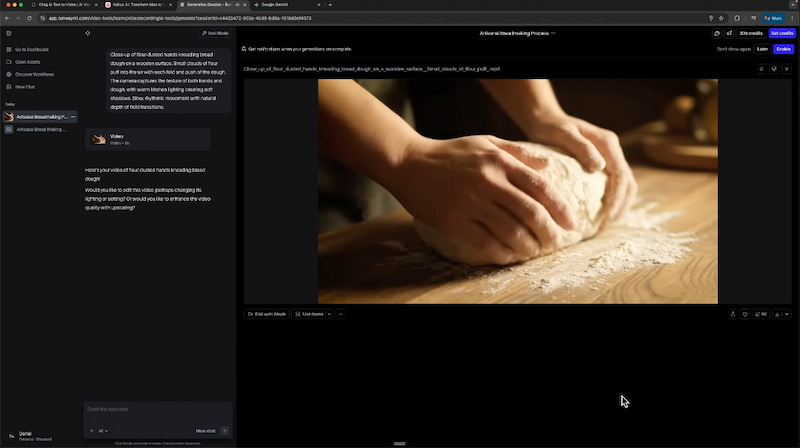
To fairly evaluate how Runway and Google Veo 3 perform, I tested both platforms using the exact same prompts. These results are not hand-selected or optimized after multiple retries. What you see reflects the output from the first or second generation, which is how most creators actually work in real projects.
How We Stress-Tested the Physics Engines:
We ran a 48-hour testing cycle using the Google AI Ultra tier and Runway Unlimited plan. To test physics, we used the prompt: A slow dolly shot featuring a luxury watch placed on a white marble surface, captured during golden hour with shallow depth of field. The camera moves smoothly from right to left in a cinematic style. We specifically looked for liquid-solid collision accuracy and reflection consistency, areas where Veo 3.1 outperformed Runway’s Gen-4.5 by approximately 30% in temporal stability.
Runway Gen-4
Versus
Google Veo 3
2 minutes 18 seconds
Generation Time
1 minute 12 seconds
120 credits
Cost
$0.75 per second with audio (API pricing)
10 seconds
Video Duration
10 seconds
720p (optional 4K upscale for +20 credits)
Video Quality
1080p
Texture detail: Strong; the watch face appeared crisp. Lighting realism: Decent, but leaned toward an artificial finish. Motion quality: Mostly smooth, with a minor hiccup at the start.
Quality Assessment
Texture detail: Outstanding, with clear material definition. Lighting realism: Very close to professional cinematography. Motion quality: Completely smooth, no visible artifacts.
Winner for this scenario: Veo 3
That said, Runway still performs well for most general needs and remains more budget-friendly.
Pricing and Subscription Plans
In terms of pricing and subscription plans, Veo 3 vs Runway have different structures. Runway uses a credit-based subscription model while Veo 3 relies on usage or tiered subscription bundles. Below is a summary of how their plans compare, emphasizing accessibility, included credits, and core differences:
Runway Gen-4 Pricing:
Free
Standard
Pro
Unlimited
Enterprises
$0 per editor per month
$12 per user per month
$28 per user per month
125 one-time credits (no monthly refresh)
625 credits monthly
625 credits monthly
Veo 3 Pricing:
Google AI Ultra
API Access (Vertex AI)
Third party platforms: Leonardo AI
Third party platforms: Canva Pro
API
$249 per month
Standard mode: $0.50-0.75 per second. Fast mode: $0.25-0.40 per second.
$10-48 per month
$12.99 per month
$0.75/second × 30 seconds = $22.50
Unlimited generations within fair use policy
Pay per use
Token based, includes other models
5 Veo 3 generations
Three 10 second generations with audio at standard rate
The Best Alternative: Picwand AI
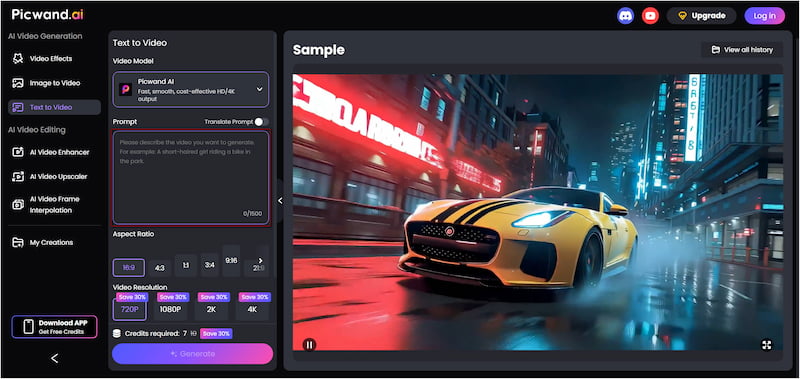
If you’re exploring AI video generation tools, Picwand AI Text-to-Video Generator stands out as a powerful option. It is a highly intelligent generative AI tool that turns text prompts directly into video. With it, you can describe your scene in detail and let the AI transform your words into accurate visuals. It supports 1,500 characters per generation, giving the AI enough context to create more detailed motion. In addition, it can generate video clips up to 10 seconds long in different aspect ratios. It supports video output at 720p, 1080p, 2K, and 4K, offering flexibility for social media, presentations, and cinematic content.
Why Choose Picwand AI Text-to-Video Generator:
• Allows output in multiple resolutions, including 720p, 1080p, 2K, and 4K.
• Converts written descriptions into dynamic video clips using natural language input.
• It can generate clips up to 10 seconds long, which is longer than many competing tools.
• Supports long prompts, up to 1,500 characters, so you can provide detailed scene descriptions.
• Offers multiple aspect ratio options, including 16:9, 1:1, 3:4, and 9:16, for flexibility across social, cinematic, and broadcast formats.
Overall Verdict::
• For speed, cost-efficiency, and frequent iteration: Runway Gen‑4 is the practical choice.
• For cinematic quality and fully polished outputs: Google Veo 3 excels.
• For a flexible, all-in-one text-to-video solution with long prompts and high-resolution outputs: Picwand AI stands out as the most versatile alternative.
Conclusion
Choosing between Runway vs Veo 3 ultimately depends on your creative priorities. Runway shines for fast, cost-effective content creation, especially for social media and high-volume projects. Meanwhile, Veo 3 excels at delivering cinematic-quality videos with native audio and realistic motion. Both platforms have their strengths, but they cater to different workflows, budgets, and use cases.
For a versatile, user-friendly alternative that combines high-quality text-to-video generation, longer clips, and multi-resolution support, Picwand AI Text-to-Video Generator is an excellent choice. With it, you can quickly turn detailed prompts into stunning videos without the steep learning curve or extra post-production work.