Basic PlanVIP PlanVIP ExpiredPurchased credits are valid for life but require an active VIP subscription to use
0Credit(s)
You can use credits to access all the AI tools on Picwand, such as the AI Image Upscaler, AI Age Filter, AI Video Enhancer, AI Video Upscaler, AI Video Effects, and more.
AI-generated video is no longer experimental. With the arrival of advanced generative models like Sora, creators can transform simple written prompts into cinematic video clips. Whether you are a marketer, content creator, educator, or entrepreneur, text-to-video tools are redefining how visual content is produced. If you are searching for "Sora AI text to video how to use," this guide will walk you through everything you need to know: what Sora is, who can use it, how to access it, how the text-to-video process works, prompt-writing tips for better results, and a powerful alternative—Picwand AI—for users who need a practical solution today. Let’s get started.
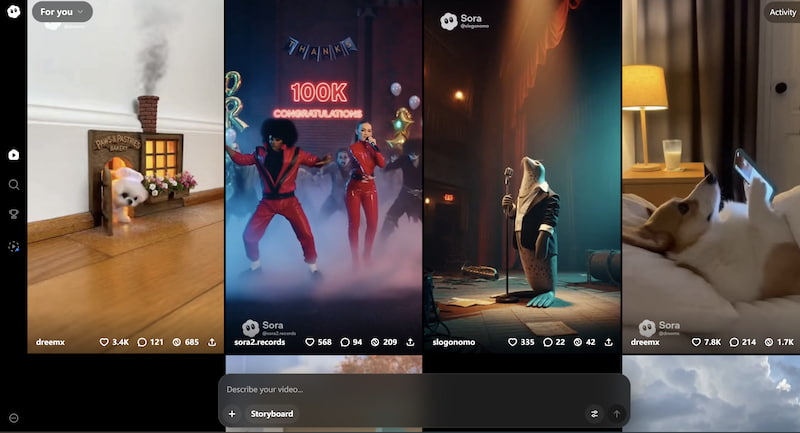
Sora AI is a text-to-video generation model developed by OpenAI. It allows users to input detailed text descriptions and generate realistic, dynamic video scenes that can include complex camera movement, lighting changes, character motion, and environmental effects.
Unlike earlier AI video tools that produced short or low-resolution clips, Sora aims to generate longer, more coherent video sequences. It can simulate physics, perspective, and cinematic composition based purely on written instructions.
In simple terms, Sora converts text into video by:
• Interpreting the prompt semantically
• Building a virtual scene layout
• Rendering motion across time
• Synthesizing frames that maintain visual consistency
The technology behind it relies on diffusion models and transformer-based architectures trained on large-scale visual datasets.
Key strengths of Sora AI include:
• High realism
• Complex scene generation
• Cinematic camera simulation
• Multi-character interaction
However, access and availability remain limited (more on that below).
Part 2. Who Can Use Sora AI
Currently, Sora is not publicly available to everyone.
Access is typically granted to:
• Selected researchers
• Creative professionals
• Safety testers
• Limited enterprise collaborators
OpenAI has taken a cautious rollout approach to evaluate safety, misuse risks, and ethical concerns before broad public deployment.
So if you are an individual creator hoping to immediately use text to video AI Sora, you may find that access is restricted. This limited availability is one of the biggest reasons why many users are actively searching for accessible text-to-video AI alternatives.
Part 3. How to Access Sora AI
Since Sora is not fully open to the public, there is no standard "sign up and start" process yet. However, based on how OpenAI typically releases products, access generally follows these steps:
Step 1.Monitor Official Announcements
Follow official OpenAI communication channels for updates on public release or beta testing programs.
Step 2.Apply for Early Access (If Available)
Sometimes research previews or limited-access programs are opened through application forms.
Step 3.Enterprise Collaboration
Some AI tools are first released to enterprise partners before individual users. You can take Sora AI video prompt guidelines as a reference.
Important Note
If you cannot access Sora directly, you will need an alternative AI video generator that provides immediate usability and stable output quality. That leads us to understanding how Sora’s text-to-video process works conceptually.
Part 4. How Text to Video Works in Sora
Even if access is limited, understanding the workflow helps you master prompt design for any AI video tool. Here is how text-to-video works in Sora:
1. Prompt Interpretation
The system analyzes your written description, identifying:
• Subjects
• Actions
• Environment
• Style
• Camera movement
• Lighting
• Mood
For example:
"A golden retriever running across a snowy field at sunrise, cinematic slow motion, soft lighting."
The model extracts objects (dog, field), actions (running), setting (snowy sunrise), and cinematic style elements.
2. Scene Simulation
Sora builds a structured representation of the scene, including:
• Spatial layout
• Object relationships
• Motion trajectory
• Environmental consistency
3. Frame Generation Over Time
Unlike static image models, video generation requires temporal consistency. Sora AI text to video predicts multiple frames in sequence while maintaining continuity in lighting, physics, and object identity.
Tips: Write a Good Sora Prompt for Best Results
To get the best output from Sora—or any text-to-video AI—your prompt quality matters significantly. Here are practical tips:
1. Be Specific About Visual Details
Instead of:
"A city scene."
Try:
"A futuristic cyberpunk city at night, neon signs reflecting on wet pavement, slow camera pan from left to right."
2. Define Camera Movement
Include instructions like:
• Close-up shot
• Wide angle
• Aerial drone view
• Slow-motion tracking shot
• Handheld camera effect
3. Specify Lighting
Lighting transforms realism:
• Golden hour lighting
• Studio soft light
• High-contrast noir lighting
• Backlit silhouette
4. Add Style References
You can mention:
• Cinematic
• Documentary style
• Anime-inspired
• Realistic 4K
5. Control Motion and Duration
Example:
"A 10-second slow zoom toward the subject while leaves gently fall."
The clearer your instructions, the more coherent the generated video will be.
Part 5. Best Sora Text to Video AI Alternative
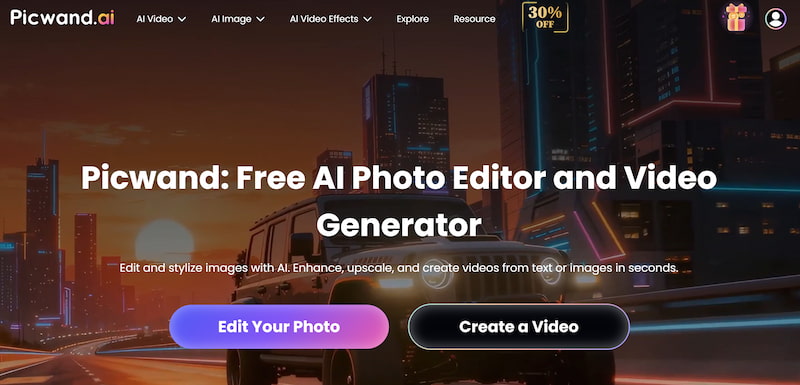
Since Sora access is currently limited, many creators need a tool they can use immediately. That’s where Picwand AI Text-to-Video Generator becomes a practical solution. Picwand AI offers user-friendly text-to-video generation without requiring exclusive invitations.
Key Features of Picwand AI
• Text-to-video generation
• Image-to-video animation
• Multiple video styles
• Fast processing
• Beginner-friendly interface
• No complex setup required
Unlike restricted experimental models, Picwand focuses on accessibility and usability.
How to Use Picwand AI
Step 1. Step 1he main dashboard, choose the Text-to-Video Generator option. This tool allows you to generate short video clips purely from written descriptions.
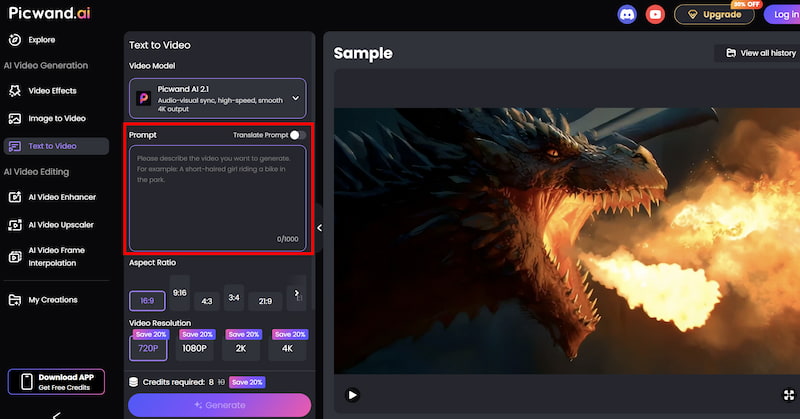
Step 2. Step 2your text prompt by describing the scene you want to create using natural language. You can specify elements such as environment, mood, movement, and visual style. For example, you might describe a cinematic landscape, a product showcase, or a short animated concept.
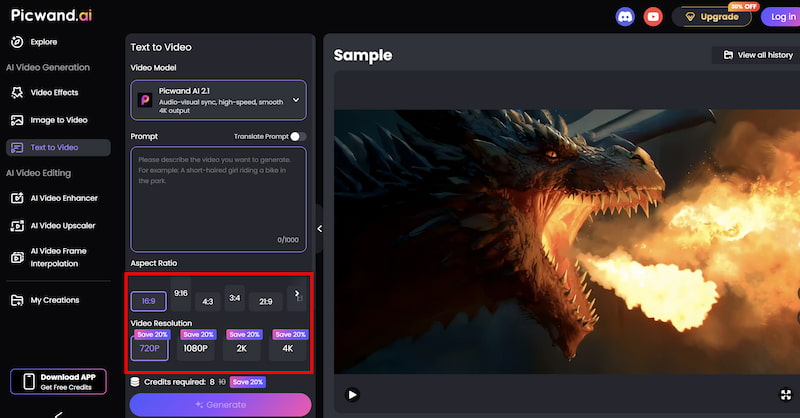
Step 3. Step 3 generating the video, you can fine-tune settings such as Aspect Ration, Video Resolution, etc. These options help tailor the output to social media, marketing, or presentation needs.
Step 4. Step 4our prompt is ready, click the generate button. Picwand processes the request and produces a preview video within a short time, allowing you to review the result instantly. If you are satisfied with the output, you can export the video directly.
Click generate and wait for the video to render for live video upscaling. Once completed, download your file for social media, marketing, or creative projects.
Why Choose Picwand Over Waiting for Sora?
• Immediate access
• No application barrier
• Suitable for marketing teams
• Easier learning curve
• Stable and practical output
For businesses that need fast content production, Picwand provides a realistic solution rather than waiting for limited research releases.
Part 6. FAQs about Sora AI Text to Video
How long can Sora AI videos be?
Sora is designed to generate longer clips than early AI video tools, but exact limits depend on current release conditions.
Do I need technical skills to use text-to-video AI?
No. Most modern tools are designed for non-technical users. Writing clear prompts is more important than coding knowledge.
Can I use AI-generated videos for commercial purposes?
This depends on the platform’s terms of service. Always review licensing conditions before commercial use.
Conclusion
Sora AI text to video represents a major advancement in text-to-video generation. Its ability to simulate realistic motion, camera movement, and complex scenes demonstrates how far generative AI has evolved. However, limited access means most users cannot rely on it yet. If you are searching for "Sora AI text to video how to use," the key takeaways are:
• Understand how text prompts shape video output
• Write detailed, structured prompts
• Monitor official announcements for access updates
Use accessible alternatives like Picwand AI Text-to-Video Generator for immediate production needs AI video creation is becoming a core skill in digital marketing, education, and content production. The sooner you master prompt writing and workflow optimization, the more competitive your visual storytelling will become.