Tips for Creating Viral Costume Videos That Get Millions of Views

Costume films have become one of the most engaging content genres on TikTok, Instagram Reels, YouTube Shorts, and other short-video platforms. These films always get millions of views, whether it’s a stunning cosplay transformation, a witty Halloween skit, or a historical clothing replica; they mix creativity, storytelling, and visual surprise. But it’s not enough to just have a nice costume nowadays. Thousands of artists publish costume-related videos every day, making it harder and harder to stand out. And now success is all about knowing what makes some videos go viral, while others get buried by the algorithm.
Fortunately, you don’t need a professional production team or pricey editing software to make interesting costume material. Anyone can generate eye-catching videos in a fraction of the time using clever content tactics and AI-powered technologies. In this guide, you'll learn why costume videos become viral, practical tips for creating viral costume videos, and how Picwand AI Video Cloner can help you create stunning costume videos faster than ever.
Contents:
Part 1. Why Costume Videos Go Viral
Before we get deeper into production approaches, let’s break down what stops viewers from scrolling.
Instant visual makeover
People just love the excitement of a before and after. Costume movies generally start off with normal clothes and then show a fantastic metamorphosis, which instantly piques the viewer’s attention. This 'wait for it' effect encourages viewers to keep watching until the reveal.
Strong Emotional Connection
Great costume videos make people feel something. They may inspire nostalgia through movie characters, create excitement with superhero costumes, or simply make viewers laugh through humorous roleplay. Videos that trigger emotions are more likely to receive shares and comments.
Easy to Share
Unlike lengthy tutorials, costume videos are easy to understand regardless of language. A creative transition or funny costume idea can entertain audiences worldwide, making these videos highly shareable.
Hitting the Trend
Successful artists typically pair costumes with:
- • Trending music
- • Popular challenges
- • Seasonal festivals
- • New movie premieres
- • Anime conferences
- • Gaming trends
Joining established trends greatly enhances the likelihood you will reach new audiences.
High replayability
Many viral costume videos have subtle details, fluid transitions, or spectacular makeup effects that make the viewers want to watch them over and over. Better performance on social platforms often correlates with higher watch time and replay rates for videos.
Part 2. Tips That Make Costume Videos More Viral
Now you understand why costume videos work, let’s go into some tips for creating viral costume videos.
Begin with a compelling hook
“Viewers will decide in the first three seconds whether or not to continue watching. Rather than introducing yourself, instantly demonstrate:
- • Mysterious sneak peek at costume
- • A revolution
- • A surprise character reveal
- • A surprising effect on visuals
Curiosity keeps the audience’s interest.
Trim Videos
While longer videos are possible, shorter form is rewarded on shorter form sites.
Go with:
- • 15-30 seconds TikTok
- • 20-45 seconds Instagram Reels
- • 30-60 seconds YouTube Shorts
Remove unnecessary scenes and focus on the most exciting moments.
Use Smooth Transitions of Scenes
Costume vids feel fantastic with transitions.
Here are a few common transition ideas:
- • Jump cuts
- • Cutaway cuts
- • Camera spins
- • Mirror effects
- • Light Flashes
- • Hand-over
- • Object motion
Practice the transitions a few times before you record them so you can transition smoothly.
Select a trending audio
Music is a key part of discoverability.
Search for:
- • Popular TikTok music
- • Popular audio on Instagram
- • Movie soundtracks
- • Anime themes
- • Remix viral songs
When you pair your costume theme with the correct audio, it provides a stronger viewing experience.
Tell a Mini Story
Rather than simply showing a costume, create a narrative.
For example:
- • A superhero preparing for battle
- • A villain’s dramatic entrance
- • Princess transformation
- • Time traveler changing outfits
- • Historical character entering the modern world
Even a 20-second story feels more memorable than random clips.
Be Aware of the Lighting
Expensive cameras are not always necessary to produce videos that seem professional.
Proper lighting may significantly enhance:
- • Colors of the costume and fabric texture
- • Details of makeup and facial emotions
Excellent results are frequently obtained with inexpensive LED lights or natural sunshine.
Pay Attention to Character Performance
Costumes are not as memorable as people.
Maintain your character by matching:
- • Body language and facial expressions
- • Walking manner, gestures, and voice (if relevant)
Acting authentically makes the shift more believable to the viewer.
Post at the Appropriate Time
Initial engagement is enhanced when you publish while your audience is engaged. To find out when your followers are most receptive, experiment with different publishing times and keep an eye on analytics. Regular uploads let viewers know when to anticipate fresh content, so consistency is just as vital.
Hope these tips for creating viral costume videos can be useful for you.
Part 3. Use AI to Create Costume Videos Faster
It is sometimes necessary to film several takes, alter transitions, modify timing, and recreate identical content for several platforms in order to produce high-quality costume videos. Many of these repetitious chores can be made easier by AI solutions. If you want to know how to change clothes in video editing, Picwand AI Video Cloner is one helpful remedy.
Picwand AI Video Cloner: What Is It?
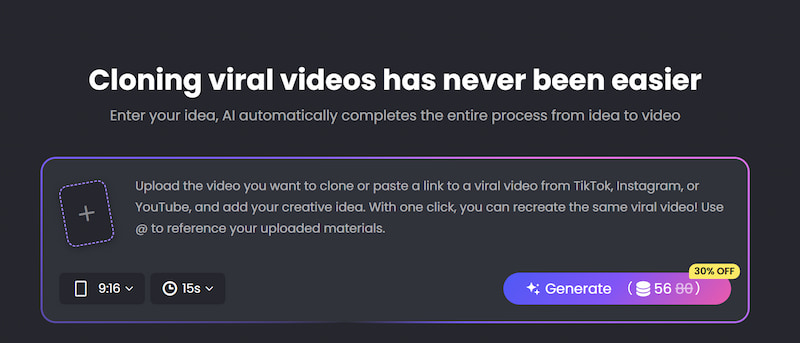
Using an existing reference clip, Picwand AI viral video cloner enables producers to create new videos. Users may submit a sample video and make new variants while preserving the same pace, movement, or visual style, as opposed to repeatedly capturing each transition. This makes it especially useful for creators who frequently publish costume transformations, cosplay content, or seasonal videos.
Why Use Picwand AI Video Cloner?
• Save Recording Time
Instead of filming the same sequence multiple times, you can reuse a successful reference video and generate new creative versions more efficiently. You can refer to video to prompt for more detailed generating guidance.
• Maintain a Consistent Visual Style
AI aids in maintaining consistent pacing and transitions between uploads if you've developed a recognizable editing style.
• Produce More Content in Less Time
Because development takes too long, many authors find it difficult to upload regularly. By eliminating tedious editing tasks, AI enables you to publish more often.
• Experiment with Different Costume Ideas
Want to test several characters or outfit concepts? AI makes it easier to produce multiple versions without starting every project from scratch.
• Beginner-Friendly Workflow
Even creators with limited editing experience can generate polished-looking costume videos using an intuitive workflow.
Simple Workflow
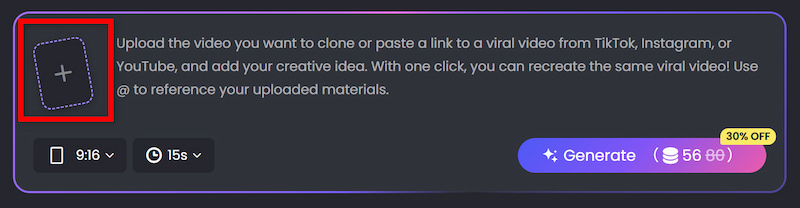
Step 1. Upload a Reference Video
Click on “+” to upload a video that inspires you or paste a supported video link. The AI will analyze its visual style, pacing, camera movements, and transitions to use as a creative reference.
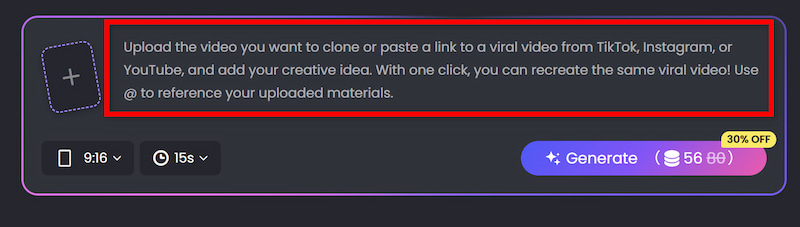
Step 2. Enter Your Prompt
Describe the video you want to create. You can replace the subject, change the background, or customize the scene while keeping the overall style of the original video.
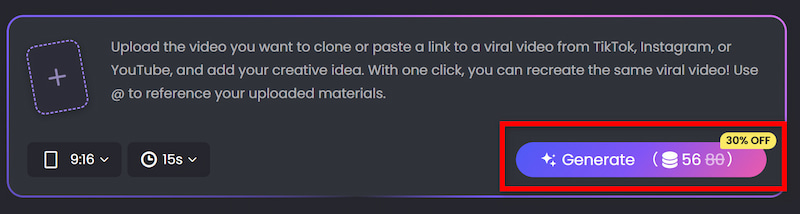
Step 3. Generate Your AI Clone Video
Click on Generate, and Picwand AI Video Cloner will automatically create a brand-new video based on your prompt and the reference video's style. The process usually takes just a few minutes.
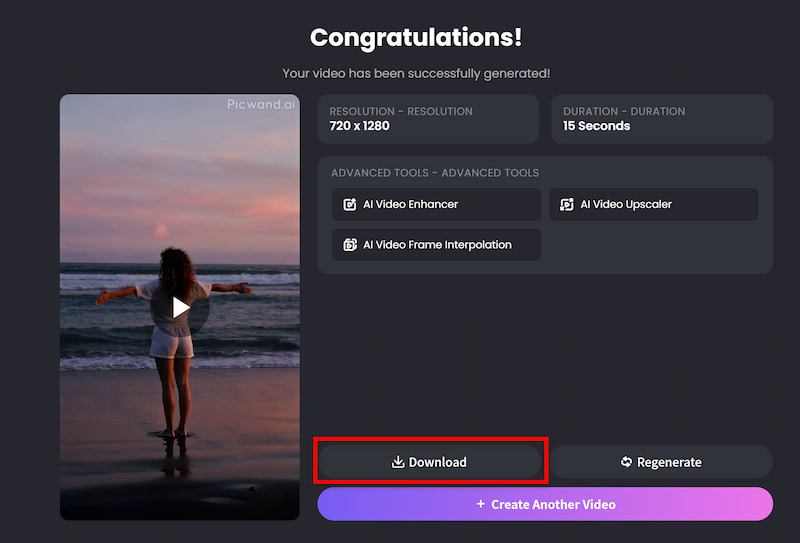
Step 4. Preview and Download
Review the generated video, make any necessary adjustments, and download the final version.
By combining your creativity with AI-assisted production, you can spend more time developing new ideas and less time repeating technical editing tasks. By the way, AI prompt examples can provide more holistic and aesthetic prompt references.
Part 4. FAQs about Tips for Creating Viral Costume Videos
Which kinds of costume videos are most popular?
Comedy skits, Halloween costumes, cosplay exhibits, transformation videos, anime-inspired entertainment, fantasy costumes, and movie character recreations are all always in demand.
What is the ideal duration for a costume video?
The majority of popular short-form costume videos last 15 to 45 seconds. Keep spectators interested all the way through by concentrating on delivering the transition swiftly.
Can novices use Picwand AI Video Cloner?
Indeed. Although it offers helpful tools for seasoned makers, its simple process makes it accessible even if you have little expertise with video editing.
Conclusion
That’s all about tips for creating viral costume videos. You don’t need the biggest budget or the fanciest gear to produce popular costume videos. The best artists know how to pull the audience in fast, tell compelling visual stories, use flawless transitions, and publish regularly.
AI has emerged as a useful tool for accelerating production without compromising originality as the market for content continues to intensify. Picwand AI Video Cloner may streamline your workflow and free up time for new ideas, whether you're creating cosplay transformations, Halloween material, fantasy characters, or movie-inspired outfits. Mix in established tactics with continuous experimentation, listen to comments from your audience, and keep perfecting your approach. Over time, you’ll be far more equipped to do costume videos that get views, get shared, and generate a dedicated following.
AI Picwand - Anyone Can be A Magician
Get Started for Free