Basic PlanVIP PlanVIP ExpiredPurchased credits are valid for life but require an active VIP subscription to use
0Credit(s)
You can use credits to access all the AI tools on Picwand, such as the AI Image Upscaler, AI Age Filter, AI Video Enhancer, AI Video Upscaler, AI Video Effects, and more.
AI video generators are no longer experimental toys, they’re becoming practical tools for marketers, creators, educators, and small businesses. Among the newer entrants gaining attention is Vidu AI, a platform focused on turning prompts and images into animated video clips with minimal effort. Its promise is simple: cinematic AI video in seconds, without complex editing software. But does it actually deliver? Can it compete with more established AI video tools? And is it reliable enough for real production work rather than social media novelty? Here is a comprehensive Vidu AI review. We’ll evaluate its prompt handling, animation styles, speed, interface, pricing, and real-world usefulness. We’ll also compare it to a strong alternative if Vidu doesn’t fully match your workflow.
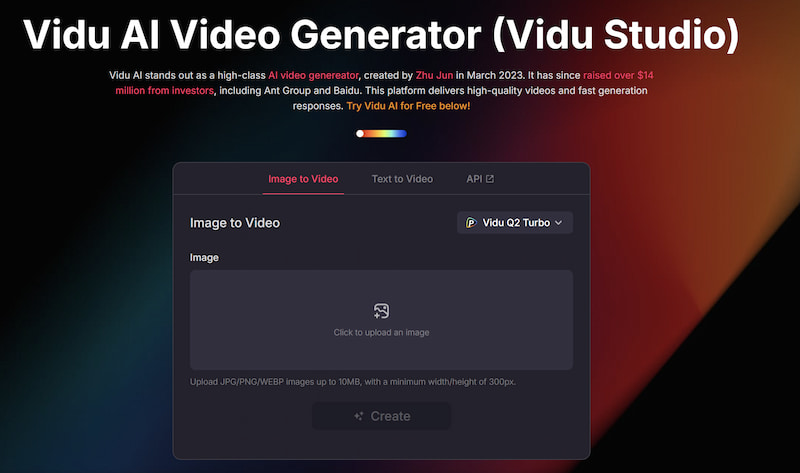
Vidu AI video generator is an AI-powered video generation platform designed to transform text prompts and images into short animated clips. The system focuses on fast rendering, stylized motion, and accessible controls, making it appealing to creators who want quick results without technical complexity.
At its core, Vidu sits between animation software and generative AI. It doesn’t aim to replace full-scale editing tools. Instead, it provides an efficient pipeline for generating short visual sequences that can later be edited or combined in other software.
Vidu AI Reviews: Key Features
1. Text-to-video generation
Users can describe a scene using natural language, and Vidu interprets the prompt to generate an animated clip. The emphasis is on visual storytelling rather than static imagery.
2. Image-to-video animation
You can upload an image and animate it. This is particularly useful for social media creators who want motion effects from still artwork or photography.
3. Two built-in animation styles
Vidu provides stylistic presets that change how motion is rendered. These styles help users avoid generic-looking output and give visual identity to their clips.
4. Fast cloud rendering
Speed is a selling point. The platform is optimized to produce short videos quickly, making it suitable for rapid iteration and experimentation.
5. Frame control options
Users can influence movement direction and transitions, adding a layer of creative control that many beginner AI tools lack.
6. Simple dashboard
The interface is intentionally minimal. Even first-time users can navigate it without tutorials.
Part 2. Detailed Review of Vidu
1. Prompts
Prompt interpretation is one of the most important measures of an AI video generator. Vidu handles descriptive prompts reasonably well, especially those focused on mood, motion, and atmosphere.
While how to write AI prompts? Short prompts produce acceptable results, but detailed prompts perform noticeably better. The system responds best when users specify:
• Camera movement
• Lighting style
• Environment
• Subject motion
• Emotional tone
For example, prompts that include cinematic language yield more coherent output. However, Vidu occasionally struggles with complex scenes involving multiple interacting elements. It excels in single-subject or stylized environments rather than dense narrative setups. Consistency across repeated generations varies. While you can refine outputs through re-prompting, exact reproduction is difficult, which may be limiting for commercial branding.
2. Two Animation Styles
Vidu AI video generator’s two animation styles are more than cosmetic presets. They influence motion dynamics, lighting interpretation, and texture rendering.
One style leans toward cinematic realism, with smoother camera flow and atmospheric depth. The other prioritizes stylized animation, producing more exaggerated motion and artistic interpretation.
These built-in options reduce the need for heavy prompt engineering. Users can quickly test visual directions without starting from scratch. While the style library is currently limited, the distinction between them is clear and useful. The downside is that creators seeking highly specific aesthetics may feel constrained. Advanced users may want deeper customization layers.
3. Speed
Rendering speed is one of Vidu’s strongest advantages. Short clips generate quickly, allowing rapid experimentation. This makes Vidu suitable for brainstorming, social media content production, and visual concept testing.
Compared to heavier AI video systems that prioritize ultra-high realism but require longer processing time, Vidu enhances old photos perfectly and favors workflow efficiency. The trade-off is that extremely complex scenes may lose detail.
For creators working on tight deadlines, speed is a practical benefit that outweighs minor imperfections.
4. Frame Control in Image-to-Video
Frame control adds meaningful flexibility to the image-to-video pipeline.
Users can guide movement direction, zoom effects, and transitions. This prevents the animation from feeling random or disconnected from the source image.
While the controls aren’t as deep as professional animation tools, they offer enough precision for:
• Product showcases
• Portrait motion
• Background parallax
• Cinematic zoom sequences
This feature is especially valuable for marketers and designers repurposing still visuals into engaging clips.
5. User-Friendly Dashboard
Vidu’s dashboard is clean and approachable. There’s no steep learning curve.
The layout focuses on:
• Prompt entry
• Media upload
• Style selection
• Generation queue
• Download management
Everything is accessible within a few clicks. Beginners can start producing clips almost immediately. However, advanced users might want expanded project management tools or timeline integration. The simplicity is a strength for casual use but may feel limiting for larger production workflows.
6. Pros and Cons
Pros
Fast generation speed
Simple interface
Good prompt responsiveness
Useful animation presets
Accessible for beginners
Efficient image-to-video pipeline
Cons
Limited style variety
Inconsistent scene complexity
Few advanced customization options
Not ideal for long-form video
Reproducibility challenges
7. Vidu Studio Pricing
Is Vidu free? Actually, Vidu follows a subscription-based pricing model. Entry plans typically allow limited generation credits, while higher tiers unlock faster queues and increased usage.
The pricing is positioned for individual creators and small teams rather than enterprise studios. For casual creators, the cost can be reasonable. For heavy production use, credits may deplete quickly.
Because AI video tools evolve rapidly, pricing should be evaluated alongside usage frequency. Occasional creators may find the entry tier sufficient, while professionals should calculate cost per finished clip.
8. Applications
Vidu AI is best suited for:
• social media animations
• marketing teasers
• short promotional clips
• visual concept prototyping
• music visuals
• educational illustrations
• motion-enhanced photography
• storytelling experiments
It is less suitable for:
• long-form cinematic projects
• complex narrative animation
• high-end commercial production
• frame-perfect editing workflows
Part 3. Vidu AI Free Alternative
For users who want more flexibility in visual enhancement and media transformation, Picwand AI presents a strong alternative.
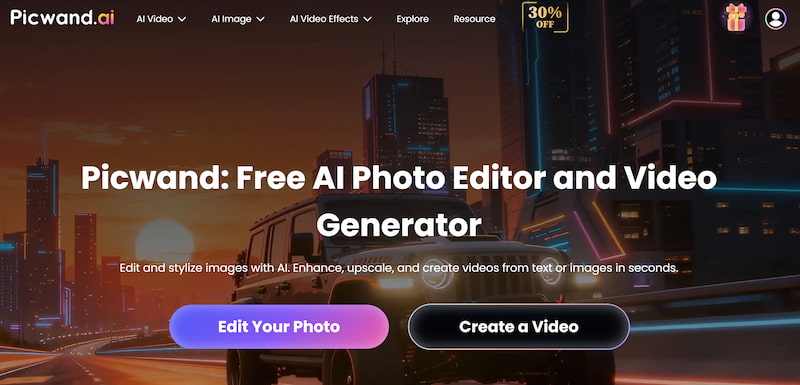
Picwand AI Text-to-Video Generator focuses on intelligent image and video enhancement rather than just generation. It integrates restoration, upscaling, and creative AI tools into a single environment.
Why consider Picwand AI?
• advanced image repair
• resolution enhancement
• AI-powered editing
• restoration tools
• accessible interface
• creative media workflow integration
While Vidu emphasizes animation generation, Picwand is better suited for creators who want to refine assets before or after animation. Many users combine generation tools with enhancement software, and Picwand fills that role effectively. For marketers and designers managing brand visuals, quality control matters as much as speed. Picwand helps maintain consistency across media outputs.
Part 4. FAQs about Vidu AI Review
Is Vidu AI good for beginners?
Yes. The interface is simple, and basic prompts generate usable results without technical knowledge.
Can Vidu create long videos?
It focuses on short clips. Long-form production requires external editing.
What makes Picwand a good alternative?
Picwand excels in enhancement, restoration, and media refinement, making it ideal for improving AI-generated assets.
Conclusion
That’s all for Vidu AI review. Vidu AI is a fast, accessible tool for generating animated clips from prompts and images. Its strengths lie in speed, ease of use, and stylized motion. For creators focused on short-form content, experimentation, and rapid iteration, it offers a practical entry point into AI video. However, its limitations in customization and scene complexity mean it works best as part of a larger creative toolkit rather than a complete production solution.
If your workflow requires not only generation but also enhancement and quality control, pairing or replacing it with a tool like Picwand AI Text-to-Video Generator can create a more balanced pipeline. Ultimately, Vidu is not trying to replace professional animation software — it’s trying to make motion creation accessible. In that mission, it succeeds more often than it fails.