Basic PlanVIP PlanVIP ExpiredPurchased credits are valid for life but require an active VIP subscription to use
0Credit(s)
You can use credits to access all the AI tools on Picwand, such as the AI Image Upscaler, AI Age Filter, AI Video Enhancer, AI Video Upscaler, AI Video Effects, and more.
As AI transforms video creation, now is the perfect time to explore tools that simplify this process. As the demand for video content continues to grow, many creators struggle to turn text into videos quickly. This is where Wan AI Prompt Generator proves useful. It is a creative tool to convert text into videos with minimal effort. By using well-structured prompts, you can guide the AI to produce high-quality videos. In this post, you’ll learn how to use the Wan AI effectively. We will help you generate visually compelling videos with less effort and more consistency.
Part 1. Use Wan AI Prompt Generator to Generate a Prompt
Wan AI is a multimodal video model that can create visuals using text prompts or images. It can translate text descriptions into videos, written text into images, or images into videos. Its latest release, Wan 2.1, focuses on text-to-video and image-to-video generation. The Wan prompt generator can produce 6-second videos at 30 FPS.
Wan AI Prompt Example:
Purpose: Create videos where spoken lines sync naturally with characters and the scene.
How to prompt: Include spoken lines in quotation marks, label the speaker, and define tone or delivery style when needed.
Prompt Example:
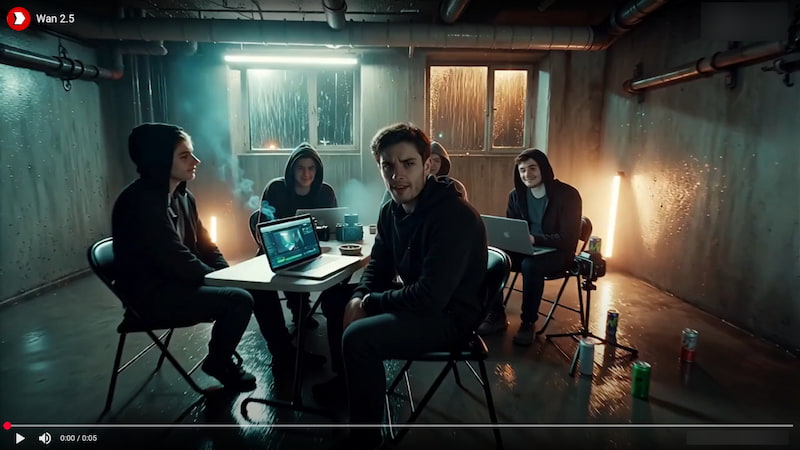
Rain pours outside a grim underground studio late at night. Flickering ceiling lights cast sharp shadows across metal chairs, open laptops running video-editing timelines, and a group of hoodie-wearing young filmmakers clutching retro cameras and half-empty energy drinks. Concrete walls, exposed wiring, and foggy windows frame the industrial setting as cigarette smoke curls through the air.
The camera opens wide on the cluttered basement, slowly pushes into a medium shot of TYLER at the center. He leans forward, eyes locked on the group, voice rough and deliberate:
TYLER (low, intense): Rule number one of AI filmmaking: you absolutely talk about AI filmmaking.
The camera eases back as the group exchanges knowing grins and nods. Ambient sounds include rainfall, distant traffic, buzzing lights, laptop fans, and rolling thunder.
Visual style: muted colors, strong contrast, cinematic grain, and teal-and-amber tones, with a shallow depth of field that isolates Tyler.
Here’s how to use the Wan 2.2 prompt generator to generate the example prompt:
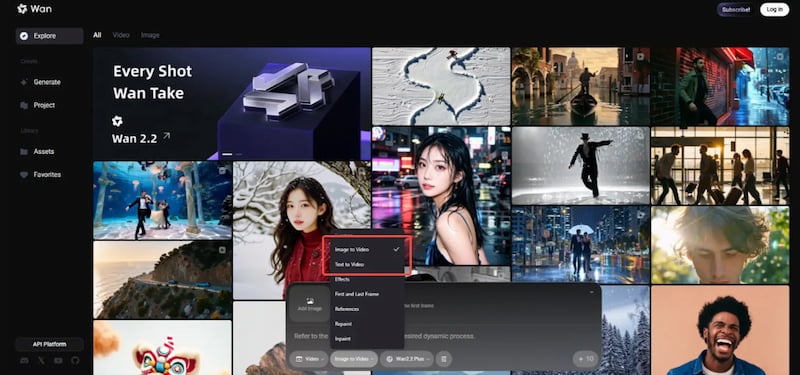
Step 1. On the Wan AI page, select the Text to Video option from the prompt menu. You can use the provided prompt example or create a unique description of your own. Be as descriptive as possible, as clear and detailed prompts lead to better visual results.
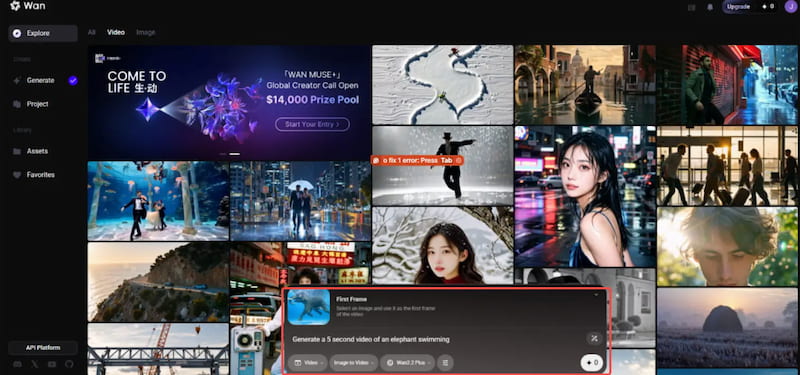
Step 2. After entering your prompt, the next step is configuring your video settings. Choose Wan 2.0 Turbo, Wan 2.1 Plus, or Wan 2.1 Turbo as your Generation Model. Next, choose an aspect ratio that fits your platform. Once everything is set, click Enter to start generating your video.
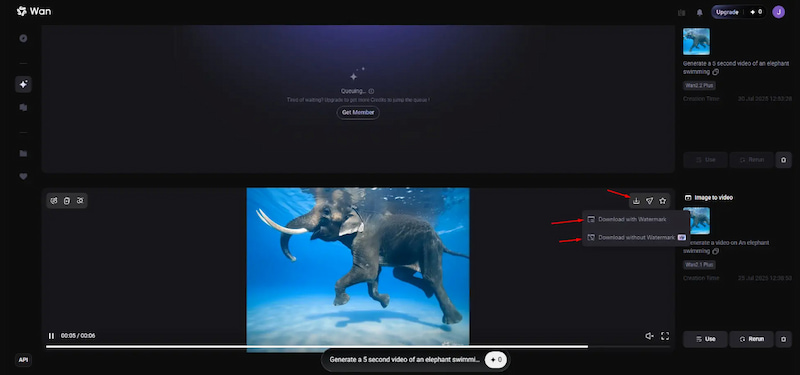
Step 3. When the video is ready, click the Download button. You’ll see two download options: Download with Watermark and Download without Watermark (VIP). If you’re using Wan AI for free, the exported video will include a watermark.
Wan 2.1 prompt generator and other models offer quick and creative video generation. However, if you need advanced customization, faster rendering, or watermark-free exports by default, Wan AI may feel somewhat limited.
Part 2. Use These Prompts to Generate a Video With Wan AI on Picwand
Wan AI prompt generator is undeniably a strong tool for video creation. However, Wan AI’s limitations prevent many users from relying on it for consistent, professional output. Some common drawbacks include short video durations, low-quality outputs, and watermarked exports. Due to these constraints, many users seek a more powerful alternative.
Picwand AI Text-to-Video Generator is a state-of-the-art AI generative tool built for prompt-driven video creation. It can turn any simple or highly detailed text inputs into high-quality videos. It supports prompts up to 1,500 characters per generation, allowing for detailed text descriptions. In terms of video duration, you can generate videos up to 10 seconds long. Remarkably, you can export the generated video up to 4K resolution without watermarks.
Why Choose Picwand AI Text-to-Video Generator:
Generates videos up to 10 seconds long, ideal for short-form videos.
Supports rich prompts of up to 1,500 characters for detailed text description.
Offers flexible aspect ratio options, including 16:9, 9:16, 1:1, 4:3, 3:4, and more.
Exports videos in multiple resolutions, including 720p, 1080p, 2K, and up to 4K.
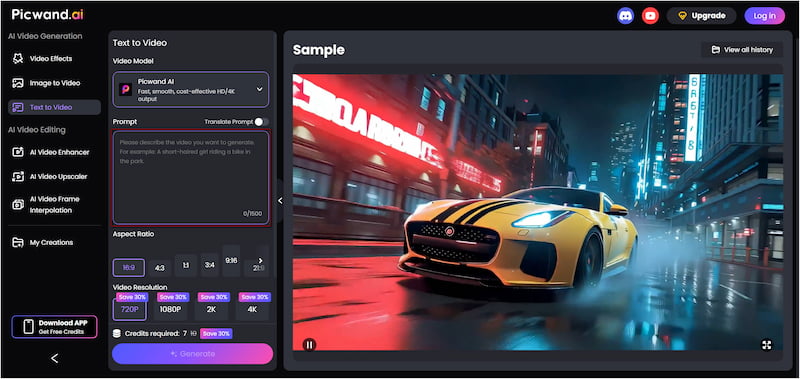
Step 1. Access the Picwand AI Text-to-Video Generator’s official site through the provided link. In the prompt box, paste or rewrite your Wan AI prompt. The more specific your prompt, the more accurately Picwand AI can translate it into visuals.
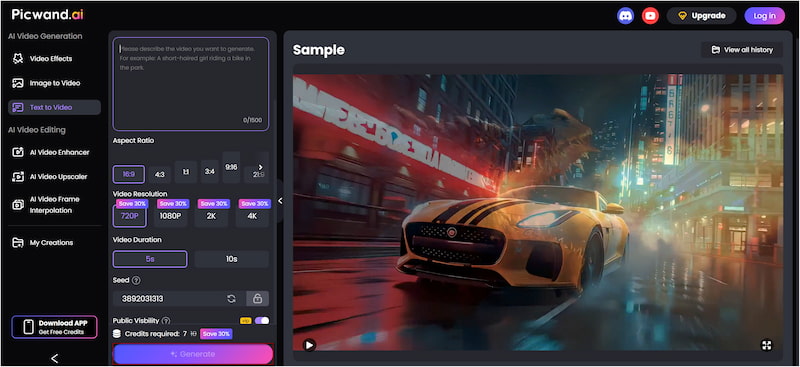
Step 2. Next, scroll to the Aspect Ratio section and choose the format that matches your target platform. Then, choose your preferred output resolution, which can range up to 4K. Please note that Picwand supports a maximum video duration of 10 seconds.
Step 3. If you want to keep your project private, simply turn off Public Visibility. Once all settings are finalized, click Generate. Picwand AI will process your prompt quickly and render a video that matches your written description.
Wan AI prompt generator offers impressive creative tools, but its limitations make it less suitable for professional use. If you require longer video durations, high-quality output, and watermark-free exports, Picwand AI Text-to-Video Generator is a reliable and efficient alternative worth considering.
To achieve the best possible results, ensure to follow best practices on how to write AI prompts.
Part 3. FAQs about Wan AI Prompt Generator
Q: Is Wan AI free to use?
A: Yes, Wan AI is considered free and open-source, including 2.1, 2.2, and 2.5. It allows you to access, use, and experiment with its AI video generation capabilities without licensing fees.
Q: What is the latest Wan AI model?
A: The latest release in the Wan AI lineup is Wan 2.6, developed by Alibaba. This version represents a significant upgrade, with a strong focus on advanced multimodal video generation.
Q: Does Wan AI support custom avatars?
A: No, Wan AI does not support fully customizable avatars. While it can generate characters based on text or image prompts, it lacks built-in tools for creating personalized avatar.
Conclusion
The Wan AI Prompt Generator makes AI video creation more approachable. It is ideal for those who want to explore AI-driven video generation through text and image prompts. It helps you understand how structured, descriptive prompts can translate into short videos. While Wan AI offers strong generative capabilities, its limitations can restrict its usefulness for professional projects. If you’re looking to take your prompts further and achieve higher-quality results, Picwand AI Text-to-Video Generator is a smart next step. It supports longer videos, detailed prompts, multiple aspect ratios, and high-resolution exports. Picwand AI makes it easier to turn well-written prompts into share-ready content.