How to Make a PDF Clearer in Adobe (With an Easier Alternative)

Blurry PDFs are frustrating—especially when you need to read scanned documents, share work files, or submit something important. Many people choose to make a PDF clearer in Adobe or Photoshop, but the tools can feel complicated, expensive, or time-consuming if you just want a quick clarity boost.
You can make a PDF much clearer using Adobe’s built-in enhancement tools. In this guide, we’ll walk through simple steps anyone can follow, even if you’re not familiar with Adobe software.
And for those who want a faster, easier, and more affordable option, we’ll also introduce Picwand AI, an intuitive AI enhancer that can fix blurry PDF images and scanned pages in seconds—without requiring professional skills.
Contents:
Part 1. How to Sharpen a PDF in Adobe
Sharpen PDF Adobe offers several tools to improve a PDF, especially if it was created from a scanned document. The clarity depends on the original file quality, but with the right settings, you can significantly enhance text and images.
Steps
Step 1: Launch Adobe Acrobat Pro and click on Enhance Scans to open the PDF you want to improve. The enhancement tools are only available in the Pro version, so make sure you have access.
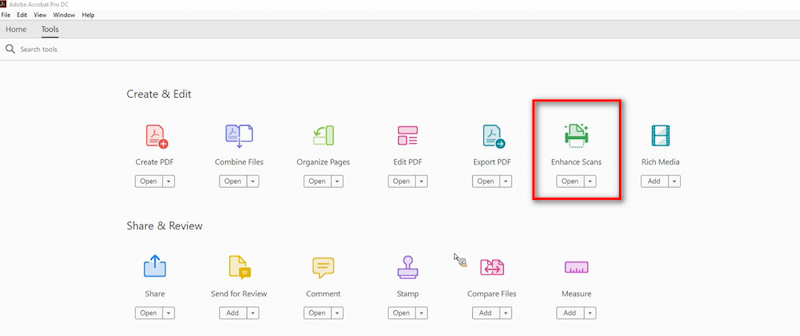
Step 2: On the right-hand toolbar, find the option labeled "Scan & OCR." This tool is designed to clean up scanned pages and make them more readable.
Step 3: Click "Enhance Scans" → "Enhance." Adobe will analyze the document and attempt to smooth out noise, sharpen edges, and boost text clarity.
Step 4: You can manually fine-tune the clarity using:
Despeckle → removes noise and grain
Sharpen → improves text crispness
Contrast → increases visual clarity
Filters → fix faded or darkened areas
Move the sliders until the PDF looks clear and readable.
Step 5: If the PDF was scanned, select "Recognize Text" in the same panel. OCR (Optical Character Recognition) turns blurry or pixelated text into selectable, sharper digital text.
Step 6: Click the download icon to save a clean version without overwriting the original file.
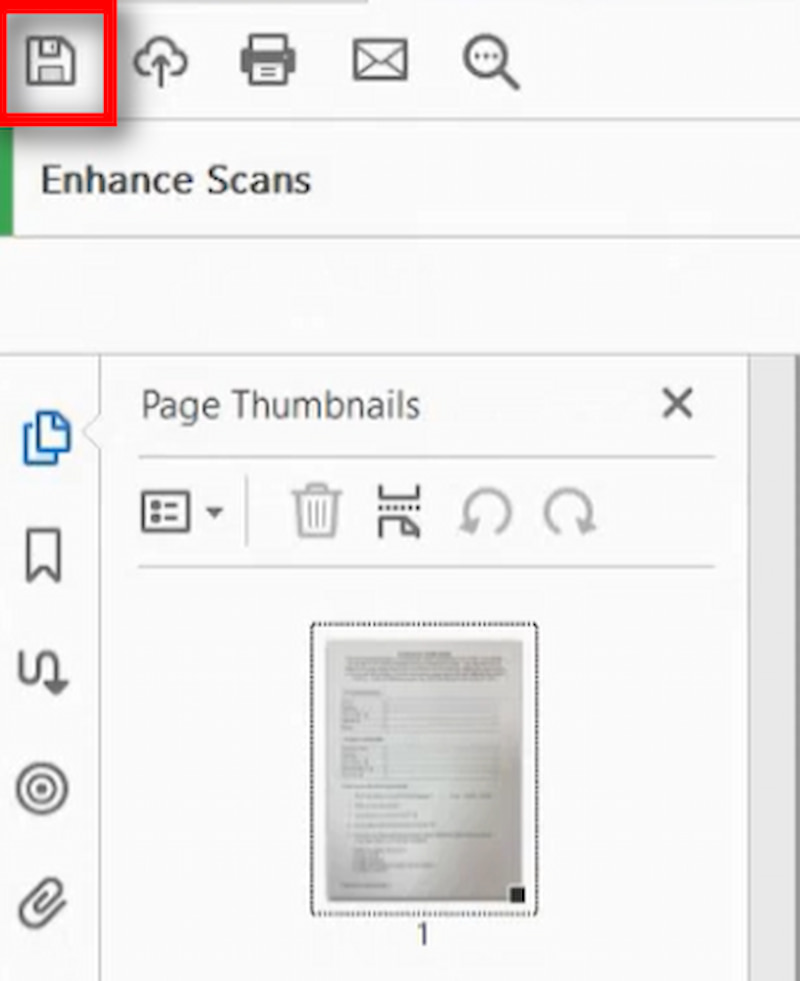
Sharpening PDF Adobe Acrobat pro undeniably provides strong tools for improving PDF clarity. It works well for scanned documents, faded text, and general cleanup. However, it comes with several drawbacks:
Cons
- Requires Adobe Acrobat Pro, which is expensive
- The enhancement process is not very beginner-friendly
- Images inside PDFs may remain blurry even after enhancement
- OCR doesn’t always work well on low-resolution scans
- Processing can be slow for large PDFs
Your concern on how to sharpen PDF in adobe can be resolved. If you need to improve only images in a PDF—such as scanned pages, photos, or product images—Adobe AI art enhancer may not always give the best results. This is where an AI enhancer like Picwand becomes a much simpler and more efficient solution.
Part 2. Best Adobe Photoshop Alternative - Picwand
Sometimes the PDF pages are blurry because the images inside the PDF are low-resolution. In these situations, no amount of editing inside Adobe will completely fix the problem.
That’s why many users turn to Picwand AI Photo Enhancer, a modern AI-powered tool that restores clarity, removes blur, and enhances details automatically. It’s lightweight, fast, and beginner-friendly—no technical skills required.
Features
• AI Super Resolution: Upscale low-quality PDF images up to 4K while preserving natural details.
• Old Photo Restoration: Repair faded documents, historical scans, and old text pages.
• Smart Deblur: Fix motion blur, camera shake, and pixelation in scanned pages.
• Noise Reduction: Smooths grainy documents without damaging important text.
• Sharpening & Detail Enhancement: Unlike basic sharpening filters, Picwand's AI analyzes the edges and textures in your photo to apply a natural and impactful clarity boost.
• Extremely User-Friendly: The interface is clean, intuitive, and requires no technical knowledge or training. It’s designed for everyone.
Steps
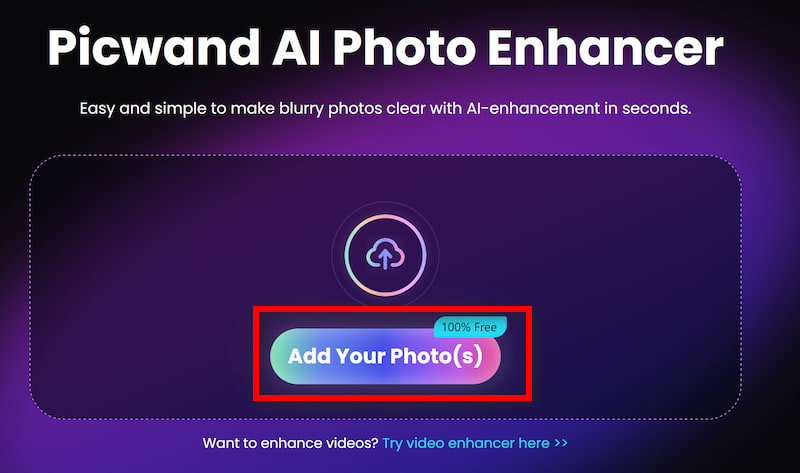
Step 1: Click Add your photo(s) to upload the old image in Picwand AI Photo Enhancer.
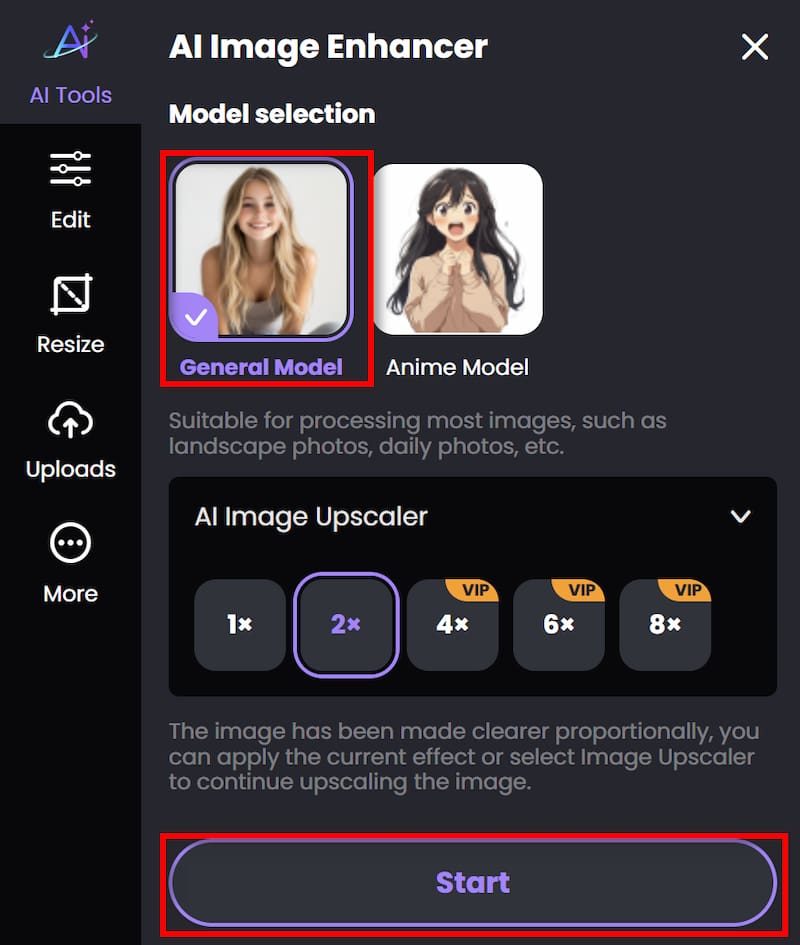
Step 2: Beside Photo enhancement, if you want to improve the resolution, you can also achieve image upscaler by adjusting the parameter. Then click on Start to begin processing.
Step 3: Wait for seconds. And then you can click Download to save the finished work.
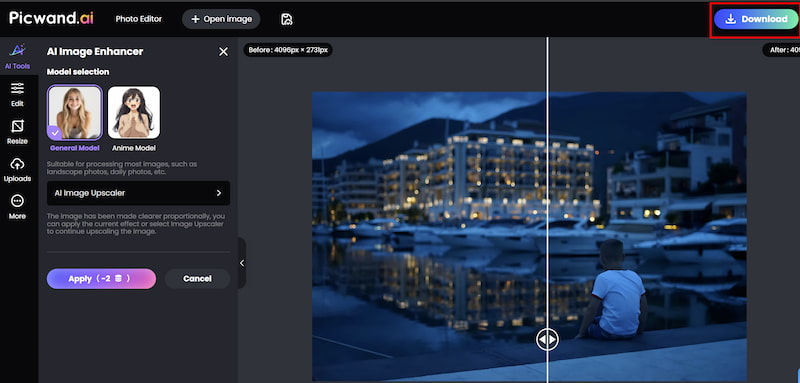
Unlike Adobe, which focuses mostly on text optimization, Picwand improves the actual image quality—which is often the root cause of a blurry PDF.
Pros
- Unmatched AI Quality: The clarity and detail recovery provided by a specialized AI like Picwand's often surpasses what is possible with manual tools in Photoshop or Acrobat, especially for severely degraded images.
- Incredible Ease of Use: The three-step process (upload, click, download) is accessible to anyone, regardless of skill level.
- Cost-Effective: Picwand offers flexible pricing, including free trials and affordable credits, making high-end image enhancement accessible without a subscription burden.
- Speed: What takes minutes of tweaking in complex software takes seconds in Picwand.
- Focus on the Root Cause: It directly targets the most common source of PDF clarity issues: poor-quality images.
If your PDF looks blurry because of embedded images or scans, Picwand produces better, more natural results for enhancing landscape with less effort.
Part 3. FAQs about Making a PDF Clearer in Adobe
Can I make a PDF clearer for free in Adobe?
Adobe Acrobat Reader (the free version) has very limited editing capabilities. It does not include the "Scan & OCR" or "Enhance" tools needed to improve clarity significantly. You would need a paid Acrobat Pro DC subscription for that.
What is the main difference between using Adobe and Picwand?
Adobe Acrobat is a comprehensive document editor that includes enhancement as one of its many features. It's best for overall document cleanup. Picwand is a specialized AI tool focused purely on image quality. It is far more powerful and efficient for enhancing graphics and photos.
What should I use if my PDF is blurry because it's just an image of a text page?
For a scanned text document, Adobe Acrobat Pro's OCR feature is your best bet, as it will convert the image-text into selectable, clear text. For a PDF containing a blurry photograph or graphic, Picwand will deliver superior results.
Conclusion
Improving PDF clarity doesn’t have to be difficult, because making a PDF Clearer in Adobe brings convenience. But if your PDF contains blurry images—or if you want results faster and with less effort— Picwand AI Photo Enhancer provides a powerful and user-friendly alternative.
Whether you're preparing work files, restoring old documents, or creating a polished PDF for clients, combining Adobe with Picwand gives you the best of both worlds: professional enhancement and effortless AI clarity.
AI Picwand - Anyone Can be A Magician
Get Started for Free