Basic PlanVIP PlanVIP ExpiredPurchased credits are valid for life but require an active VIP subscription to use
0Credit(s)
You can use credits to access all the AI tools on Picwand, such as the AI Image Upscaler, AI Age Filter, AI Video Enhancer, AI Video Upscaler, AI Video Effects, and more.
Old home videos, MiniDV recordings, VHS transfers, and early digital camera clips often look blurry or noisy on today's high-resolution screens. AI-powered video restoration tools can sharpen details, reduce noise, improve resolution, and even stabilize shaky footage. While Topaz Video AI is one of the best-known solutions, its price and hardware requirements aren't ideal for everyone. If you're looking for a more affordable or beginner-friendly option, this guide compares the three best Topaz Video AI alternatives in 2026 to help you choose the right one.
Quick Answer
Looking for a Topaz Video AI alternative? Picwand AI Video Enhancer is the best choice for beginners thanks to its online workflow and free watermark-free exports. AVCLabs is ideal for desktop users who need batch processing, while TensorPix is a great cloud-based option for users who don't want to install software.
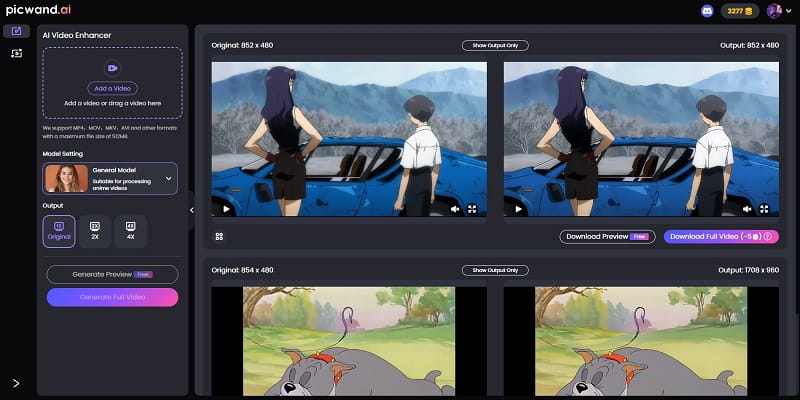
Picwand AI Video Enhancer is a cutting-edge tool designed to transform low-resolution videos into stunning, high-quality footage. Specializing in AI-powered enhancement and detail restoration, it breathes new life into blurry, pixelated, or outdated videos with remarkable clarity and precision. Picwand combines AI video restoration, super resolution, AI denoising, and stabilization into a beginner-friendly workflow.
• Improve visuals with one click. With just one click and a few seconds, it can increase video quality to 1080p, improving overall visual appeal.
• Reduce noise from videos. It will effectively remove unwanted noise from grainy or compressed videos.
• Stabilize and unblur videos. Each frame will be adjusted to ensure smooth movement and clear display.
• Designed for users, especially beginners. Its clean and instructive interface is friendly to users of all skill levels.
Additionally, it is a perfect tool for various occasions:
• Film & TV restoration. It revives classic movies with enhanced details.
• Content creation. It elevates the quality of social media videos, such as those on YouTube, and exhibits a professional look.
• Home video preservation. It can restore cherished family memories by sharpening and upscaling old recordings.
With advanced AI technology, Picwand AI Video Enhancer guarantees that every frame is optimized for crisp, vibrant results. It also offers free outputs without watermarks and supports MP4, MOV, MKV, AVI, and other formats. It is the preferred solution for anyone looking to upgrade video quality effortlessly. If you are interested in it, follow the guide below to start.
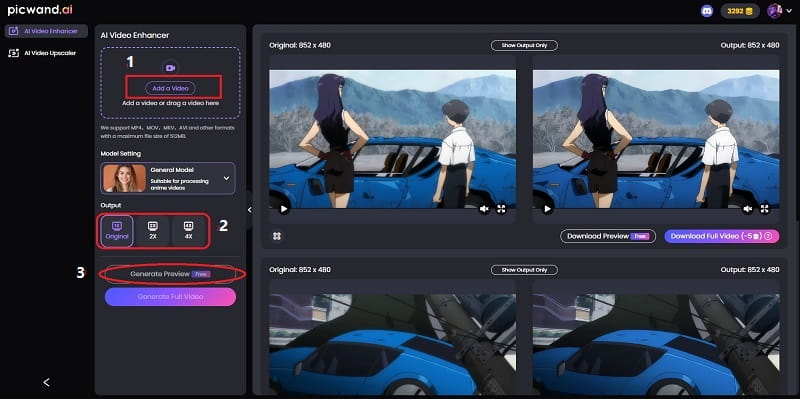
Step 1: Go to Picwand AI Video Enhancer, click Add a Video button to select a video, and choose a model (General & Anime) and a suitable resolution (Original/2X/4X) to generate a preview for free.
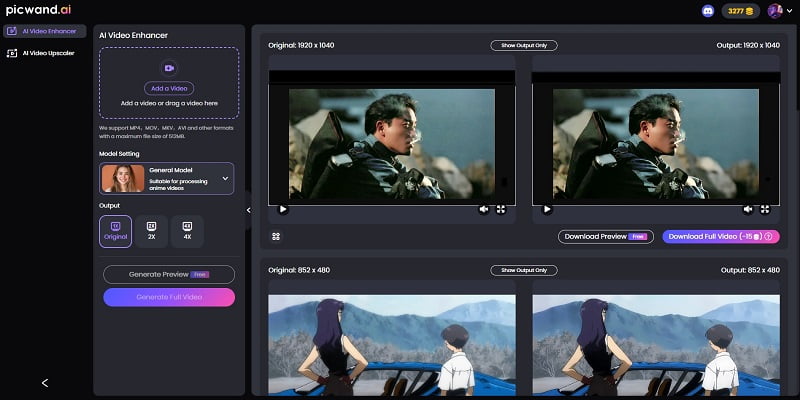
Step 2: Once you upload a video successfully, you can click Generate Preview button to preview the video, with the original one on the left and the AI-processed on the right.
As we can see, it is effortless to enhance our videos through Picwand AI Video Enhancer; and it is online and free, perfect for beginners. We also conclude the price, pros, and cons for your reference.
Pros
Potent Video Enhancement.
Easy Operations.
Lightning Processing.
Free Outputs, No Watermarks.
Multiplatform Compatibility (Web & PC & Mobile App).
Cons
It has a maximum file size of 512 MB.
Price • Free.
Best for:
• Beginners
• Online video enhancement
• Users who want free exports without watermarks
If you take a screenshot from an old video and want to upscale the image to 4K resolution, Picwand also provides an AI photo editor to meet your needs.
Top 2. AVCLabs Video Enhancer AI
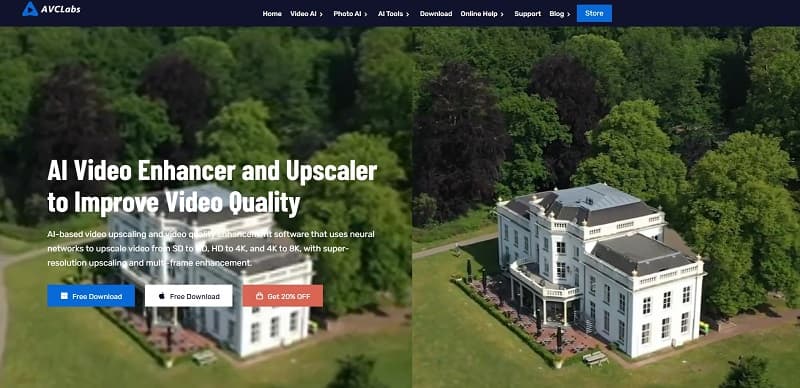
AVCLabs Video Enhancer AI is a powerful AI-driven software designed to upscale, restore, and enhance videos. It specializes in denoising, resolution boosting, and detail recovery, ideal for improving low-quality footage. It has some key features.
• Multi-functional enhancement. It can fix blurry, grainy, or compressed videos through AI upscaling, noise reduction, and stabilization.
• Batch processing. It can process files simultaneously, saving time and ensuring consistent results.
• Colour correction. It will adjust brightness, contrast, and saturation in real time, delivering natural colours and high-quality details.
Here are the price, pros, and cons of AVCLabs Video Enhancer AI.
Pros
User-Friendly Interface.
Batch Processing.
Fast Rendering.
Cons
No web version, users are required to download the software.
It has a limited free trial, with watermarked outputs.
Price:
• $ 39.95 monthly.
• $ 95.96 yearly.
• $ 299.9 perpetually.
Best for:
• Desktop users
• Batch enhancement
• Users processing multiple videos
AVCLabs Video Enhancer AI is a versatile solution for video restoration, particularly strong in facial enhancement and denoising. While it may struggle with extremely degraded footage, it delivers impressive results for most common enhancement needs.
Top 3. TensorPix AI Video Enhancer
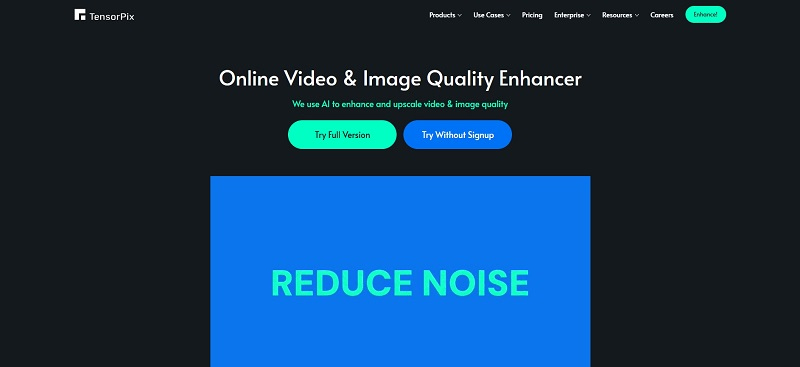
TensorPix AI Video Enhancer is a cloud-based, AI-powered video enhancement tool that instantly improves video quality without requiring software installation. Designed for quick and hassle-free processing, it offers real-time previews so users can adjust settings before final rendering. Here are some key features.
• Enhance video quality. TensorPix offers video enhancement to the highest 4K quality.
• Quickly enhance lots of videos. TensorPix uses GPU-accelerated cloud servers that can process hundreds of videos at once.
• Stabilize videos. It can stabilize any shaky video by intelligently analyzing the rocky scenes and applying video stabilization when needed.
Here's a quick overview of TensorPix's pricing, advantages, and limitations.
Pros
No Software Installation.
Beginner-Friendly.
Parallel Processing.
Cons
It has only a web version and cannot be used as a mobile app.
The free trial usually needs a long waiting time to deliver results.
Price:
• $ 5.5 monthly for the standard version.
• $ 12.42 monthly for the premium version.
• $ 30.25 monthly for the elite version.
Best for:
• Cloud workflow
• No software installation
• Lightweight enhancement tasks
To wrap up, TensorPix AI Video Enhancer is a convenient, lightweight solution for users who need fast video enhancement. Its real-time preview and web accessibility make it perfect for casual creators and quick fixes.
A Contrast Template of the 3 Tools
How We Scored These Tools
Each tool was evaluated on five criteria: ease of use, enhancement quality, processing speed, pricing, and platform compatibility. Scores are based on testing the same sample videos using each tool's recommended settings.
Considering four major factors, we craft a contrast template of the three tools to help users decide on their best alternative for Topaz Video AI.
As the template shows, the three tools are all terrific; however, Picwand AI Video Enhancer is the best overall performer, excelling other AI video enhancers in user experience, output quality, price competitiveness, and multi-platform compatibility. We highly recommend Picwand as the top alternative for Topaz Video AI.
Picwand AI Video Enhancer
AVCLabs Video Enhancer AI
TensorPix AI Video Enhancer
Ease of Use
5
4
4
Quality & Speed
5
5
4
Price Competitiveness
5
4
4
Multi-platform Compatibility
5
3
4
Overall Performance
5
4
4
How We Tested These Video Enhancers
We tested each tool using identical low-resolution sample videos, including a 720p home video and a compressed 1080p clip. We evaluated enhancement quality, detail restoration, AI denoising, processing speed, ease of use, supported platforms, and overall value. All information was verified in July 2026.
FAQs
Is there a free alternative to Topaz Video AI?
Yes. Picwand AI Video Enhancer offers a free plan that lets you enhance videos online without adding watermarks, making it an excellent choice for beginners and casual users.
Can Picwand match Topaz Video AI quality?
For most everyday videos, Picwand delivers impressive AI enhancement, including noise reduction, sharpening, and resolution improvement. Topaz still offers more advanced manual controls for professional workflows, but Picwand provides a better balance of quality, speed, and ease of use.
Does TensorPix require a powerful computer?
No. Since TensorPix processes videos on cloud servers, most of the computing work is done remotely. You only need a stable internet connection and a web browser.
Which alternative supports batch processing?
AVCLabs Video Enhancer AI is the best choice for batch processing because it can enhance multiple videos simultaneously, saving significant time for large projects.
Can these tools upscale videos to 4K without watermarks?
Picwand supports free exports without watermarks. AVCLabs and TensorPix also provide high-quality 4K enhancement, although free trials may include certain limitations depending on the plan.
Conclusion
If you're looking for a Topaz Video AI alternative in 2026, all three tools are excellent choices for different needs. Picwand is the easiest option for beginners thanks to its online workflow and free watermark-free exports. AVCLabs is better suited for desktop users who frequently process multiple videos, while TensorPix is ideal for cloud-based enhancement without software installation.
No matter which tool you choose, AI-powered video restoration can significantly improve old or low-quality footage by enhancing details, reducing noise, and increasing resolution. If you want the best balance of quality, simplicity, and value, Picwand AI Video Enhancer remains our top recommendation.