How to Denoise an Image in Python (Step-by-Step Tutorial)

Image noise is one of the most common issues photographers, developers, and researchers encounter. Whether you’re working with digital photos, scanned images, or computer vision datasets, noise can make images look grainy, blurry, or unclear. If you’re learning image processing or building a Python project, knowing python denoise image is an essential skill. Python’s ecosystem—especially libraries like OpenCV, NumPy, and SciPy—offers powerful and flexible noise-reduction techniques.
This article provides a clear and accessible explanation of: What image noise is; How to denoise images in Python using three common filters; And finally, how to quickly remove noise using Picwand, a beginner-friendly online AI photo enhancer without writing code. Whether you're a developer, student, or photographer, you’ll find solutions that suit your workflow.

Contents:
Part 1. What is Image Noise
Image noise refers to the random variation of brightness or color information in images. It appears as grain, speckles, or pixel distortions, and reduces image quality significantly.
Common Types of Image Noise
Below are the most common types you’ll encounter:
1. Gaussian Noise
• Appears as random grain
• Very common in low-light photography
• Modeled using a normal distribution
2. Salt-and-Pepper Noise
• Appears as random white and black pixels
• Caused by transmission errors or sensor faults
3. Poisson Noise
• Related to photon detection
• Common in scientific imaging
4. Speckle Noise
• Mostly affects medical and radar images
• Multiplicative rather than additive
• Why Noise Happens
Noise can be caused by:
• High ISO settings
• Low light conditions
• Poor sensor quality
• Transmission errors
• Movement during capture
Regardless of its origins, noise decreases clarity and affects computer vision tasks such as edge detection, classification, or segmentation. This leads us to Python, which offers multiple filtering techniques to fix this issue.
Part 2. How to Denoise by Using Python
Python provides several filters to smooth noisy images, each with its own strengths. Below are three widely used methods in denoising images python: mean filtering, median filtering, and Gaussian filtering.
Examples will reference OpenCV, the most commonly used Python library for image processing.
1. Mean Filter (Averaging Filter)
What it does:
The mean filter smooths an image by replacing each pixel with the average value of the surrounding pixels.
Good for:
• Random noise
• Simple smoothing
Not good for:
• Preserving edges
• Heavy noise
Python Example:
import cv2
img = cv2.imread("noisy.jpg")
denoised = cv2.blur(img, (5, 5))
cv2.imwrite("mean_filtered.jpg", denoised)
How It Works:
The function cv2.blur() applies a simple averaging kernel to reduce variations in intensity.
3. Gaussian Filter
What it does:
The Gaussian filter applies a weighted blur where pixels closer to the center get more influence.
Good for:
• Gaussian noise
• Gentle, natural smoothing
• Reducing random grain
Not good for:
• Salt-and-pepper noise
Python Example:
import cv2
img = cv2.imread("noisy.jpg")
denoised = cv2.GaussianBlur(img, (5, 5), 0)
cv2.imwrite("gaussian_filtered.jpg", denoised)
How It Works:
cv2.GaussianBlur() calculates a Gaussian kernel based on the specified sigma value.
It provides smooth and visually pleasing results without overly removing detail.
Through the above filters, you can quickly denoise image in python. However, if you are not good at using python, we can offer you an automatic AI tool.
Part 3. Use The Top AI Tool to Remove Image Noise
While image denoise Python filters are powerful, they require:
• Coding knowledge
• Proper parameter tuning
• Library installation
• Time-consuming experimentation
For beginners, non-developers, or anyone wanting faster, professional-quality noise reduction, AI-based tools provide a much more efficient option.
Among them, Picwand AI Photo Enhancer, supporting AI upscaling, stands out as the easiest and fastest solution.
Picwand AI Photo Enhancer
Picwand AI Photo Enhancer is an online AI-powered image enhancer that automatically removes noise, sharpens details, and improves clarity in seconds—no coding required like python denoising images.
Features
• One-Click AI Noise Removal: Picwand’s advanced AI model identifies noise and removes it intelligently based on image structure.
• Detail Recovery: Instead of blurring details like traditional filters, Picwand enhances edges and textures.
• Deblur + Denoise at Once: Fix motion blur, graininess, and low-light issues in a single upload.
• 4K Upscaling Capability: AI increases image resolution while denoising, ideal for printing or presentations.
• 100% Online: No installation, no complex settings, no GPU requirements.
• Beginner-Friendly Interface: Great for students, photographers, designers, and casual users.
Steps
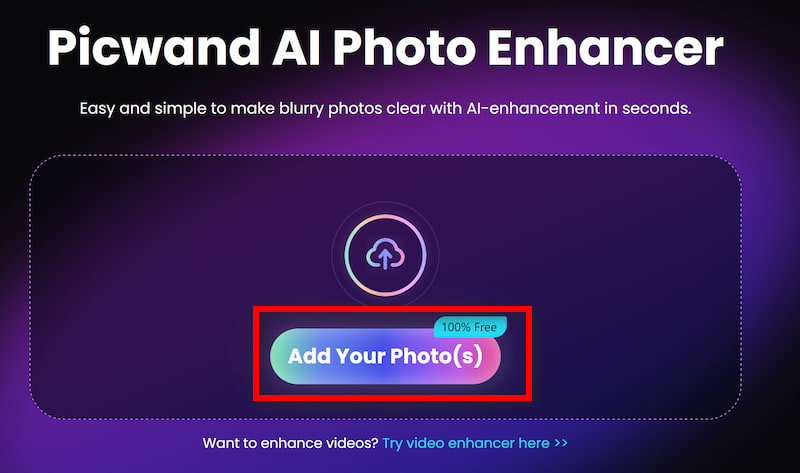
Step 1: Click Add your photo(s) to upload the old image in Picwand AI Photo Enhancer.
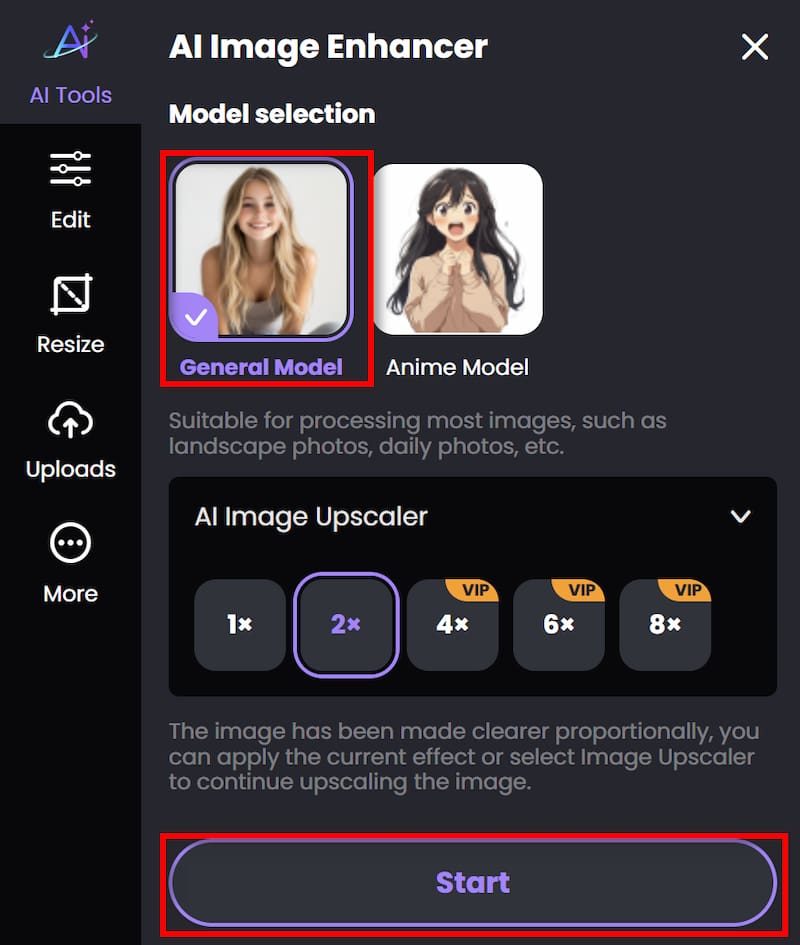
Step 2: Beside Photo enhancement, if you want to improve the resolution, you can also achieve image upscaler by adjusting the parameter. Then click on Start to begin processing.
Step 3: Wait for seconds. And then you can click Download to save the finished work.
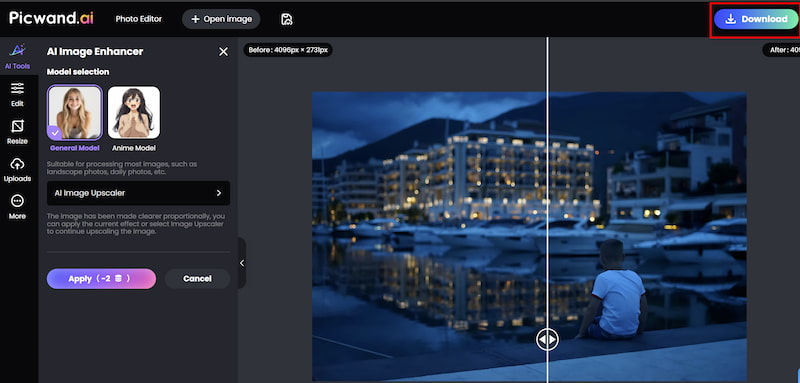
Picwand provides outstanding noise reduction performance without any of the complexity that comes with coding in Python.
Pros
- Extremely easy to use
- Fully automated AI enhancement
- No blurry artifacts
- Online and accessible anywhere
- Removes noise + fixes blur simultaneously
- More natural results than classical filters
- Ideal for productivity and everyday use
For users who want better results with less effort, Picwand, the best free Photoshop alternative, is the most convenient and effective solution.
Part 4. FAQs about Denoise Image Python
Is Python good for denoising images?
Yes. Python offers strong libraries, but results depend heavily on correct parameter tuning.
Are AI tools better than traditional filters?
For most real-world photos, yes. AI tools like Picwand remove noise without losing details.
Can I use Picwand for low-light photos?
Absolutely. Picwand is excellent for night photography and high-ISO grain.
Conclusion
Python denoise image allows you to denoise images using traditional filters like mean, median, and Gaussian blurs—great for learning and experimentation.
But if you want a faster, more accurate, and beginner-friendly method, Picwand AI Photo Enhancer is the ideal solution. With one click, it removes noise, recovers details, and outputs a clean, high-quality image—no code, no configuration, no technical skills required.
Whether you're working on a project or simply improving personal photos, Picwand makes professional noise removal accessible to anyone.
AI Picwand - Anyone Can be A Magician
Get Started for Free