Best Free Movie Maker: Create Your Own Movies Without Expensive Software

Gone are the days when you need to buy expert editing software or spend hours on convoluted timelines to make a movie. The best free video maker today can do simple edits and transitions, AI-generated scenarios, animated pictures, subtitles, and ready-made templates. But “free” can be a relative term. Some apps provide quite comprehensive editing features for free, but others limit AI credits, premium templates, resolution or exports. The correct choice depends on what you want to build.
Contents:
Part 1: What Is a Free Movie Maker?
Movie Maker Definition
A movie maker is software or an online tool that helps users combine visual and audio materials into a finished video. Typical functions include trimming, splitting, transitions, text overlays, music, sound effects, subtitles, filters, and video export.
At least some of these functionalities can be obtained via a free movie creator, without paying up front. But free plans have constraints on the number of templates, AI credits, cloud storage, export quality or premium materials.
AI Movie Maker Review
An AI movie creator takes it a step further. Rather than you doing all the work of building each scene by hand, the artificial intelligence may create screenplays, storyboards, images, animations, voiceovers or full video sequences from a prompt.
For example, Picwand can take a simple idea and turn it into a structured narrative, storyboard, and final video. Its workflow includes AI story understanding, script generation, scene creation, and an editable storyboard. This makes AI movie makers especially useful for short films, visual stories, social content, product videos, and concept videos.
Part 2: How to Choose a Free Movie Maker
Not every free movie maker is equally useful. Before choosing one, check these five factors.
1. Ability to Generate AI
If you want to create scenes rather than just edit existing footage, check for text-to-video, image-to-video or story-to-video features.
Picwand AI supports video creation from text and images, with an AI video agent workflow designed to help turn story ideas into videos.
2. Editing Features
AI generation is only part of filmmaking. You may still need to trim clips, rearrange scenes, add music, adjust timing, insert captions, or refine transitions.
CapCut, for instance, provides timeline editing, transitions, filters, text, audio, background removal, and other editing functions.
3. Templates
Templates can dramatically reduce production time. They are particularly useful for beginners who have a clear idea but don't know how to structure the video.
Canva's free plan currently includes more than 1.6 million templates and 4.7 million photos, videos, graphics, and audio assets.
4. Quality Export
Before you commit to a tool, check the max resolution and the formats accessible. A video that appears fine in an editor may not be similarly helpful after export.
For example, Picwand AI video model enables up to 4K output. Its image-to-video workflow supports output in MP4 and up to Full HD 1080p on the cited tool site.
Part 3: Best Free Movie Maker Tools
1. Picwand AI — Recommended
Features:
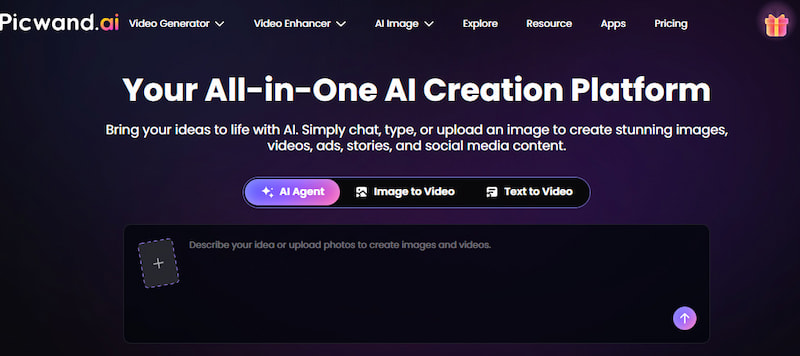
Picwand AI combines AI video generation with creative editing tools. Its key features include Text to Video, Image to Video, AI Video Agent, AI Video Editor, and AI Video Enhancer. With the AI Agent, users can describe their ideas or upload reference images and let AI help develop scripts, generate visuals, and create videos through natural conversation. Users can also edit individual scenes and refine the final result.
Its Image to Video tool is useful when you already have character designs, photographs, illustrations, or product images. It can bring static visuals to life with camera movements such as zooming, panning, and rotation.
Advantages:
- • AI Agent supports conversational video creation
- • Text-to-video and image-to-video workflows
- • AI-assisted script and visual generation
- • Beginner-friendly interface
- • Suitable for cinematic and marketing content
- • Free access options available
Disadvantages:
- • AI generation may consume credits
- • AI-generated results may require further refinement
- • Offers less precise manual control than traditional video editors
Pricing: Free to start, with additional credits available for purchase.
Best for: Creators who want AI to enhance image quality, generate the story, scenes, and motion rather than simply edit existing footage.
2. Canva
Features:
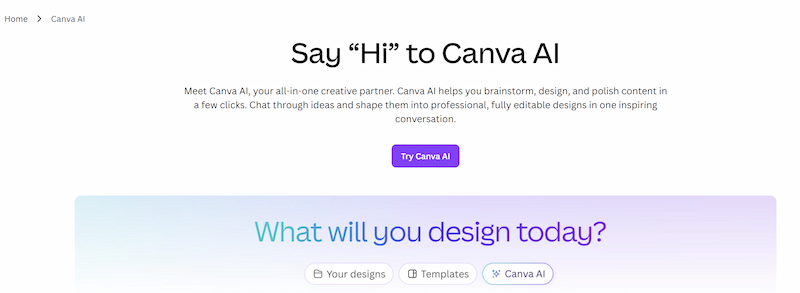
Canva is most recognized as a design platform, but its video features let you easily create slideshows, social videos, presentations, promotional films and simple movies. This AI art enhancer is one of the best free movie makers for Windows. It’s beginner-friendly with a drag-and-drop interface and a huge template collection.
Pros:
- • Extremely easy to learn
- • Large template and media library
- • Good for presentations and story-based slideshows
- • Convenient drag-and-drop editing
Downsides:
- • Certain premium assets need a paid plan
- • Designed for design-led videos rather than AI-generated cinematic films
Pricing: Free plan offered; premium plans unlock more assets and functionality.
Best For: Beginners, marketers, students and producers who like templates and visual design.
3. CapCut
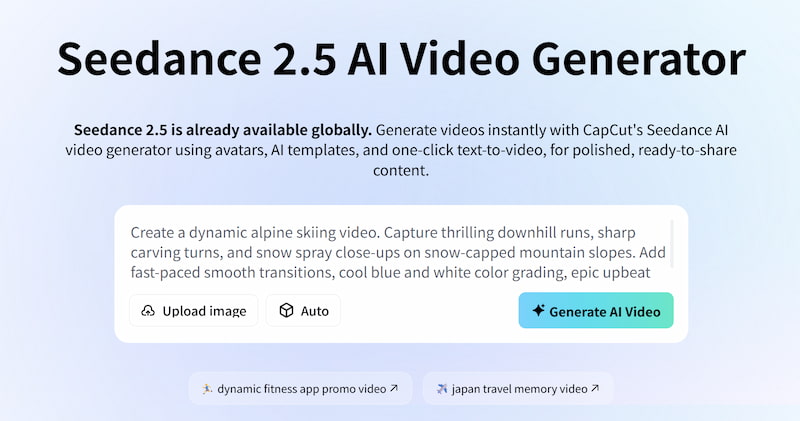
Features:
CapCut combines a traditional video editor with AI-powered creation features, seen as one of the best AI movie makers for free. Its free movie editor includes tools such as multitrack editing, filters, effects, background removal, chroma key, and speed controls. Its AI video editor can also help generate scripts, create videos, add AI voiceovers, captions, and other elements.
Pros:
- • Powerful editing controls
- • Large selection of templates and effects
- • AI-assisted video creation
- • Suitable for short films and social videos
Downsides:
- • Some features are Pro-only
- • Availability of pricing and features may differ by area
Cost: Free editing options CapCut Pro is paid, with cost depending on area and platform.
Best for: Users who want a balance between manual editing and AI-assisted creation.
Part 4: How to Make Movies with Picwand AI
If you want to turn a creative idea into a movie without manually editing multiple clips, Picwand AI Agent can help you create images and videos through natural conversation.
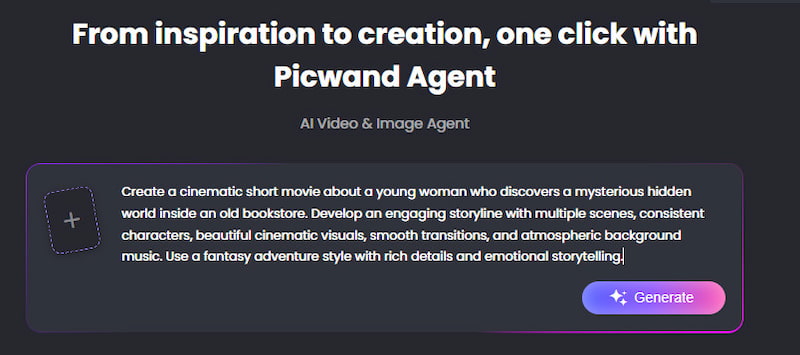
Step 1. Enter Your Movie Idea
Open Picwand AI Agent and describe your movie concept, including the plot, characters, setting, and visual style. You can also upload reference images to help the AI understand your creative vision.
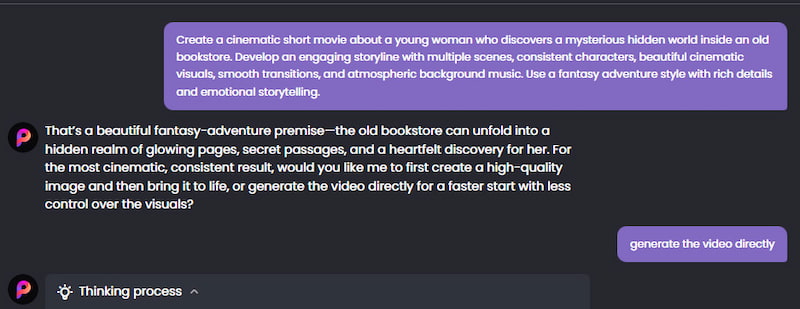
Step 2. Generate Your Movie Scenes
Chat with the AI Agent to develop your story and generate visuals for each scene. You can refine your ideas, adjust the results, and continue the conversation until the scenes match your vision.
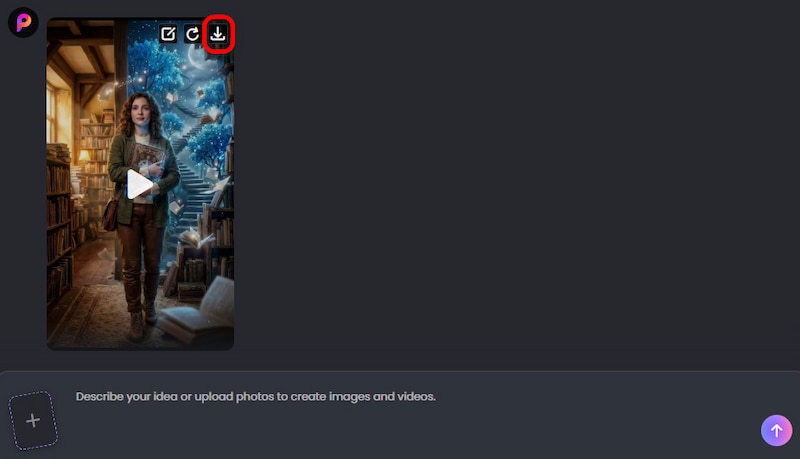
Step 3. Generate and Download Your Video
Ask the AI Agent to turn your ideas and generated visuals into a video. Once the video is ready, preview the result and download it.
Part 5: FAQs About the Best Free Movie Maker
What is the best free video producer for beginners?
Both Canva and CapCut are easy to use. Picwand AI is a better choice if you want AI to create scenery and stories for you.
Is it free to make a movie with AI?
Yes. Free access to AI video tools is available on a number of platforms, although restrictions could apply on generation, credits, templates or premium features. Picwand offers free credits to new users that can be earned through in-app activities and new-user prizes.
Can I make a movie using images?
Yeah. An image-to-video tool can animate still photos and turn them into video sequences. Picwand supports this approach and can apply camera-like motion effects to uploaded photos.
Is Canva excellent for generating videos?
Canva is a great option for simple movies, slideshows, promo videos and template-based storytelling. But if you are seeking AI-generated cinematic moments, you could be better off with a professional AI movie maker.
Conclusion
That’s all about the best free movie maker. The greatest free movie maker depends on how much control you want to have over the production process. Canva is the tool to choose if you want a template-driven project. CapCut, by contrast, has a more traditional editing approach with some AI tools sprinkled throughout. Picwand AI is a good option for turning an initial concept, story, or image into a video with the help of AI. Its AI video agent approach creates narrative and storyboards, and Image to Video makes it easy to convert static visuals into moving scenarios.
AI Picwand - Anyone Can be A Magician
Get Started for Free