Basic PlanVIP PlanVIP ExpiredPurchased credits are valid for life but require an active VIP subscription to use
0Credit(s)
You can use credits to access all the AI tools on Picwand, such as the AI Image Upscaler, AI Age Filter, AI Video Enhancer, AI Video Upscaler, AI Video Effects, and more.
YouTube is among the world’s largest platforms for sharing videos. It attracts millions of creators who upload content every day. As demand for video content grows, many people are now turning to AI to create videos directly from text. This technique is much faster, easier, and doesn’t require filming or editing skills. This method has become extremely popular today, particularly among those seeking quick, high-quality visuals. In this post, you’ll learn how to create YouTube videos from text prompts using AI. We will help you understand how AI video tools work, how to write effective prompts, and how to generate YouTube-ready videos effortlessly.
A well-structured prompt guides the AI in generating footage that aligns with your target output. This ensures consistency in camera perspective, character behavior, environment, and overall aesthetic. To maximize quality, prompts should combine clarity, detail, and creativity.
Shot Type Description
This specifies the camera’s perspective and movement in the scene. It instructs the AI on how to perceive the action. Describe whether the shot is close-up, medium, or wide. Include camera movements such as pans, zooms, tilts, or tracking shots, and indicate angles to create a mood.
Character Description
This defines who is in the scene, their appearance, clothing, age, emotion, and any unique traits. Be specific about physical features: size, color, distinguishing marks and include clothing or accessories if relevant. This makes the AI-generated visuals more relatable, avoiding vague.
Action
This describes what the character is doing in the scene. Clearly state physical actions, include subtle movements for realism, and add context to actions for storytelling. Without specifying what’s happening, the scene may appear static or confusing.
Location
This sets the environment where the action occurs. It includes terrain, weather, and contextual details. A well-defined location grounds the scene, helping the AI create a believable and consistent world for the characters.
Aesthetic
This defines the style, ambience, and cinematic quality of the video. Specify visual style, include technical aspects, and mention mood or tone. The aesthetic unifies the visual elements, giving the scene its emotional and stylistic impact. It guides the AI on color palette, lighting, and focus.
Part 2. How to Create a YouTube Video from Text
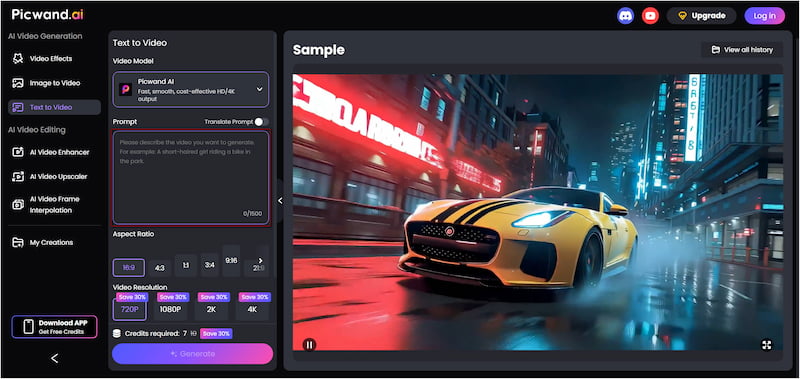
Picwand AI Text-to-Video Generator is a highly regarded AI prompt generator that allows you to create YouTube videos from text. This tool can translate your written ideas into short-form videos, such as YouTube Shorts. It allows up to 1,500 characters per prompt, allowing you to describe scenes in detail for more accurate results. Not to mention, it supports various aspect ratios, including 16:9, 9:16, and 4:3, among others. You can also export videos in resolutions like 720p, 1080p, 2K, and 4K. This ensures the output matches YouTube’s quality standards. For video durations, it allows up to 10 seconds, perfect for Shorts.
Why Choose Picwand AI Text-to-Video Generator:
• Supports up to 1,500 characters in a single text prompt.
• Highly flexible aspect ratio options make it perfect for any YouTube format.
• Read and process prompts in multiple languages to make them accessible to global users.
• Export videos in resolutions like 720p (HD), 1080p (Full HD), 1440p (2K), or 2160p (4K).
Here’s how to create YouTube videos from text prompts using AI:
Step 1: On your browser, access Picwand AI Text-to-Video Generator’s official page through the provided link. In the prompt box, type a clear and descriptive idea of what you want to appear in the video. Remember, a detailed prompt results in a much more accurate video.
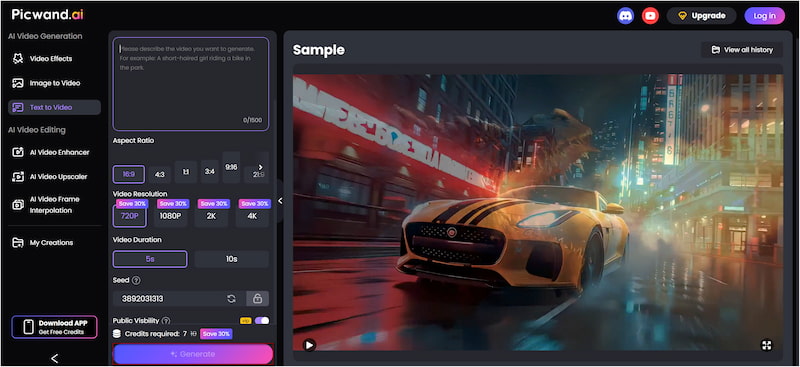
Step 2: Scroll down to the Aspect Ratio options and pick the correct ratio for your platform. Select 16:9 for YouTube videos, 9:16 for Shorts, or 1:1 for social feed. Then select 4K for the quality and set your video duration to 10 seconds.
Step 3: If you want your video to remain private, toggle the Public Visibility switch. Once all settings are ready, click Generate to analyze your text, build the frames, and add motion. In under a minute, it will automatically generate a video that matches your description.
Picwand AI Text-to-Video Generator is the perfect tool for converting text to a YouTube Video AI. This professional tool can transform any text prompt into a YouTube video or Shorts in just seconds. If your YouTube video looks low-quality, use a YouTube video enhancer to upgrade its resolution.
Part 3. Create Text from YouTube Video
NoteGPT is an online tool that can turn spoken content from a YouTube video into plain text. It converts YouTube videos’ audio into text, even if the video doesn’t have official subtitles. The process is fast, free, and works across languages.
Here’s how to create text from a YouTube video:
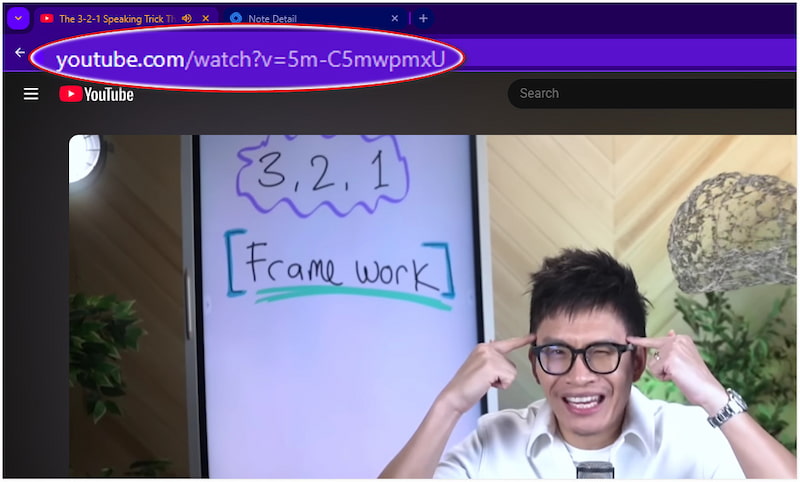
Step 1: On YouTube, proceed to the video you want to transcribe and copy its full URL. This ensures NoteGPT can find the correct video.
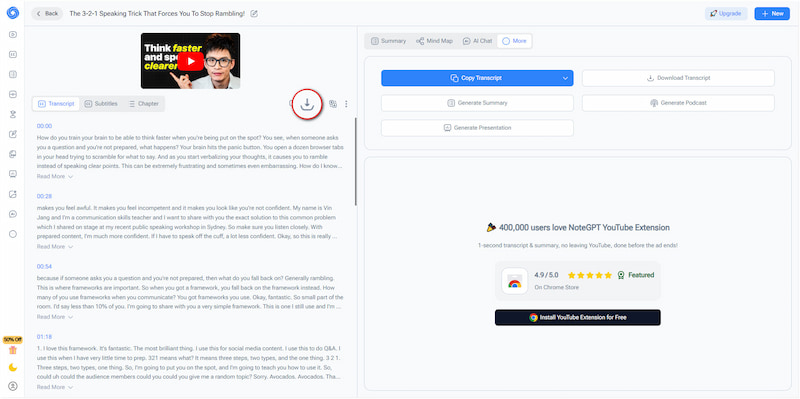
Step 2: Switch to the NoteGPT’s YouTube Transcript Generator page and paste the copied YouTube video URL. Click Generate Transcript to start the transcription process.
Step 3: In just seconds, NoteGPT returns a full transcript with timestamps showing when each line was spoken. Once the transcript appears, click Download to export the transcript file.
NoteGPT’s YouTube Transcript Generator can generate transcripts even if the video does not have official subtitles. Its AI listens to the audio and automatically converts it into text. However, if a YouTube video has heavy background noise, the transcript may contain mistakes.
Part 4. FAQs about Creating YouTube Videos From Text Prompts Using AI
How to write effective text prompts to generate AI videos?
To write effective text prompts for AI video generation, it is essential to be clear, detailed, and structured. Describe everything in detail so the AI understands exactly what to create.
Can we create YouTube videos using AI?
Yes, you can create YouTube videos using AI, and it’s easier with Picwand AI Text-to-Video Generator. It allows you to turn written descriptions into full-motion video clips effortlessly.
How does AI make videos from text?
AI makes videos from text by analyzing your prompt and converting it into visual components. It interprets your description and generates individual frames that match your instructions.
Conclusion
Learning how to create YouTube videos from text prompts opens up a world of possibilities for many. It allows creators to produce high-quality content quickly and efficiently. By leveraging AI, you can transform written ideas into full-motion videos without the need for complex editing. To start turning your text into engaging videos, Picwand AI Text-to-Video Generator is the ideal tool. It provides flexible aspect ratios, high-resolution exports, and advanced AI capabilities.