How to Create a YouTube Outro Like a Pro Creator in Seconds

YouTube outros only last a few seconds, but they are crucial in growing a channel. A good outro encourages viewers to subscribe, watch more videos, and stay connected with your content. When done right, outros can make your videos look professional. If you want to create them without spending hours editing, Picwand AI Video Extender make the process much easier. This tool helps you produce smooth, high-quality, and customizable outros in just a few clicks.
You've probably asked yourself at least once why the last part of every YouTube video shows promotions, subscribe buttons, or suggested videos. That final section is called the outro. It is a short concluding segment that guides viewers toward the next action. It keeps viewers on the platform longer and strengthens channel growth through higher engagement. If you are a new content creator and want to include this kind of outro in your videos, you're in the right place. We've got you covered. This guidepost will show you how to create a YouTube outro step by step, using simple methods and tools. We will help you design effective outros that improve viewer retention, increase engagement, and make your channel look more professional and structured.
Contents:
Part 1. What is a YouTube Outro
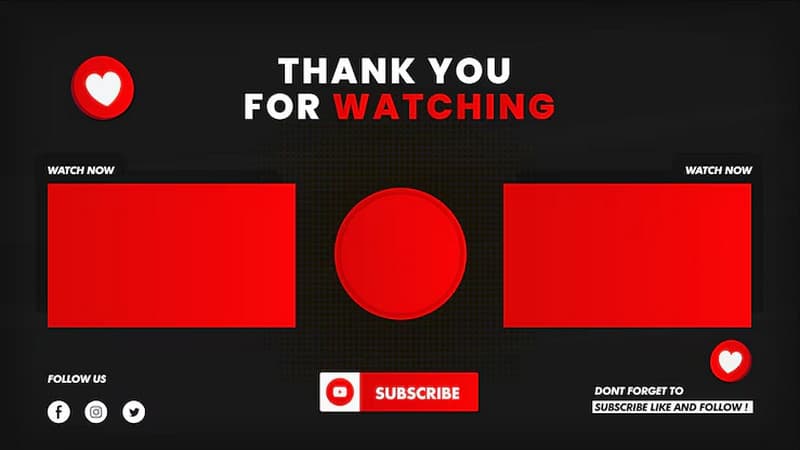
A YouTube outro is the closing section of a video that appears during the final seconds. It includes subscribe buttons, video recommendations, social media links, and calls to action. Learning how to make an outro on YouTube is important for improving watch time, increasing subscribers, and guiding viewers to more content. On YouTube, outro videos combine graphics, music, and clear calls to action to make endings memorable and professional for audiences.
Part 2. Why YouTube Outros Matter for Channel Growth
A YouTube outro is a smart way to keep viewers interested even after the video ends. A good outro can encourage people to watch more videos, subscribe to the channel, and remember your brand. It also makes your videos look more professional.
- • Encourages viewers to subscribe to the channel.
- • Helps improve audience retention and engagement.
- • Directs viewers to social media platforms or websites.
- • Promotes related videos or playlists to increase watch time.
- • Strengthens channel branding through consistent visuals and messaging.
Note: AI video optimization for social media platforms helps you boost engagement, and one key example is YouTube outros. A well-optimized outro increases watch time, encourages subscriptions, and guides viewers to more content.
Part 3. Key Elements of a Good YouTube Outro
Clear Call to Action
An outro should tell audiences what to do before the video ends. This can be asking them to subscribe, watch another video, like the content, or leave a comment. Remember, clear instructions make it easier for viewers to take action and stay engaged with your channel.
Consistent Branding
An outro should match the style of your channel to easily recognize it. Use the same colors, fonts, logos, and animations to build a consistent branding. It also makes viewers feel more familiar with the creator. A consistent outro can make your channel look cleaner, professional, and polished.
Recommended Videos or Playlists
If you're learning how to make an outro for YouTube, this section becomes more powerful. Adding suggested videos or playlists keeps viewers on the channel longer and increases total watch time. These recommendations should naturally connect to the content they just watched, keeping viewers interested. Promoting related videos also improves content discovery.
Engaging Background Music and Visuals
Instead of being dull or abrupt, an outro may be made to feel vibrant and unforgettable using background music and imagery. A better viewing experience is produced in the closing seconds by fluid animations, eye-catching images, and appropriate music.
Proper Timing and Layout
A good outro should be long enough for viewers to interact with end-screen elements without feeling dragged out. Keeping the layout organized prevents distractions and makes buttons or links easier to notice. Balanced timing and clean element placement improve usability.
Part 4. Picwand AI Video Extender: Create Professional Outros
Picwand AI Video Extender is a smart YouTube outro creator that can extend clips and produce video endings. With it, you can upload up to 12 reference materials, such as images, videos, and audio files, to create outro sequences. It also supports AI prompting, allowing you to describe how you want the video to continue or be extended.
Moreover, it offers multiple aspect ratios, including 16:9, 9:16, 4:3, 3:4, 21:9, and 1:1. You can export videos in resolutions ranging from 720p and 1080p to 2K and even 4K for higher-quality output. The tool also supports video durations of 5, 10, and 15 seconds. Notably, you can include background music to create a more professional YouTube outro.
- • Provides flexible video durations of 5, 10, and 15 seconds.
- • Supports video export in 720p, 1080p, 2K, and up to 4K resolution.
- • Offers multiple aspect ratios, including 16:9, 9:16, 4:3, 3:4, 21:9, and 1:1.
- • Includes AI prompting to describe how the video should continue or expand.
- • Allows uploading up to 12 reference materials, including images, videos, and audio files.
Here's how to create a YouTube outro using Picwand AI Video Extender:
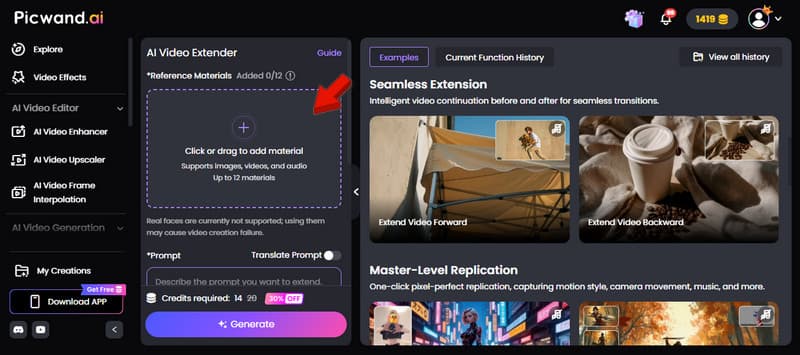
Step 1. Reach the official Picwand AI Video Extender page by clicking the link provided. On the homepage, click + in the Reference Material section to upload assets. You can import images, video clips, audio files, or a combination of all three.
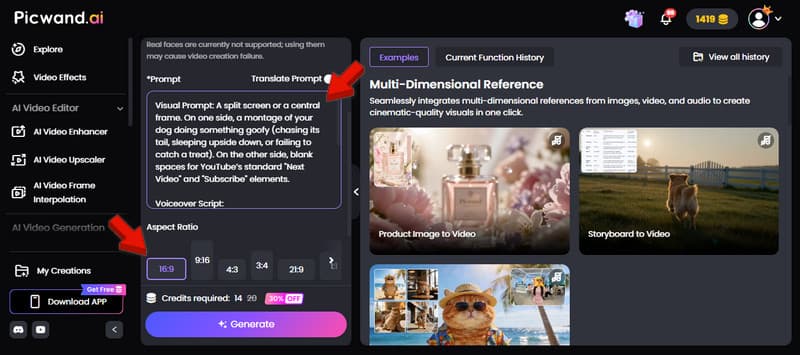
Step 2. In the Prompt field, clearly describe how you want your outro to look and how you want it to extend. Make it detailed to help the AI understand your creative direction. Then, select the 16:9 aspect ratio, which is the standard format for YouTube videos.
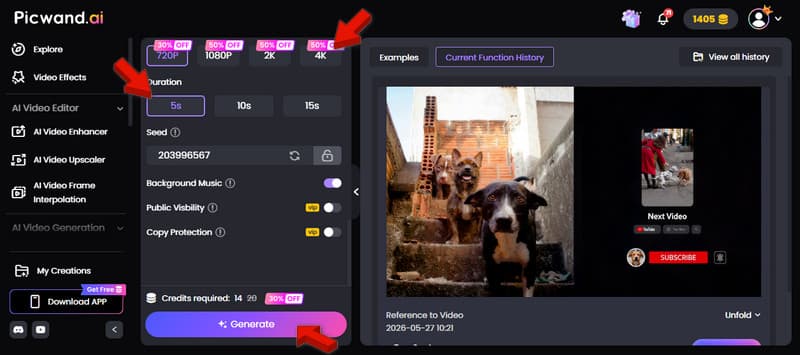
Step 3. After configuring your prompt, choose your preferred video resolution. Choose 4K resolution for high-quality and professional uploads. Then, select 10 seconds as your video duration. Finally, click Generate to create your YouTube outro in just a few seconds.
Tips:
Got low-resolution videos? You can still make them look sharp by enhancing their quality. Learn here how to upscale YouTube videos and give your content a cleaner, more professional look.
Picwand AI Video Extender provides an efficient way to create professional YouTube outros. It simplifies the production process while delivering high-quality results quickly. This tool can easily produce engaging, visually appealing outros that enhance branding, improve viewer retention, and effectively support channel growth.
Part 5. FAQs about YouTube Outro Creation
How long do outros have to be for YouTube?
YouTube outros are usually 5 to 15 seconds long. The ideal length is around 10 seconds because it gives viewers enough time to see and click end-screen elements without losing attention. Keeping it short ensures higher engagement and prevents viewers from dropping off.
What should I include in my outro?
A good YouTube outro should include clear calls to action such as subscribing, watching another video, or visiting a playlist. It should also include end-screen elements such as recommended videos, a channel watermark, and possibly social media links.
When do end screen elements appear?
End screen elements appear in the final 5 to 20 seconds of a YouTube video. However, it still depends on how the creator designs them. They are displayed during the outro section and allow viewers to click on suggested videos, subscribe buttons, or playlists.
CONCLUSION
Learning how to create a YouTube outro is essential to building a successful channel. It can increase engagement, improve watch time, and guide viewers toward your content. To make this process easier, use Picwand AI Video Extender. It lets you quickly generate high-quality, customizable outros that match your style and support your growth as a creator.
AI Picwand - Anyone Can be A Magician
Get Started for Free