Basic PlanVIP PlanVIP ExpiredPurchased credits are valid for life but require an active VIP subscription to use
0Credit(s)
You can use credits to access all the AI tools on Picwand, such as the AI Image Upscaler, AI Age Filter, AI Video Enhancer, AI Video Upscaler, AI Video Effects, and more.
Have you ever seen those mesmerizing dance videos on social media platforms such as TikTok and Instagram, hoping to perform the same captivating dance moves? Now, even if you can't dance, you can easily make your photos "come alive" with AI dance generators. In this article, we'll introduce the three best AI dance video generators and provide a step-by-step guide on how to make a picture dance online for free, allowing not only people but even your pets to dance.
Part 1: Why Use an AI Dance Generator & How to Choose One
Why Use an AI Dance Generator?
1. Save time and effort: With an AI dance generator, you can quickly create dance videos without learning movements or practicing dancing yourself.
2. Create viral social media content: The characters in dance videos have realistic expressions and smooth movements, making it easier to gain traffic and attention when posted on short-video platforms such as TikTok, YouTube Shorts, and Instagram Reels.
How to Choose the Best AI Dance Generator?
With so many dance generation tools on the market, how do you pick the right one? Here are some criteria to consider:
1. Generation quality: Are the movements natural and smooth? Does the character maintain consistency with the original image while dancing?
2. Ease of use: Is the tool simple to operate, and is the user interface friendly?
3. Pricing: Does it offer free usage, and what are the differences between free and paid versions?
4. Features: Does the AI dance generator support multiple dance styles?
Part 2: Top 3 AI Dance Generators (At a Glance)
Tool
Ease of Use
Key Features
Rating
Best For
Picwand AI
Very High
Offers multiple AI dance effects; supports one-click dance video generation
⭐⭐⭐⭐⭐
Quickly creating viral social media videos
Viggle AI
Medium
Custom Motion Reference; high Controllability
⭐⭐⭐⭐
Customizing complex dance movements
Clipfly
High
All-in-One editor; supports multiple music styles
⭐⭐⭐
Simple facial and photo animations
Part 3: In-Depth Analysis of the Top 3 AI Dance Generators
Top 1: Picwand AI
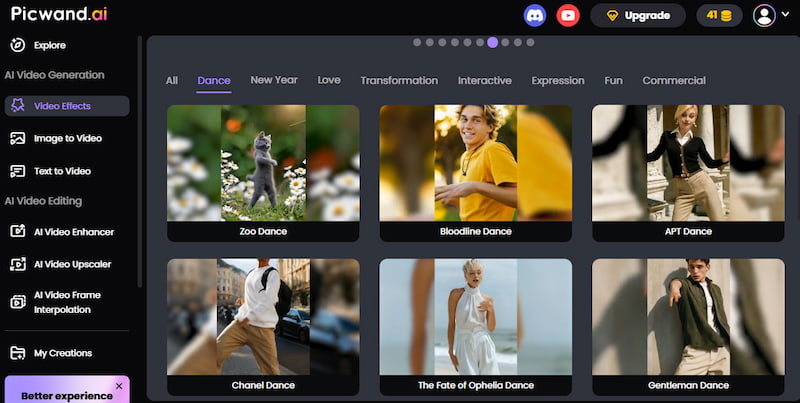
Picwand AI is a powerful AI-powered image and video processing tool known for its ease of use and high-quality output. It offers a wide range of viral dance effects popular on social media. In addition to making pictures dance online, Picwand AI also provides many other useful tools, such as photo retouching and enhancing video quality.
Features
• One-Click Dance Video Generation: Simply upload a photo of a person or a pet and generate a dancing video with one click. The tool offers a wide selection of popular dance effects and requires no manual adjustments, making it easy for beginners with no video editing experience to create impressive results.
• Realistic Output: The generated dance videos preserve the original facial features, delivering realistic and natural-looking results.
• Online Creation: No software download required, everything works directly in your web or mobile browser.
• All-in-One Toolset: Includes additional features such as video upscaling, object removal, and more.
Price
Users can earn credits through daily check-ins and simple tasks to generate dance videos for free. Advanced features require a subscription, which offers excellent value compared to similar tools.
Rating
⭐⭐⭐⭐⭐
Best For
Beginners and users who want to quickly produce high-quality social media content. It is currently one of the simplest and most stable options available.
Pros
Extremely clean and beginner-friendly interface
Fast generation speed with true one-click creation
Realistic and smooth dance movements with well-matched background music
Cons
Limited freedom for custom dance movements
Top 2: Viggle AI
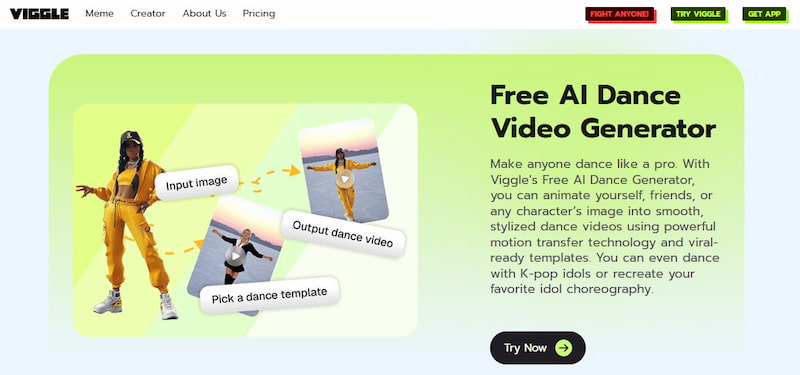
Viggle AI is a powerful AI tool that can convert images into videos and is adept at controlling character actions through text or reference videos.
Features
• Mix Motion: Allows users to upload their own dance videos as motion references, enabling the person in the photo to mimic the same movements.
• High Controllability: Supports adjusting character movements through text prompts, offering greater control over motion and style.
Price
Free registered users can generate up to 5 dance videos per day at no cost. Upgrading to a paid plan unlocks additional features and higher usage limits.
Rating
⭐⭐⭐⭐
Best For
Advanced users who want deeper control. Viggle AI offers an extremely rich dance motion library, making it ideal for users who enjoy experimenting with complex movements.
Pros
Highly customizable movements
Capable of handling complex full-body dance motions
Exceptionally large and diverse library of dance templates
Cons
Higher learning curve for beginners
Video generation may require waiting in line during peak hours
Top 3: Clipfly
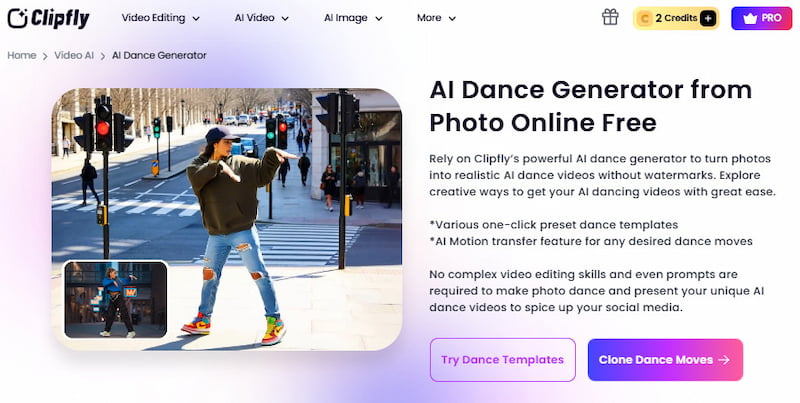
Clipfly is a comprehensive online AI image and video editing platform. Its powerful AI dance generator can transform photos into realistic AI-generated dance videos.
Features
• All-in-One Editor: After the video is generated, it can be edited, and text and music can be added directly within the webpage.
• One-Click Photo Animation: Easily bring photos to life with a single click.
• Multi-Person Dance Support: The Clipfly AI Group Dance Video Generator allows multiple people to dance together in the same scene.
Price
New users usually receive a certain amount of free trial credits. Advanced features and generating more videos require payment.
Rating
⭐⭐⭐
Best For
Users need lightweight, occasional editing features.
Pros
Easy to use
Integrated with rich post-production video editing features
Cons
Slower upload and generation speeds when the network is unstable
Part 4: How to Make a Picture Dance with the AI Dance Generator – Picwand AI (Step-by-Step Guide)
Since Picwand AI achieved the highest overall score in our review, below we'll demonstrate how to make AI dance videos using Picwand AI step by step.
There are three ways to create AI dance videos. The first method is using Picwand AI Video Effects. You only need to upload a photo. The steps are as follows.
Method 1: AI Dance Effects
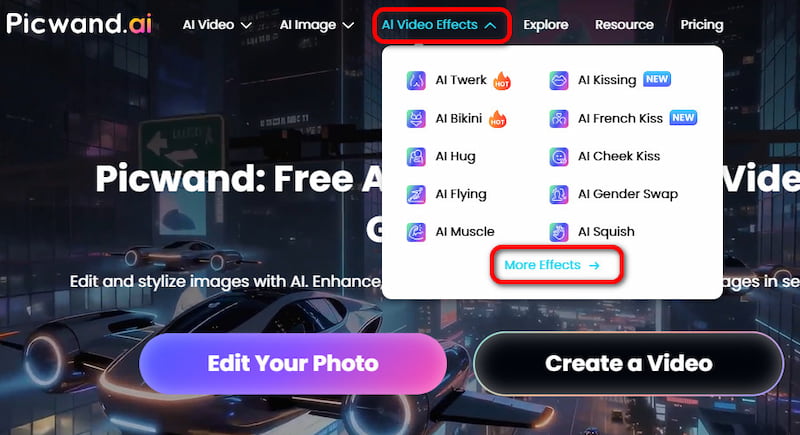
Step 1. Open the Picwand AI website, and click "More Effects" under "AI Video Effects" in the top navigation bar.
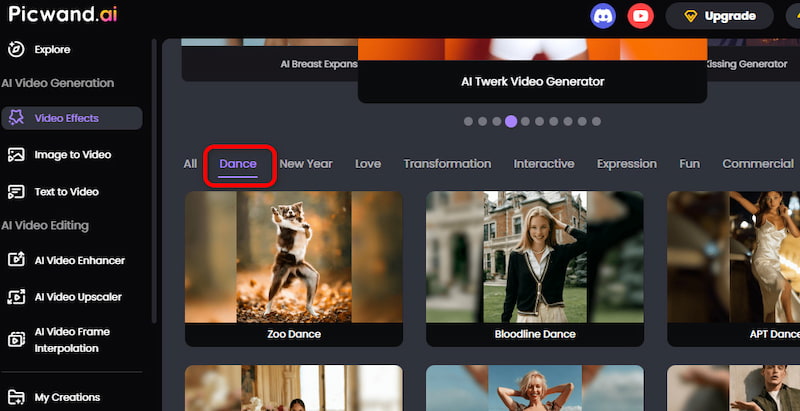
Step 2. Select the "Dance" category. You'll see many popular dance effects. Here, we'll use Take Me Up Dance (AI Baby Dance) as an example.
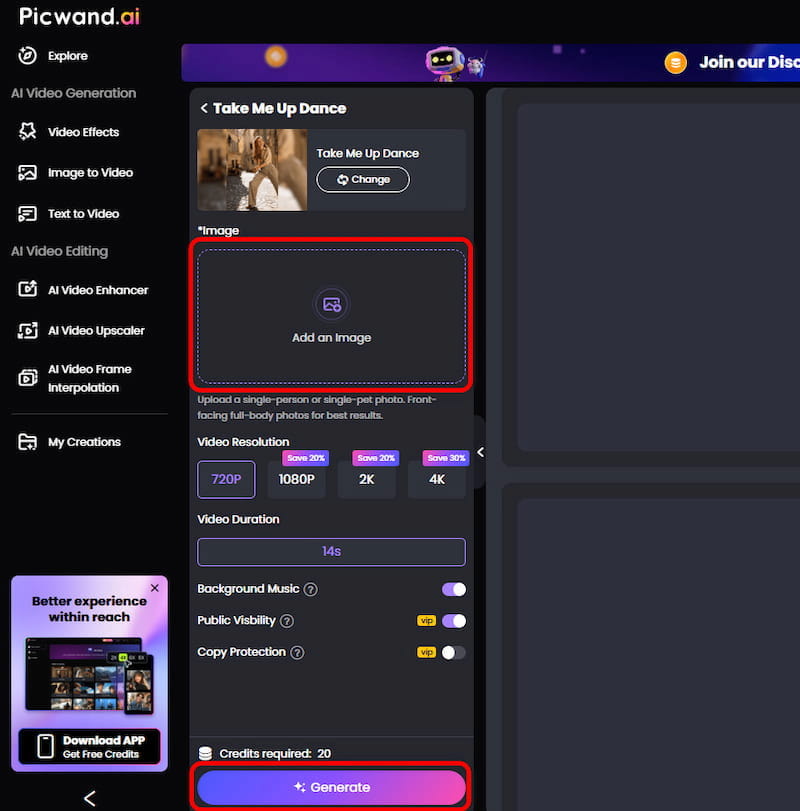
Step 3. Click "Add an Image" to upload your photo. Then you can choose custom options, such as video resolution. Finally, click "Generate" to output the video.
Within a few minutes, you'll get an AI dancing video with background music that perfectly matches the dance. You can download the video or share it directly on social media to create viral dance content and attract more attention.
Method 2: AI Image to Video
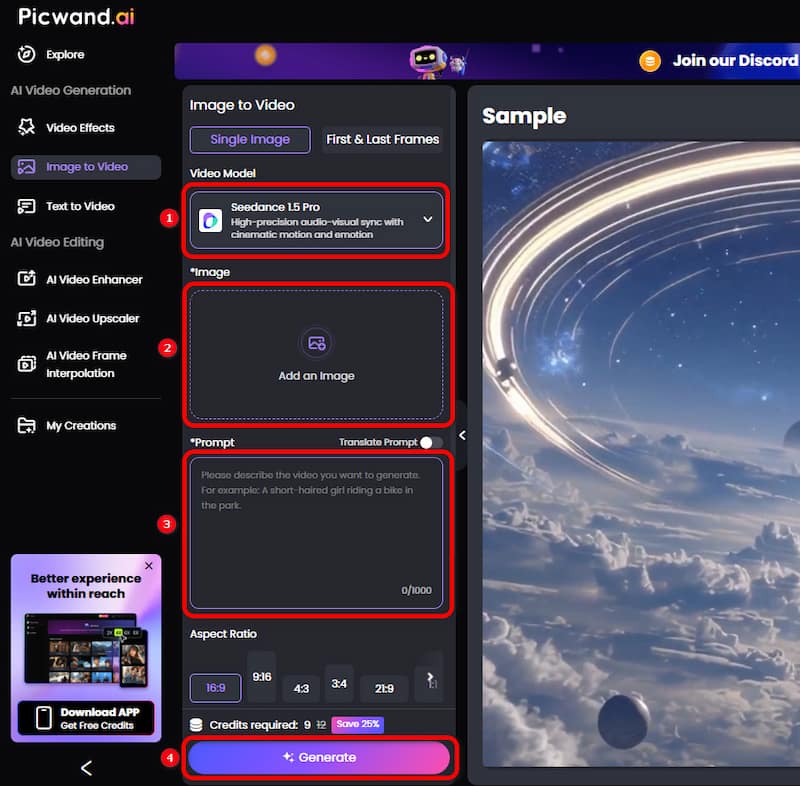
The second method is using AI image-to-video to turn a picture into a dancing video. Simply upload a photo and enter text prompts. The steps are shown below.
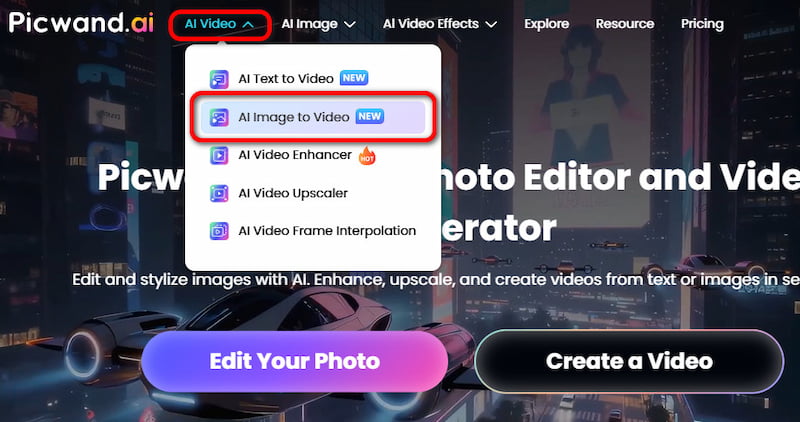
Step 1. Click "AI Image to Video" under "AI Video" in the top navigation bar.
Step 2. Select a video model. Upload an image and enter text prompts describing the dance moves you want.Finally, click "Generate" to output the video.
Method 3: AI Text to Video
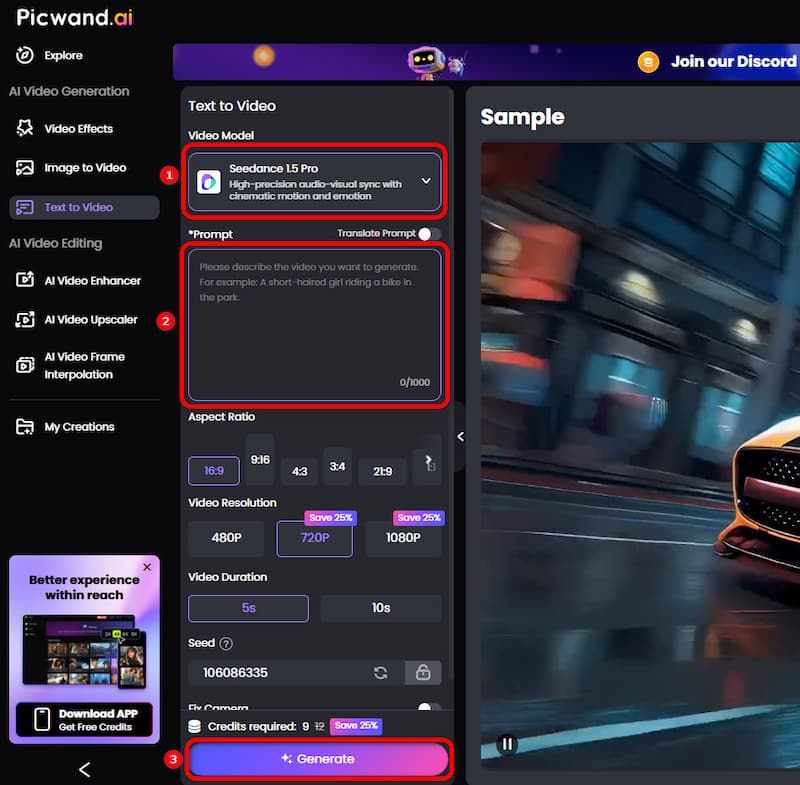
The third method is using AI text-to-video to generate a dancing video. Just enter text prompts. The steps are as follows.
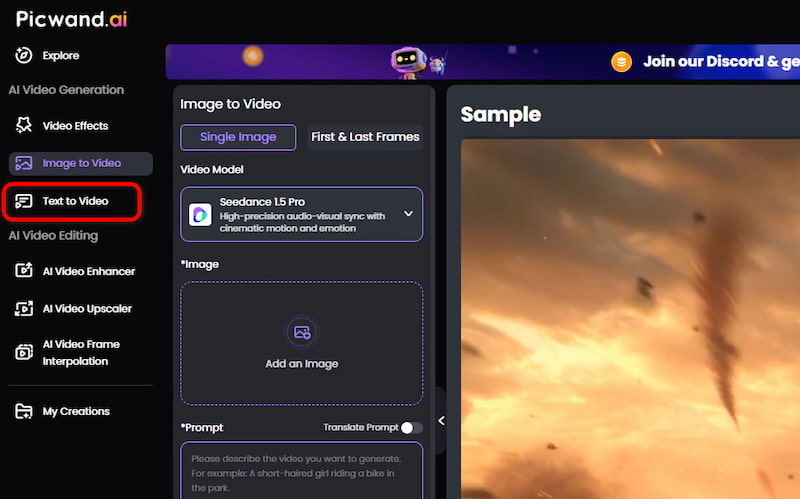
Step 1. Click "Text to Video" on the left side.
Step 2. Select a video model. Enter text prompts describing the dance moves you want. Finally, click "Generate" to output the video.
The above are three AI dance tutorials. The process is simple, and you can easily turn a photo or prompt into a high-quality dancing video. With realistic output and smooth movements, it helps you quickly create viral, eye-catching dance content.
Part 5: More AI Dance Video Ideas
• Pet Dancing: Make cats, dogs, and other pets “dance” for fun and entertainment.
• Trending Dance Challenges: Generate popular dance videos on TikTok or Instagram.
• Holiday-Themed Dances: Festive atmosphere videos are more likely to attract audiences.
• Anime Character Dancing: Let your favorite anime characters dance.
• Group Dance Compilations: Combining multiple photos into a multi-person dance effect.
• Pranking Friends: Create a funny dance video with a friend’s photo as a birthday surprise.
• Reviving Old Photos: Let the characters in old photos dance a modern dance, creating a contrast across time and space.
Part 6: FAQS
What is the AI dance generator?
AI dance generator is a tool that uses artificial intelligence to turn static images into dancing videos. Users don't need to record any footage. The AI automatically creates realistic dance animations from photos.
Which AI dance generator is best for beginners?
Picwand AI is the best option for beginners. It's easy to use and offers multiple dance effects with one-click video generation, making it ideal for users with no video editing experience.
How to make a picture dance with AI?
You can use AI dance generators like Picwand AI to make photos dance. Just go to the Picwand official website, find the dance effect you want, upload photos, and finally click Generate to generate smooth and realistic dance animations in just a few minutes.
Do AI dance generators require payment?
Most AI dance generators offer free versions, but more advanced features may require a subscription or payment.
How to make a photo dance on TikTok?
The fastest way is to use Picwand AI. Upload photos and select popular dance effects on TikTok to generate videos with matching music. No manual music is required, and the exported videos can be directly uploaded to TikTok.
Conclusion
Based on our review and tutorial, each of the three tools has its own strengths:
• Picwand AI stands out for its ease of use, one-click generation, smooth and natural dance movements, and stable output, making it the best AI dance generator for beginners and social media creators.
• Viggle AI is better suited for advanced users who seek greater flexibility and precise control over complex movements.
• Clipfly offers comprehensive video editing features and is ideal for users who need lightweight editing capabilities.
Taking generation quality, ease of use, feature set, and overall value into account, Picwand AI is currently the most highly recommended AI dance generator for anyone wondering how to make a photo dance. Even without any dance or video editing experience, you can create high-quality dancing videos for free in just a few minutes. AI dance generators make it easier than ever to bring photos to life. Start creating stunning dancing videos now!