How to Make an AI Movie: From Story Idea to Finished Video

The experimental demonstrations have turned into a viable path for designers who want to develop ideas into visual storytelling. You don’t need a camera crew, actors, expensive equipment or sophisticated editing abilities to play with a short movie any longer. Instead, you can start with a story idea, develop a script, create visual references, and use AI to generate scenes. The biggest challenge is no longer simply making a video—it is keeping the story coherent while maintaining consistent characters, style, pacing, and visual quality. In this guide, we'll walk through how to make an AI movie, from preparing your story to generating scenes with Picwand AI.
Contents:
Part 1: What Is an AI Movie?
AI Filmmaking Overview
An AI movie is a film or short video created partly or substantially with artificial intelligence. Depending on the workflow, AI can help with scriptwriting, storyboarding, character design, image generation, video generation, voiceovers, music, and post-production.
This does not mean that AI has to make every decision. A more practical approach is human-led, AI-assisted filmmaking: you decide what the story should say, while AI helps turn those creative decisions into visual material. This method is generally easier to control for novices. You can compose the primary idea yourself, have AI expand it into scenes, and assess each generated sequence before continuing on.
AI Generated Scenes & Characters
AI video generators can generate scenarios from verbal prompts, or animate existing images. For instance, a prompt like “a young woman walks through a foggy train station at dawn” can result in a cinematic scenario.
The challenge is character consistency. If you generate every scene independently, the same character may look different from one shot to another. This is why reference images, detailed prompts, and storyboard-based workflows are useful. Picwand's reference-to-video system, for example, supports images, videos, text, and audio as inputs and is designed to maintain character details across changing scenes.
Part 2: What You Need to Make an AI Movie
You don't need a complicated production setup. The question of how to make AI movies is also easy to answer. A basic AI movie workflow can begin with three things.
1. Script
Start with a simple story rather than trying to write a feature-length screenplay.
A useful short-film structure is:
Beginning → Conflict → Turning Point → Resolution
Describe the main character, setting, objective, conflict, and ending. If your movie contains several scenes, keep the descriptions specific enough that you can later turn each one into a visual prompt. For example: A young photographer discovers an old camera that contains photographs of places she has never visited. That single concept can become a much richer story once characters, locations, and events are developed.
2. Storyboard
A storyboard divides your script into discrete shots/scenes. It gives you a visible path before you burn AI credits creating video.
As you write each scene consider:
- • When and Where
- • Characters
- • Character actions
- • Camera angle
- • Lighting
- • Mood
- • Important objects
- • Dialogue or narration
Picwand's AI agent tool can automate much of this process. It takes a simple idea or rough concept, develops a structured narrative, generates characters, and breaks the story into scenes in an editable storyboard.
3. Video tools with AI
Last, you need an AI video generator. Search for tools that can handle the type of input you have. Text-to-video is quite good if you start from a written scene. If you have character designs, illustrations, pictures or concept art, image-to-video will be helpful. Reference-to-video is handy if you want the AI to stick to various visual references and need consistency. Picwand unifies these technologies on one platform, including AI Image to Video, AI Text to Video, Story to Video and Reference to Video.
Part 3: How to Make an AI Movie
Picwand AI Agent lets you create images and videos through natural conversation, helping you turn your movie ideas into finished movies.
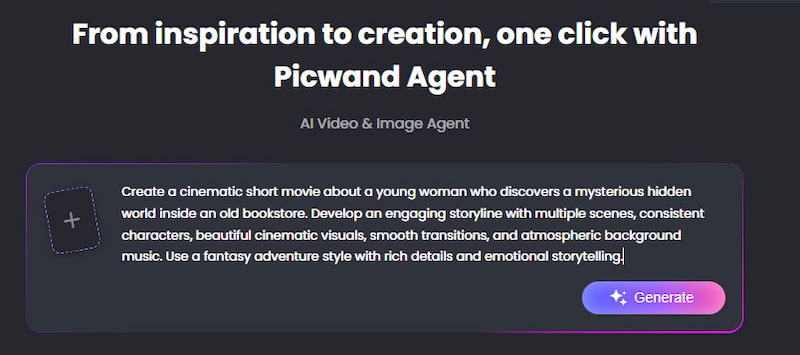
Step 1. Describe Your Movie Idea
Open Picwand AI Agent and describe your movie concept, including its plot, characters, setting, and visual style. You can also upload reference images to provide visual guidance.
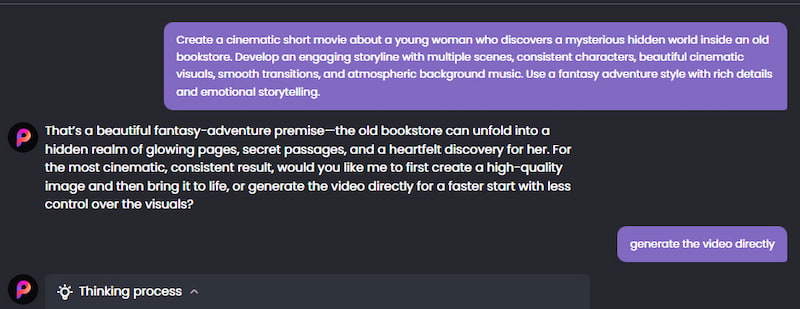
Step 2. Develop Your Story and Scenes
Chat with the AI Agent to develop your storyline and generate visuals for different scenes. You can refine your ideas and adjust the results through conversation until you're happy with the direction.
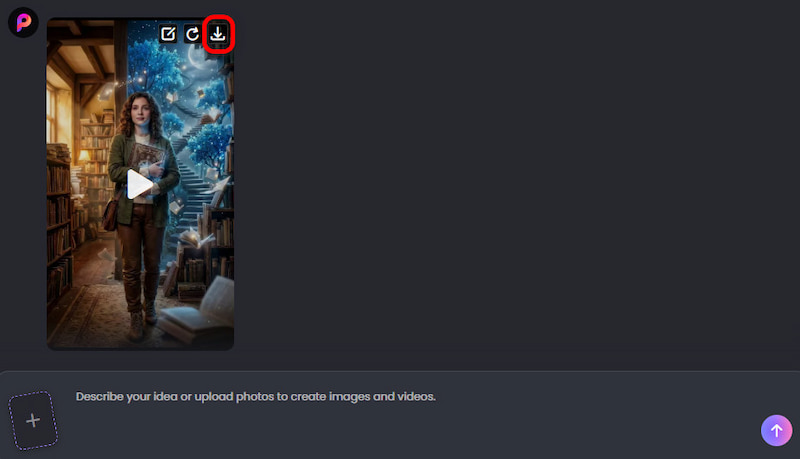
Step 3. Generate and Download Your Video
Ask the AI Agent to bring your ideas and generated visuals together in a video. Once generation is complete, preview the result and download your video.
AI Filmmaking Tips
- • Keep characters consistent. How to make a movie with AI? First, define recurring characters clearly and use reference images whenever possible.
- • Think in shots, not paragraphs. A long prompt containing five different actions may produce an unpredictable result. Break complex sequences into smaller scenes.
- • Give AI visual direction. Words such as close-up, wide shot, tracking shot, low angle, and over-the-shoulder can make your prompts more specific.
- • Maintain one visual style. Decide whether your movie is photorealistic, animated, cinematic, retro, or another style before generating dozens of scenes. For example, you need to enhance old photos before employing it.
- • Generate short clips first. Test a scene before committing to a large project. This saves time and helps you refine your prompts.
- • Leave room for editing. AI generation is not the entire filmmaking process. You may still need to combine clips, adjust timing, add subtitles, synchronize audio, use AI video skin retouching, and remove scenes that don’t work.
Part 4: FAQs About How to Make an AI Movie
Can I make an AI movie without filmmaking experience?
Yes. AI video creators dramatically lower the technical threshold. If you're a newbie, you can create short AI films without standard filmmaking tools. All you need is a plot idea, prompts and basic editing decisions.
Can you produce a full movie from a single command with AI?
It can produce a lot of content from a single idea, but a lengthier movie usually benefits from a scene-by-scene method. You can have more influence over characters, continuity, pacing and visual style by breaking the story into smaller chunks.
Can I create a picture from an AI film?
Yes. Tools that use photos to make video can animate still images and make dynamic shots. Picwand allows image-to-video generation and is able to convert portraits, illustrations, landscapes and other photos into video sequences.
What makes a good AI movie prompt?
A good prompt is usually subject + action + place + camera + lighting + style. Instead of “a woman in a city,” try something more like: “A young woman walks alone through a rain-soaked downtown street at night, cinematic tracking shot, soft neon reflections, realistic film lighting”.
Conclusion
That’s all about how to make an AI movie for free. Making an AI movie is less about discovering a magic trigger and more about creating a repeatable production methodology. Take a strong story, break it down into a storyboard, create consistent characters and visual direction, and then build your scenes one by one.
For beginners, Picwand AI makes this process more accessible with its AI video agent workflow, while Image to Video provides a straightforward way to animate existing visual assets. Its broader AI video toolkit also includes text-to-video and reference-based generation.
If you have a movie idea sitting in your notes, you don't need a camera crew to test it. Start with one scene, build from there, and let AI handle more of the production as your story takes shape.
AI Picwand - Anyone Can be A Magician
Get Started for Free