Basic PlanVIP PlanVIP ExpiredPurchased credits are valid for life but require an active VIP subscription to use
0Credit(s)
You can use credits to access all the AI tools on Picwand, such as the AI Image Upscaler, AI Age Filter, AI Video Enhancer, AI Video Upscaler, AI Video Effects, and more.
To make people hug using AI, you can use Text-to-Video (describing the scene) or Photo-based Animation (uploading two separate images). Tools like Picwand AI use diffusion models to map body physics, allowing for realistic 8-second clips in up to 4K resolution.
Missing someone you love can feel even harder in a long-distance relationship, especially when all you want is a simple hug. Today, virtual solutions make it easier to cope with that feeling. With the latest AI tools, it's now possible to create hugging videos. Although these videos are not real, they can still provide comfort when you see yourself or someone you care about sharing a warm embrace. If you've ever wondered how to make people hug using AI, this guide will show you exactly how. In this post, you'll learn two effective methods: text-to-video generation and photo-based AI hug tools. We will help you turn simple ideas or images into meaningful hugging videos.
The AI Hug trend is a viral content style where people use AI to make people hug. There are two popular formats in this trend: Text-to-video AI hugs and Photo-based AI hugs. Instead of filming real-life interactions, users generate hugging moments using text prompts or photos, depending on the tool. At its core, the trend is about recreating emotional connection through AI. Many people use it to visualize scenarios, such as reuniting with a loved one or imagining a long-distance relationship.
Part 2. AI Hugging Video Prompts You Can Try
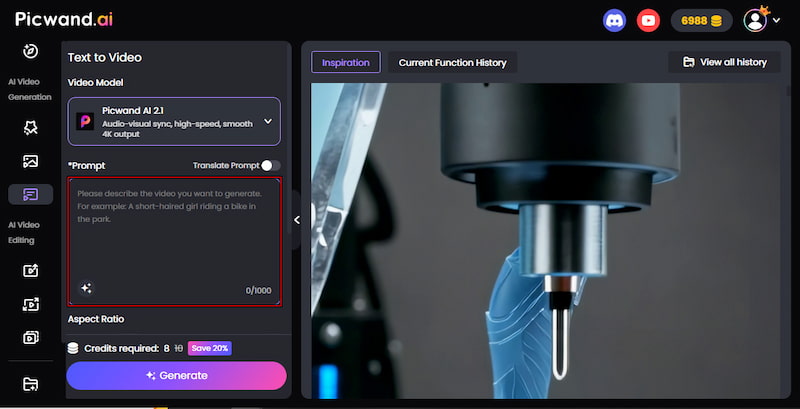
Picwand AI Text-to-Video Generator is a highly intelligent generative AI tool. It can create realistic AI-hugging videos with nothing but text prompts. You can enter up to 1,000 characters in your prompt, giving you enough space to describe how to make them hug using AI. In terms of quality, you can export your video in 720p, 1080p, 2K, or 4K resolution. Additionally, the video length is customizable, allowing you to generate clips between 5 and 10 seconds.
Why Choose Picwand AI Text-to-Video Generation:
• Turn simple text into a complete AI hugging video.
• Export videos in 720p, 1080p, 2K, or 4K resolution.
• Option to keep your videos private or share them publicly.
• Understands and processes prompts in multiple languages.
Here's how to make people hug using Picwand AI Text-to-Video Generator:
Step 1. Using a browser, reach the official site of Picwand AI Text-to-Video Generator via the link provided. In the prompt box, paste or write your scene description. The more precise your prompt is, the higher the quality of the output will be.
For this example, we use:
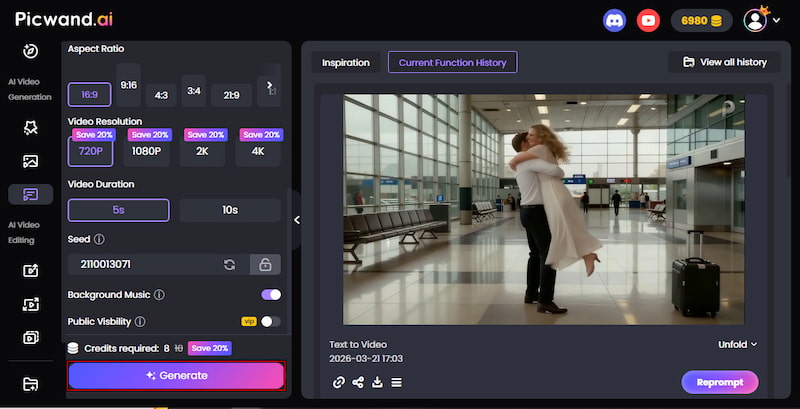
A wide shot of a woman dropping her suitcase and jumping into a man's arms at a bright, modern airport terminal. He spins her around in a joyous hug. Motion blur on the spin, bright natural lighting, realistic fabric movement, heartwarming.
Creative Tip: Be sure you know how to write AI prompts effectively to get the best, most accurate results.
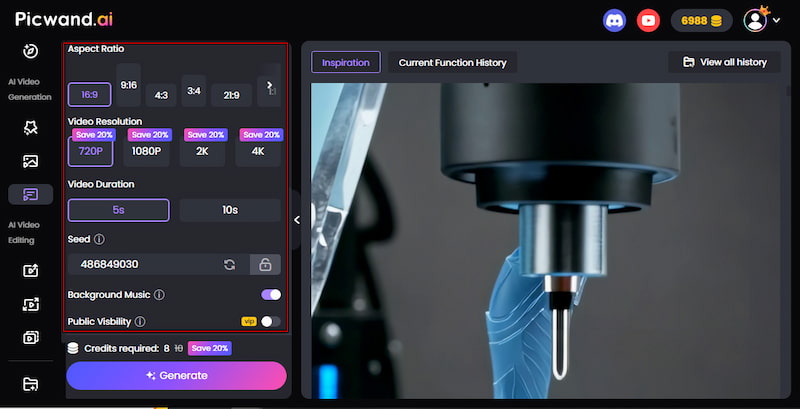
Step 2. After entering your prompt, scroll down to adjust the output settings. Choose your aspect ratio: for example, 9:16 for TikTok or 16:9 for YouTube. Next, set the video duration to 5-10 seconds and select your preferred video resolution.
Step 3. Optionally, enable Background Music to enhance emotion and storytelling. Then, click the Generate button to start creating your video. The process usually takes 1-2 minutes. If you're happy with it, click Download to save your AI-generated hugging video.
Picwand AI Text-to-Video Generator makes it easy to create AI-hugging videos with simple text prompts. You describe the scene you want, and the AI turns it into a short, realistic video. It's a fast, creative way to turn ideas into emotional visual content.
Part 3. The Ultimate Way to Make AI Hug Easily
Picwand AI Hug Generator is a powerful creative tool that lets you make two people hug using AI. Instead of using text prompts, you upload images, and the AI creates a lifelike hugging video. It offers various aspect ratios for cropping the uploaded photo, including 16:9, 9:16, 4:3, 3:4, and 1:1. For output quality, it supports exports in 720p, 1080p, 2K, and 4K resolutions. You can also set the video length to up to 8 seconds.
Why Choose Picwand AI Hug Generator:
• High-quality video exports in 720p, 1080p, 2K, and 4K resolution.
• Creates realistic hugging videos by animating two uploaded photos.
• Option to add background music for a more engaging viewing experience.
• Copy protection option to help prevent unauthorized use of generated content.
• Public visibility settings to control whether your video is private or shared publicly.
Here's how to make two AI people hug using Picwand AI Hug Generator:
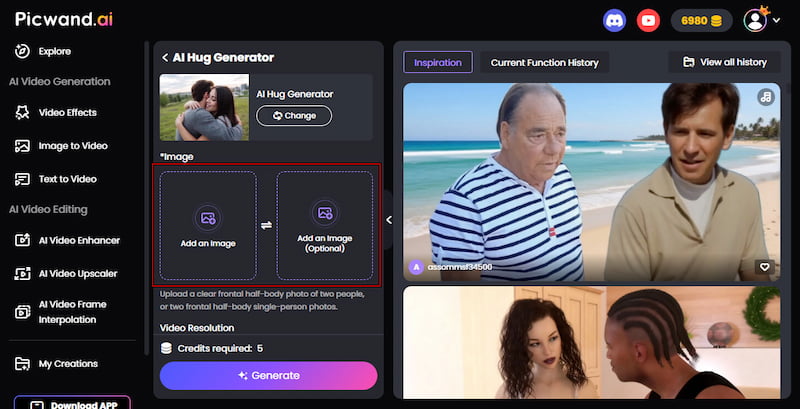
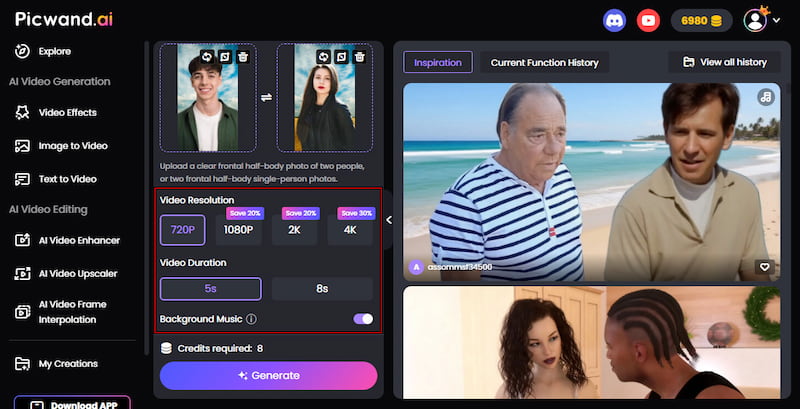
Step 1. Access the Picwand AI Hug Generator's official site by clicking the link. On the homepage, click Add an Image and upload your first photo. Then, upload a second image to form the hug interaction. After each upload, choose your preferred aspect ratio.
Step 2. Next, set your desired video resolution and choose the video length. You can also enable Background Music to add emotion to your video. If you're a VIP user, turn on Copy Protection to help prevent unauthorized downloads or reuse of your content.
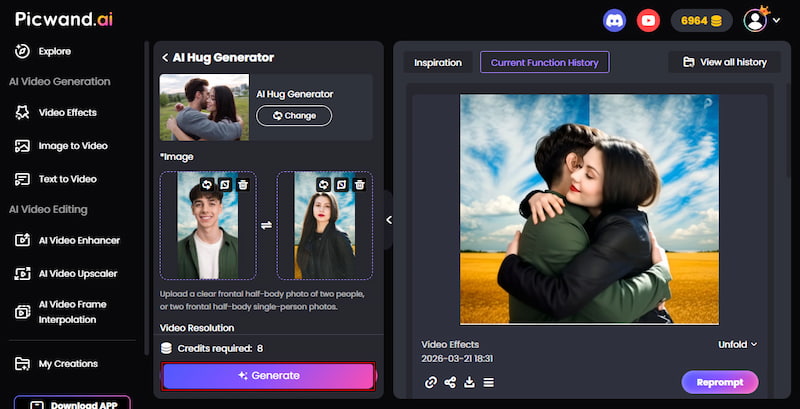
Step 3. Click Generate and wait for the AI to process your hugging video. Once it's ready, preview the result to check the motion and realism. If everything looks good, click the Download button to save your final AI hugging video.
Picwand AI Hug Generator lets you easily create AI hugging videos by uploading two photos. It can quickly turn them into a natural-looking animated hug. In addition to AI hug generation, it also offers other video effect generation, such as the Senior filter.
Part 4. FAQs about Making People Hug
Q: How do I make the Hug My Younger Self video?
A: To create a Hug My Younger Self video, use the Picwand AI Hug Generator. Upload two images: one of your current self and one of your younger self. Once both photos are uploaded, set the resolution and video length. Then click generate, and the AI will animate both versions of you into a natural hugging scene.
Q: Can I make an AI hug a deceased loved one?
A: Yes, you can use AI hug generators to create a symbolic hugging video with a deceased loved one. The AI will generate an animated interaction between the two images. While it is not real, many people use this feature to express remembrance and emotional connection.
Q: How to ask AI to make videos?
A: To get the best results when asking AI to make videos, you need to write clear and detailed prompts. Describe the scene, characters, emotions, setting, lighting, and motion. For example, instead of saying two people hugging, you can describe where they are, how they move, and the mood of the moment.
Conclusion
Learning how to make people hug has never been easier with today's creative tools. From simple ideas to emotional photos, AI brings hugging experiences to life in just a few clicks. It's a unique way to express feelings, tell stories, and visualize connections that matter to you. If you're ready to try it yourself, start using Picwand AI Text-to-Video Generator to create hugging videos from detailed prompts. On the other hand, you can explore the Picwand AI Hug Generator to animate real photos into heartfelt embraces. Both tools make it simple to produce realistic, emotional results without editing skills.