Basic PlanVIP PlanVIP ExpiredPurchased credits are valid for life but require an active VIP subscription to use
0Credit(s)
You can use credits to access all the AI tools on Picwand, such as the AI Image Upscaler, AI Age Filter, AI Video Enhancer, AI Video Upscaler, AI Video Effects, and more.
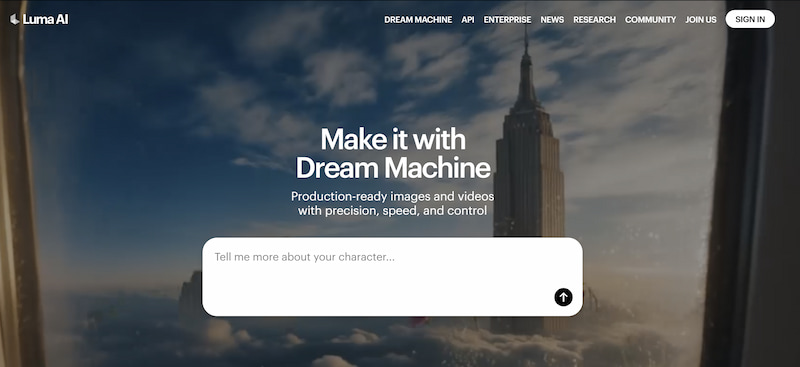
AI video generation has evolved rapidly in recent years, and tools like Luma AI are pushing the boundaries of what creators can achieve with minimal technical effort. Known for its cinematic visuals and cutting-edge neural rendering technology, Luma AI has attracted filmmakers, designers, and content creators looking to experiment with next-generation video workflows. In this in-depth Luma AI review, we’ll break down what Luma AI is, its core features, real-world pros and cons, pricing structure, and common use cases. We’ll also share tips for getting better results and compare Luma AI with popular alternatives—including Picwand AI, a more creator-oriented option for those seeking consistent results.
Luma AI is an AI-powered visual generation platform best known for its NeRF (Neural Radiance Fields) and text-to-video capabilities. Initially gaining recognition for 3D scene reconstruction from images and videos, Luma AI has since expanded into AI-generated cinematic video content.
At its core, free Luma AI focuses on visual realism and motion quality. Rather than targeting quick social media clips or marketing videos, it positions itself as a tool for creators who prioritize aesthetics, camera movement, and immersive environments.
Luma AI is commonly used for:
• Cinematic video experiments
• Concept visuals and pre-visualization
• Creative storytelling and art projects
• Visual prototyping for films and games
While impressive from a technical standpoint, Luma AI’s learning curve and workflow can feel unfamiliar to users coming from traditional video editing or marketing backgrounds.
Key Features of Luma AI Video Generator
Luma AI’s feature set reflects its research-driven roots. Below are the most notable capabilities of the Luma AI video generator.
1. High-Quality Cinematic Video Generation
Luma AI excels at producing smooth camera motion, depth-aware scenes, and realistic lighting. Its videos often feel more “film-like” than typical AI-generated clips.
2. Text-to-Video Generation
Users can generate videos by describing scenes in natural language. Luma AI interprets prompts with a strong focus on spatial depth and movement.
3. NeRF-Based 3D Reconstruction
One of Luma AI’s standout features is its ability to reconstruct 3D environments from real-world footage, allowing creators to explore scenes from multiple angles.
4. Physics-Aware Motion
Compared to many AI tools, Luma AI handles object motion and camera transitions more realistically, avoiding jittery or unnatural results.
Pros
Exceptional visual quality
Cinematic camera movement
Strong depth and lighting realism
Innovative 3D scene capabilities
Cons
Steep learning curve for beginners
Limited audio control and integration
Less suitable for fast marketing workflows
Output can be unpredictable depending on prompts
Luma AI is visually impressive, but it often prioritizes experimentation over efficiency.
• Researchers and developers testing AI-generated environments
It may be less ideal for:
• Social media managers
• Marketing teams
• Educators creating instructional videos
• Businesses needing fast, repeatable output
If your goal is storytelling and visual exploration, Luma AI shines. If you need scalable content production, it may feel limiting.
Pricing: Is Luma AI Affordable?
Luma AI typically offers a freemium or credit-based pricing model, with limitations on:
• Generation length
• Resolution
• Export frequency
Paid plans unlock higher-quality outputs and more generation credits, but pricing can feel high for users who need frequent iterations. For many creators, the cost-to-output ratio becomes a deciding factor when comparing alternatives.
Part 2. Tips and Tricks to Get the Best from Luma AI Video Generator
Video Generator
To get better results with Luma AI, consider the following tips:
1. Focus on Camera Language
Instead of generic descriptions, specify camera movement such as “slow dolly-in,” “wide-angle tracking shot,” or “overhead pan.”
2. Keep Prompts Visually Oriented
Luma high resolution converter responds best to prompts that emphasize space, lighting, and motion rather than abstract concepts.
3. Expect Iteration
High-quality results often require multiple generations. Treat Luma AI as an exploratory tool rather than a one-click solution.
4. Plan Audio Separately
Since audio support is limited, plan to add sound design or narration in post-production.
Part 3. Best Luma AI Alternative: Picwand
While Luma AI is powerful, it’s not always the most practical option. Many creators seek alternatives that balance quality with usability.
Picwand AI: A Practical Alternative for Content Creators
• Optimized for marketing, education, and social media
• Faster generation with predictable results
How to Use Picwand AI
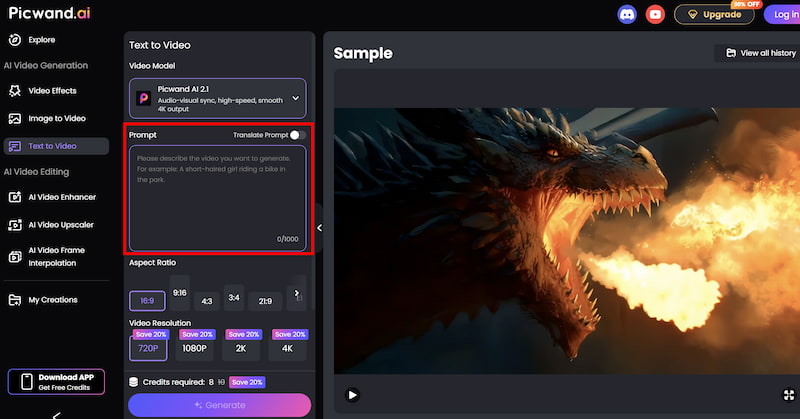
Step 1. From the main dashboard, choose the Text-to-Video Generator option. This tool allows you to generate short video clips purely from written descriptions.
Step 2. Enter your text prompt by describing the scene you want to create using natural language. You can specify elements such as environment, mood, movement, and visual style. For example, you might describe a cinematic landscape, a product showcase, or a short animated concept.
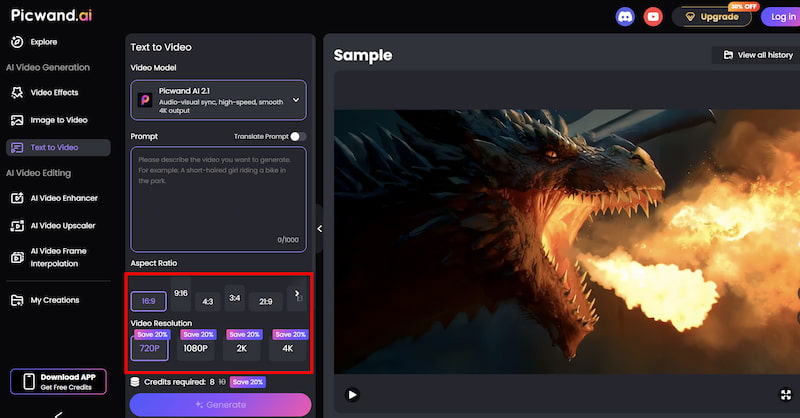
Step 3. Before generating the video, you can fine-tune settings such as Aspect Ration, Video Resolution, etc. These options help tailor the output to social media, marketing, or presentation needs.
Step 4. Once your prompt is ready, click the generate button. Picwand processes the request and produces a preview video within a short time, allowing you to review the result instantly. If you are satisfied with the output, you can export the video directly.
This streamlined workflow allows creators to produce video content without traditional editing software.
Results: Luma AI vs. Picwand AI
Aspect
Luma AI
Picwand AI
Visual style
Cinematic, experimental
Clean, practical
Audio support
Limited
Built-in
Ease of use
Moderate to difficult
Beginner-friendly
Best for marketing
No
Yes
Output consistency
Variable
High
Part 4. FAQs about Luma AI Rviews
Does Luma AI support audio generation?
Audio support is limited and often requires external editing tools.
Can Luma AI be used for commercial projects?
Yes, but users should carefully review licensing terms based on their subscription plan.
Is Picwand AI better for marketing videos?
Yes. Picwand AI is optimized for fast, reliable marketing and social media content.
Conclusion
The above content is a comprehensive Luma AI review for readers’ reference. Luma AI stands out as an innovative and visually impressive AI video generator, especially for creators interested in cinematic motion and 3D environments. Its strengths lie in experimentation, realism, and creative freedom. However, for everyday content creation—particularly marketing, education, and social media—Luma AI’s complexity and limited audio support can slow workflows. In contrast, Picwand AI Text-to-Video Generator offers a more balanced solution, combining ease of use, stable audio-video output, and practical features tailored to real-world creators.
Ultimately, the best choice depends on your goals. If you value cinematic visuals above all else, Luma AI is worth exploring. If you prioritize speed, consistency, and usability, Picwand AI may be the smarter long-term option.