Basic PlanVIP PlanVIP ExpiredPurchased credits are valid for life but require an active VIP subscription to use
0Credit(s)
You can use credits to access all the AI tools on Picwand, such as the AI Image Upscaler, AI Age Filter, AI Video Enhancer, AI Video Upscaler, AI Video Effects, and more.
The future of video creation has arrived with Google’s Veo 3. This powerful tool revolutionizes how creators bring their visions to life. Whether you want to craft character-driven storytelling, product showcase, social content, or professional videos, Veo 3 can generate them. However, to achieve your desired output, you need to understand how to write effective prompts. And the best way to learn is through strong, structured examples. This post will highlight the best Veo 3 AI video prompt examples. Our aim is to help you unlock the full potential of this powerful video generation model. This way, you can craft clear, detailed, and high-performing prompts easily. This way, you can produce accurate, high-quality videos that match your creative vision.
Veo 3 is Google’s most advanced AI video generation model. It is designed to redefine the future of filmmaking, content creation, and high-end video production. It can produce high-definition videos with native audio, generating visuals in response to text prompts. It blends realism, precise motion, and creative control, which is something previous models struggled to do.
Native Audio Generation:
Veo 3’s groundbreaking feature is its built-in ability to generate synchronized audio with video. It creates dialogue, ambient sound, and background music natively within the same generation.
Physics Simulation:
Veo 3 also simulates real-world motion and interactions with impressive accuracy. You can craft life-like sequences through simple descriptions, making motion feel natural and realistic.
Prompt Adherence:
Another major leap forward is Veo 3’s ability to follow instructions with exceptional precision. Instead of loosely interpreting prompts, it carefully adheres to every detail.
Character Consistency:
Maintaining character consistency is the most challenging aspect of AI video generation, but Veo 3 excels in this area. When you use identical descriptions for characters, it preserves their appearance.
Access Through Google Flow:
Veo 3 is accessible through Flow, Google’s AI-powered filmmaking interface that centralizes all creative tools. With the AI Ultra plan, you receive 12,500 credits that cover video generations.
Part 2. Veo 3 AI Video Prompt Examples
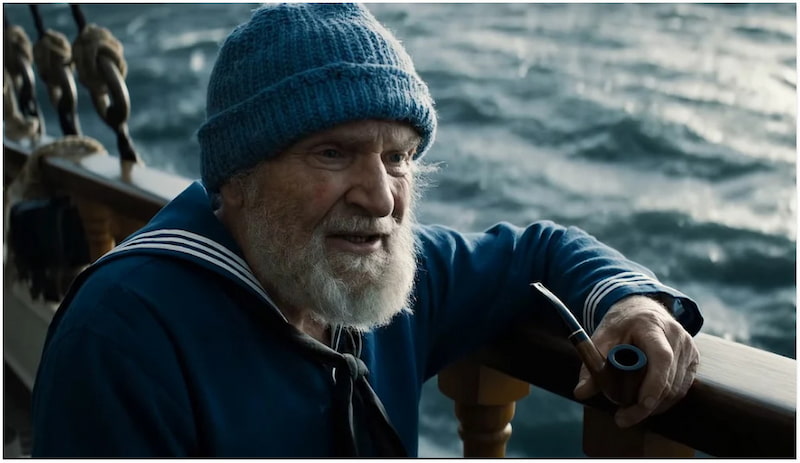
For Character-Driven Storytelling
Veo 3 AI prompt:
A medium shot captures an elderly sailor wearing a knitted blue cap that shades his eyes, his thick grey beard covering most of his jaw. He grips a pipe in one hand, pointing it toward the restless grey sea beyond the ship’s railing. The ocean… she’s power itself, wild, untamed, and she earns your respect with every glimmer of light, he says.
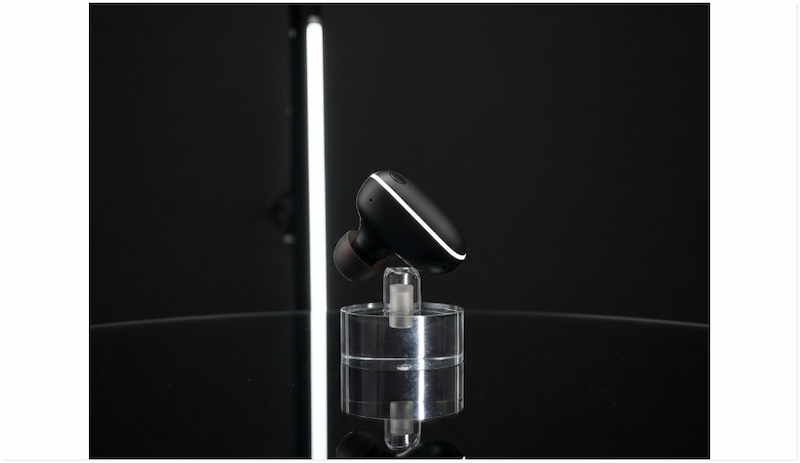
For Product Showcase
Veo 3 prompt:
A close-up tabletop macro shot of a matte black wireless earbud slowly rotating on a polished black surface. A single rim light outlines its shape while a softbox highlight gently sweeps across the body. The camera performs a slow 180-degree turn in a minimal, high-end studio setting. Include clean, subtle swoosh sound effects. Negative Prompt: No fingerprints, no dust, no text, and no additional objects in the frame.
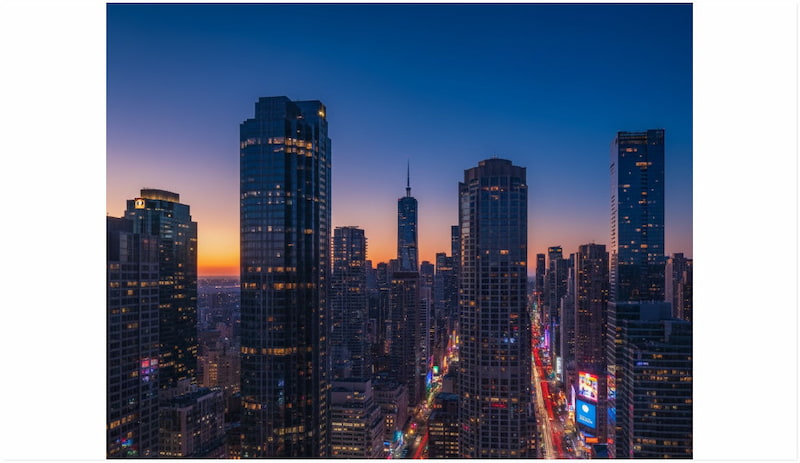
For Social Media Content
AI Veo 3 prompt:
Locked‑off rooftop timelapse of skyscrapers shifting from day to neon night, car light trails, sky turning deep cobalt, subtle star appearance. Urban ambience evolves. Negative prompt: no text overlays, no sudden jumps, no stutters.
For Professional Results
Veo 3 prompt:
A clean corporate office environment with a confident presenter standing beside a digital screen displaying charts and analytics. The camera uses a slow dolly-in motion as the presenter gestures naturally. The lighting is bright, neutral, and professional. Native audio: subtle office ambience with gentle air conditioning and light typing in the distance. Mood: polished, informative, and suitable for a business presentation.
Part 3. Use These Perfect Prompts Examples to Generate Videos with Picwand AI Text-to-Video Generator
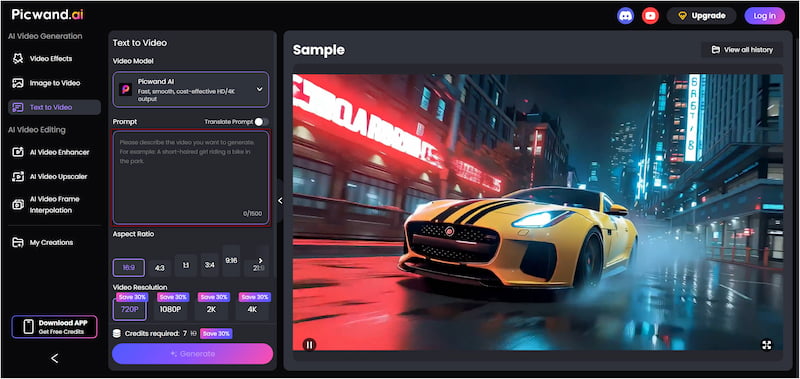
Picwand AI Text-to-Video Generator is a top-tier generative AI tool accessible online. It can effortlessly translate any textual prompts into fully high-quality generated video clips. It only requires a clear description of what you want to create. It supports highly detailed prompts of up to 1,500 characters, allowing you to specify scenes, actions, cinematography, etc. It offers a wide variety of aspect ratio options, extending beyond the standard 16:9 and 9:16. For export resolutions, it ranges from 720p to 4K, ensuring that your videos meet professional quality standards. Each clip can run up to 10 seconds, the ideal duration for various platforms.
Why Choose Picwand AI Text-to-Video Generator:
• Create short-form videos between 5 to 10 seconds.
• Choose from multiple aspect ratios, such as 16:9, 4:3, 1:1, and 21:9, among others.
• Export videos in high resolution, including 720p, 1080p, 2K, and 4K.
• Craft detailed prompts up to 1,500 characters for precise instructions.
Here’s how to use Veo 3 AI video prompt examples with Picwand AI Text-to-Video Generator:
Step 1. On a browser, navigate to the official Picwand AI Text-to-Video Generator page through the provided link. In the prompt box, type your video idea in a descriptive and structured way. Be specific and include details such as cinematography, subject/character description, actions/motions, and so on.
Step 2. Proceed to the Aspect Ratio section and select the format that best suits your target platform. Next, choose your export resolution; 4K delivers a more immersive viewing experience. Then set the video length to 10 seconds.
Step 3. If you prefer to keep your output private, toggle the Public Visibility option. Once all settings are finalized, click Generate. Within seconds, your descriptive text is transformed into a fully generated, dynamic video clip.
Picwand AI Text-to-Video Generator is a top-performing tool for anyone who needs to create a quick video. This tool converts detailed descriptions into high-quality videos in just a few clicks. If you have an existing video that needs enhancement, use a video sharpener to improve its quality.
Part 4. FAQs about Veo 3 AI Video Prompt Examples
How to create effective prompts with Veo 3?
To create effective prompts with Veo 3, you need to be clear, structured, and descriptive in your approach. Use the cinematography, subject, action, context, style, and ambience formula.
How does Veo AI work?
Veo AI works by interpreting detailed text prompts and converting them into high-quality video clips. It combines multiple AI systems to create realistic motion and synchronized sounds.
How long are Veo 3 clips?
Veo 3 currently generates short, high-quality video clips that last up to 8 seconds. This duration is short enough for rapid rendering yet long enough to create cinematic shots.
Conclusion
Understanding the Veo 3 AI video prompt examples lets you create high-quality, realistic, and fully immersive videos. By studying and applying strong prompt examples, you can communicate your vision clearly to Veo 3. If you’re ready to take your video creation to the next level, try Picwand AI Text-to-Video Generator. This tool makes transforming your ideas into stunning videos easier than ever. It supports generous character prompts, flexible aspect ratio, up to 4K quality, and longer video duration.