Basic PlanVIP PlanVIP ExpiredPurchased credits are valid for life but require an active VIP subscription to use
0Credit(s)
You can use credits to access all the AI tools on Picwand, such as the AI Image Upscaler, AI Age Filter, AI Video Enhancer, AI Video Upscaler, AI Video Effects, and more.
Forensic video enhancement is the scientific process of improving the clarity of video evidence used in criminal investigations and legal proceedings. From surveillance camera footage to dashcam recordings, law enforcement agencies and forensic experts rely on enhancement techniques to extract critical details—facial features, license plates, body language—that would otherwise remain invisible. According to industry reports, over 1 billion surveillance cameras operate globally, generating petabytes of video evidence each year. Yet most raw footage suffers from low resolution, motion blur, poor lighting, or compression artifacts. AI-powered forensic video enhancement has emerged as the fastest, most reliable solution to this challenge—restoring 4K quality from blurry source footage in minutes. This guide covers what forensic video enhancement is, the top 3 forensic video enhancement software tools for 2026, and step-by-step instructions for enhancing your video evidence today.
Part 1. What Is Forensic Video Enhancement? Definition & Techniques
Forensic video refers to any video footage submitted as evidence in criminal investigations, civil litigation, or legal proceedings. Common sources include:
According to the National Center for Forensic Video, these recordings are often captured in uncontrolled environments with inconsistent lighting, camera motion, and compression artifacts—making forensic video enhancement a critical step before analysis.
What Is Forensic Video Enhancement?
Forensic video enhancement is the scientific process of improving raw video quality to extract maximum evidentiary detail while preserving the original file's integrity for court admissibility. Unlike general video editing, forensic enhancement must follow strict protocols to ensure the enhanced video remains legally defensible.
8 Key Forensic Video Enhancement Techniques
Modern forensic video enhancement employs a combination of the following techniques, as documented by digital forensics researchers:
Technique
Purpose
Contrast & Brightness Adjustment
Reveal details in shadows and overexposed areas
Noise Reduction
Remove grain and sensor noise from low-light footage
De-blurring & Sharpening
Restore sharpness to motion-blurred frames
Video Stabilization
Eliminate camera shake for stable analysis
Super Resolution (AI Upscaling)
Enlarge video to 2X, 4X, or higher without quality loss
Color Correction & Grading
Normalize color casts from different lighting sources
Frame Interpolation
Increase frame rate for smoother motion analysis
Detail Magnification
Zoom into specific areas (faces, plates) without pixelation
Traditional methods required hours of manual adjustment by trained forensic analysts. However, AI-powered forensic video enhancement has transformed this workflow—automating all of the above techniques and delivering court-ready results in minutes. Tools like Picwand AI Video Enhancer can process a 500MB video file and output 4K-resolution footage with a single click, making professional-grade forensics accessible to law enforcement agencies of any size.
Part 2. 3 Best Forensic Video Enhancement Software
Picwand AI Video Enhancer - Best
Picwand AI Video Enhancer is a browser-based online tool designed for users who need professional-grade forensic video enhancement without complex software installation. It's particularly well-suited for law enforcement investigators, legal professionals, and security teams who need results fast.
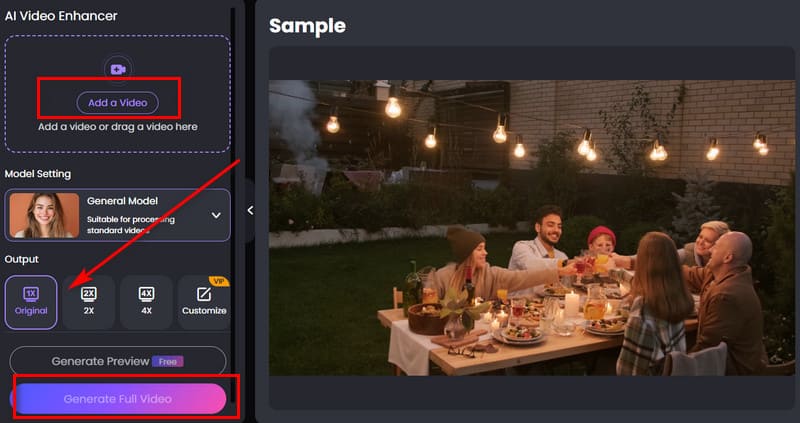
Step 1. Choose a browser. Search for Picwand AI Video Enhancer. Go to its official website. Prepare the forensic video you want to enhance. Click the Add a Video button to upload it.
Step 2. We recommend selecting General Model (because forensic videos are mostly real-life videos and do not include animated videos).
If you want to enlarge the video frame to see every detail clearly, you can upscale the video to 2X, 4X, or larger sizes—select Customize, then adjust it to your desired state.
Step 3. You can first click Generate Preview. Picwand AI Video Enhancer will first show you a repaired segment. Check it to see if the results meet your expectations. If you think the repair effect is good, you can click Generate Full Video to get the complete enhanced video.
VideoCleaner
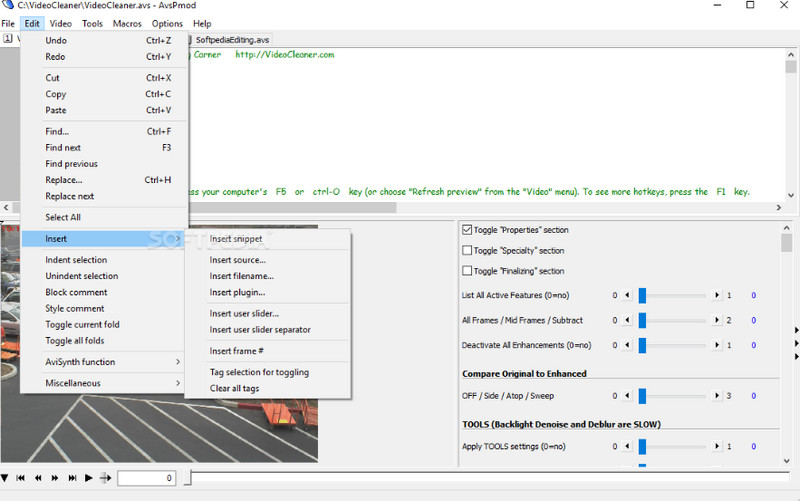
If you're looking for a forensic video enhancement expert, go with VideoCleaner. It's a software trusted by law enforcement, investigators, and forensic experts worldwide. Its developers are from all over the world, and it's 100% free and open-source. You won't have to deal with any ads or watermarks.
What surprised us most is that VideoCleaner's beginner's guide is exceptionally well-designed. On its official download website, you can find detailed instructions for downloading, installing, and using the software. VideoCleaner also allows you to customize controls and train the software. If you encounter any issues while using it, you can seek assistance from the platform's free support.
Super Resolution, Stabilization, Equalizer, FORENSIC Analysis group, tamper detection
Support
Free community support & detailed documentation
Ads/Watermarks
None
Best for: Investigators who need a powerful desktop tool and have the technical expertise to navigate a more complex interface.
Considerations: VideoCleaner is a desktop application that requires download and installation, unlike Picwand's browser-based approach. Its learning curve is steeper—but the open-source community documentation is excellent, and the price (free) is unmatched.
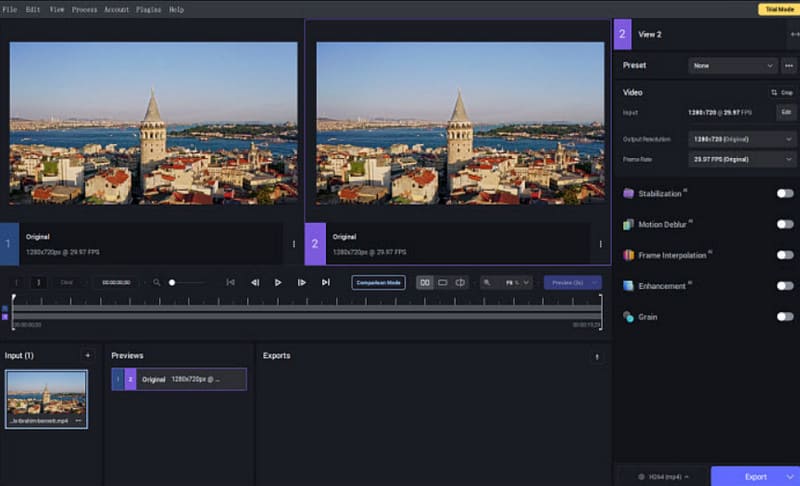
Topaz Video AI
Another surveillance video enhancement software worth trying is Topaz Video AI.
This AI is renowned for its high-quality restoration capabilities. It can restore blurry videos to 4K, 8K, or even 16K resolution. One of its key features makes it particularly suitable for forensic video restoration—it employs different techniques when processing faces and backgrounds. Additionally, Topaz Video AI can accurately distinguish between details and noise, ensuring that valuable information is not blurred.
Furthermore, Topaz Video AI is highly efficient, making it ideal for use in professional settings. It can enhance video quality at 3X faster speed and also features batch processing capabilities.
Key specifications:
Feature
Detail
Max Output Resolution
Up to 16K
Pricing
$299 (one-time purchase, includes unlimited upgrades)
Free Trial
Available (limited features)
Speed
Up to 3X faster than real-time processing
Batch Processing
Yes
Unique Feature
Separate face/background processing models
Forensic-specific advantages:
• Face-aware processing — applies different enhancement models to facial regions vs. backgrounds, which is critical for suspect identification from surveillance footage
• Noise-to-detail distinction — accurately separates genuine noise from important details, reducing the risk of destroying evidentiary information during cleanup
part 3. Forensic Video Enhancement Software Comparison
Choosing the right forensic video enhancement software depends on your workflow, budget, and technical requirements. Here's a side-by-side comparison of the three tools:
Feature
Picwand AI Video Enhancer
VideoCleaner
Topaz Video AI
Price
Free tier available
100% Free
$299 one-time
Platform
Web (any browser)
Windows desktop
Windows/Mac desktop
Max Output
4K
4K (Super Resolution)
8K/16K
AI-Powered
✅ Yes
Partial
✅ Yes
Stabilization
✅ Yes (frame-level)
✅ Yes
Limited
Watermark
❌ None
❌ None
❌ None
Learning Curve
Low
Medium-High
Medium
Max File Size
500MB
Unlimited
GPU-dependent
Best For
Quick online enhancement
Deep forensic analysis
Max resolution restoration
Quick recommendation:
Law enforcement on the go → Picwand (no install, mobile-friendly)
Forensic lab with dedicated analysts → VideoCleaner (free-depth analysis)
Professional forensic agency → Topaz Video AI (highest output quality)
part 4. faq
What is the free forensic enhancement software?
Picwand AI Video Enhancer and VideoCleaner are both excellent options. Picwand AI Video Enhancer is an online tool that runs directly in your browser, while VideoCleaner is a desktop application that requires download and installation.
Is Topaz Video AI free?
No. Topaz Video AI does offer a free trial, but you cannot unlock all the features. To use it normally, you need to pay $299 for a one-time purchase of the software. After that, you will enjoy unlimited upgrades.
What is the free forensic audio enhancement software?
Good options include Audacity, Audio Forensic Analysis, and iZotope RX. These three tools can all repair audio and remove noise.
Conclusion
Forensic video enhancement is essential. We cannot guarantee that such videos were shot in a stable environment. Furthermore, due to limitations in filming equipment, the video may be blurry. In this case, you will need to choose a professional tool such as Picwand AI Video Enhancer and VideoCleaner to help you restore the details. If you already have the video ready, you can follow the steps in this article to start processing it now.