Basic PlanVIP PlanVIP ExpiredPurchased credits are valid for life but require an active VIP subscription to use
0Credit(s)
You can use credits to access all the AI tools on Picwand, such as the AI Image Upscaler, AI Age Filter, AI Video Enhancer, AI Video Upscaler, AI Video Effects, and more.
Remini can help enhance your videos, but its advanced features require a subscription, and the processing speed is limited. But if you’re looking for a better alternative, this post introduces the top 5 apps like Remini: Picwand AI Video Enhancer, AnyEnhancer, Filmora, CapCut, and Topaz Video AI. Some of these tools are free and work on both Android and iPhone, while others can be accessed directly through a browser. With these powerful video enhancement apps, you can unlock the full potential of your videos and say goodbye to pixelated or blurry details. Check them out now!
Quick Comparison Table: Best Remini Alternatives at a Glance
Tool
Key Features
Best For
Rating
Picwand AI Video Enhancer
AI video enhancement (up to 4K), AI denoise, video stabilization, automatic color correction, batch processing, web-based enhancement
Users looking for a free, no-watermark, beginner-friendly AI video enhancer
⭐⭐⭐⭐⭐
AnyEnhancer
AI face restoration, video deblurring, denoise, frame interpolation, 2K/4K upscaling, multi-format support, GPU acceleration
Users who want advanced AI enhancement and face restoration on desktop
⭐⭐⭐⭐
Filmora
AI video enhancement, auto color correction, noise reduction, frame interpolation, 4K editing, built-in effects and transitions
Content creators who need both video editing and AI enhancement in one tool
⭐⭐⭐⭐
CapCut
AI upscaling, Auto HDR, beautification tools, background removal, motion tracking, cloud sync, 4K export
Social media creators, TikTok and Instagram users
⭐⭐⭐⭐
Topaz Video AI
Professional AI upscaling up to 8K, deblurring, denoise, video restoration, frame interpolation, multiple AI models, batch processing
Professionals, filmmakers, and video restoration specialists
⭐⭐⭐⭐⭐
Top 1: Picwand AI Video Enhancer
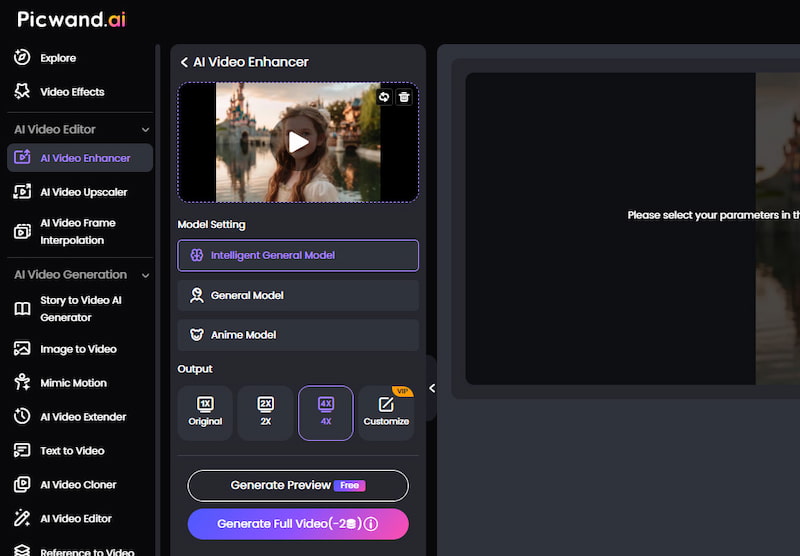
Picwand AI Video Enhancer is a user-friendly video enhancement tool made for both casual users and creators who desire quick, high-quality upscaling. It uses artificial intelligence AI to sharpen blurry film, reduce noise, and increase resolution, making it ideal for repairing old movies or getting content ready for social media. These features are somehow similar to those of the Remini tool but with enhanced capabilities.
Picwand's user-friendly interface and powerful results, which include 2K to 4K improvements with just a few clicks, are what make it unique. Motion stabilization, automatic color correction, and batch processing are all supported. Whether you're editing vlogs or bringing back family memories, Picwand excels at striking a balance between simplicity, speed, and quality. Since it's a cloud-based tool, you may upload and let AI handle the laborious tasks without a powerful computer.
Key Features
• AI-powered video upscaling up to 4K
• AI denoise for cleaner and sharper footage
• Video stabilization for reducing camera shake
• Automatic color correction and enhancement
• Web-based platform with no software installation required
• Fast one-click enhancement workflow
Pros
Free to use and entirely online (no watermark).
uses AI sharpening to upscale video to 2x or 4x resolution (1080p/4K).
uses AI denoise and stabilization to eliminate noise and steady, unstable video.
Cons
Fully web-based, it requires a robust internet connection.
No desktop or mobile apps.
It has no manual controls.
Depending on the server load, processing can be slower.
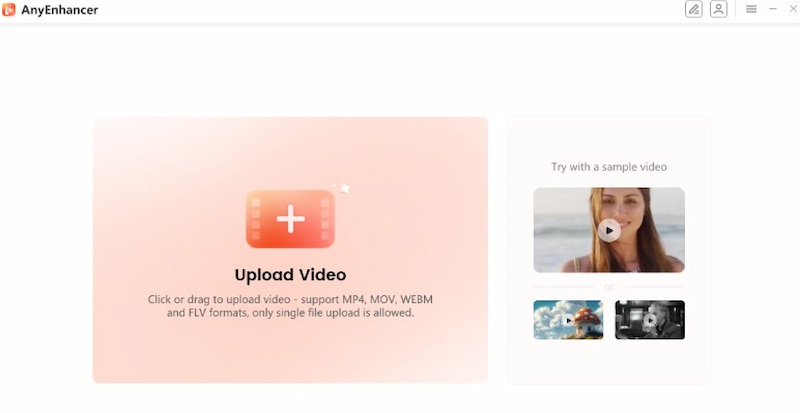
AnyEnhancer is a flexible AI-powered tool, similar to Remini, that produces high-definition outputs from low-quality images and videos. It serves both business and home users and is well-known for its automated upscaling capabilities and multi-format compatibility. AnyEnhancer can enhance facial details, upscale films to 4K, and smooth out shaky footage with just a few simple steps.
It provides frame interpolation, denoising, and video deblurring to bring back motion and clarity. Technical expertise is not required; simply submit your file and let the AI engine handle the rest. AnyEnhancer provides a dependable and effective solution for media enhancement with clear, user-friendly controls and rapid rendering speeds, whether you're editing mobile content or refining existing media.
Key Features
• AI face restoration and facial detail enhancement
• Video deblurring for clearer footage
• AI denoise for reducing grain and artifacts
• Frame interpolation for smoother motion
• GPU acceleration for faster processing
• Multi-format video support
• Real-time preview before export
Pros
AI-powered face restoration, colorization, denoise, interpolation, and 2K/4K upscaling
GPU acceleration, compatibility for many formats, and real-time previews.
Windows and macOS compatible; 60-day money-back guarantee.
Easy to use and requires no editing expertise.
Cons
Desktop only; no mobile or web version.
Processing is limited to single videos (some tiers do not support batch mode).
Resource-intensive; for quick results, high-quality hardware is required.
Cost:
• About $28.99 a month or $38.99 with tax included.
• About $88.99 a year or $98.99 with VAT included.
• Lifetime: around $268.99 to $308.99 tax included.
Top 3: Filmora
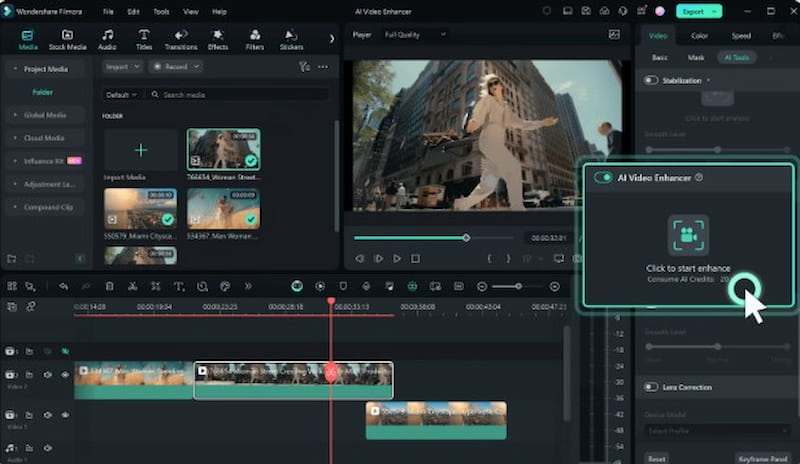
In the third spot of applications like Remini, we have Wondershare's Filmora. It is a comprehensive video editing program with AI-powered improvement tools. More than that, its video enhancer stabilizes shaky images, automatically adjusts lighting, and improves clarity. The tool is ideal for content producers seeking to create fast, high-quality videos, as it features AI Portrait, automatic color correction, and noise reduction. With its capabilities for 4K editing, frame interpolation, and scene detection, Filmora is suitable for both novice and expert editors. With only a few clicks, improvements may be implemented, and the interface is user-friendly. It is an accessible, on-the-go editing and enhancing video tool because it is available on both desktop and mobile devices.
Key Features
• AI video enhancement tools
• Auto color correction
• Noise reduction
• Frame interpolation for smoother videos
• AI Portrait effects
• 4K video editing and export
• Built-in transitions, effects, and music assets
Pros
Easy-to-use UI, perfect for novices.
AI-enhancement tools.
Quick rendering and support for 4K.
Excellent collection of music, effects, and transitions.
Accessible on iOS, Android, Windows, and macOS.
Cons
Watermark on exports of the free version.
A premium tier is required to access certain advanced features.
Reduced authority for frame-by-frame improvement.
Price:
• Watermarked free version
• $19.99 a month
• $69.99 annually
• One-time purchase of $79.99.
Top 4: CapCut
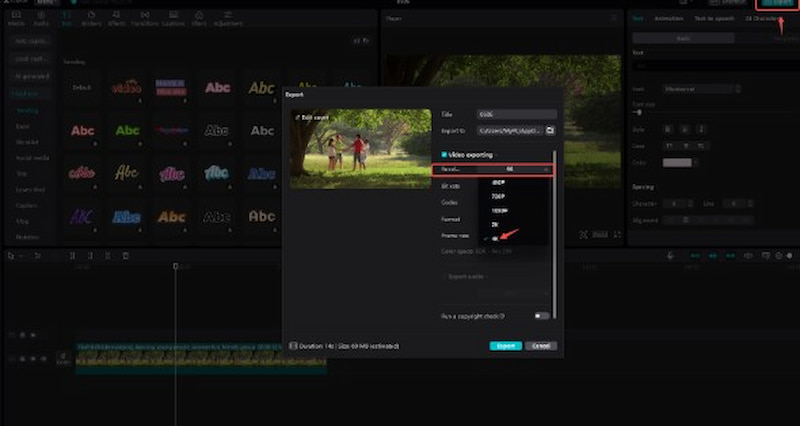
As we proceed to the fourth spot, we have the popular CapCut. It is a free video editor and enhancer with amazing features for aspiring video editors, intended for both desktop and mobile users. It provides intelligent video enhancement through resolution upscaling, auto HDR adjustment, beautification, and filters. Those features that also offered by Remini. However, CapCut is superior because it automatically adjusts brightness, contrast, and sharpness. CapCut's AI technologies help make lifeless footage appear vibrant.
In addition to motion tracking, background reduction, and audio sync features. More than that, CapCut upscales video up to 4K exports. It is particularly well-liked among Gen Z and influencers, as it offers pre-made designs and effects specifically designed for Instagram and TikTok. Additionally, its cloud syncing facilitates a smooth transition between desktop and mobile editing.
Key Features
• AI video upscaling
• Auto HDR enhancement
• AI beautification tools
• Background removal
• Audio synchronization
• Cloud syncing across devices
• Trending templates for TikTok and Instagram
Pros
Free to use and packed with features.
Compatible with mobile devices and cloud syncing.
AI tools for auto-enhancement, HDR, and background removal.
Integrated trending templates.
Enables the export of 4K videos.
Cons
Internet access is necessary for certain functions and exports.
Periodic latency is more common on smartphones with lower specifications.
Fewer options for manual enhancement than desktop tools.
Cost:
• Freebase plan that includes the majority of features.
• The Pro Plan is around $7.99 per month.
Top 5: Topaz Video AI
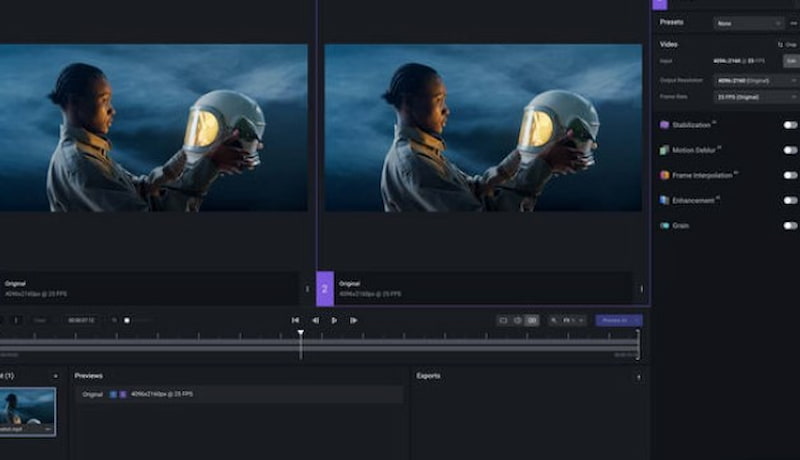
The fifth tool, similar to Remini, is called Topaz Video AI. This tool is a high-end video-enhancing solution. Its specialty is upscaling videos from low-resolution to high-definition video quality, including 1080p and 4K formats. It lowers motion blur, eliminates compression artifacts, improves details, and accurately stabilizes video. The program features several AI models, including Artemis, Proteus, and Chronos, specifically designed for frame interpolation, restoration, and sharpening.
Furthermore, the Topaz AI denoiser is one of its best features, according to many users. Topaz Video AI, which offers batch processing and timeline previews, is ideal for video editors, restorers, and filmmakers. It operates offline. Although it requires sophisticated hardware, this high-performance program produces amazing visual enhancements.
Key Features
• AI video upscaling up to 8K
• Advanced video restoration
• AI deblurring technology
• Noise reduction and artifact removal
• Frame interpolation for higher frame rates
• Professional-grade stabilization
• Batch processing
Pros
AI upscaling that leads the industry up to 8K.
Outstanding at restoration, noise reduction, and deblurring.
Several models of augmentation.
Batch processing and superior results.
Perfect for experts and film restorers.
Cons
High-end GPU and system resources are needed.
Steep initial learning curve.
No version for mobile.
Cost:
• $299 for a one-time license that includes updates for a year.
• Upgrade plan option is $99/year for upcoming improvements.
Which Remini Alternative Is Best for You?
The best Remini alternative depends on your budget, device, and video enhancement needs. While all five tools use AI to improve video quality, each one excels in different areas.
• Choose Picwand AI Video Enhancer if you want a free, beginner-friendly solution with no watermark. Its web-based platform makes it easy to upscale videos, remove noise, and improve quality without installing software.
• Choose AnyEnhancer if your priority is restoring facial details and enhancing old or blurry videos. Its AI-powered face restoration and frame interpolation features make it a strong choice for personal and professional projects.
• Choose Filmora if you need a complete video editing suite in addition to AI enhancement. It combines editing, effects, transitions, and video quality improvement in a single platform.
• Choose CapCut if you create content for TikTok, Instagram Reels, YouTube Shorts, or other social media platforms. Its AI enhancement tools, templates, and cloud syncing make content creation fast and convenient.
• Choose Topaz Video AI if you are a professional editor, filmmaker, or video restoration specialist. With advanced AI models, 8K upscaling, and industry-leading restoration capabilities, it delivers the highest-quality results but requires more powerful hardware.
For most users, Picwand AI Video Enhancer offers the best balance of ease of use, video quality, and accessibility. However, creators and professionals may benefit more from the advanced capabilities of Filmora or Topaz Video AI, depending on their workflow and requirements.
Conclusion
Above is the information we need whenever we are looking for Remini Alternatives. We can see the five leading apps that you can use in addition to Remini. The tools of Picwand AI Video Enhancer, AnyEnhancer, Filmora, CapCut, and Topaz AI Video offer diverse features that serve a single purpose: enhancing our videos. However, if you're looking for a tool like Remini, then Picwand AI Video Enhancer is a great choice because it offers excellent value for money, an easy-to-use interface, and professional-quality 4K video enhancement results. Use it now!