Add Video to Video AI: How to Merge Videos Easily

Video editing has changed a lot over the years. What used to need software and skills can now be done easily with AI tools. One popular editing task is adding video to video AI. This helps creators put clips into one smooth project. Old video editing software can be too much for beginners. It has timelines and takes a long time to render. You have to make adjustments by hand.
This is where AI video editing tools help a lot. You do not have to spend hours putting clips by hand. In this guide, you will learn what video-to-video AI is, how AI makes editing easier and how to merge video clips step by step using Picwand AI Video Editor.
Contents:
Part 1. What Is Video-to-Video AI
AI video to video intelligence is a technology that can change, mix or make video content better on its own. It does not need people to edit everything by hand. Video to video intelligence tools look at video footage and help people do things like:
- • Combining multiple video clips
- • Generating transitions
- • Synchronizing scenes
- • Matching video styles
- • Removing unwanted sections
- • Enhancing video quality
- • Applying effects automatically
When users add video to video with AI, the software intelligently processes the clips to create smoother and more natural results.
For example, AI can:
- • Detect scene changes
- • Align clip timing
- • Match colors between videos
- • Improve transitions
- • Maintain consistent visual quality
This tech helps both new and pro creators save time when editing. It makes editing easier for everyone. Unlike editing ways AI video merging needs less technical know-how but still gives great results.
Part 2. Common Use Cases for Adding Video to Video
Adding video to video is really helpful in lots of situations. Many people, from media creators to businesses use video merging tools to make their content better.
Here are some common reasons why they do it:
Social Media Content Creation
Creators on TikTok, Instagram Reels and YouTube Shorts often put short clips together to make one interesting video.
For example they might combine:
- • Daily vlogs
- • Fitness routines
- • Makeup tutorials
- • Food videos
- • Behind-the-scenes content
Merging clips helps videos feel more dynamic and visually interesting.
Marketing and Advertising
Businesses frequently combine product footage, customer testimonials, and promotional clips into one advertisement.
AI video merging can help:
- • Speed up production
- • Improve storytelling
- • Create smoother transitions
- • Maintain consistent branding
This allows companies to produce marketing videos more efficiently.
Teachers and online course creators often combine:
- • Screen recordings
- • Webcam footage
- • Presentation slides
- • Demonstration clips
AI tools simplify the editing process and reduce production time.
Gaming Videos
Gaming creators regularly merge gameplay recordings, reaction videos, overlays, and commentary footage.
AI editing tools can automatically organize and synchronize content for smoother viewing experiences.
Travel and Lifestyle Videos
Travel vloggers usually record large amounts of footage from different locations.
By combining clips together, creators can:
- • Build cinematic travel stories
- • Highlight key moments
- • Improve pacing
- • Enhance audience engagement
AI editing tools help organize and merge footage quickly.
Part 3. How AI Helps Merge Video Content
Traditional video editing often involves dragging clips manually across timelines, adjusting transitions frame by frame, and rendering projects for long periods. AI simplifies many of these tasks automatically.
AI can analyze uploaded videos and identify:
- • Scene changes
- • Important moments
- • Motion patterns
- • Facial recognition
- • Audio synchronization
AI editing tools can automatically:
- • Match brightness
- • Balance colors
- • Improve contrast
- • Normalize exposure
This creates a more unified appearance across all clips. Tasks that once required hours of editing can now be completed within minutes, and you do not need to know how does AI work. This is especially useful for creators who produce content regularly.
Part 4. How to Add Video to Video with AI
If you want to put videos in a simple way and you do not have a lot of experience with editing, Picwand AI Video Editor is a good choice. It helps people combine videos quickly. It also makes the videos look better at the same time. PicWand AI Video Editor does this with the help of intelligence.
Use PicWand AI Video Editor
PicWand AI Video Editor is designed for users who want efficient editing without complicated software.
Main features include:
- • AI-powered video merging
- • Automatic transitions
- • Smart scene detection
- • Video enhancement tools
- • Beginner-friendly interface
- • Fast exporting
- • High-quality output
Whether you are creating short-form content or longer projects, this AI video to video generator simplifies the editing process.
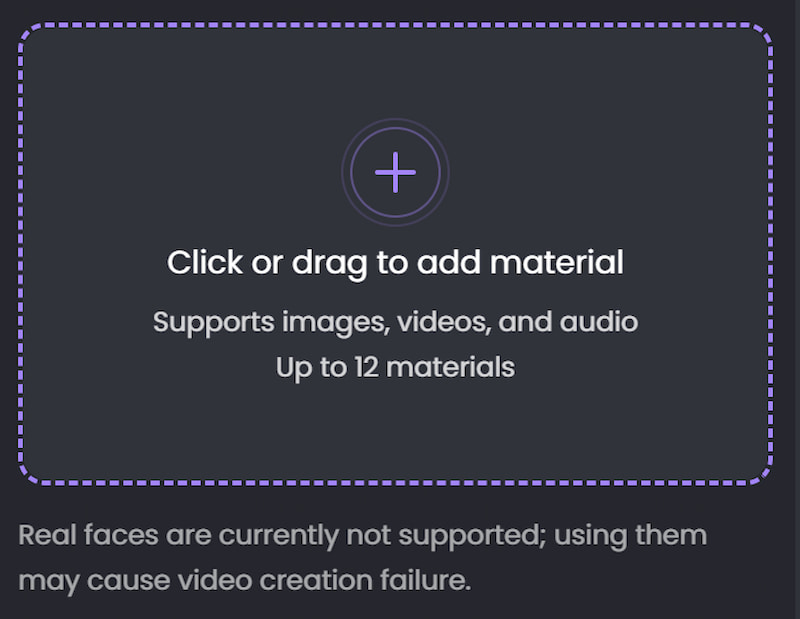
Step 1. Upload Your Video
Open the PicWand AI Video Editor website and Click or drag to add material. After uploading, the AI system will process the video automatically.
Step 2. Apply Visual Effects
Browse available AI filters and effects and choose the one you need.
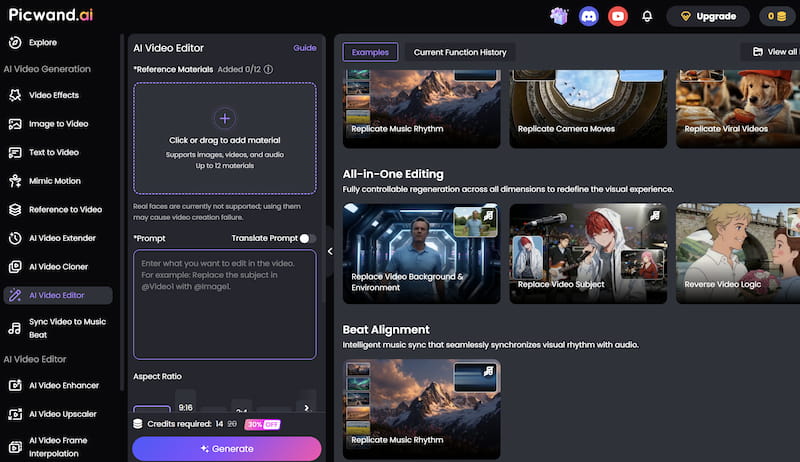
Step 3. Preview and export the Final Video
After finishing the edits, export the video in your preferred resolution. Download the final video and share it directly on your preferred platforms.
You don’t have to ask how to choose AI model because Picwand AI Video Editor offers a practical solution for users who want to combine videos quickly without dealing with complicated editing software. For beginners, social media creators, and small businesses, it provides an accessible way to create polished videos efficiently.
Part 5. FAQs about Add Video to Video AI
Can AI automatically combine videos?
Yes. AI video editors can automatically organize clips, generate transitions, and improve pacing to simplify the merging process.
Do I need professional editing skills to merge videos?
No. Many AI video editors are designed for beginners and require little to no editing experience.
Will merging videos reduce quality?
High-quality AI editors like PicWand are designed to preserve video quality during exporting.
Using high-resolution source footage generally produces better final results.
Conclusion
Adding video to video AI is really easy now because of these tools that use artificial intelligence to help with editing. You do not have to spend a lot of time learning how to use programs. Now you can put clips together make the transitions between them better and make the video look nicer by itself. Tools like Picwand AI Video Editor are really helpful because they make it easy to put videos together to make a project that looks good.
As artificial intelligence gets better it is likely that editing video will become faster and more clever in the future. This means that video editing will keep getting better and better. Artificial intelligence video editing will probably be able to do more things to help people make videos.
AI Picwand - Anyone Can be A Magician
Get Started for Free